
TL;DR
- Expert formula mode is now available across Applications, Automations, and Database AI fields
- Major infrastructure upgrades: Nuxt 3 migration, Django 5.2 upgrade, faster and smaller Docker images
- Improved security and long-term maintainability across the platform
- PostgreSQL 13 is no longer supported — self-hosters must upgrade to PostgreSQL 14+
- New Ukrainian translation 🇺🇦
- Many bug fixes
Baserow 2.1 is a maintenance-focused release aimed at making the platform faster, safer, and easier to maintain long-term, while also introducing expert formula mode across Applications, Automations, and AI fields.
Introducing Baserow 2.1
Baserow 2.1 primarily focuses on infrastructure, security, and long-term maintainability.
Most of the work in this release went into a migration to Nuxt 3, a Django 5.2 backend upgrade, and improvements to how Docker images are built and shipped.
Alongside these foundational improvements, Baserow 2.1 also introduces expert formula mode across several parts of the platform.
Here’s what’s included in this release.
Expert formula mode
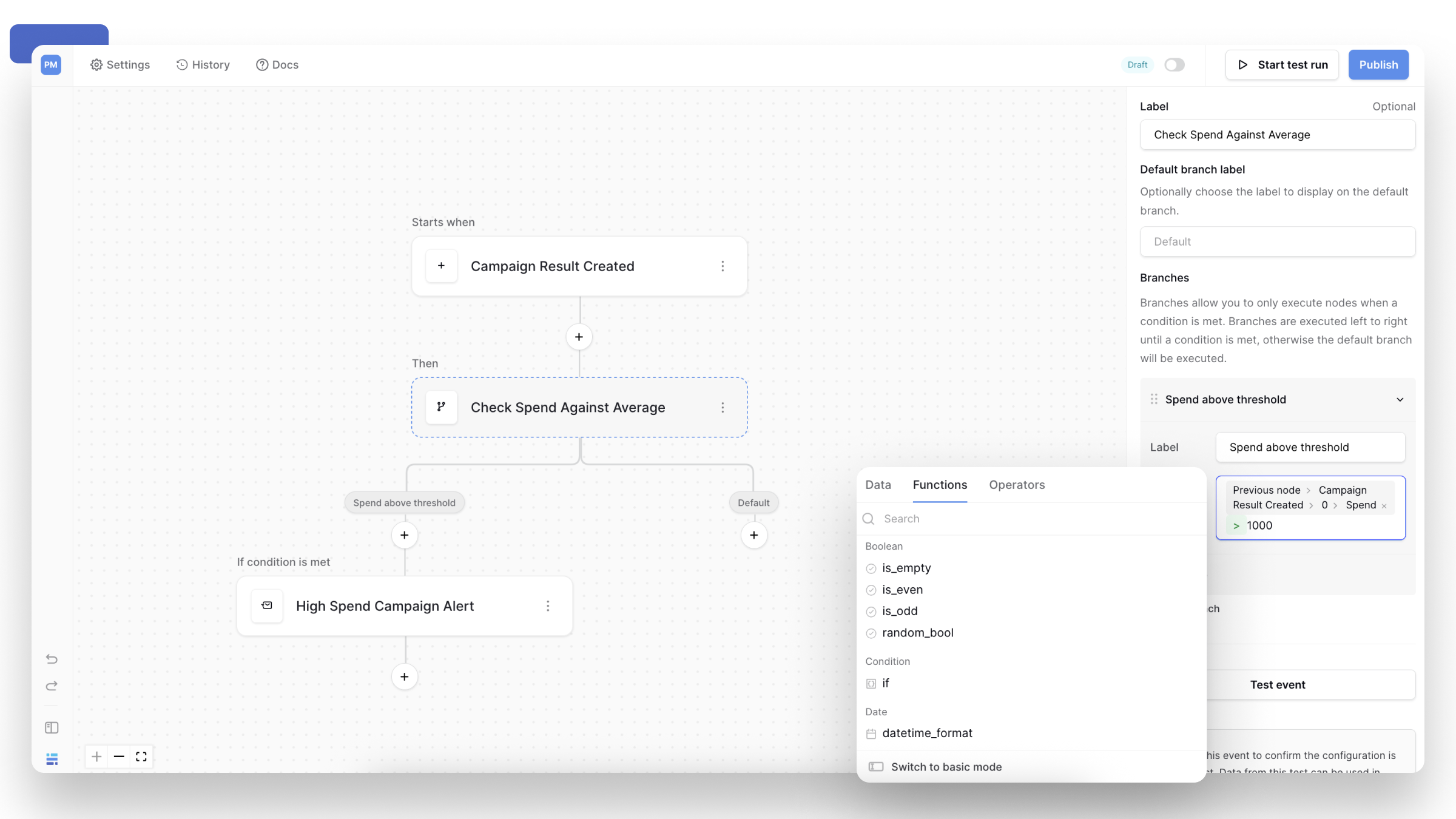
Baserow 2.1 introduces expert formula mode across:
- Applications (Application Builder)
- Automations
- AI fields (Database Builder)
Expert mode provides the full formula editor, allowing you to combine data, functions, and operators instead of selecting a single value or simple condition.
It’s useful whenever logic depends on more than one value, or when values need to be transformed or formatted.
You might use expert mode to:
- branch workflows based on calculated values
- show or hide UI elements based on user context or relationships
- format values such as dates or labels
- generate dynamic text, including AI outputs
If you simply wish to display a data source or page parameter value, then basic mode will suffice.
For example, a workflow condition can compare two values directly:
[Campaign spent] > [Spend goal]
In the Application Builder, formulas can control visibility and behavior based on relationships or the current user:
[Task.Assignee.id] = [User.id]
OR
[Task.Reviewer.id] = [User.id]
And inside an AI field, formulas can be embedded in prompts to generate data-aware output:
if(
  [Campaign spent] > [Spend goal],'Stop','Running'
)
If needed, Kuma can help translate a plain-language rule into a formula.
👉 Learn how expert formulas mode works →
Infrastructure upgrades
Baserow 2.1 includes several infrastructure updates:
- migration to Nuxt 3
- a Django 5.2 backend upgrade
- faster and smaller Docker images
These changes improve security, compatibility with upstream dependencies, improve performance, and production efficiency.
PostgreSQL 13 support has been dropped
As part of the Django upgrade, PostgreSQL 13 is no longer supported.
Upstream support for PostgreSQL 13 ends in November 2025, and newer Django versions require PostgreSQL 14 or higher.
What this means for you
- Cloud users: no action required
- Self-hosters using an external database:
- PostgreSQL must be upgraded to version 14 or newer
- This is required to run Baserow 2.1 and future releases
👉 Read the Django release notes →
New Ukrainian translation 🇺🇦
Baserow 2.1 adds Ukrainian language support, expanding access for teams using Baserow in different regions.
We’re grateful to Marat Dospolov who contributed this translation.
What’s next
Ongoing work includes:
- expanding Kuma’s application-building capabilities
- improving dashboard support
- introducing view-level permissions
- editable form views
- real-time, undo/redo, trash, and drag-and-drop support for the application builder
- 1m rows plan in Cloud
As always, if you have questions or feedback, drop by our official community forum. We’d love to hear from you!

Baserow 2.4 adds Button fields, Graph elements, workflow automation, AI provider management, improved Group By views, and 30+ more updates.

Discover how Airtable and Baserow compare in features, flexibility, speed, and scalability. Compare pricing plans and hidden costs to make an informed decision!

Explore the best open-source software alternatives to proprietary products. Discover OSS tools, licenses, and use cases with our updated directory.