

A project rarely stalls because nobody is working. More often, progress slows because people are working with different information. A deadline changes in a spreadsheet, feedback disappears into an email thread, and an important document sits in a folder that half the team cannot find. Everyone stays busy, but moving the project forward takes more effort than it should.
Collaborative project management software brings those moving parts into a shared workspace. It connects assignments, conversations, documents, and progress updates so people can see what needs attention and understand how their work affects others. For organizations balancing office schedules, external partners, and remote work, that shared context can make everyday coordination much easier.
The right platform should fit the way your team delivers work. This guide explains the features to evaluate, compares six options, and explores how Baserow can support a more adaptable approach to managing projects.
What is collaborative project management software?
Collaborative project management software helps people plan, coordinate, and track work together. It gives a team a shared place to define outcomes, organize tasks, assign responsibility, monitor due dates, and keep relevant discussions close to the work itself.
The collaborative element matters because a project plan alone does not explain everything people need to know. A task might have an owner and a deadline, yet still depend on an unanswered question, an unfinished design, or a decision from another department. Effective software helps make those relationships visible.
Instead of asking a manager for the latest update, team members can check the shared record. Instead of forwarding a document repeatedly, they can reference the agreed version from the relevant task. Instead of guessing who should respond, they can identify the person responsible for the next step.
Many project management tools include collaboration features, but their emphasis varies. Some prioritize structured schedules and resource planning. Others focus on visual boards, shared documents, or configurable databases. The best fit depends on the information your team needs to coordinate and the amount of structure your projects require.
A collaboration platform becomes useful when it supports clear working habits. People still need to agree on ownership, update expectations, and decision processes. Software gives those agreements a practical home.
!
Why collaborative working needs more than messages
Messaging applications make it easy to contact someone, but a busy conversation is not the same as a reliable project record. Decisions can become separated from their context, and new participants may have to read long threads before understanding what happened.
A shared project workspace connects communication to a specific deliverable. A reviewer can explain why an asset needs changes directly beside the assignment. A coordinator can record the effect of a delayed approval. Someone joining the project later can follow the discussion without asking colleagues to reconstruct it.
This approach also helps teams communicate across working hours. When an update includes the current status, the blocker, and the next action, another person can respond when their day begins. Progress depends less on everyone being available simultaneously.
Collaborative working also makes handoffs more explicit. The person finishing a draft can identify the reviewer, attach the document, and explain what needs approval. The reviewer can see the request in context and return a decision to the same place.
The goal is to reduce uncertainty. People should know where to find the latest information, what they own, and when they need to involve someone else.
The benefits of a shared project workspace
Clearer ownership and accountability
Work becomes easier to coordinate when each task has a clearly accountable owner. Other people may contribute, but one person should know that moving the assignment forward is their responsibility.
A shared workspace makes that ownership visible. It also gives contributors a place to explain blockers before a deadline passes. Accountability then becomes a practical conversation about progress and support, rather than a retrospective search for who missed an update.
Fewer gaps between departments
Projects often cross functional boundaries. Marketing needs product information, sales needs launch materials, and customer support needs guidance before customers start asking questions. Separate departmental trackers can hide those connections.
Collaborative project management software can give these groups a common reference point. Each department may need a different view, but everyone should be able to trace their responsibilities back to the same deliverables and milestones.
Faster access to useful information
Searching for an approval or asking someone to resend a brief interrupts productive work. A project workspace can reduce that friction by keeping links, comments, assignments, and relevant details together.
The benefit depends on consistent use. If decisions remain in private messages and the shared record stays incomplete, the platform becomes another place to check. Agreeing where information belongs is therefore part of getting value from the software.
More useful progress reviews
When task records stay current, project reviews can focus on decisions. Instead of collecting basic updates from every participant, a manager can examine blocked assignments, approaching deadlines, and unresolved dependencies before the meeting starts.
That creates room for better questions: Which deliverable needs additional support? What can move without affecting the milestone? Who needs to approve a change? The workspace provides the evidence; the team uses its judgment to act.
Essential features to look for
Task management that explains the next action
Good task management begins with clarity. Each assignment should describe an observable outcome, name an owner, and include a realistic deadline. A title such as “review onboarding email sequence” is more useful than a vague instruction to “work on onboarding.”
Look for a system that makes these details easy to maintain. Useful fields include status, priority, project, reviewer, and links to supporting information. For more involved work, teams may also need subtasks, dependency tracking, or a way to document acceptance criteria.
Avoid collecting fields simply because the software allows them. Every required detail adds work for the person updating the task. Start with information that supports a decision, and expand when the team can explain why another field matters.
Real time collaboration with clear context
Real time collaboration helps participants see changes while working in the same shared environment. That can be useful during planning sessions, operational reviews, and periods when several people need to update related information quickly.
However, live updates should support a durable record. A change in status needs enough context to explain what happened. A comment should identify the question or decision involved. Otherwise, people can see activity without understanding its significance.
When evaluating software, distinguish live data updates from simultaneous document editing, chat, and video calls. These are different capabilities. Test the specific interaction your team needs instead of assuming that a general collaboration claim includes all of them.
Views that help people organize tasks
Different roles need different perspectives. A contributor might want a list of personal assignments. A project lead might need work grouped by status. A stakeholder might care mainly about milestone dates and outstanding approvals.
Look for views that make these perspectives possible without creating disconnected copies of the plan. When views reference the same underlying information, an update can remain consistent across the project.
Choose the presentation that answers the question at hand. A board can expose work piling up in review, while a calendar can reveal competing due dates. A detailed table may be more useful when comparing assignments, owners, and several operational fields together.
Communication connected to the work
Comments, mentions, and notifications can help teams collaborate without losing the surrounding context. The important question is whether people can find the resulting discussion when they return to a task later.
During a trial, ask participants to request feedback, record a decision, and explain a blocker. Then have another person locate that information. This simple exercise reveals whether the communication features support retrieval as well as immediate conversation.
Notification controls matter too. Teams need a way to distinguish an action requiring their attention from general activity. Agree when to mention someone, when to change ownership, and when an update can remain available for reference without sending an alert.
Practical ways to share files
A project workspace should make supporting material easy to locate. Depending on the platform, people may upload attachments, link to an external document, or connect another service. Each approach has implications for access and version control.
If your organization uses Google Drive, decide whether the project tool will store copies or point to the original files. Linking to an agreed source can reduce confusion, provided everyone who needs the document has permission to open it.
Evaluate file storage alongside everyday usage. Large design assets, videos, and repeated attachments can affect storage requirements. Check upload limits, available capacity, and what happens when a collaborator leaves. The aim is to share files reliably throughout the project lifecycle.
Reporting that supports decisions
Useful reporting reveals situations that require action. Examples include overdue assignments, unresolved blockers, work awaiting approval, and upcoming milestones with unfinished prerequisites. A colorful dashboard has limited value if it cannot answer those practical questions.
Start with the decisions your project lead makes regularly. Then identify the fields and views needed to support them. This prevents reporting from becoming a separate administrative exercise that consumes time without improving delivery.
Be careful with completion percentages. Ten finished minor tasks do not necessarily offset one unfinished critical deliverable. Review milestones, dependencies, and the significance of remaining work alongside any numerical summary.
Time and workload visibility
Some teams need timers and timesheets for billing or capacity planning. Others only need estimated effort and a record of actual hours. These requirements should guide the evaluation because a configurable number field is different from a dedicated time tracking feature.
Ask participants to complete the full workflow during a trial. Can they record time, correct an entry, associate it with the right project, and produce the report finance needs? If a separate tool is involved, check the handoff as well.
Workload information also needs context. Task counts alone cannot show whether someone has capacity. Consider effort, specialist skills, review commitments, and leave before moving assignments between team members.
Permissions and dependable access
Collaboration works best when people can access the information relevant to their responsibilities. Internal contributors, contractors, and clients may need different levels of visibility and editing rights.
Evaluate those requirements with realistic examples. Can a reviewer see the necessary deliverable without gaining access to unrelated client information? Who can change the workspace structure? What happens when a temporary collaborator finishes their contract?
For cloud based services, review the deployment and administration options that matter to your organization. For self hosted software, identify who will operate and maintain it. These choices affect implementation responsibilities as well as the experience of everyday users.
Six collaborative project management tools to evaluate
The following options approach collaboration differently. These descriptions provide a starting point for a shortlist. Feature availability, usage limits, and administrative controls depend on the product and subscription, so test the plan your team would actually use.
1. Baserow: adaptable project workflows built around connected data
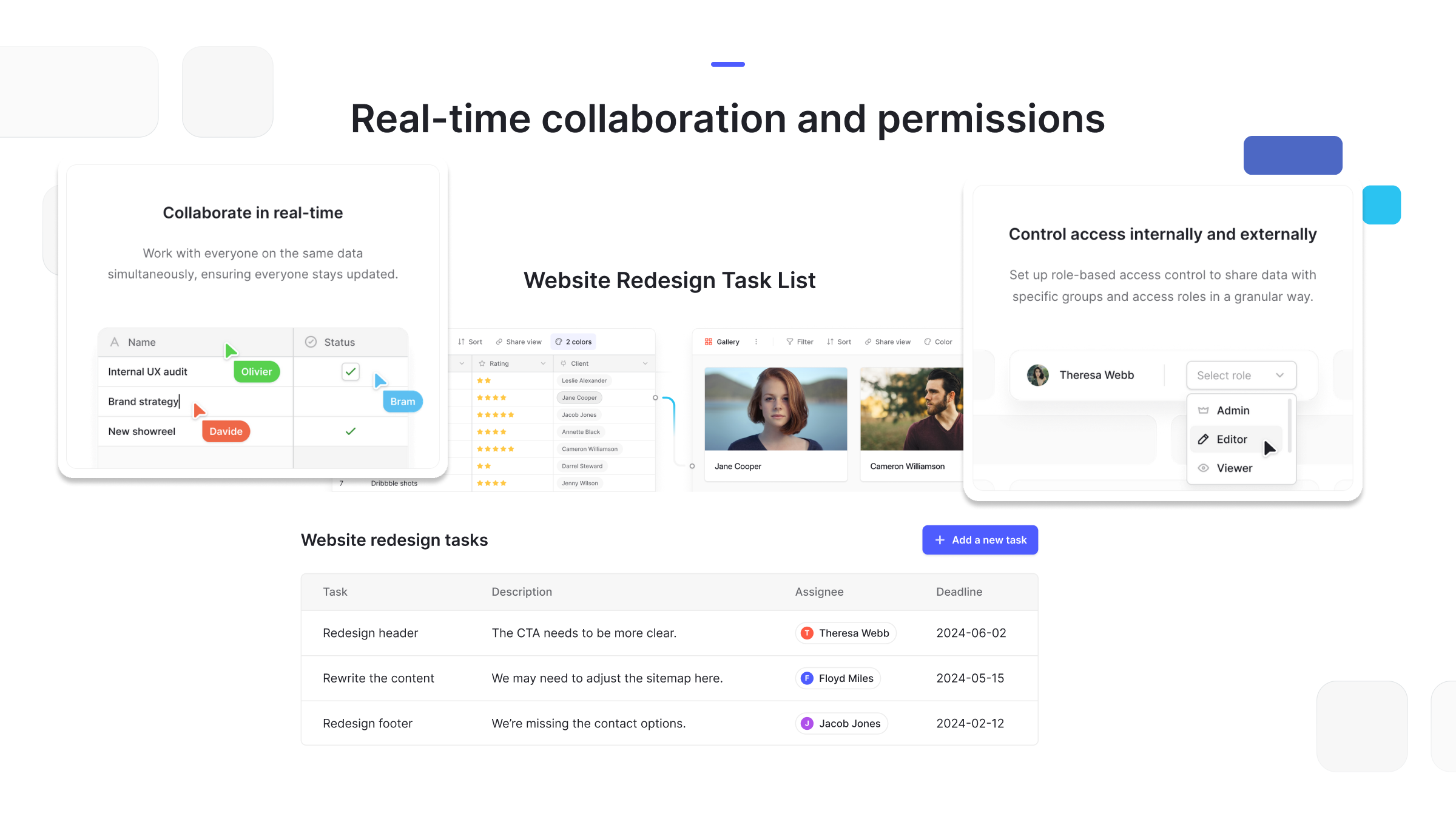
Baserow is a no-code platform for building databases and applications. Its database approach lets teams define fields and relationships around their own information, with views such as grids, boards, and calendars. It also supports people working simultaneously on shared data.
For project management, this suggests a flexible starting point: represent projects, tasks, and related business records in a structure that reflects how your organization operates. An agency, for example, might want to connect delivery work with clients and campaign information rather than maintain each item in a separate spreadsheet.
The main consideration is setup ownership. Flexibility creates decisions about naming, fields, relationships, and reporting. Assign someone to maintain the structure and begin with a focused workflow. Baserow is worth evaluating when adapting the system to your process matters more than adopting a predefined project template.
2. Asana: structured coordination across projects
Asana offers task organization, project views, rules, forms, goals, portfolios, and reporting capabilities. It also provides workload and time tracking features, with availability depending on the selected offering.
This makes it a candidate for teams that want an established structure for coordinating assignments across several initiatives. During evaluation, use a project involving multiple departments and test how participants discover responsibilities, update progress, and identify work awaiting another team.
Pay particular attention to the views and controls included in your intended plan. A successful demonstration should show the complete coordination process, including handoffs and reporting. Confirm that occasional contributors can understand their next action without extensive guidance from the project owner.
3. Trello: visual organization through boards and cards
Trello centers its project experience on boards and supports automation, integrations, templates, and additional capabilities through Power-Ups. Its visual approach makes it an option to consider when your team thinks in terms of work moving through stages.
A content workflow, for instance, could move assignments from ideas to drafting, review, and publication. The board becomes a shared picture of what is underway and where attention is needed.
During a trial, use enough cards to reflect a normal working week. A small demonstration may look clear while hiding the navigation challenges of a busier project. Also test how you will handle related work across boards, reporting requirements, and any extensions your process depends on.
4. ClickUp: a broad workspace for tasks and supporting work
ClickUp brings together tasks, documents, whiteboards, chat, dashboards, custom fields, and time tracking capabilities. That breadth makes it relevant for teams assessing whether several existing activities could share one workspace.
The evaluation should focus on how those features connect during real delivery. Ask someone to find a brief, update an assignment, request feedback, and review the resulting project status. A broad feature list becomes valuable when participants can follow that sequence easily.
Configuration discipline matters with an extensive platform. Decide which views, statuses, and communication options your team will use first. Expanding gradually can make onboarding more manageable and reduce uncertainty about where a particular update belongs.
5. monday.com: configurable coordination and visibility
monday.com provides a configurable workspace with boards, dashboards, documents, forms, integrations, and automations. Teams evaluating it can explore how those components support the flow from incoming requests to delivery updates.
A useful trial might begin with a campaign request, move through assignment and review, and end with a stakeholder checking progress. This tests both the contributor experience and the usefulness of the resulting overview.
Set boundaries for customization before expanding the pilot. Agree who can create new structures and which information should stay consistent across teams. As with other configurable systems, clear shared conventions help preserve useful reporting as more departments begin using the workspace.
6. Wrike: detailed coordination and resource planning
Wrike lists dashboards, Gantt charts, resource management, automation, and dynamic request forms among its capabilities. These make it relevant to teams evaluating more structured project intake, scheduling, and capacity processes.
Consider a pilot with several handoffs and competing resource needs. Ask the project lead to identify a scheduling issue, assess its effect, and decide what should change. This reveals whether the available detail supports the decisions your organization makes.
Also include the people who perform occasional reviews or receive assignments infrequently. A platform needs to work for those participants as well as experienced project managers. Confirm that the required planning and resource capabilities are included in the proposed subscription.
Why consider Baserow for collaborative project management?
A standard project workflow may work well until the team needs to connect delivery with other business information. A consultancy might track client engagements, a product team might connect research to planned improvements, and an operations team might link assignments to locations or equipment.
In these situations, the structure of the information matters as much as the task list. Baserow offers an approach for teams that want to design that structure themselves. The practical advantage is the ability to start with the relationships that explain the work, then build a manageable process around them.
Design a project structure around your workflow
Imagine a small agency coordinating several client campaigns. A sensible starting design would separate clients, projects, and tasks. Each project would identify its client, while each task would connect to the relevant project.
This is a suggested implementation pattern rather than a ready-made guarantee. Its purpose is to reduce repeated information. The agency can decide which details belong at the client level, which describe the project, and which need to be maintained for every assignment.
Begin with a single campaign and validate the structure with its contributors. If people cannot tell where a detail belongs, simplify the design before expanding. A flexible database becomes easier to use when the underlying model reflects familiar business concepts.
Keep ownership and discussions close to records
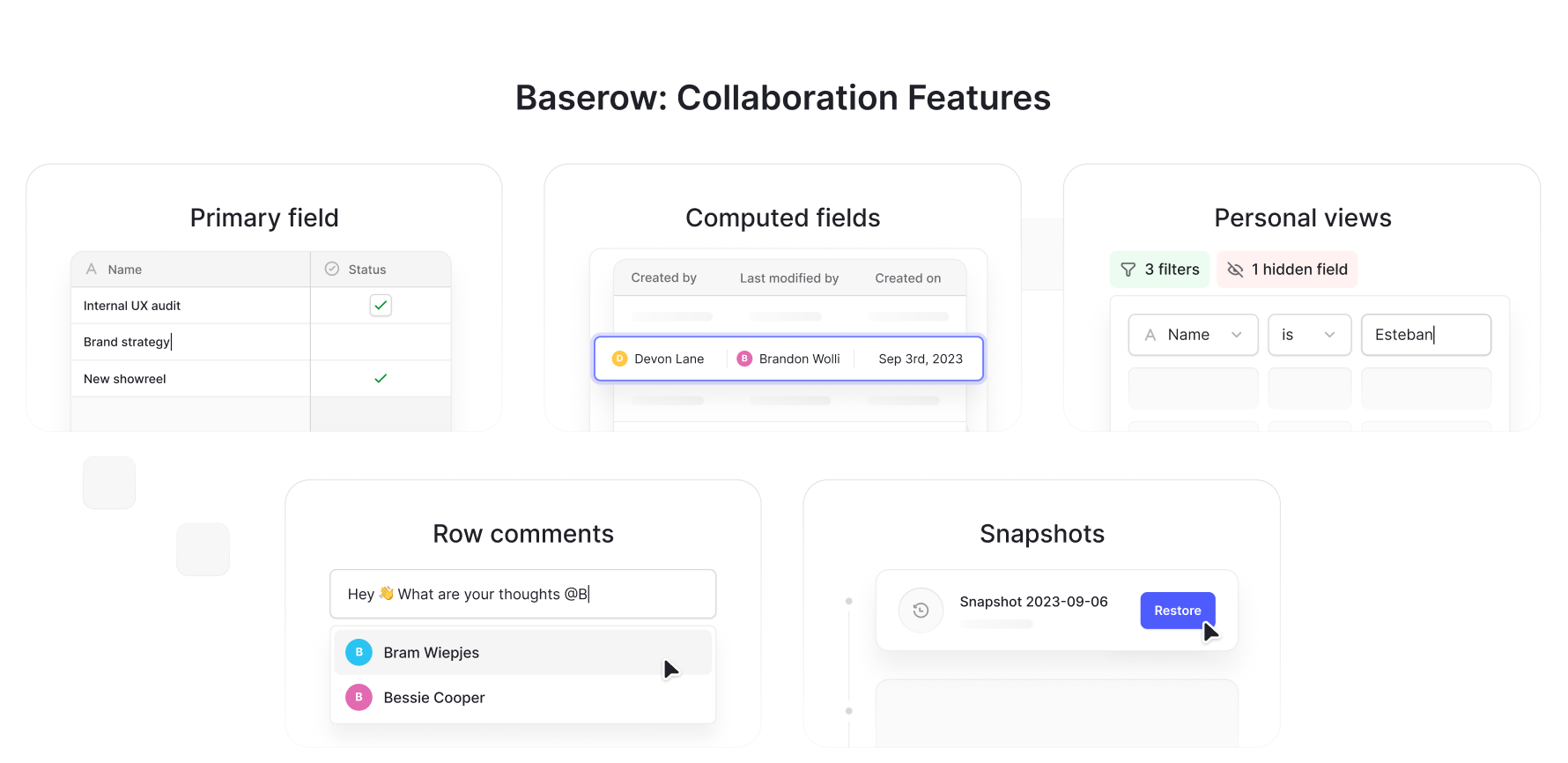
Baserow’s workspace collaboration documentation describes collaborator fields for assigning people to rows, row comments, mentions, and shared data updates. These capabilities can support a workflow where assignments and their discussions remain connected.
For the agency example, a task record could represent one deliverable. The responsible person would update the assignment, while a reviewer could use the discussion to explain requested changes. The team would still need conventions for status updates and final approval.
That distinction matters. Software can provide the place to record a decision, but your process determines what counts as approval and who has authority to give it. Define those expectations before relying on the workspace for delivery decisions.
Evaluate the right plan and deployment model
Baserow offers cloud and self hosted options, alongside a free plan and paid subscriptions. Included views, collaboration controls, and capacity vary, so match the subscription to the workflow you intend to run.
A free plan can provide a starting point for testing a small database. For a wider rollout, check the features your participants need, expected data volume, storage requirements, and administrative responsibilities. A useful pilot should reflect the intended production setup closely enough to expose important gaps.
Avoid assuming that every project requirement is available as a dedicated built-in function. For example, recording estimated and actual effort in fields is a different solution from using a timer, approval-based timesheets, or billing software. Identify what you will configure and what may require another application.
How to choose the right collaboration platform
Start with a coordination problem
Describe what is going wrong before comparing products. Perhaps approvals take too long because reviewers cannot find the latest draft. Perhaps managers spend hours collecting status updates. Perhaps client requests arrive through several channels and never become clearly owned assignments.
Choose one or two problems that matter most and define the improvement you want. For example, every approval request could have a named reviewer, a target date, and an accessible document. This gives the evaluation a concrete purpose.
Test a complete workflow
Use a real project with manageable scope. Include an incoming request, a task assignment, a document, a review, a blocker, and a completed deliverable. Invite the people who perform those steps rather than relying entirely on an administrator’s demonstration.
Observe where participants hesitate.
- Do they understand the statuses?
- Can they locate the current file?
- Does someone notice the approval request?
These moments tell you more about likely adoption than a checklist of available features.
Separate essential requirements from preferences
Create a short list of requirements that determine whether the platform can support your work. These might include external reviewer access, specific reporting, a required integration, or an acceptable deployment model.
Then record preferences separately. A preferred visual style should not outweigh a missing operational requirement. Equally, an impressive advanced feature should not distract from an everyday workflow that contributors find difficult to use.
Compare the full operating cost
Subscription fees are one part of the cost. Consider setup, training, administration, migration, storage growth, integrations, and any additional applications the workflow still requires. Include the time someone will spend maintaining shared templates and answering questions.
A low starting price can be useful, but the better comparison is the cost of running your actual process. Review what changes as the team grows and whether important features require a different plan.
Decide who will maintain the workspace
Every shared system needs an owner. That person does not have to control every assignment, but someone should maintain conventions, manage structural changes, and help resolve confusion about how the workspace is used.
Make this responsibility explicit during the pilot. Without it, different teams may create competing statuses, duplicate records, or inconsistent templates. A modest amount of ongoing stewardship can prevent a flexible workspace from becoming difficult to navigate.
Example: coordinating a product launch
Consider a fictional company preparing to launch a new service. Marketing owns the campaign, product specialists supply technical information, sales prepares outreach, and customer support needs answers to likely questions. Each department has its own priorities, but the launch depends on their work coming together.
Without a shared process, the campaign manager might collect updates through messages and meetings. A delayed product description could hold up the landing page, while sales continues preparing material based on an older draft. The problem is the missing connection between those activities.
A collaborative project management software pilot could make that connection explicit. Start by defining the launch milestone and the deliverables required to reach it. Create assignments for the product description, landing page, sales briefing, and support guidance. Give each assignment an accountable owner and identify who reviews the result.
Next, record the handoffs. The landing page needs approved product information before final review. Sales and support need confirmation of the service scope before completing their materials. Even if the chosen platform does not automatically manage dependencies, those prerequisites should be visible in the project record.
Keep the supporting documents connected to their assignments. The landing page task should point to the current copy and design, while the sales briefing should reference the approved service details. This helps each contributor understand which information to use and where to request clarification.
During the pilot, introduce a realistic change: the product team revises one part of the service. Ask the owner to explain the update, identify affected deliverables, and request the necessary reviews. Observe whether the right people discover the change and understand what they must do next.
This exercise tests collaboration more effectively than asking everyone to create sample tasks. It exposes the quality of the handoffs, the clarity of ownership, and the accessibility of supporting information. It also reveals whether the workspace makes a change easier to manage.
At the end, review the outcome with all participating departments.
- Did anyone work from outdated information?
- Was an approval unclear?
- Could the campaign manager identify the next blocker without contacting every owner individually
Use those answers to refine the process before expanding it.
The same approach applies beyond launches. An onboarding program, client engagement, internal event, or operational improvement can provide a useful pilot when it includes several contributors and a meaningful handoff. Choose an example that represents normal work closely enough to reveal everyday coordination needs.
Document the decisions that made the pilot successful, including where approvals belong and how changes are communicated. These agreements give future projects a reusable starting point and help new participants understand the process without depending on informal explanations from more experienced colleagues.
A practical rollout plan
Begin by mapping the current workflow with the people who use it. Identify where work enters, who prioritizes it, how assignments move, and what evidence marks completion. Keep the first version understandable enough to explain in a short team session.
Next, define a small set of statuses. A straightforward process might use planned, in progress, awaiting review, blocked, and complete. Explain what each status means and who acts when work enters it. If two statuses prompt the same behavior, consider combining them.
Create a task template that includes the outcome, owner, due date, and supporting material. Add review criteria where they are needed. Templates should help someone begin work without searching through several conversations for missing instructions.
Migrate active work selectively. Bringing every old task and attachment into a new workspace can bury current priorities. Preserve historical information where appropriate, but make the live project view focus on work the team still needs to deliver.
Run the pilot long enough to include a meaningful handoff and review cycle. Collect feedback from contributors, reviewers, and the project lead. Adjust the structure based on recurring friction, then document the agreed process before inviting additional teams.
Making collaboration work across locations
Remote work requires information to travel well without a live explanation. Write updates that describe what changed, what remains unresolved, and who needs to act. A colleague should be able to understand the situation without attending the meeting where it was discussed.
Agree on response expectations. An urgent blocker may require direct contact, while routine feedback can remain in the relevant task thread. A project workspace is more useful when people understand which signals need immediate attention.
Use meetings for decisions that benefit from discussion, then return the outcome to the shared record. Include the decision, owner, and resulting change to the plan. This keeps participants who could not attend from working with outdated assumptions.
Online collaboration tools can make distributed coordination easier, but they cannot create focus by themselves. Protect time for delivery, keep notifications purposeful, and make updates concise enough that people can maintain them consistently.
Mistakes that weaken project collaboration
One common mistake is building too much structure before the team has used the system. Numerous fields, elaborate statuses, and several competing views can make a simple update feel difficult. Start with the smallest workable process and expand when actual needs emerge.
Another is maintaining several authoritative task lists. When a spreadsheet, a board, and a private document all claim to show the current plan, discrepancies become inevitable. Decide which record determines ownership, status, and deadlines, then make supporting systems reference it clearly.
Teams also weaken collaboration when they treat every change as a notification. Excessive alerts teach people to ignore the workspace. Reserve direct requests for situations that require action, and make routine information easy to review without interrupting everyone.
Finally, avoid treating automation as a substitute for agreement. A rule can move an assignment or send a reminder, but it cannot resolve an unclear approval policy. Establish the process first, then automate repetitive steps that participants already understand.
How to measure whether the software helps
Choose a few measures that connect to the problems you identified. If approvals were slow, track the time between requesting and receiving a review. If work was frequently overlooked, examine missed handoffs or assignments without owners. If updates consumed meetings, assess how much preparation the shared workspace now supports.
Combine those observations with feedback. Ask contributors whether they can find priorities and supporting information quickly. Ask reviewers whether requests include enough context. Ask project leads whether the workspace helps them intervene earlier.
Interpret results carefully. A project with fewer overdue tasks may simply have easier deadlines or smaller scope. Compare similar work where possible and examine the reasons behind changes. The goal is to improve coordination, not generate an attractive score that hides remaining problems.
Frequently asked questions
- Can a small team benefit from collaborative project management software?
Yes, when coordination problems justify a shared system. A small team may only need clear ownership, a few statuses, supporting links, and reliable deadlines. Start with those basics and avoid introducing reporting or administrative routines that create more work than they save.
- What should a team test on a free plan?
Test the complete working process, including collaboration with the people involved. Check user access, views, attachments, notifications, and any essential integrations. Record which limits affect the pilot and which capabilities would require an upgrade before making a rollout decision.
- Can one platform handle a complex project?
Potentially, but complexity needs to be defined. A project may involve scheduling dependencies, confidential information, extensive resources, or unusual data relationships. Evaluate those requirements directly. The number of features advertised does not establish whether a platform can support your particular delivery process.
- Should the project workspace replace other applications?
Only where doing so improves the workflow. Your team may still need specialist design software, document editing, accounting, or communication tools. Define how those applications connect to the project record so contributors know where to work and where to find the agreed status.
Build a clearer way to deliver work
Collaborative project management software creates value when it helps people understand their responsibilities, find the information they need, and move work through a clear process. The right choice depends on your workflow, coordination challenges, and willingness to maintain a shared system.
Baserow is worth exploring if you want to shape project information around your business and connect assignments with related records. Begin with one practical workflow, involve the people who will use it, and refine the structure through a focused pilot.
Get started with Baserow to explore a project workspace built around how your team works.

Baserow 2.4 adds Button fields, Graph elements, workflow automation, AI provider management, improved Group By views, and 30+ more updates.

Discover how Airtable and Baserow compare in features, flexibility, speed, and scalability. Compare pricing plans and hidden costs to make an informed decision!

Explore the best open-source software alternatives to proprietary products. Discover OSS tools, licenses, and use cases with our updated directory.