

Modern teams rely on collaboration software every day. Whether you’re managing projects, sharing documents, coordinating remote work, or tracking business processes, the right team collaboration tool can make a significant difference in productivity.
Today’s organizations use collaboration tools for much more than messaging. Team members need a central place to manage shared files, coordinate projects, assign work, communicate in real time, and track progress. As remote work becomes more common, teams also need ways to collaborate effectively across departments, offices, and time zones.
The challenge is that there is no single definition of collaboration software. Some platforms focus on team communication. Others specialize in project management, documentation, workflow automations, video meetings, or data collaboration.
To help you navigate the market, we’ve compiled 100 of the most popular team collaboration tools used by startups, small businesses, and enterprises. This guide compares collaboration software across multiple categories, including communication tools, project management platforms, knowledge management systems, data collaboration platforms, whiteboarding tools, and developer collaboration software.
Whether you’re building a remote-first company or improving collaboration across an existing organization, this guide will help you compare solutions and identify the right platform for your team.
What is a team collaboration tool?
A team collaboration tool is software that helps people work together toward shared goals.
These platforms make it easier for team members to communicate, share information, assign work, and coordinate projects. Instead of relying on scattered spreadsheets, email threads, and disconnected systems, teams use collaboration software to centralize information and improve visibility.
Most modern collaboration tools include some combination of:
- Team communication
- Shared files
- Assigning tasks
- Task tracking
- Real time communication
- Real time collaboration
- Workflow automations
- Reporting and analytics
- Integrations with third-party apps
Some platforms focus primarily on communication. Others focus on project management, documentation, or operational workflows.
For example, Slack is widely used for team communication, while Microsoft Teams is popular among organizations using Microsoft 365. Baserow takes a different approach by focusing on data collaboration, workflow automation, and structured information management.
The best solution depends on how your teams work and the type of collaboration they need most.
Want to learn more? If you’re looking for a deeper explanation of collaboration tools, including their benefits, key features, and common use cases, read our guide: What Are Collaboration Tools? Features and Use Cases.
Compare 100 team collaboration tools
The comparison table below includes 100 of the most popular collaboration tools available today.
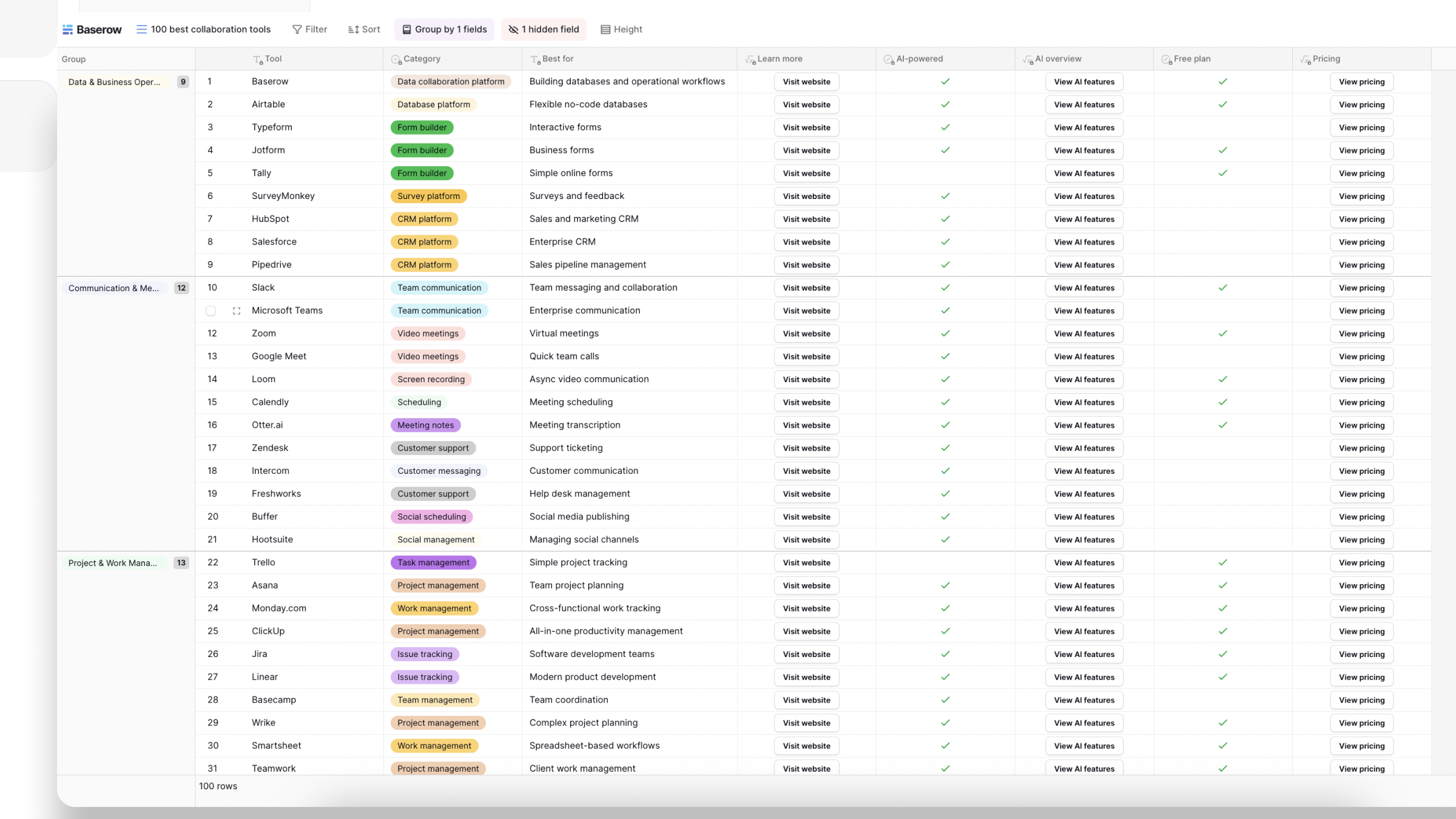
We’ve included a mix of communication tools, project management software, documentation platforms, data collaboration solutions, whiteboarding tools, and developer collaboration platforms.
For each tool, you’ll find information about:
- Category
- Best use case
- AI capabilities
- Free plan availability
- Pricing information
- Official website
Use the table to compare solutions side by side and identify the right collaboration software for your team.
How we evaluated these 100 collaboration tools
To create this list, we reviewed 100 of the most popular collaboration platforms used by businesses around the world.
Each tool was evaluated using several criteria:
Collaboration capabilities
Does the platform support team communication, project collaboration, file sharing, or workflow management?
AI features
Many modern collaboration tools now include AI-powered features such as summaries, assistants, workflow suggestions, and automation.
Free plan availability
Cost remains an important factor for startups and small businesses. We identified which platforms offer free plans.
Popularity and market adoption
We focused on tools that are widely used across industries and company sizes.
Business use cases
Different teams have different needs. We considered how each tool supports communication, documentation, operations, software development, project management, and workflow automation.
The result is a practical comparison of collaboration software rather than a simple list of products.
Data collaboration platforms
Data collaboration is one of the fastest-growing areas of modern teamwork.
Many organizations have moved beyond spreadsheets and now need systems that support structured information, workflow automation, and real time collaboration.
According to the comparison table above, Baserow, Airtable, Coda, and Smartsheet are among the leading solutions in this category.
Baserow
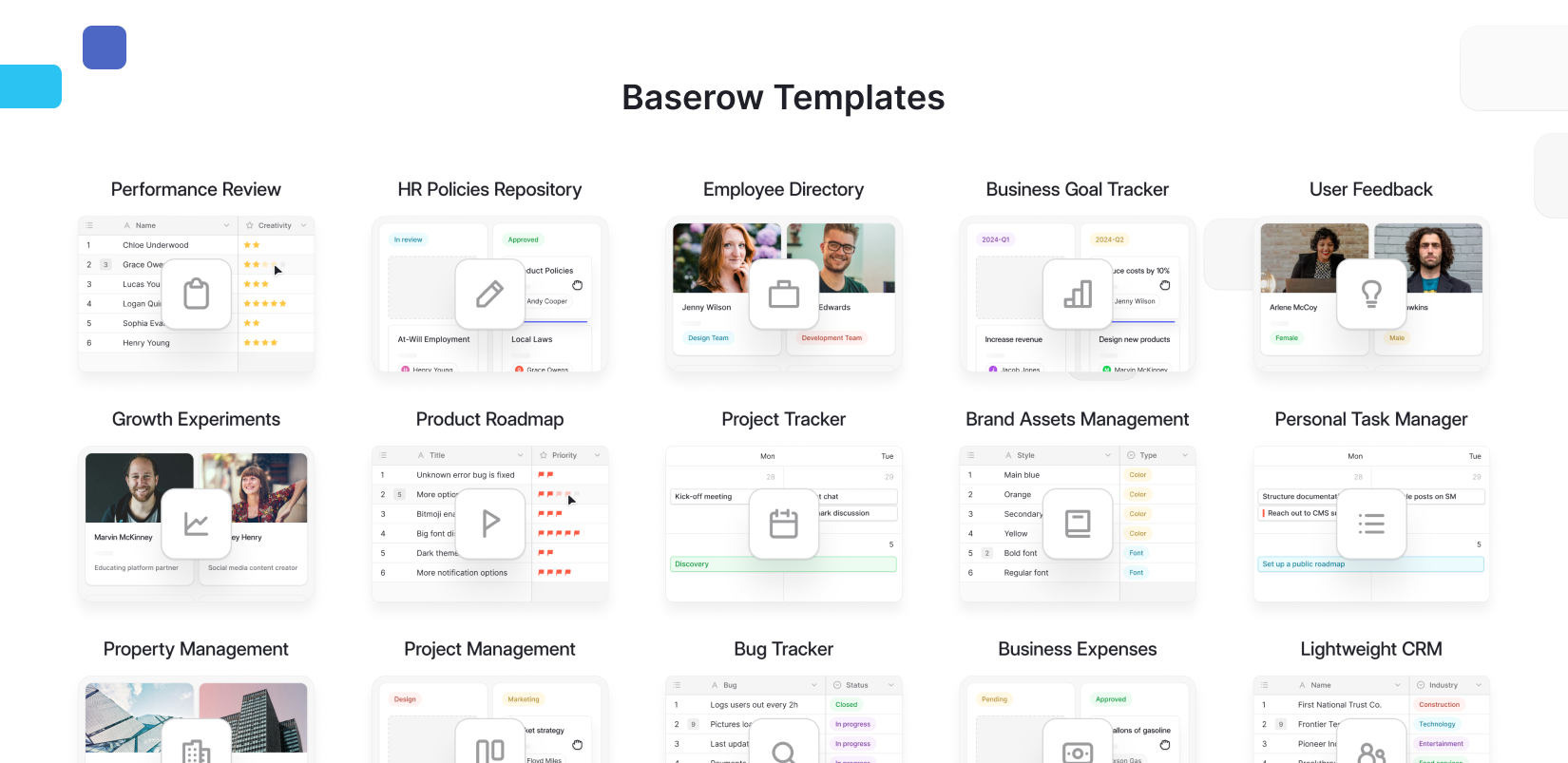
Baserow is an open-source team collaboration tool designed for organizations that need flexible workflows and structured data management.
Teams use Baserow to build CRM systems, project trackers, customer portals, content calendars, inventory systems, and internal applications without writing code.
Unlike traditional spreadsheets, Baserow allows teams to collaborate on information in real time while maintaining a structured database.
Key benefits include:
- Real time collaboration
- Workflow automations
- API access
- AI-powered capabilities
- Open-source architecture
- Self-hosting options
- Flexible permissions
For organizations looking for open-source collaboration software, Baserow provides a powerful alternative to proprietary platforms while avoiding vendor lock-in.
Airtable
Airtable combines spreadsheet simplicity with database functionality and remains popular among marketing, operations, and project teams.
Coda
Coda brings together documents, databases, and workflows in a single workspace.
Smartsheet
Smartsheet focuses on enterprise planning and operational management.
Team communication tools
Communication tools remain essential for successful collaboration.
The comparison table above includes several popular communication platforms that support team communication, shared files, and real time communication.
Slack
Slack is one of the most widely adopted collaboration tools in the world. Teams use Slack channels to organize conversations, share updates, and coordinate work.
Microsoft Teams
Microsoft Teams is a leading collaboration platform for organizations using Microsoft 365. It combines messaging, meetings, file sharing, and AI-powered productivity features.
Zoom
Zoom continues to expand beyond video conferencing and now offers broader collaboration capabilities.
Google Meet and Google Chat
Google’s collaboration ecosystem remains a popular choice for businesses using Google Workspace.
Communication tools are especially important for remote work environments where teams depend on real time communication and quick access to information.
Project management collaboration software
Project management platforms help teams organize work, assign responsibilities, and track progress.
Popular options from the comparison table include:
- ClickUp
- Asana
- Monday
- Trello
- Jira
- Linear
These platforms help teams:
- Assign work
- Track progress
- Manage deadlines
- Coordinate projects
- Improve visibility
Many organizations combine project management software with communication tools and database platforms to create a complete collaboration ecosystem.
Documentation and knowledge management tools
Documentation tools help organizations preserve knowledge and improve collaboration.
Popular solutions include:
- Notion
- Confluence
- Obsidian
- Evernote
These platforms make it easier for teams to share information, manage documentation, and collaborate on knowledge in real time.
Whiteboarding and visual collaboration tools
Visual collaboration software enables brainstorming, workshops, planning sessions, and design collaboration.
Popular options include:
- Miro
- Mural
These tools have become especially important for remote work and distributed teams.
Developer collaboration platforms
Engineering teams require specialized collaboration software.
Popular platforms include:
- GitHub
- GitLab
- Linear
These tools support:
- Code collaboration
- Issue tracking
- Documentation
- Workflow automation
- Team communication
AI-powered collaboration software
Artificial intelligence is reshaping how teams work together.
According to the comparison table above, many of today’s leading collaboration tools now include AI features.
Examples include:
- Baserow
- Slack
- Notion
- Microsoft Teams
- Airtable
- ClickUp
- Asana
- Zoom
- GitHub
- Miro
AI capabilities help teams:
- Save time
- Generate content
- Summarize discussions
- Create reports
- Analyze data
- Automate workflows
Best team collaboration tools at a glance
Looking for the best team collaboration tool?
The answer depends on your use case.
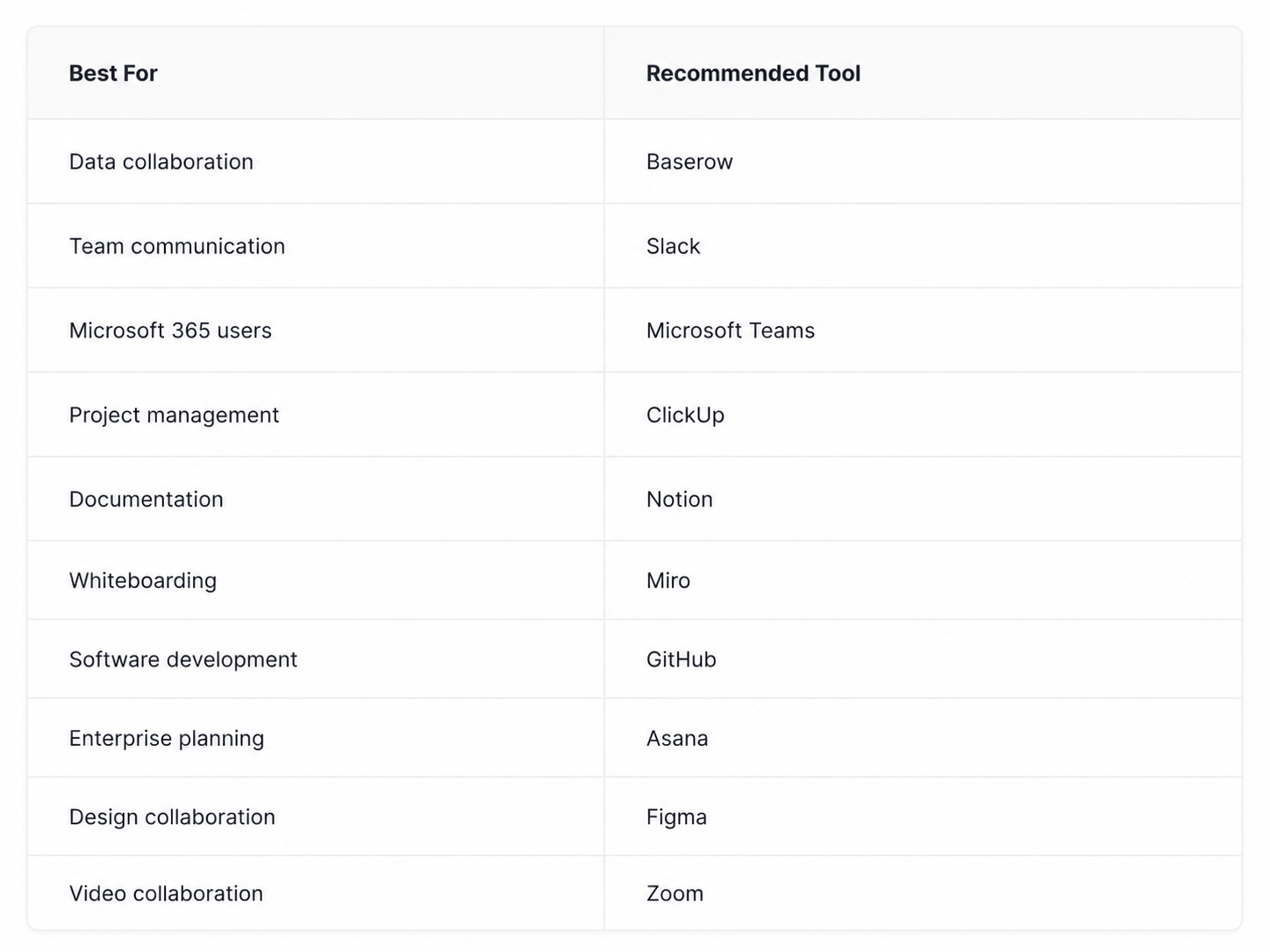
For teams managing operational workflows and structured information, Baserow is one of the strongest options available. Unlike communication-first platforms, Baserow focuses on data collaboration, workflow automation, and custom business processes.
For organizations already using Microsoft 365, Microsoft Teams remains a popular collaboration platform thanks to its integration with Microsoft’s ecosystem.
Teams that prioritize team communication often choose Slack, while project-focused organizations commonly adopt ClickUp, Asana, or Monday.
Team collaboration vs communication tools
The terms team collaboration tool and communication tool are often used interchangeably, but they are not exactly the same.
Communication tools focus on helping team members exchange information through messaging, meetings, and discussions. Popular examples include Slack, Microsoft Teams, Zoom, and Discord.
Team collaboration tools typically offer a broader set of capabilities. In addition to communication, they help teams manage projects, share documentation, track work, collaborate on data, and automate workflows. Examples include Baserow, Notion, ClickUp, Airtable, and Asana.
In practice, many organizations use both types of software together. For example, a team might use Slack for communication, Notion for documentation, and Baserow for data collaboration and workflow management.
As collaboration software continues to evolve, the line between communication and collaboration tools is becoming increasingly blurred, with many platforms now offering features from both categories.
Key features to look for in collaboration software
The best collaboration software helps teams communicate, stay organized, and work more efficiently. When comparing team collaboration tools, look for these key features:
- Team communication – Chat, comments, and meetings that keep team members connected.
- Shared files and documentation – A central place to store and access information.
- Assigning tasks and task tracking – Tools that help teams manage responsibilities and deadlines.
- Workflow automations – Features that reduce repetitive work and help teams save time.
- Real time updates – Instant visibility into project progress and changes.
- Integrations with third-party apps – Connections with tools such as Microsoft 365, Google Workspace, Slack, and Zoom.
- Security and permissions – Access controls and security features that support secure collaboration.
- AI capabilities – AI assistants that help summarize information, automate tasks, and improve productivity.
The right collaboration platform should support both your current workflows and future growth as your team expands.
Why collaboration matters more than ever
Collaboration has always been important, but the way teams work has changed dramatically.
Many organizations now operate with distributed teams spread across different locations and time zones. Employees may work remotely, travel frequently, or collaborate across multiple departments. As a result, businesses need systems that keep everyone aligned regardless of location.
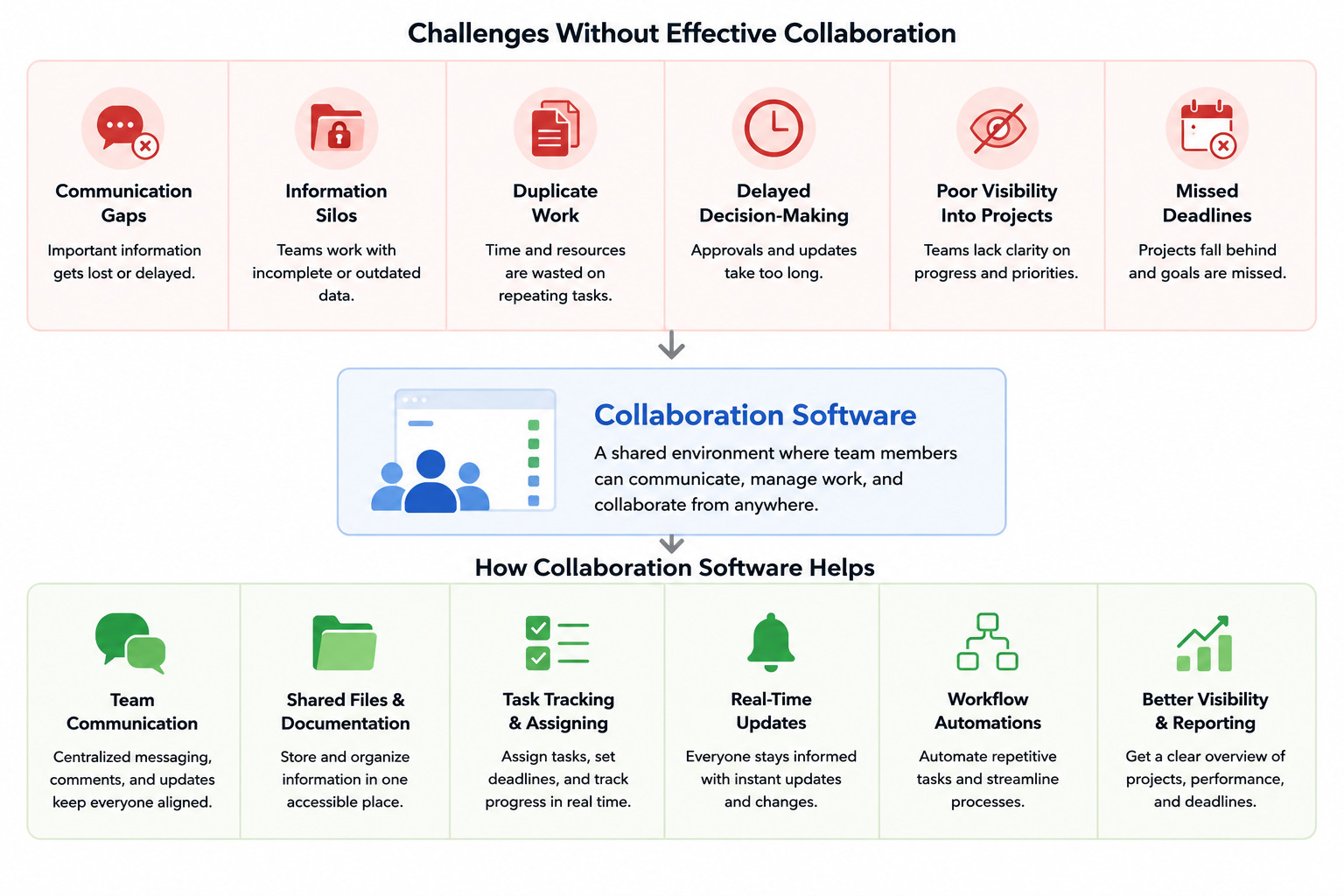
Without effective collaboration, teams often experience:
- Communication gaps
- Duplicate work
- Information silos
- Delayed decision-making
- Poor visibility into projects
- Missed deadlines
Collaboration software helps solve these challenges by creating a shared environment where team members can work together more effectively.
For example, a marketing team might use collaboration tools to plan campaigns, share creative assets, track approvals, and monitor deadlines. A product team may use the same tools to coordinate development work, manage documentation, and communicate updates.
When collaboration improves, organizations can save time, reduce errors, and improve productivity across the business.
Common collaboration challenges
Despite the availability of modern software, many teams still struggle with collaboration.
One of the biggest challenges is fragmented information. Teams often store data across spreadsheets, documents, messaging apps, and project management systems. This makes it difficult for team members to find the information they need.
Another common issue is communication overload. Employees receive messages through multiple communication tools, email threads, meetings, and notifications throughout the day. Important updates can easily get lost.
Remote work introduces additional complexity. Teams operating across multiple time zones cannot always rely on synchronous communication. Instead, they need systems that support both real time collaboration and asynchronous work.
Organizations also struggle with manual processes. Many teams still spend hours updating spreadsheets, copying information between systems, and managing repetitive workflows.
The best collaboration software addresses these issues by centralizing information, improving visibility, and reducing manual work through workflow automations.
What is secure collaboration?
Secure collaboration is the ability for team members to work together while protecting sensitive information.
As businesses increasingly depend on cloud software and distributed teams, security has become a major consideration when selecting a team collaboration tool.
Secure collaboration platforms typically include:
- Role-based permissions
- User access controls
- Audit logs
- Data encryption
- Secure file sharing
- Single sign-on (SSO)
- Compliance capabilities
These features help organizations ensure that employees only access the information they need while maintaining visibility into how data is used.
This is especially important for organizations handling customer information, financial records, healthcare data, or confidential business information.
Open-source collaboration software can provide additional flexibility because organizations have greater control over infrastructure and data management.
For example, Baserow offers self-hosting options alongside flexible permission settings, making it possible for organizations to balance collaboration with security requirements.
How to choose the right team collaboration tool
When evaluating collaboration software, consider:
- Team size
- Remote work requirements
- Number of distributed teams
- Time zones
- Workflow complexity
- Security requirements
- AI capabilities
- Integration needs
- Budget
Most organizations ultimately use multiple collaboration tools together rather than relying on a single platform.
Recommended team collaboration tools by use case
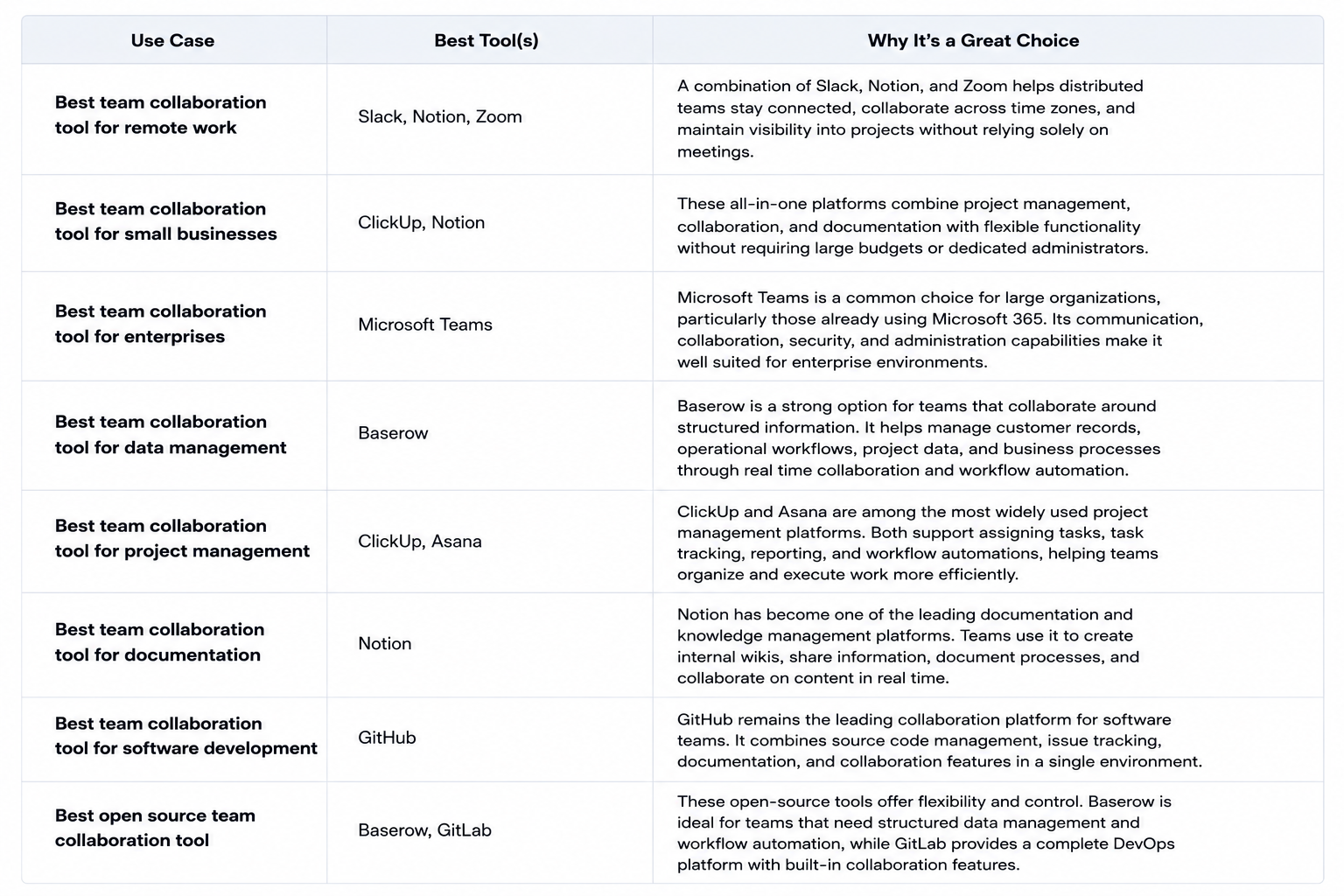
The best team collaboration tool depends on your organization’s size, workflows, and priorities. While the comparison table above includes 100 popular collaboration tools, some platforms stand out for specific use cases.
Best team collaboration tool for remote work
Remote teams need reliable communication, documentation, and meeting tools. A combination of Slack, Notion, and Zoom helps distributed teams stay connected, collaborate across time zones, and maintain visibility into projects without relying solely on meetings.
Best team collaboration tool for small businesses
Small businesses often benefit from all-in-one platforms that combine project management, collaboration, and documentation. ClickUp and Notion are popular choices because they offer flexible functionality without requiring large budgets or dedicated administrators.
Best team collaboration tool for enterprises
Microsoft Teams is a common choice for large organizations, particularly those already using Microsoft 365. Its communication, collaboration, security, and administration capabilities make it well suited for enterprise environments.
Best team collaboration tool for data management
Teams that collaborate around structured information often need more than traditional communication tools. Baserow is a strong option for managing customer records, operational workflows, project data, and business processes through real time collaboration and workflow automation.
Best team collaboration tool for project management
ClickUp and Asana are among the most widely used project management platforms. Both support assigning tasks, task tracking, reporting, and workflow automations, helping teams organize and execute work more efficiently.
Best team collaboration tool for documentation
Notion has become one of the leading documentation and knowledge management platforms. Teams use it to create internal wikis, share information, document processes, and collaborate on content in real time.
Best team collaboration tool for software development
GitHub remains the leading collaboration platform for software teams. It combines source code management, issue tracking, documentation, and collaboration features in a single environment.
Best open source team collaboration tool
Organizations looking for flexibility and control often consider open-source collaboration software. Baserow, GitLab, and n8n are among the most popular options, each serving different collaboration needs. Baserow is particularly well suited for teams that need structured data management and workflow automation alongside collaboration capabilities.
No single collaboration platform is perfect for every use case. Many organizations combine several tools to create a collaboration ecosystem that supports communication, documentation, project management, and operational workflows.
Why Baserow stands out
Among open-source team collaboration tools, Baserow occupies a unique position.
Unlike communication-focused tools or project management platforms, Baserow focuses on operational collaboration. Teams use Baserow to manage customer data, internal workflows, inventory systems, project tracking, content operations, and countless other business processes.
The platform combines database functionality, workflow automation, and team collaboration into a single open-source solution.
For organizations seeking an open-source team collaboration tool that supports real-time collaboration, workflow automation, and structured data management, Baserow is one of the strongest options available today.
Choosing the right collaboration software for your team
Choosing the right collaboration software depends on how your team works every day.
Today’s online collaboration tools help organizations manage projects, communicate, share projects, and collaborate from anywhere. Some businesses need a simple platform for team communication, while others require advanced task management, file sharing, and workflow automation. If your organization has remote teams, look for software that supports both real-time and asynchronous work.
A good collaboration platform should make it easy to assign tasks, manage due dates, support sharing projects with internal and external stakeholders, and keep every team member informed through real-time updates. Many modern platforms also include drag-and-drop interfaces that simplify organizing data and building workflows.
When comparing online collaboration tools, consider whether they offer:
- Team communication and messaging
- Task management with assigning tasks and due dates
- File sharing and secure file storage
- Workflow automation to save time
- Real-time updates and notifications
- AI-powered features
- Integrations with your existing software
- Flexible pricing, including free and paid plans
The best collaboration software isn’t necessarily the one with the longest feature list. Instead, focus on the key features that match your workflows, help team members collaborate efficiently, simplify sharing projects, reduce repetitive work, and offer a learning curve your team can adopt quickly.
The future of team collaboration
Team collaboration continues to evolve as organizations adopt new ways of working. Remote work, distributed teams, and increasing amounts of business data are changing what companies expect from collaboration software.
One of the biggest trends is the rise of AI assistants. Platforms such as Baserow, Microsoft Teams, Slack, Notion, and ClickUp now use AI to help teams summarize information, generate content, automate tasks, and save time.
Workflow automations are also becoming a standard feature. Instead of manually updating spreadsheets or moving information between tools, teams can automate repetitive processes and focus on higher-value work.
At the same time, organizations are learning to balance real time collaboration with asynchronous work. While real time communication remains important, distributed teams often work across multiple time zones and need systems that allow team members to contribute when it suits their schedule.
Another major trend is the growing importance of data collaboration. Teams are moving away from disconnected spreadsheets and toward shared platforms where information can be updated, tracked, and analyzed in real time.
As collaboration software continues to evolve, organizations will increasingly look for solutions that combine communication, workflow automation, AI capabilities, and data collaboration in a single connected ecosystem. Platforms like Baserow are helping teams meet these needs by combining structured data management with collaboration and automation capabilities.
Frequently Asked Questions
What is a team collaboration tool?
A team collaboration tool is software that helps team members communicate, share files, assign work, manage projects, and collaborate in real time.
What is the best team collaboration tool?
The best team collaboration tool depends on your needs. Baserow is ideal for operational workflows and data collaboration, Slack excels at communication, and ClickUp focuses on project management.
What collaboration software is best for remote work?
Popular options include Baserow, Slack, Zoom, Notion, ClickUp, and Microsoft Teams.
Are there open-source collaboration tools?
Yes. Popular open-source collaboration software includes Baserow, GitLab, and n8n.
Does Baserow support team collaboration?
Yes. Baserow is a team collaboration tool that enables organizations to collaborate on structured data, automate workflows, and build internal applications without coding.
Which team collaboration tools offer AI features?
Many platforms now include AI capabilities, including Baserow, Slack, Notion, ClickUp, Airtable, Microsoft Teams, and Asana.
What features should collaboration software include?
Most teams look for team communication, task tracking, shared files, workflow automations, real time collaboration, integrations, and reporting capabilities.
The team collaboration software market continues to evolve rapidly. From communication platforms and project management systems to AI-powered workflow tools and open-source solutions, organizations have more options than ever before.
The comparison table above provides a practical way to evaluate 100 leading collaboration tools and identify the best fit for your team.
If your organization needs a flexible open-source team collaboration tool for operational workflows, structured data, workflow automation, and real-time collaboration, Baserow is one of the most capable platforms available today.


Baserow 2.4 adds Button fields, Graph elements, workflow automation, AI provider management, improved Group By views, and 30+ more updates.

Discover how Airtable and Baserow compare in features, flexibility, speed, and scalability. Compare pricing plans and hidden costs to make an informed decision!

Explore the best open-source software alternatives to proprietary products. Discover OSS tools, licenses, and use cases with our updated directory.