
TL;DR
- Live collaboration indicators: see who’s working in a table and which cells they’re editing
- Improved Group By views with collapsible groups and aggregations
- Import Excel files directly into Baserow
- Undo, redo, and trash support for Application Builder elements
- Execute JavaScript inside workflows
- Node History for easier automation debugging
- Read CSV and Excel files inside workflows
- New layout and responsive design options for applications
- Batch row operations and new automation triggers
Introducing Baserow 2.3
Baserow 2.3 introduces live collaboration indicators for Database Builder, major improvements to grouped views, powerful new automation capabilities, and a more flexible Application Builder.
You can now see who’s editing a table in real time, import Excel files directly into new database tables, write JavaScript inside workflows, and recover deleted Application Builder elements with undo, redo, and trash.
Let’s take a look at what’s new.
Real-time cell editing
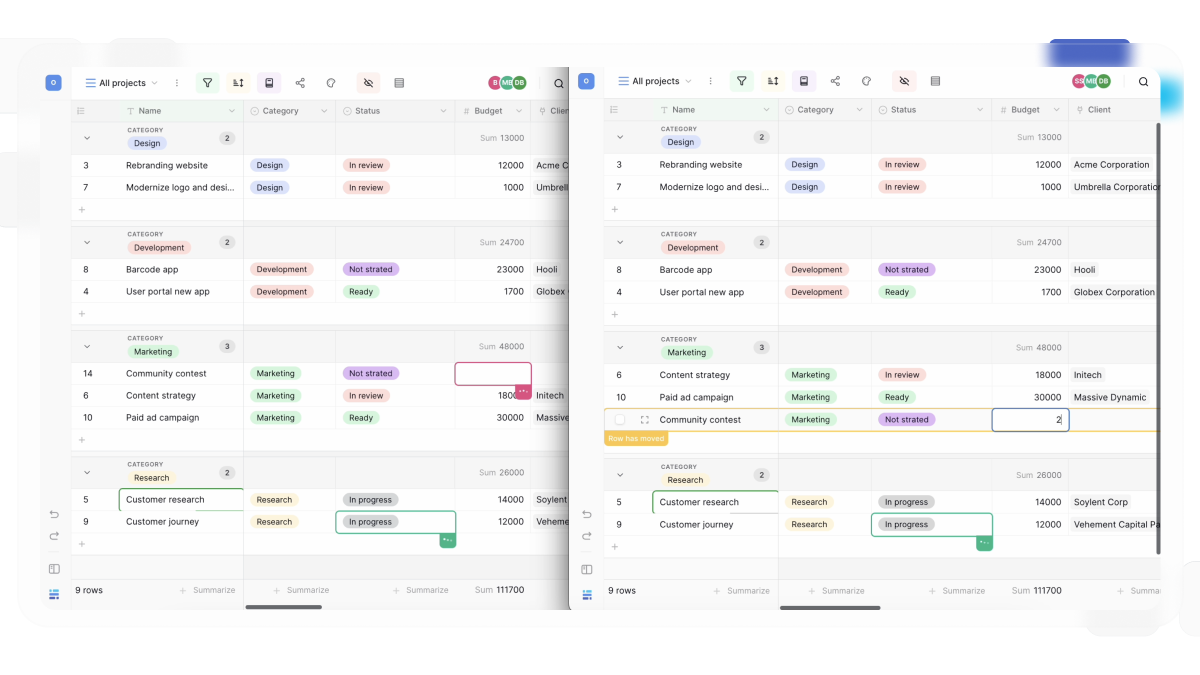
Baserow already updates table changes in real time. With 2.3, you can now also see who is currently working in a table and which cells are being edited.
When multiple users are viewing the same table, active collaborators appear in the interface, making it easier to coordinate work and avoid editing conflicts.
You can:
- See who is currently viewing a table
- See which cells other users are editing
- Watch updates appear instantly
Behind the scenes, we’ve also improved connection handling and synchronization to keep users connected more reliably during temporary network interruptions.
👉 Learn more about collaboration →
Improved Group By views
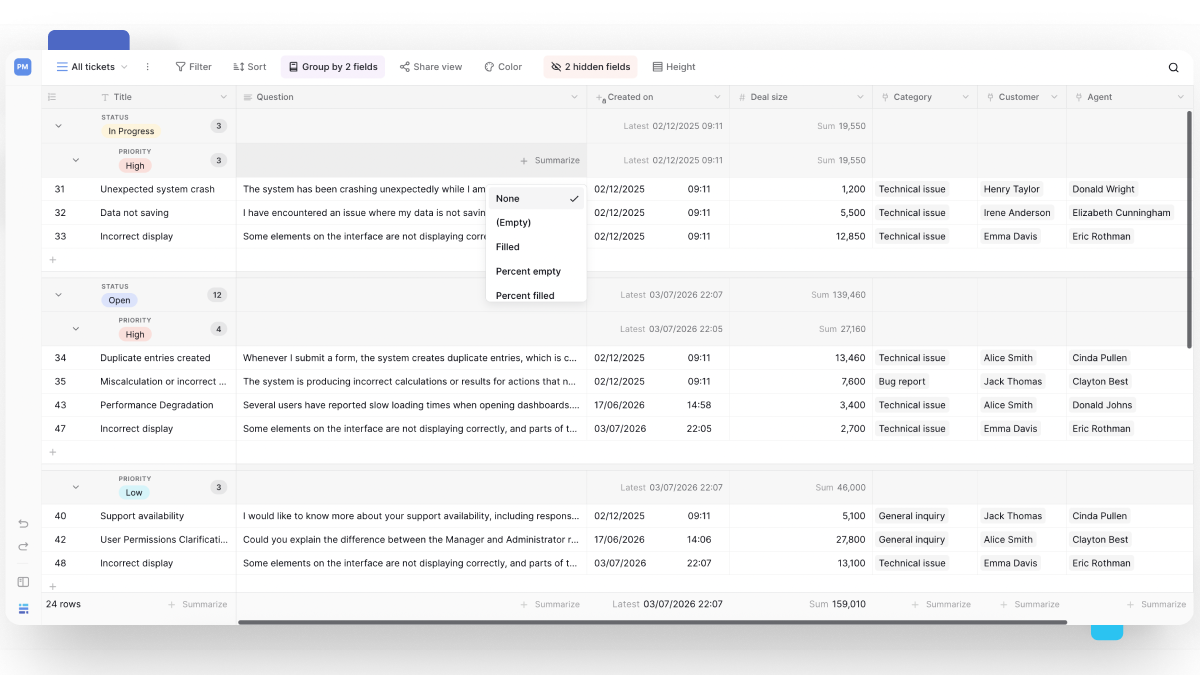
Expand, collapse, and summarize grouped data
Grouped views have been redesigned to make large datasets easier to manage.
Groups can now be collapsed and expanded, allowing you to focus only on the information you need.
You can also:
- Create rows directly inside a group
- View aggregations for individual groups
- Re-order group by fields using drag and drop
- Group by up to five fields for more detailed data organization
For example, you can group tasks by ‘Status’ and ‘Assignee’, collapse completed work, and instantly see counts or summaries for each group.
👉 Learn more about grouping rows
Import Excel files to create new tables
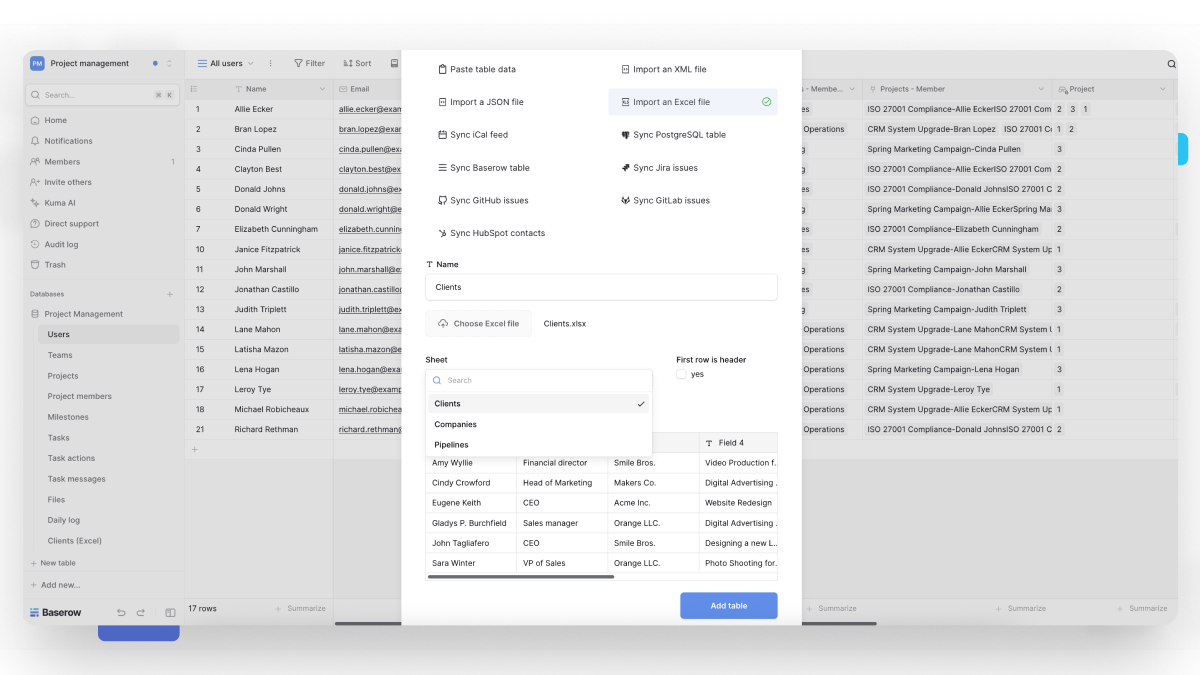
You can now create a new database table by importing an .xlsx, .xls, or .ods file.
If your workbook contains multiple sheets, you can choose which sheet to import. You can also specify whether the first row contains column headers before importing your data.
👉 Learn more about importing data to create a table →
Undo, redo, and restore deleted elements
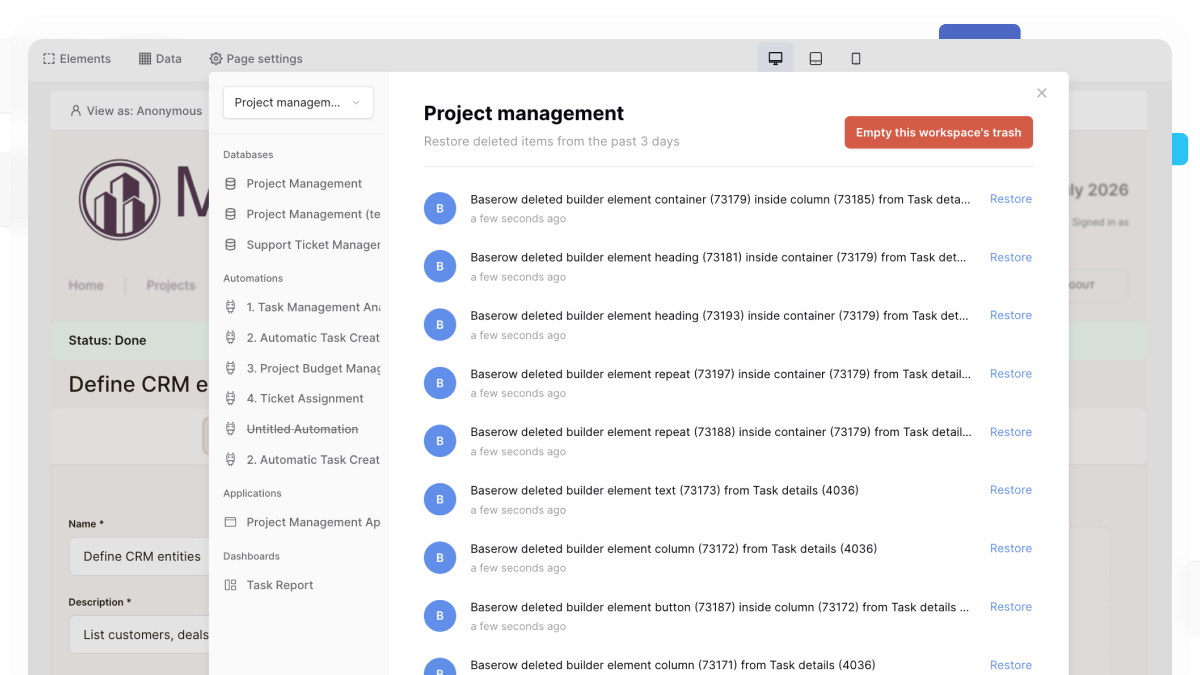
Application Builder now supports undo, redo, and trash functionality for elements.
If you accidentally delete an element or make an unwanted change, you can quickly restore it.
You can:
- Undo recent element changes
- Redo reverted changes
- Restore deleted elements from the trash for up to 3 days
This makes it easier to experiment with layouts and build applications with confidence.
👉 Learn more about deleting and recovering data
Code execution node
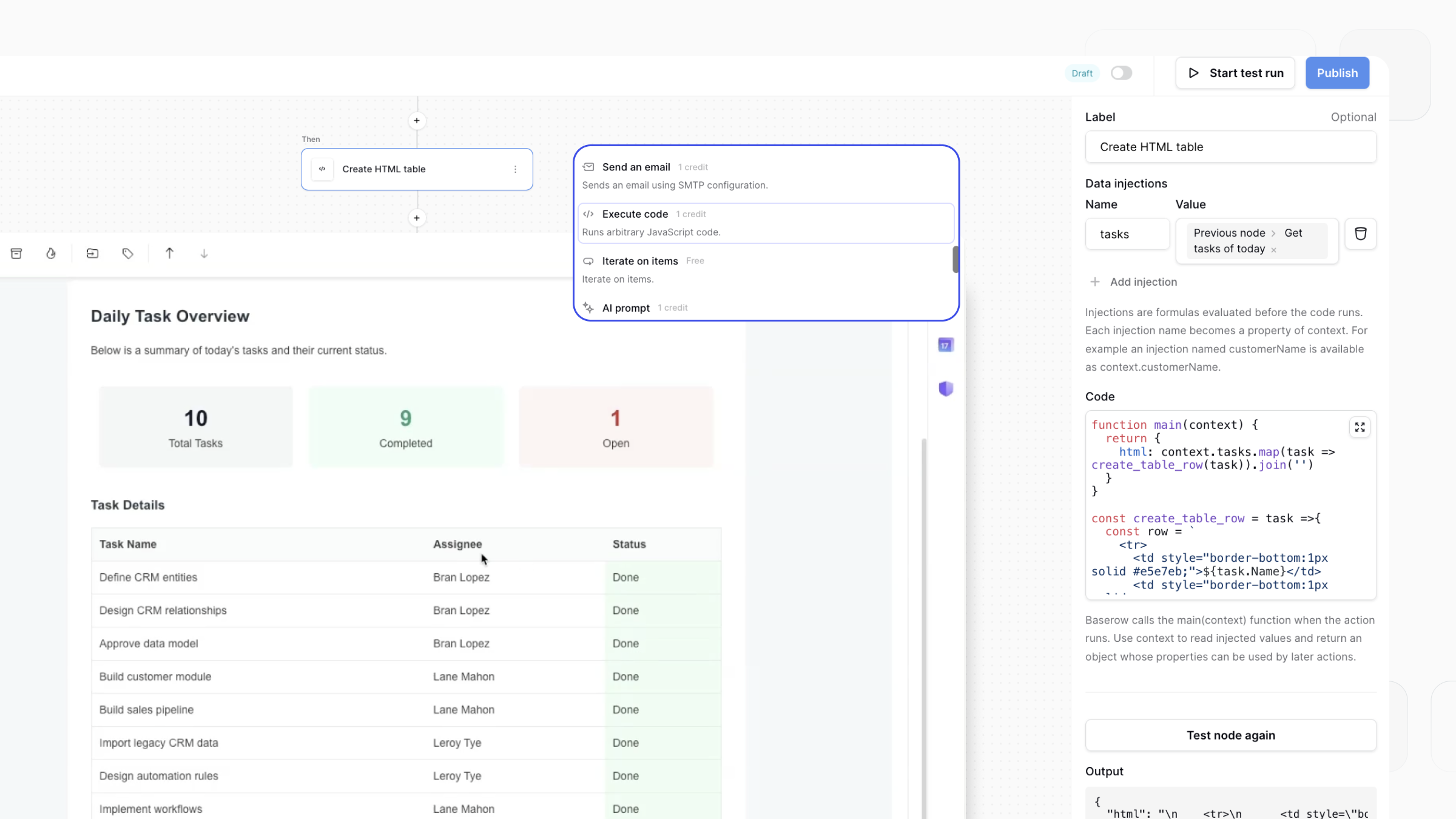
You can now run JavaScript directly inside Automations and Application Builder.
The new ‘Code execution node’ lets you write JavaScript to transform data, perform calculations, and prepare information before the next step in your automation or application.
For example, you can:
- Transform or clean text before updating a record
- Format data for emails, reports, or external systems
- Perform custom calculations and business logic
- Generate custom outputs for later workflow steps
The ‘Code execution node’ is available on the Advanced and Enterprise plans.
👉 Learn more about the execute code node →
Node history
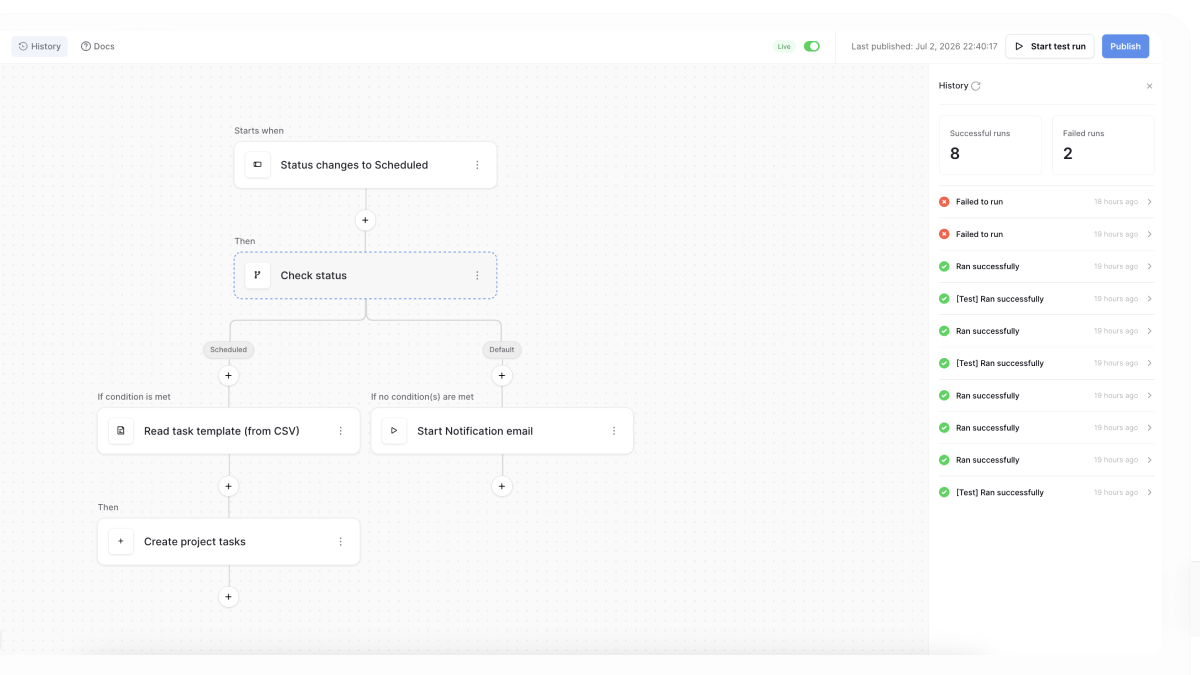
Workflow history now provides detailed information about every node that executed.
Instead of only seeing whether a workflow succeeded or failed, you can inspect:
- Individual workflow steps
- Outputs returned by nodes
- Nested loops and iterators
- Errors at the exact point where they occurred
For example, if a workflow processes a list of records and fails during one iteration, you can see exactly which node failed and inspect the returned output or error message.
This makes troubleshooting complex workflows much easier.
👉 Learn more about node history →
Read CSV and Excel files
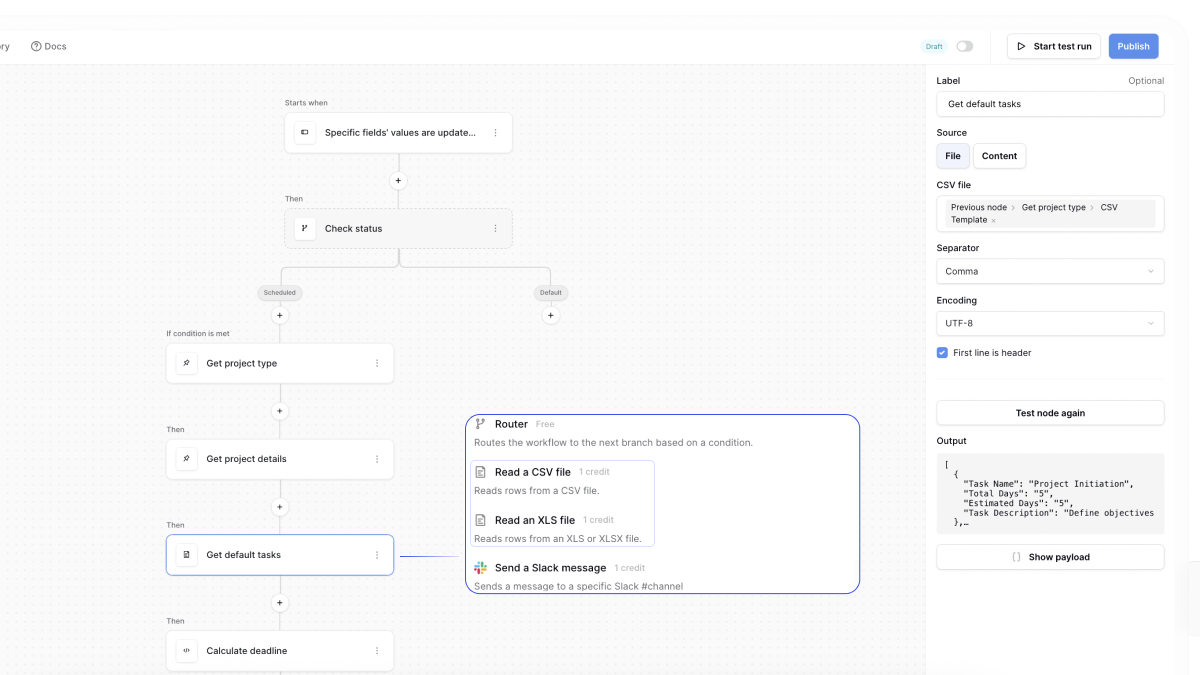
Automations and Application Builder can now read CSV and Excel files directly.
The new Read a CSV file and Read an XLS file actions let you:
- Create records from uploaded spreadsheets
- Process project templates stored as CSV or Excel files
- Use spreadsheet data in later workflow steps
- Choose which worksheet to read from Excel workbooks
This makes it easy to process spreadsheet data and use it in later workflow steps without importing it into a database first.
👉 Learn more about the Read CSV and Read XLS actions →
Batch row operations
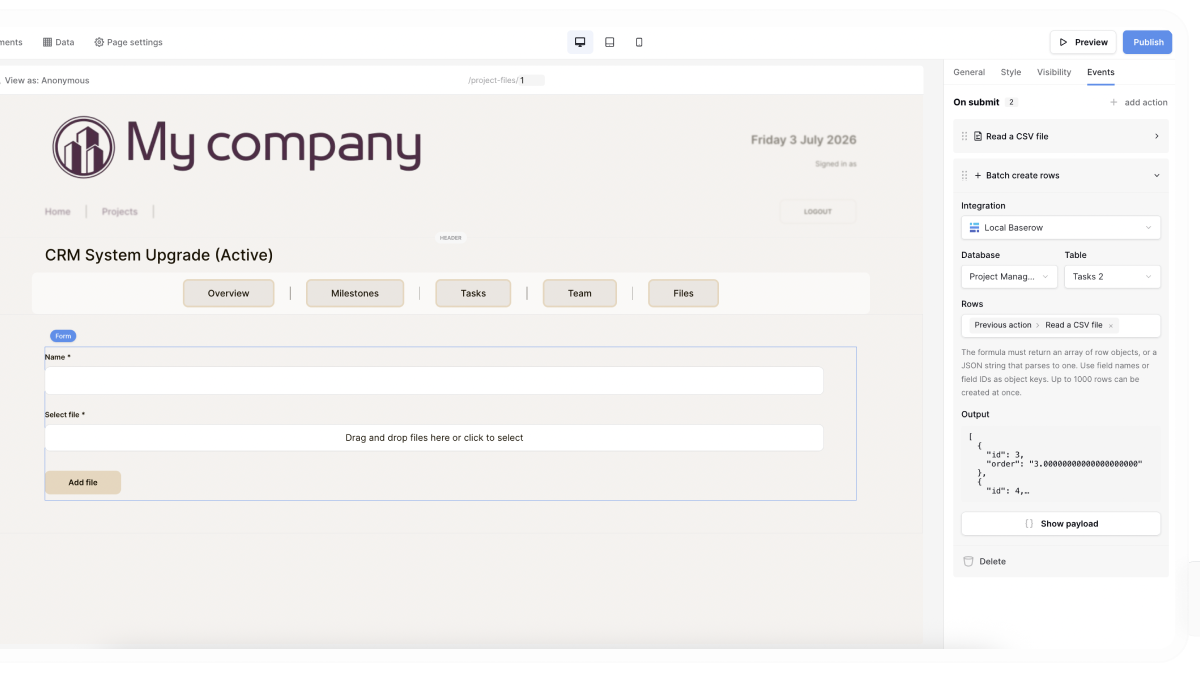
Automations and Application Builder can now create or update up to 1,000 rows in a single action.
These actions work well with the new ‘Read CSV file’ and ‘Read an XLS file’ actions, making it easy to import, transform, and write spreadsheet data without processing one row at a time.
You can use them to:
- Import rows from CSV or Excel files
- Create records from data returned by previous actions
- Update multiple records in a single step
👉 Learn more about batch row operations →
Trigger workflows when specific field values are updated
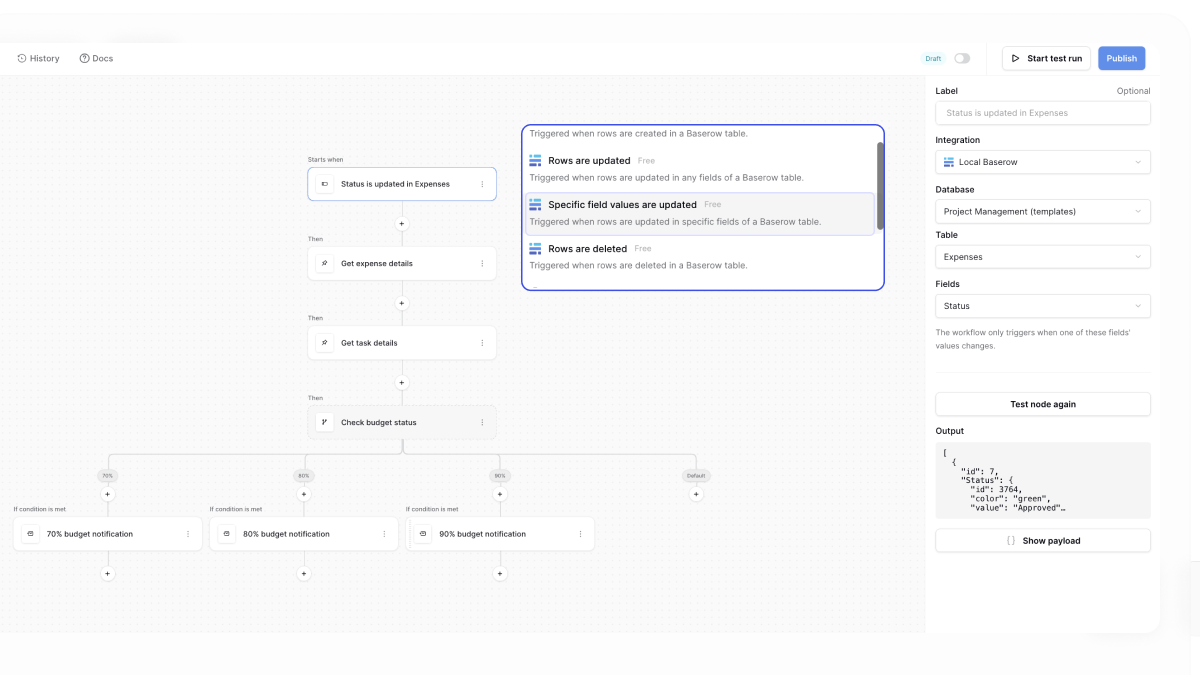
The new ‘Specific field values’ are updated trigger starts a workflow only when selected fields in a row are updated.
Instead of running every time a row changes, you can choose exactly which fields should trigger the workflow. This is especially useful when your workflow updates the same row that triggered it.
For example, you can trigger a workflow when the ‘Status’ field changes, then update a ‘Notes’ or ‘Last processed’ field without triggering the workflow again.
👉 Learn more about Specific field values are updated trigger →
Start workflows from other workflows or applications
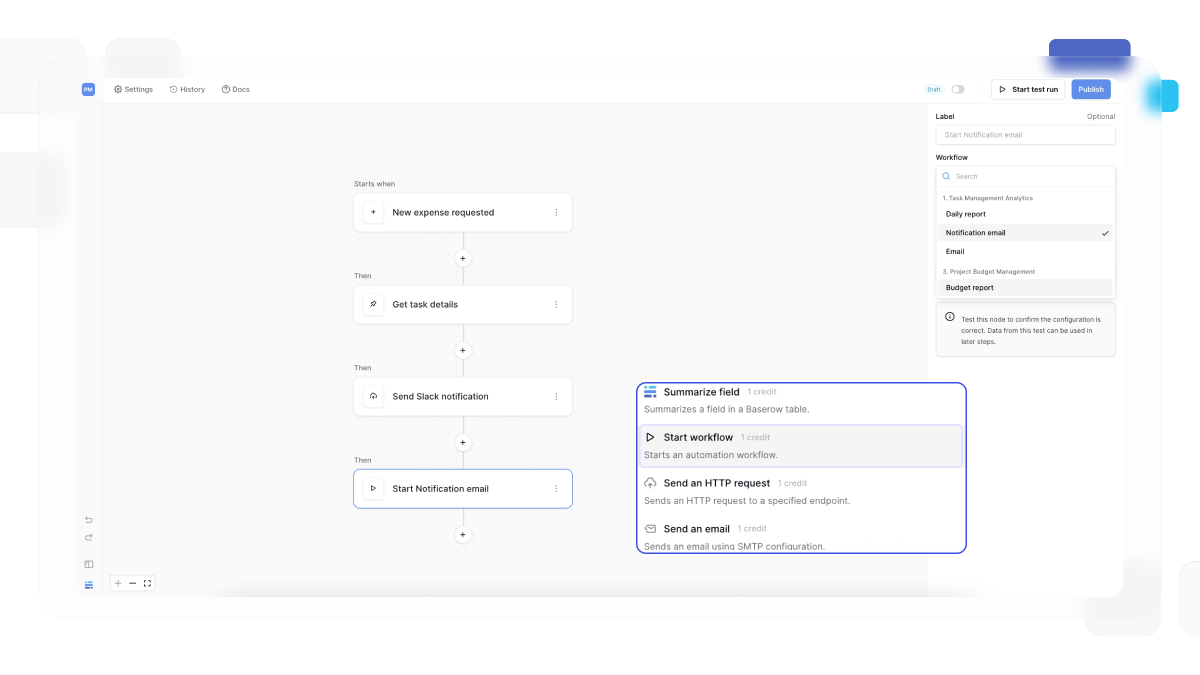
You can now start one workflow from another workflow or from the Application Builder.
The new ‘Start workflow’ action makes it easier to break complex automations into smaller, reusable workflows instead of building everything in a single workflow.
For example, you can:
- Reuse the same workflow across multiple automations
- Start a workflow when a user clicks a button in an application
- Trigger a sub-workflow from another workflow
- Organize complex business logic into smaller, easier-to-maintain workflows
This makes workflows more modular, reusable, and easier to maintain.
👉 Learn more about the Start workflow action →
Manual trigger
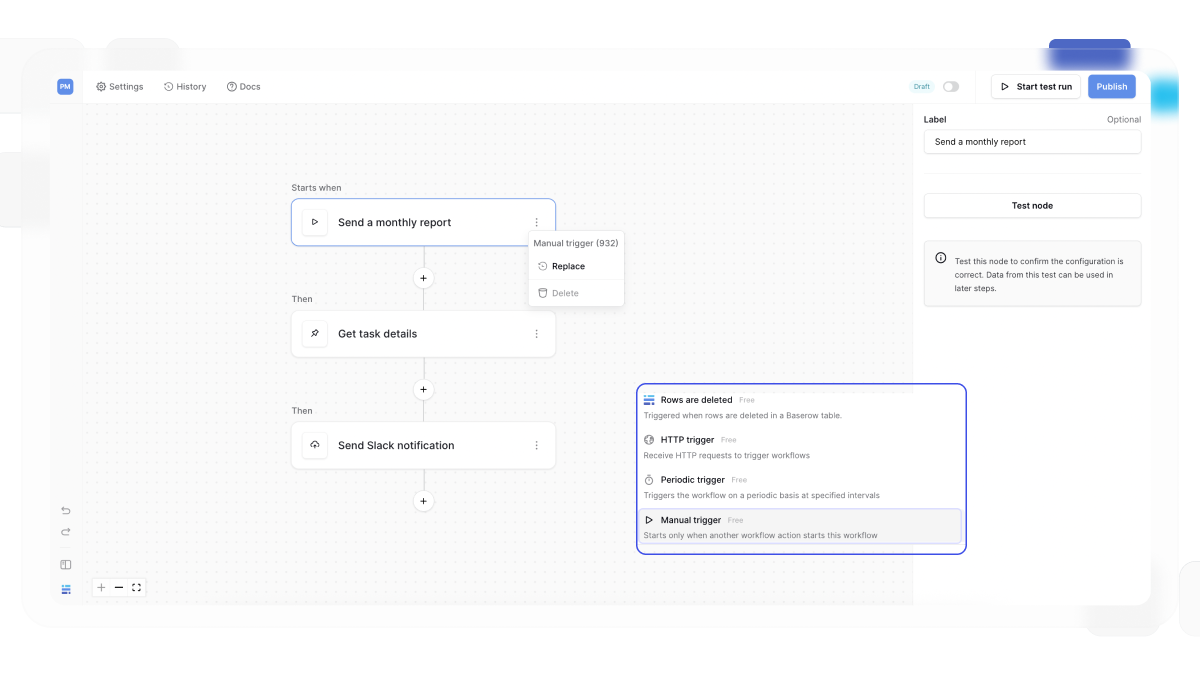
The new ‘Manual trigger’ lets you create workflows that never run automatically.
Instead of being triggered by a schedule, table changes, or incoming requests, these workflows only run when they’re started using the Start workflow action.
This is useful for building reusable workflows that can be shared across multiple automations or started by user actions in an application.
For example, you can:
- Create reusable sub-workflows.
- Start workflows when a user clicks a button in an application.
- Separate complex automation logic into smaller, reusable workflows.
👉 Learn more about the Manual trigger →
More flexible column layouts
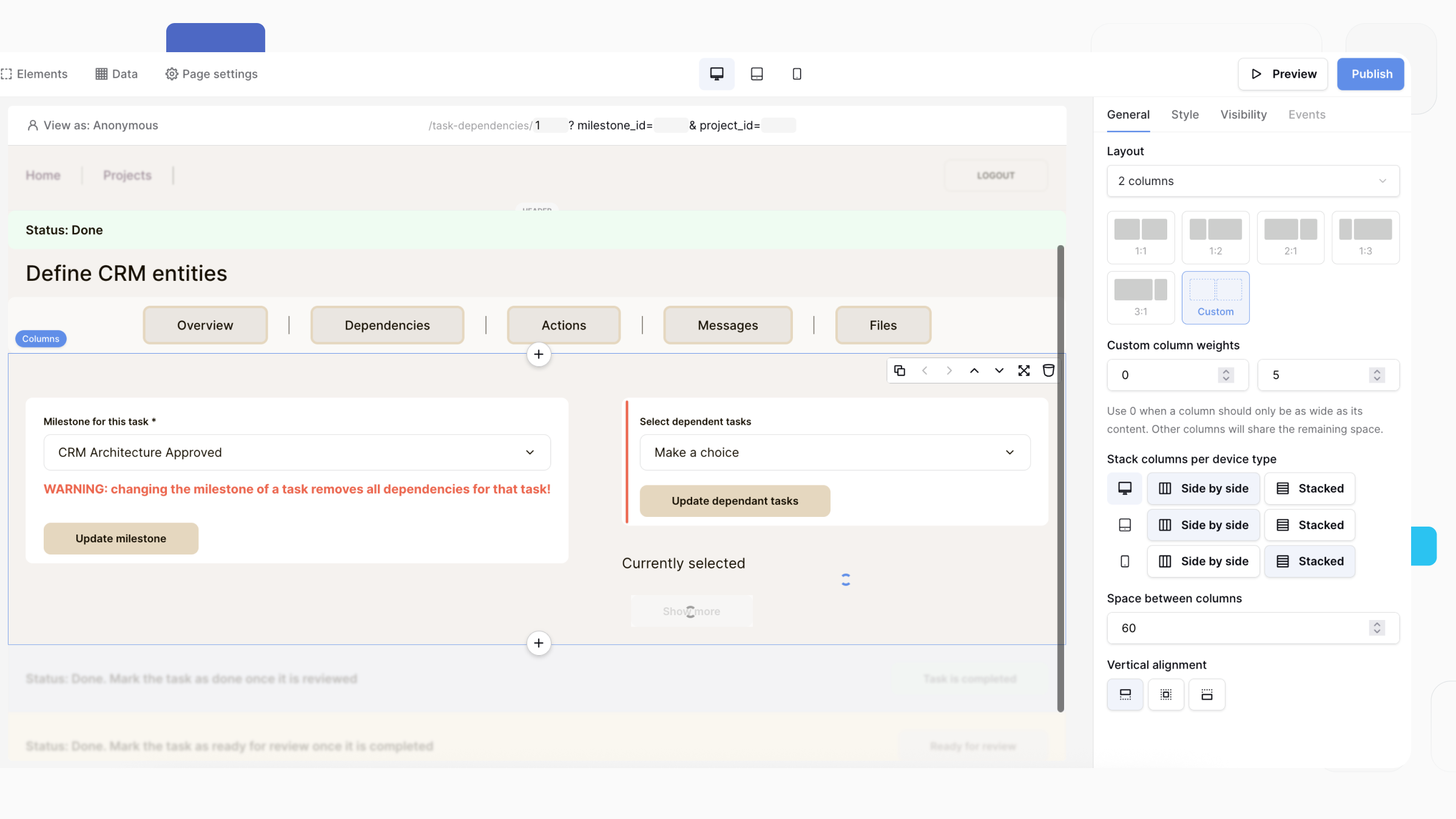
The Columns element now gives you more control over how content is arranged in your applications.
You can:
- Choose from new preset column layouts.
- Define custom column widths.
- Control whether columns stay side by side or stack on desktop, tablet, and mobile devices.
For example, you can create a layout with a content-sized logo, a wider navigation menu, and a login button, while ensuring it automatically adapts to smaller screens.
👉 Learn more about column layouts →
Responsive burger menus
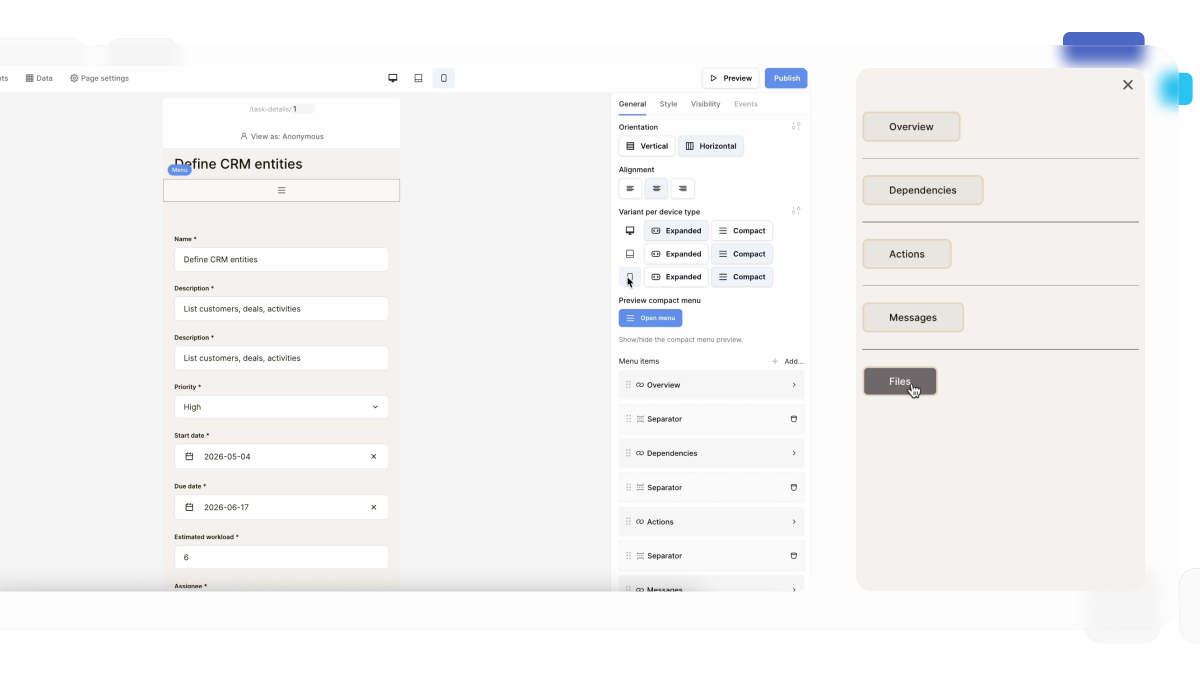
Menu elements can now automatically switch between expanded and compact navigation on desktop, tablet, and mobile devices.
You can configure the menu independently for each device type, making it easy to create responsive navigation without additional layouts or visibility rules.
👉 Learn more about the Menu element →
Duration inputs and formula improvements
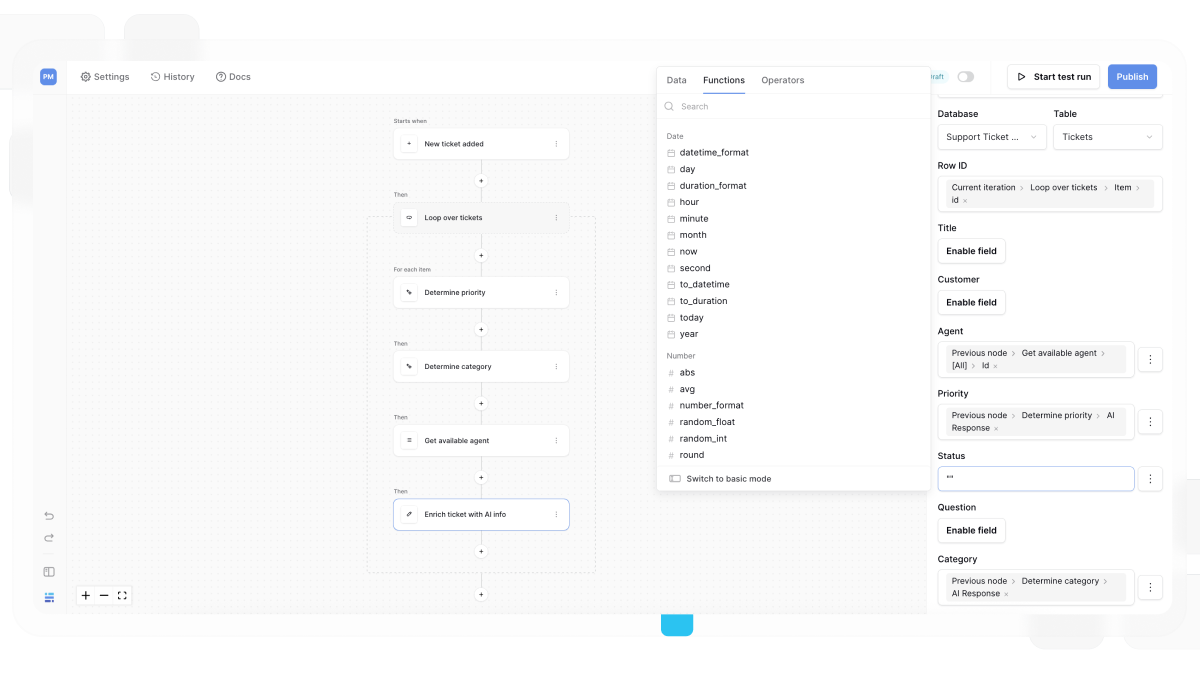
Applications now support duration values, making it easier for users to enter and edit time-based values.
We’ve also expanded the formula language with new functions including:
- number_format()
- abs()
- null()
- to_duration()
- format_duration()
- to_datetime()
- to_json()
- from_json()
- range()
You can now format durations, perform duration calculations, transform JSON data, and build more expert formulas.
We’ve also reorganized formula categories to make functions easier to discover.
👉 Learn more about expert formulas in workflows
Additional improvements
We’ve also included a variety of smaller improvements throughout Baserow:
Database Builder
- Reorder sort conditions using drag and drop.
- Kanban views now support sorting cards within each stack.
- Choose whether rows deleted or hidden in the source are also deleted from synced tables.
- Rows now update in real time when related records change.
- Better handling of long-running import and sync jobs, including the ability to monitor progress and cancel running jobs.
- Restricted views now indicate whether default row values match the view filters, making it easier to configure views that allow users to create new records.
- Choose whether to include the Row ID and primary field when exporting data to CSV, JSON, XML, or Excel.
Application Builder & Automations
- Improved drag-and-drop for elements — you can now start dragging from anywhere on an element instead of only the drag handle.
Administration
- Instance administrators can now view whether users have two-factor authentication enabled.
- Administrators can also reset a user’s two-factor authentication if they lose access to their authenticator or backup codes.
- Per-user and per-team permission management for Baserow users.
Alongside these improvements, we’ve continued to improve performance, reliability, and usability across Baserow.
Automation credits in Baserow Cloud
With Baserow 2.3, the Automation Builder is officially out of beta.
We’ve introduced automation credits in Baserow Cloud to help ensure predictable performance and fair usage across all workspaces.
Each time a billable automation action is executed, it consumes 1 automation credit. Your monthly usage depends on how many actions your automations execute and how often they run.
To give everyone time to understand the new usage model and review their workflows, we’ve temporarily enabled a soft limit. You’ll still receive notifications as you approach your monthly allowance, but your automations won’t stop running while we complete the rollout.
👉 Learn more about automation credits
What this means for you
With Baserow 2.3, you can:
- See who’s working in your tables in real time
- Organize large datasets with collapsible groups, aggregations, and up to five grouping levels
- Import and process Excel and CSV files directly inside workflows
- Create and update up to 1,000 records in a single workflow action
- Trigger workflows only when specific field values change
- Build reusable workflows and start them from other workflows or applications
- Build custom workflow logic with JavaScript
- Troubleshoot automations more easily with node history
- Recover deleted Application Builder elements and reverse recent changes
- Build more responsive applications with flexible column layouts and responsive menus
- Work with more powerful formulas and improved duration values
What’s next
Next, we’re focused on expanding workflow automation with more actions, triggers, and integrations, growing the Application Builder with new data sources and UI components, enhancing Database Builder with features like search and replace, de-duplication, and button fields, and introducing more powerful AI capabilities, including an AI agent builder and additional MCP tools.

Baserow 2.4 adds Button fields, Graph elements, workflow automation, AI provider management, improved Group By views, and 30+ more updates.

Discover how Airtable and Baserow compare in features, flexibility, speed, and scalability. Compare pricing plans and hidden costs to make an informed decision!

Explore the best open-source software alternatives to proprietary products. Discover OSS tools, licenses, and use cases with our updated directory.