
Starting a new data-driven project or spinning up a custom internal tool usually begins with a mountain of unstructured text. Whether it is a 20-page Scope of Work (SOW), a product requirement document (PRD), or a messy project brief, translating human intentions into a functional relational database layout is a notorious cognitive bottleneck.
Traditionally, an operations manager or database architect had to manually comb through these documents, isolate key entities, determine column data types (text, numbers, select dropdowns), and map out the exact relationships between tables. One missed field or misconfigured data type early on could mean hours of troubleshooting down the road.
By using an advanced AI assistant connected directly to your data environment, you can fully automate the system architecture phase. Dropping a project document into Claude allows the AI to instantly analyze the underlying requirements, suggest an optimized relational layout, map out your fields, and prepare your database schema for immediate execution.
Learn more about how to natively integrate Baserow with Claude using the Model Context Protocol (MCP).
How AI transforms unstructured documents into structured databases
In conventional project management systems or spreadsheet tools, designing a data layout is entirely manual. If you use generic project templates, you are often forced to twist your unique workflow to fit someone else’s pre-built structure.
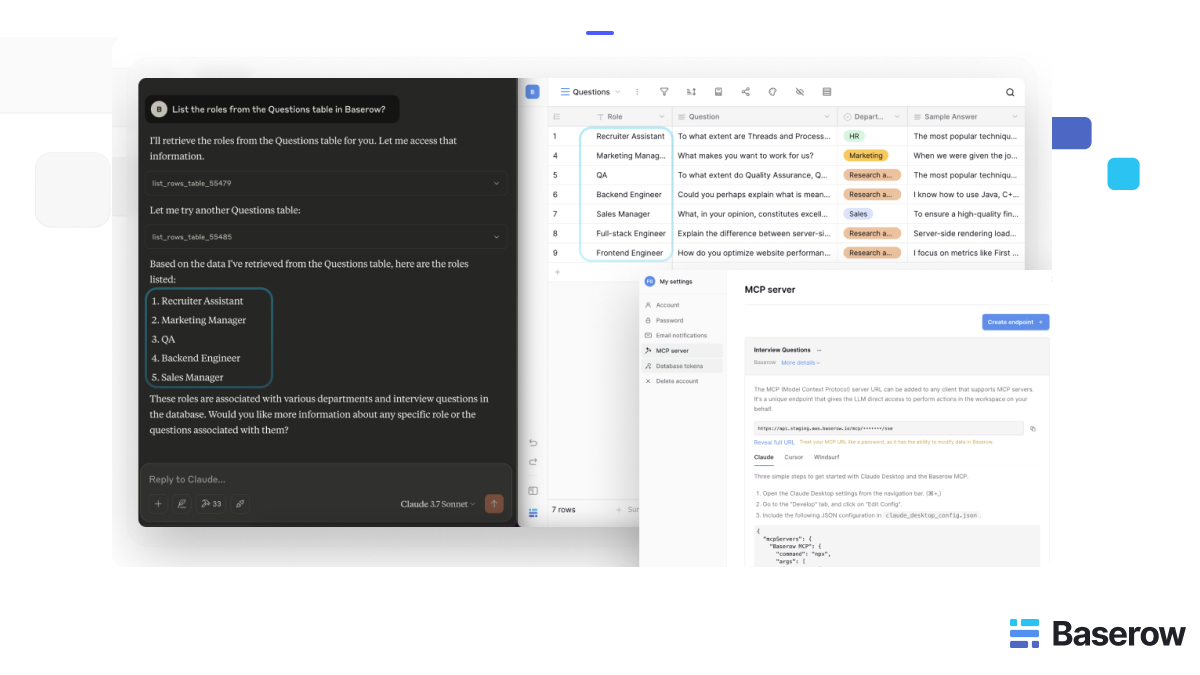
Using the Model Context Protocol (MCP) to link Claude directly to an open-source database like Baserow shifts the design dynamic from manual configuration to intelligent automation.
The data layout translation process operates through a coordinated framework:
- Extraction: Claude reads your unstructured SOW or project brief, automatically identifying core operational entities (such as clients, inventory parts, tasks, or invoices) that require dedicated tables.
- Schema Blueprinting: The AI determines the most efficient field configurations for each table, suggesting whether a metric should be tracked via text, dates, numbers, or relational dropdown links.
- Live Introspection Alignment: Because the MCP bridge permits real-time schema introspection, Claude can evaluate your existing databases and tables to ensure the new data layout perfectly aligns with your current infrastructure without duplication errors.
This agile setup allows growing teams to turn abstract business proposals into live, production-ready tracking environments in a fraction of the time.
Step-by-step: Mapping your data schema with Claude
Building a data architecture from a document requires no coding or technical background. Follow these steps to map out your layout using conversational AI.
Step 1: Securely connect Claude to your data workspace
To allow Claude to analyze your existing setups and prep your environment for data entry, establish your secure data bridge.
-
In your data platform, go to My Settings and open the MCP Server control panel.
-
Click Create Endpoint, name it (e.g.,
Schema_Architect_Bridge), and link it to your target workspace. -
Copy the secure MCP URL generated by the system.
-
Access your local
claude_config.jsonfile in your Claude client settings and append the server configuration block:`{ "mcpServers": { "Workspace Architecture Engine": { "command": "npx", "args": [ "mcp-remote", "YOUR_MCP_URL_HERE" ] } } }` -
Save and restart Claude to initialize the live structural connection.
Step 2: Upload your project document or Scope of Work
Open your live Claude interface. Upload your project brief file (such as a markdown, text, or PDF file) or paste the complete text of your Scope of Work directly into the chat prompt window.
Step 3: Run the database schema generation prompt
Instruct Claude to parse the text and draft your database design. Use an architecture-focused prompt to extract the ideal relational configuration.
Prompt: “Analyze this attached Scope of Work document. Identify the core operational objects that need tracking, and design an optimized database schema. For each recommended table, provide a bulleted list of necessary columns, specify their ideal data types (e.g., Text, Number, Select Dropdown, Date), and explain how the tables should link together.”
Claude will process the text, run an assessment of your layout requirements, and output a clean, organized structural blueprint.
Step 4: Validate and initialize your data tracking
Once Claude provides the optimized data layout blueprint, review the tables and columns. You can spin up the recommended tables inside your workspace interface in minutes. Once your empty tables and columns are created, you can instantly ask Claude to start parsing individual action items from the SOW and populating your database rows automatically using natural language.
Schema design prompt playbook
You can use tailored prompts to instruct Claude to refine its structural suggestions based on your specific operational goals.
| Optimization Objective | Natural Language Prompt Example |
|---|---|
| Minimize data duplication | “Review the database schema you just designed for our project brief. Are there any spots where we might experience data redundancy? Suggest how we can split fields into separate relational tables to keep our data completely clean.” |
| Align with existing setups | “Please inspect our active database workspace. Look at our current table schemas, and modify this new SOW schema proposal so it integrates perfectly with our existing ‘Client Master’ and ‘Invoicing’ tables.” |
| Define select dropdown options | “For any column in our new project tracking schema that you recommended setting as a ‘Select Dropdown’ field, review the text document and suggest the exact, comprehensive list of options we should program into that cell.” |
Frequently asked questions
Can Claude automatically create tables and columns in Airtable, Excel, or Baserow directly from a text file?
While an AI model connected via an MCP endpoint can perform full CRUD operations on rows and instantly read table schemas, it primarily acts as an architect to suggest, structure, and populate your data layouts. You can use Claude to instantly generate the precise column plans and text data, then utilize your no-code database interface to quickly add the tables. Once the layout is created, Claude can handle the bulk data creation automatically.
What should I do if my project scope changes or adds new requirements halfway through development?
In rigid spreadsheet tools or traditional project systems, altering a schema mid-project often breaks automated background integrations, reporting dashboards, and internal scripts. Because an MCP connection reads your database layout dynamically during every interaction, it adapts to modifications instantly. If your project requirements shift, simply add the new columns to your table; Claude will recognize the updated layout on its very next run without requiring manual reprogramming.
How do I ensure Claude accurately maps relational fields (linking data between two separate tables)?
To keep relational connections perfectly precise, explicitly define your matching fields within your structural prompt. For instance, instruct the AI: “When creating project task rows from this SOW, ensure that every single task includes the exact matching client name from our ‘Client Master’ table so that the records correspond correctly without ambiguity.”
Is it safe to drop highly confidential corporate proposals or SOW documents into Claude for schema building?
We recommend that you follow secure configuration practices. Because Baserow is built for enterprise-grade data management, you can maintain full control over your security posture through three key layers:
- Granular Access Control: When you connect Claude to Baserow via an MCP endpoint, you are not giving the AI “master access” to your entire organization. You should link the MCP server only to the specific workspace or database environment dedicated to that project.
- Baserow’s Built-in Security Infrastructure: Baserow is SOC 2 Type II, GDPR, and HIPAA compliant. Whether you are using the cloud version or a self-hosted instance, all API interactions, including those initiated by Claude, are governed by your existing role-based access controls and authentication protocols.
- Zero-Data-Retention (ZDR) & Enterprise Governance: If you are handling highly sensitive data, ensure your Anthropic account is configured with Zero-Data-Retention (ZDR) enabled. This ensures that your conversation history and the contents of your SOW are not used for model training and are not stored beyond the active session.
Best Practice: Always treat AI as a “least-privilege” user. Only provide the AI with the specific scope of data required for the task, and avoid pasting PII (Personally Identifiable Information) or highly sensitive secrets into your prompts unless you have verified your organization’s AI governance policies.


Baserow 2.4 adds Button fields, Graph elements, workflow automation, AI provider management, improved Group By views, and 30+ more updates.

Discover how Airtable and Baserow compare in features, flexibility, speed, and scalability. Compare pricing plans and hidden costs to make an informed decision!

Explore the best open-source software alternatives to proprietary products. Discover OSS tools, licenses, and use cases with our updated directory.