
TL;DR
- Kuma builds apps now: Describe what you want, and Kuma creates full applications with pages, elements, and data sources.
- View-level RBAC (restricted views): Give users access only to the exact data they should see.
- Edit rows via forms: Share secure links so users can update specific records without accessing your database.
- View default row values: Configure which values to use by default when creating a new row in a view.
- Data scanner (self-hosted): Detect sensitive data across your instance automatically.
- Pin up to 4 columns: Keep important data visible while scrolling large tables.
- New formula functions: array_unique(), array_slice(), first() and last() for more powerful data manipulation.
- AI field supports multiple files and images: Process multiple files (including images) in a single prompt
- Drag & drop in the Application Builder: Move elements visually and reorganize layouts.
- Improved formula validation: Validate function arguments immediately while building formulas
- Automation templates & SMTP improvements: Faster setup and easier email automation.
Introducing Baserow 2.2
With 2.2, we’re expanding how you build applications with AI and how you control access to your data.
Kuma can now generate full applications with pages and interfaces, permissions can be defined at the view level, and users can update records without accessing your workspace.
Let’s take a look at what’s new:
Kuma can now build full applications
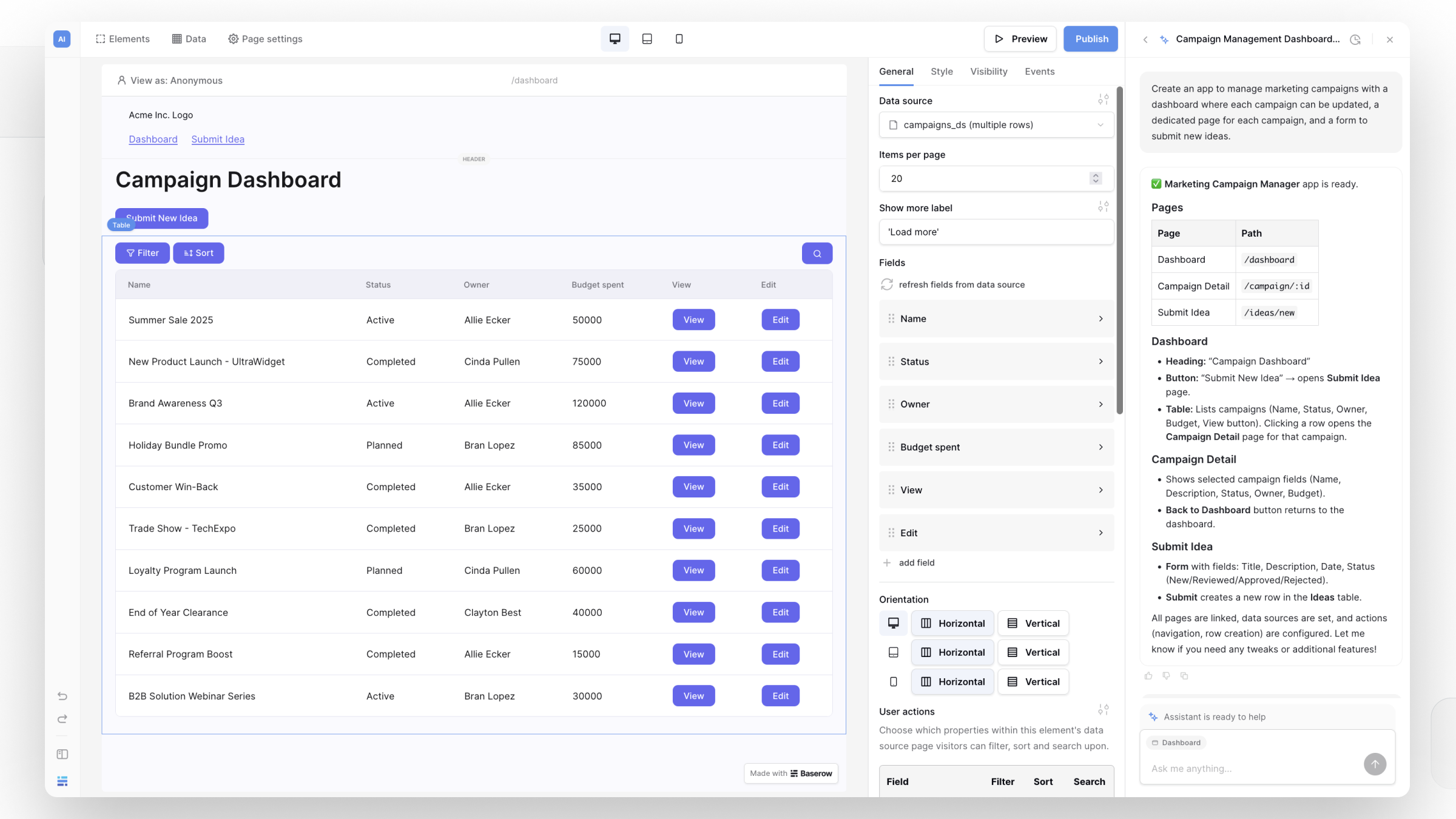
Kuma now goes beyond helping with databases and automations — it can build complete applications.
You can describe what you want in plain language, and Kuma will:
- generate application pages
- connect data sources
- add forms and actions
- update the theme or apply a different style
For example:
Create an app with a task list page, a task detail page, and a form page to add tasks.
Kuma sets up the database and builds interfaces for your data.
You can then continue iterating:
- “Add a header with navigation”
- “Create a contact form and store submissions”
- “Change the layout to two columns”
Instead of starting from scratch, you start with a working app and refine it by chatting with Kuma.
View-level RBAC (restricted views)
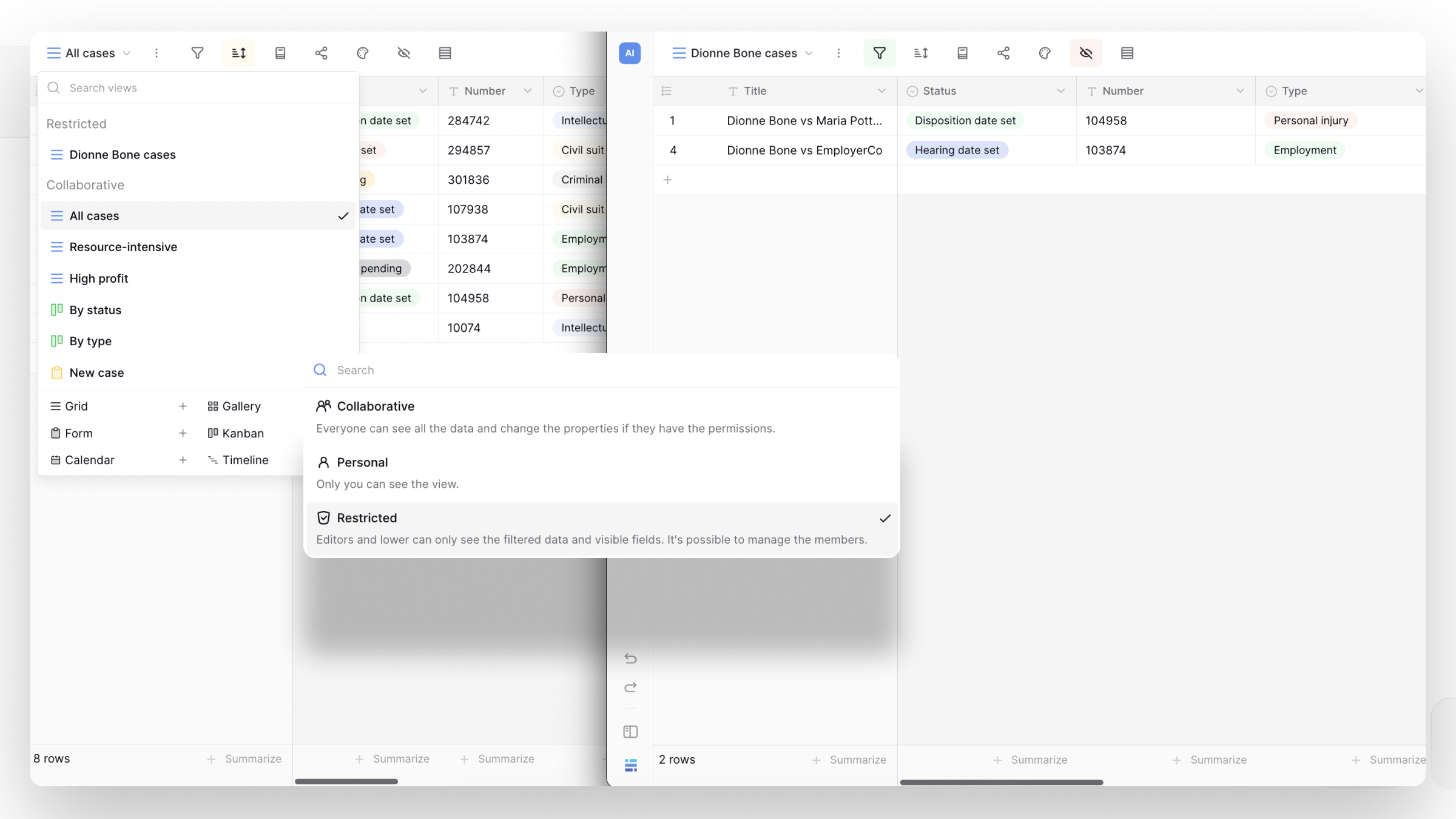
You can now control access at the view level.
A new restricted view lets you expose only part of a table to specific users.
You can:
- apply filters (e.g. only rows containing ‘Germany’.)
- hide fields
- assign roles per view
Editors (and lower roles) with access to a restricted view:
- only see the rows that match the filter and visible fields
- cannot see or change the filters
- cannot access other views or data
For example, you can create separate views for different regions or teams and assign each user access to only their data.
Permissions follow the existing hierarchy (workspace → database → table → view), but can now be scoped down to a single view.
Users can even have access to a view without having access to the rest of the workspace.
When editing data, permissions are enforced based on the view. Users can only update rows that are visible in that view.
To support creating rows inside a restricted view, you can define default values per view so new rows always match the filters. Click the three dots next to the view and select “Default row values” to configure them.
👉 Learn more about restricted views →
Edit rows via form
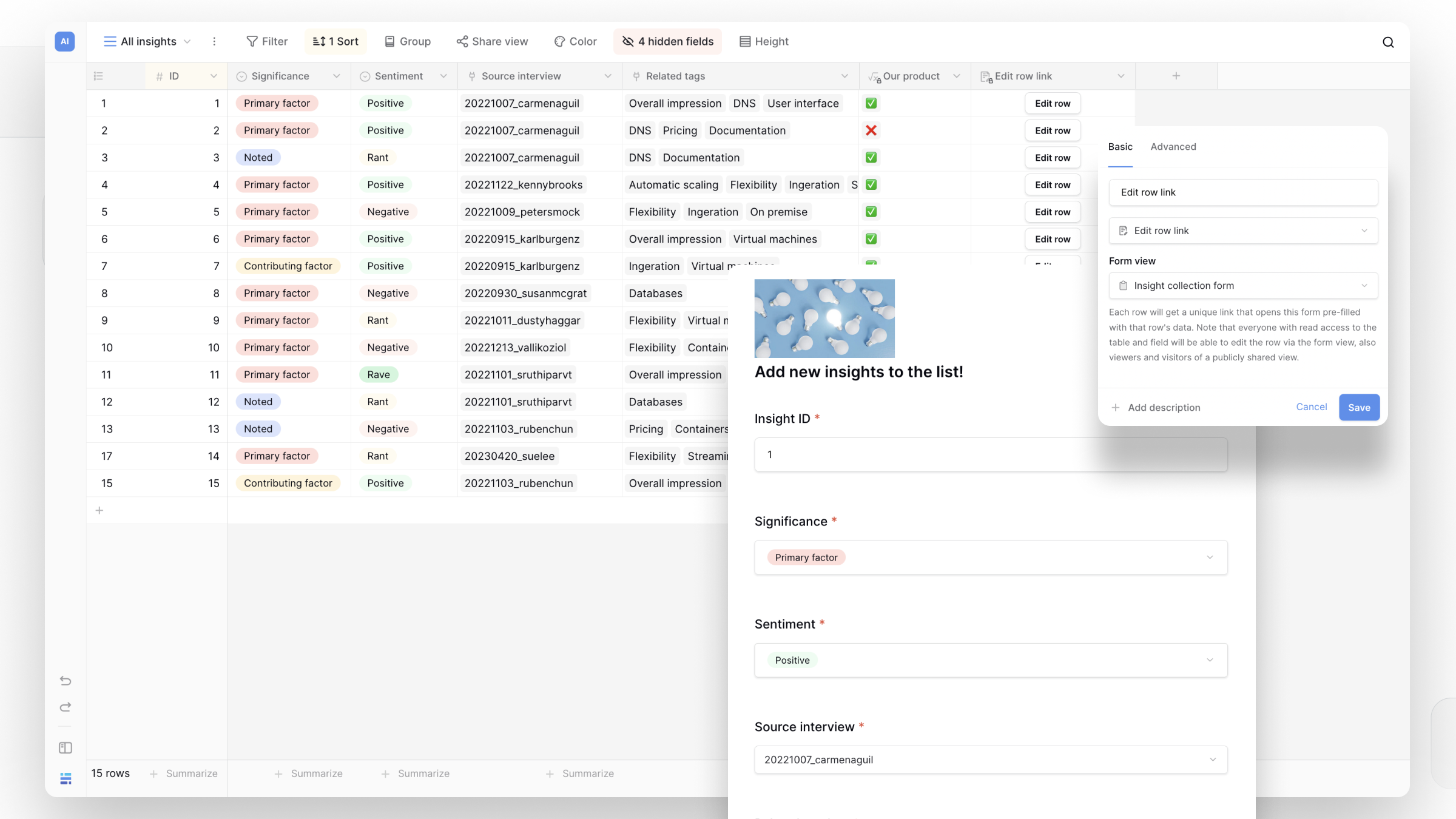
You can now update existing records through a form using a unique link.
A new field type lets you connect a row to a form view. Each row gets its own secure URL.
When someone opens the link:
- they see a pre-filled form
- the values can be changed
- the row is updated on submit
This works well for:
- letting users update their own data
- sending editable links via email
- collecting updates without giving database access
The link is unique and cannot be guessed, making it safe to share externally.
👉 Learn more about editing rows via forms →
Data scanner (self-hosted)
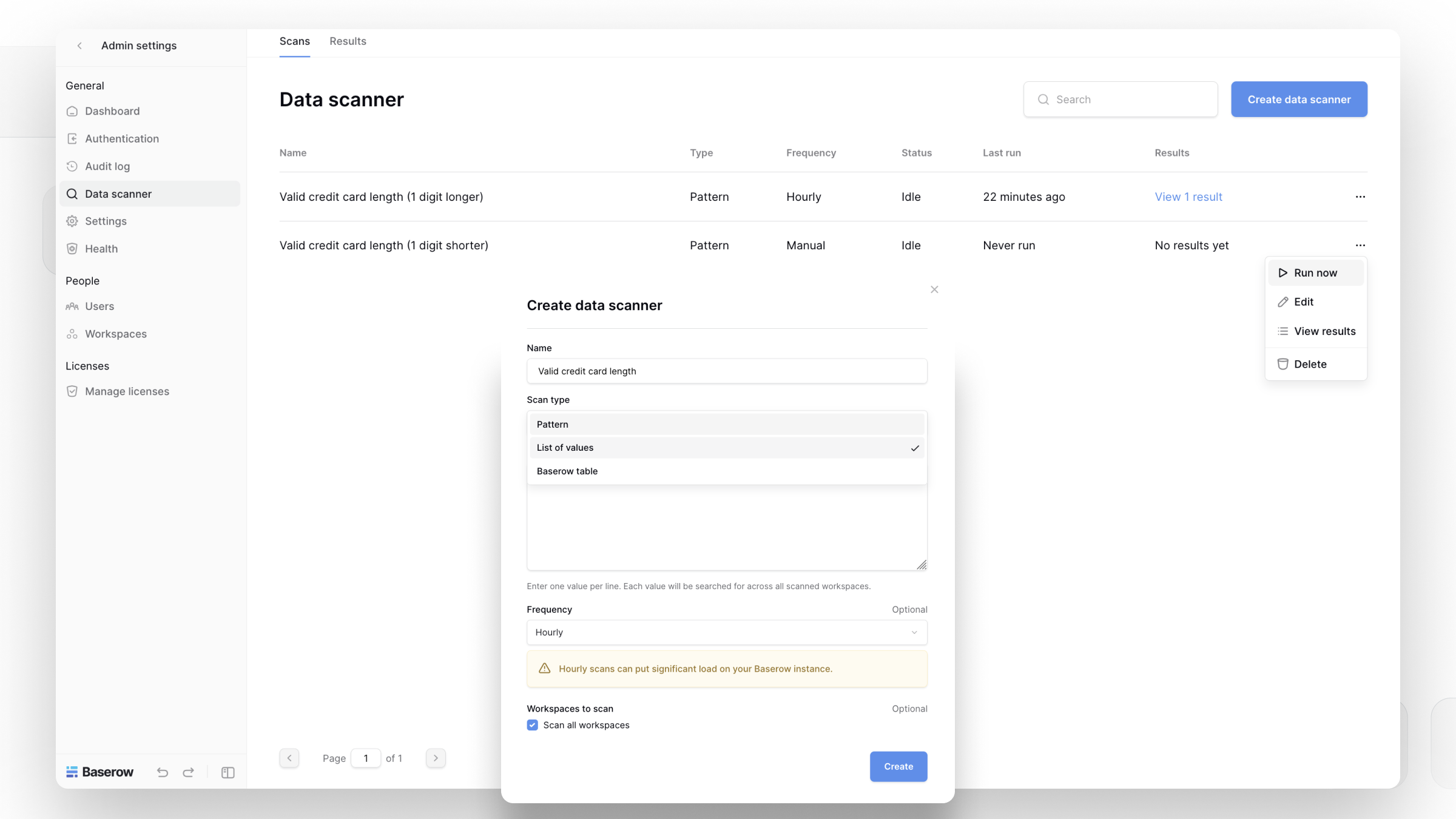
Self-hosted instances now include a data scanner to detect sensitive data.
Admins can:
- scan for patterns (e.g. IDs or number formats)
- scan for specific values
- run scans manually or on a schedule
When matches are found, results are logged and admins are notified.
This helps:
- detect exposed personal data
- find sensitive identifiers
- monitor compliance risks
You can easily identify exposed or sensitive data across large instances.
Note: This is an Enterprise feature available only for self-hosted instances.
👉 Learn more about the data scanner →
Pin up to 4 columns
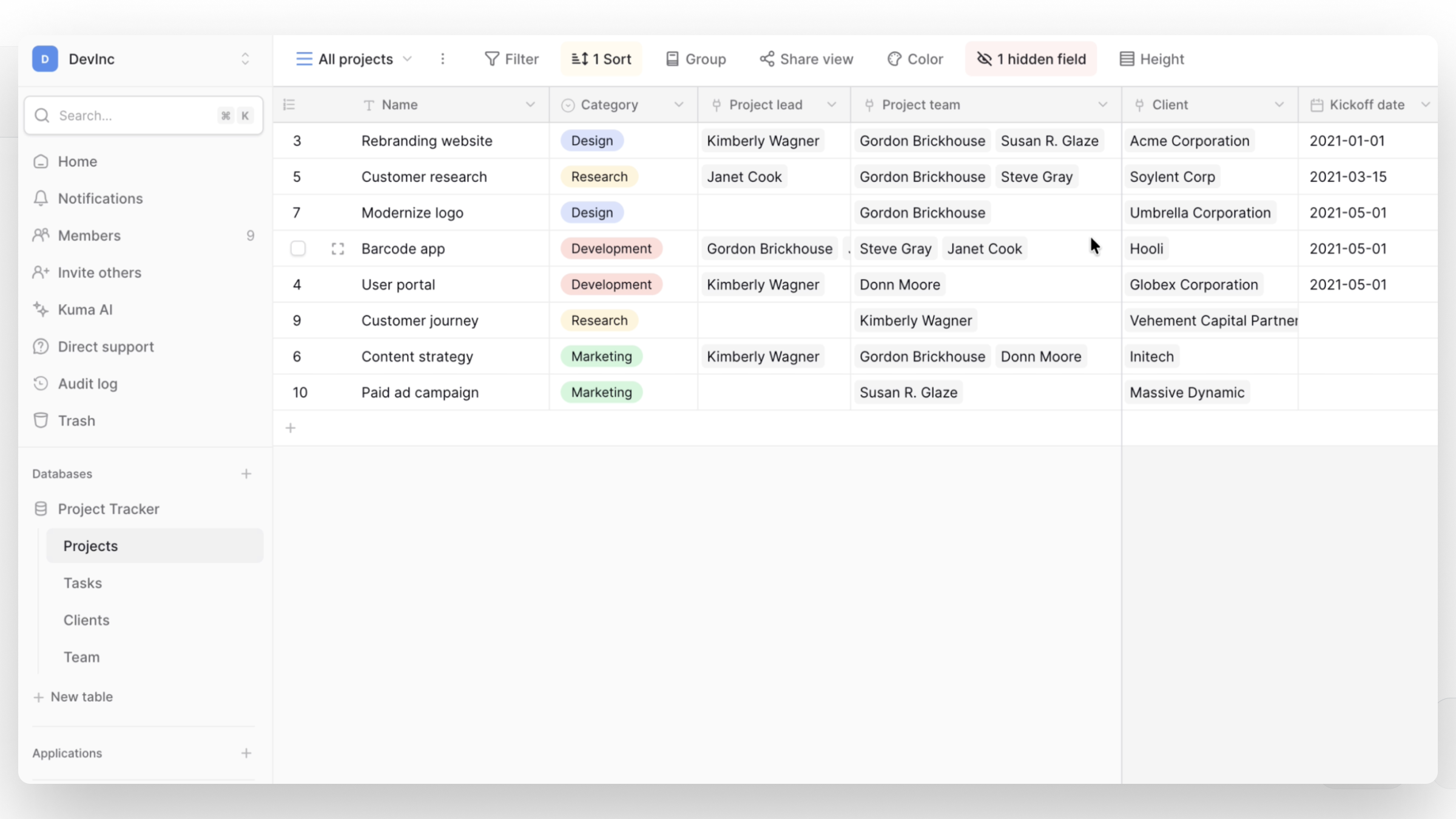
You can now pin up to four columns in a database table.
When working with wide tables:
- Keep key fields (like Name, Status, Owner) always visible
- Scroll horizontally without losing context
Simple, but a huge usability upgrade for large datasets.
👉 Learn more about pinned columns →
New formula functions
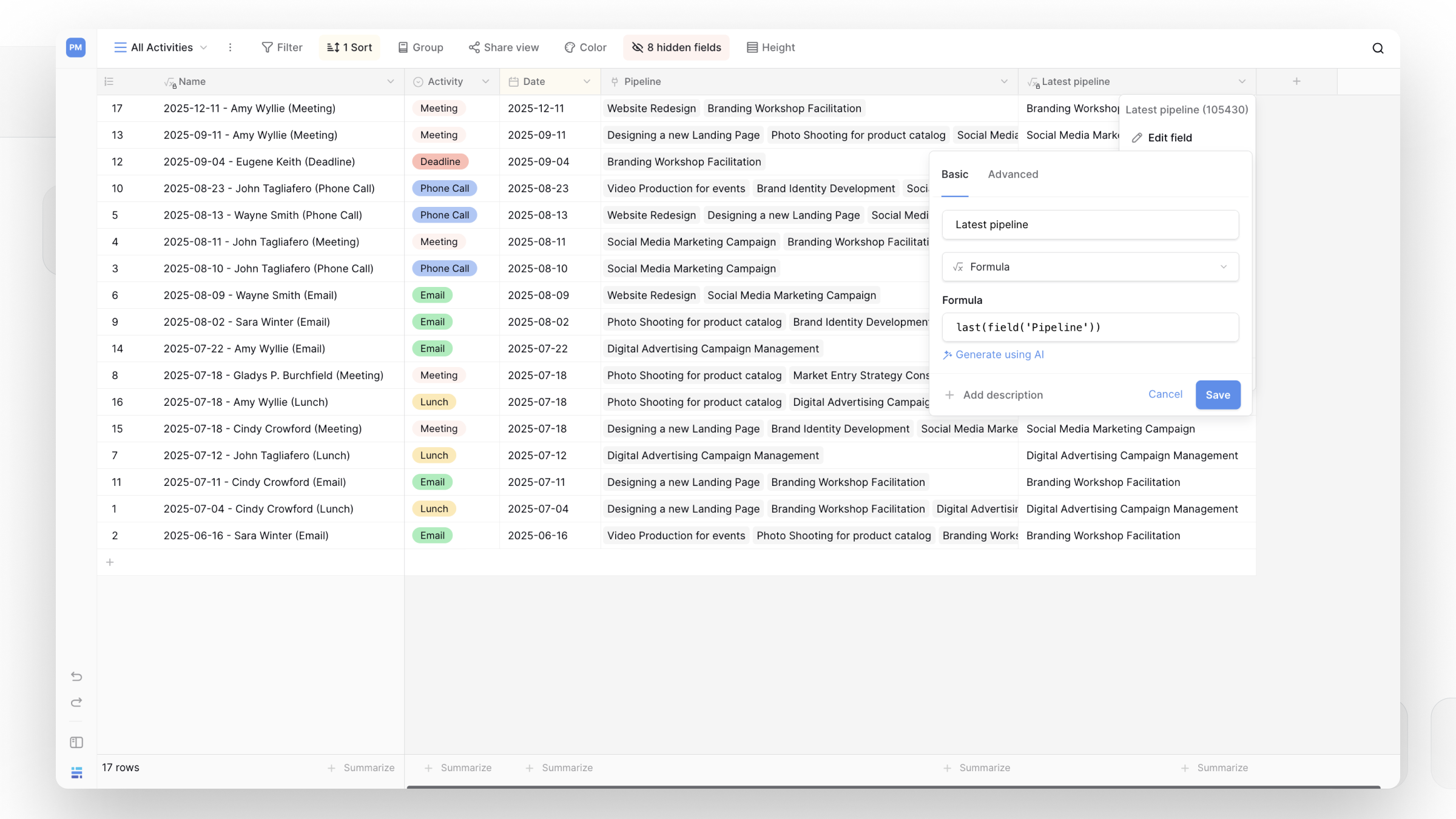
Four new functions are now available:
array_uniqueremoves duplicate values from an arrayarray_slicereturns a subset of an arrayfirstreturns the first element of an arraylastreturns the last element of an array
These functions are useful when working with multi-value fields, lookups, and AI-generated data.
👉 Learn more about formula functions →
Automation Builder templates
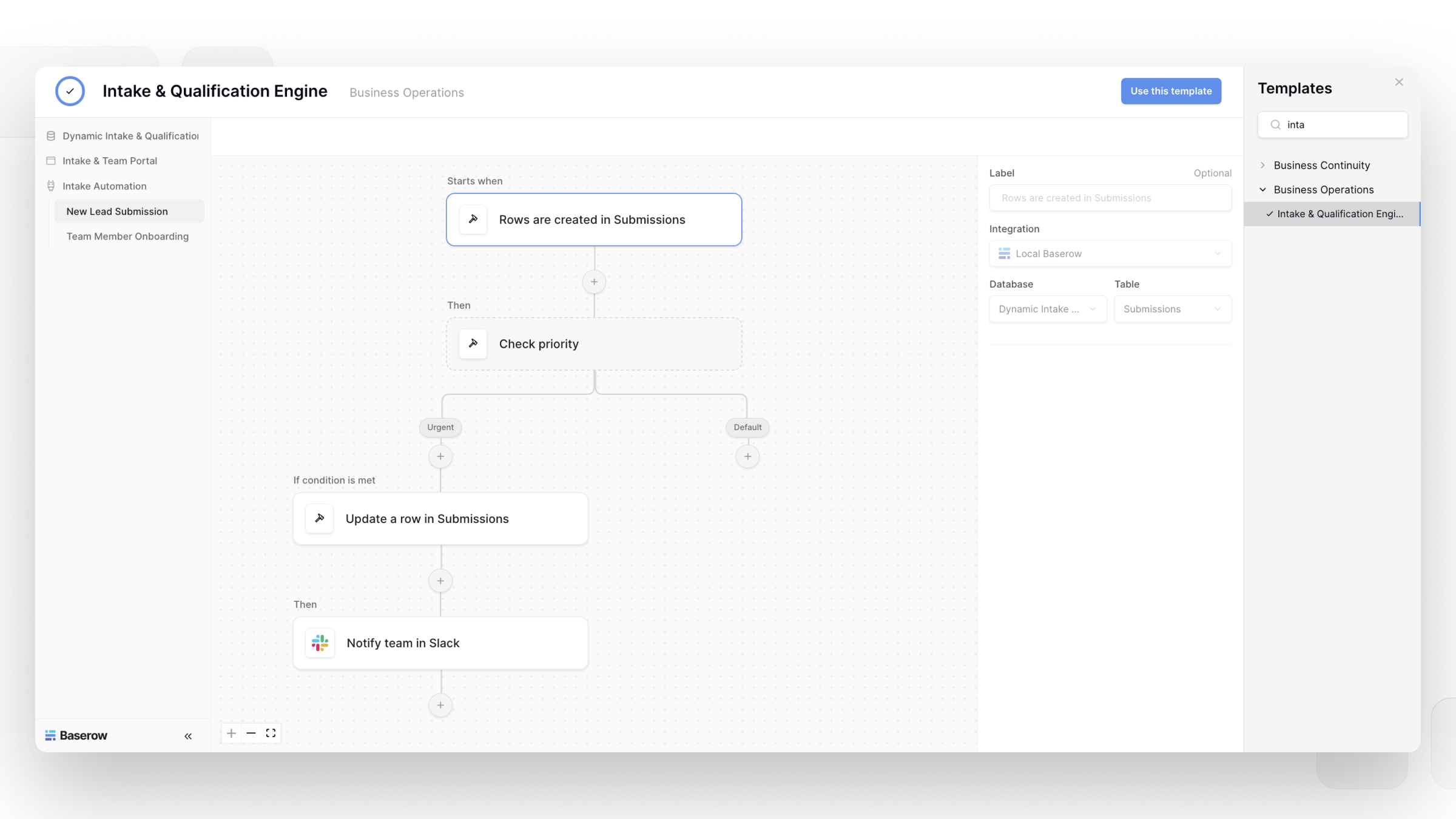
You can now install templates that include workflows. We’ve added 6 new templates to get started with Automations:
→ A/B Testing → Inspections & Compliance → Intake & Qualification → Password Reset → Program Management & KPI → Work Management Plan
This makes it easier to reuse automation setups and get started faster with common use cases.
Drag & drop in the Application Builder
You can now move elements visually inside the Application Builder.
Elements can be:
- reordered within a container
- moved across containers
This makes it much easier to adjust layouts without recreating elements.
👉 Learn more about the Application Builder →
AI field now supports multiple files and images
The AI field now works with multiple files instead of a single file, and adds support for images (.png, .jpg, etc.).
You can include several files in one prompt and process them together.
For example, you can:
- extract text from documents or screenshots
- categorize files (e.g. receipts, assets, documents)
- update fields based on file content
- trigger automations using uploaded files
This makes it easier to process incoming files and turn them into structured data automatically.
👉 Learn more about the AI field →
SMTP improvements for automations
Automations can now use a pre-configured SMTP server when self-hosting.
This removes the need to configure email settings for each automation individually, while still allowing custom configurations when needed.
👉 Learn more about SMTP configuration →
Improved formula validation
We’ve improved how formula function arguments are validated:
- Throughout AB
- Throughout WA
- In the database AI field
Previously, some invalid arguments were only caught when the formula was executed, making issues harder to spot early.
Now, arguments are validated immediately while building the formula, so errors are clearer and easier to fix before they cause unexpected results.
What this means for you
With Baserow 2.2, you can:
- Create a working application (pages, forms, and data) by describing it to Kuma, then adjust it instead of building everything manually
- Send users a link to update a specific row without giving them access to your database or workspace
- Give teams or clients editor access to only the rows and fields they should see using restricted views
- Make key columns sticky while working with large tables
- Use new formula functions to clean up or transform array data
- Rearrange application layouts without recreating elements
- Detect and review sensitive data across your instance (self-hosted)
What’s next
We’re continuing to expand Kuma’s capabilities, improve permissions, and extend automation workflows.

Baserow 2.4 adds Button fields, Graph elements, workflow automation, AI provider management, improved Group By views, and 30+ more updates.

Discover how Airtable and Baserow compare in features, flexibility, speed, and scalability. Compare pricing plans and hidden costs to make an informed decision!

Explore the best open-source software alternatives to proprietary products. Discover OSS tools, licenses, and use cases with our updated directory.