
TL;DR
- Best for customizable reporting: Baserow, for teams that want to connect sales data with other business information.
- Best for sales and marketing reporting: HubSpot CRM, for teams that need customer and marketing data in one place.
- Best for pipeline visibility: Pipedrive, for teams that want to track deals and sales activities.
- Best for customizable reports: Zoho CRM, with standard and custom reporting options.
- Best for sales analytics: Freshsales, with conversion, attribution, and win-loss reports.
- Best for visual dashboards: monday CRM, for teams that prefer a visual way to track sales work.
A small sales team doesn’t need dozens of dashboards. It needs to answer a few important questions: How many leads are we converting? Which deals are likely to close? Where are opportunities getting stuck? And are team members following up with customers on time?
The right customer relationship management system makes these answers easy to find. But choosing one isn’t just about counting reports or comparing key features. If sales reps don’t update their records, reports become unreliable. If the CRM stores only basic contact details, managers may miss the technical issues or customer service problems delaying a deal.
Discussions on Reddit highlight these challenges. In one conversation about CRM sales forecasts, users share that forecasts depend on accurate deal values, realistic stages, and consistent data entry. In another discussion about CRM adoption, sales reps describe avoiding systems that require too many clicks just to update a deal.
This guide compares six CRM platforms for small sales team reporting, focusing on what each does well, where it may fall short, and which teams should consider it.
What should small sales teams look for in CRM reporting?
When comparing CRM systems, look for key features that support your sales process. A CRM for small businesses should help each sales rep and sales team track the sales pipeline, manage the sales cycle, and build customer relationships.
Whether you need AI-powered insights, marketing automation, or software for small businesses that connects sales with project management and customer service, choose CRM tools that help team members access real-time reports and automate email follow-ups. CRM software for small sales teams should make customer relationship management easier without adding admin work.
- Pipeline visibility: See open deals by stage, owner, value, and expected close date. This helps identify stalled opportunities before the end of the quarter.
- Sales performance: Track leads contacted, conversion rates, won and lost deals, and revenue by sales rep. Compare results using consistent definitions.
- Follow-up tracking: Identify leads without a next action, overdue tasks, and accounts that haven’t received attention.
- Forecasting: Estimate future revenue using deal values, expected close dates, and realistic stage probabilities. Compare previous forecasts with actual results.
- Data quality: Make it easy to update records and identify missing information, duplicate contacts, and outdated opportunities.
- Flexible reporting: Filter reports by team member, time period, lead source, or product without exporting everything into another spreadsheet.
For a small sales team, usability matters as much as reporting depth. A complex CRM with advanced analytics won’t help if team members avoid updating it. Start with the reports you need for weekly sales reviews, then add more as your process develops.
1. Baserow: Best for customizable sales reporting and connected business data
Best for: Small teams that want to build their own CRM and connect sales reporting with operational data.
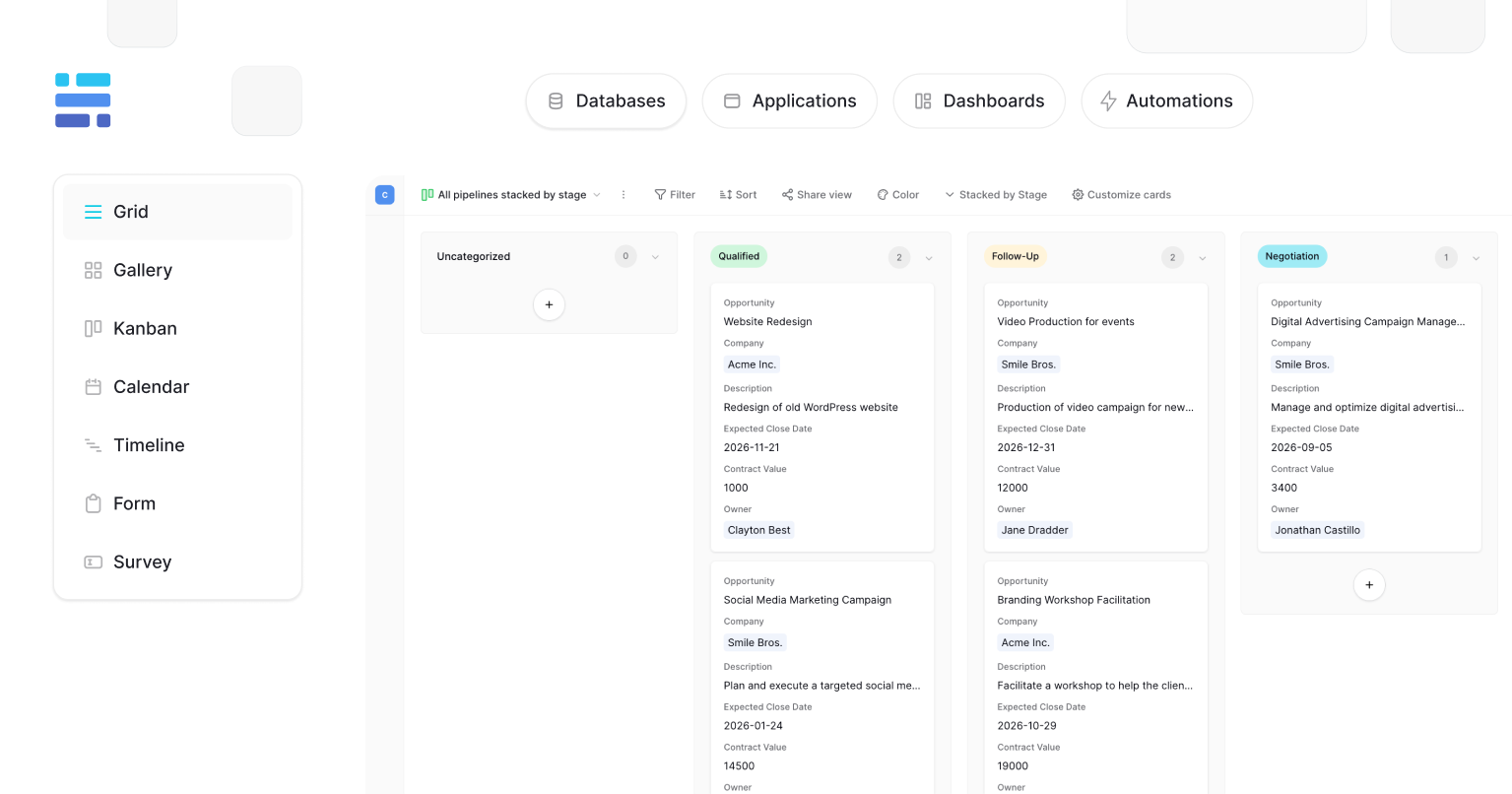
Baserow takes a different approach from traditional CRM software. Instead of giving you a fixed sales system, it provides a database, an Application Builder, and automation tools that you can combine to create a CRM around your business.
This is useful when sales reporting needs more context than a standard pipeline provides. For example, a software company might want to compare deal value with product requirements, implementation status, technical blockers, or support requests. If those details live in separate tools, a sales manager has to piece together the story before making a decision.
With Baserow, you can link companies, contacts, deals, activities, and other records in related tables. You can then build views and custom interfaces around the questions your team needs to answer.
What you can track and report on:
- Deals by stage, owner, expected close date, and value.
- Conversion rates and won or lost opportunities, using consistently recorded outcomes.
- Overdue follow-ups and deals without a next action.
- Sales performance alongside related customer, service, or technical information.
For example, imagine your weekly sales review shows three large deals stuck at the proposal stage. In a basic pipeline report, they may look like ordinary delays. In a Baserow database, you can connect each deal to its technical requirements and onboarding information to investigate whether the delay relates to an unresolved integration question, missing approval, or another recorded blocker.
You can also build different interfaces for sales reps and managers. Reps can focus on updating deals and next steps, while managers use reporting views to review the pipeline. Permissions help control who can access or edit particular information. Automations can flag overdue follow-ups or notify colleagues when a deal reaches a specific stage.
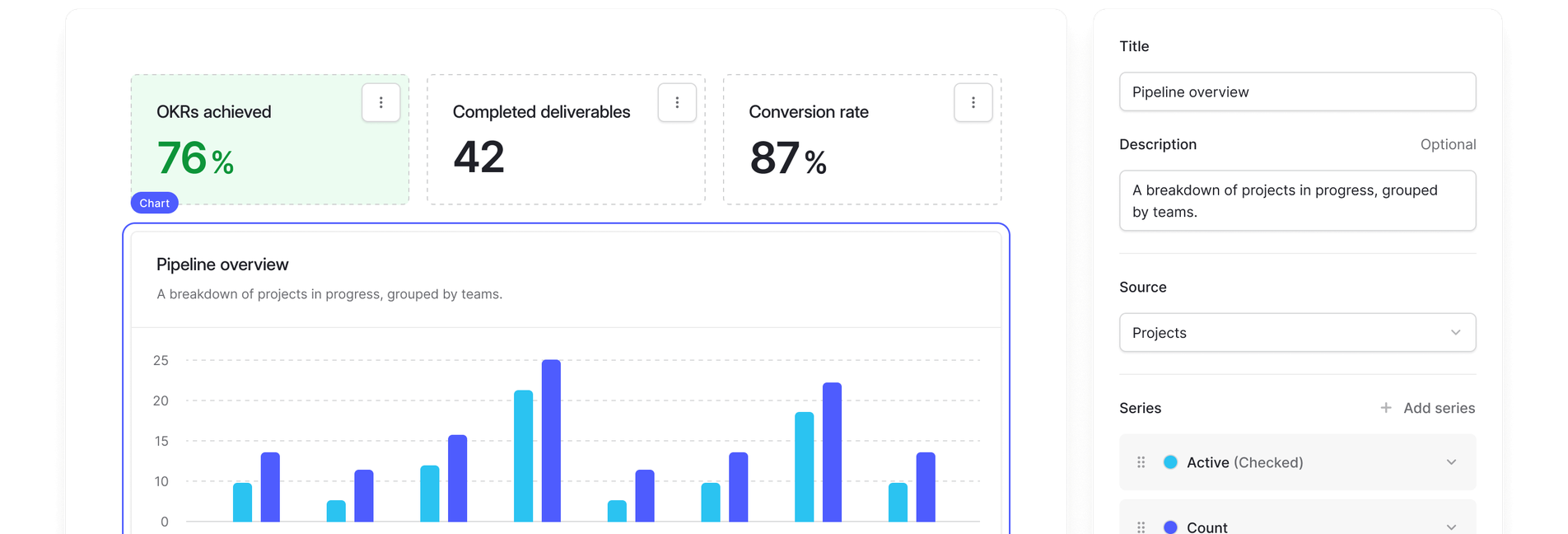
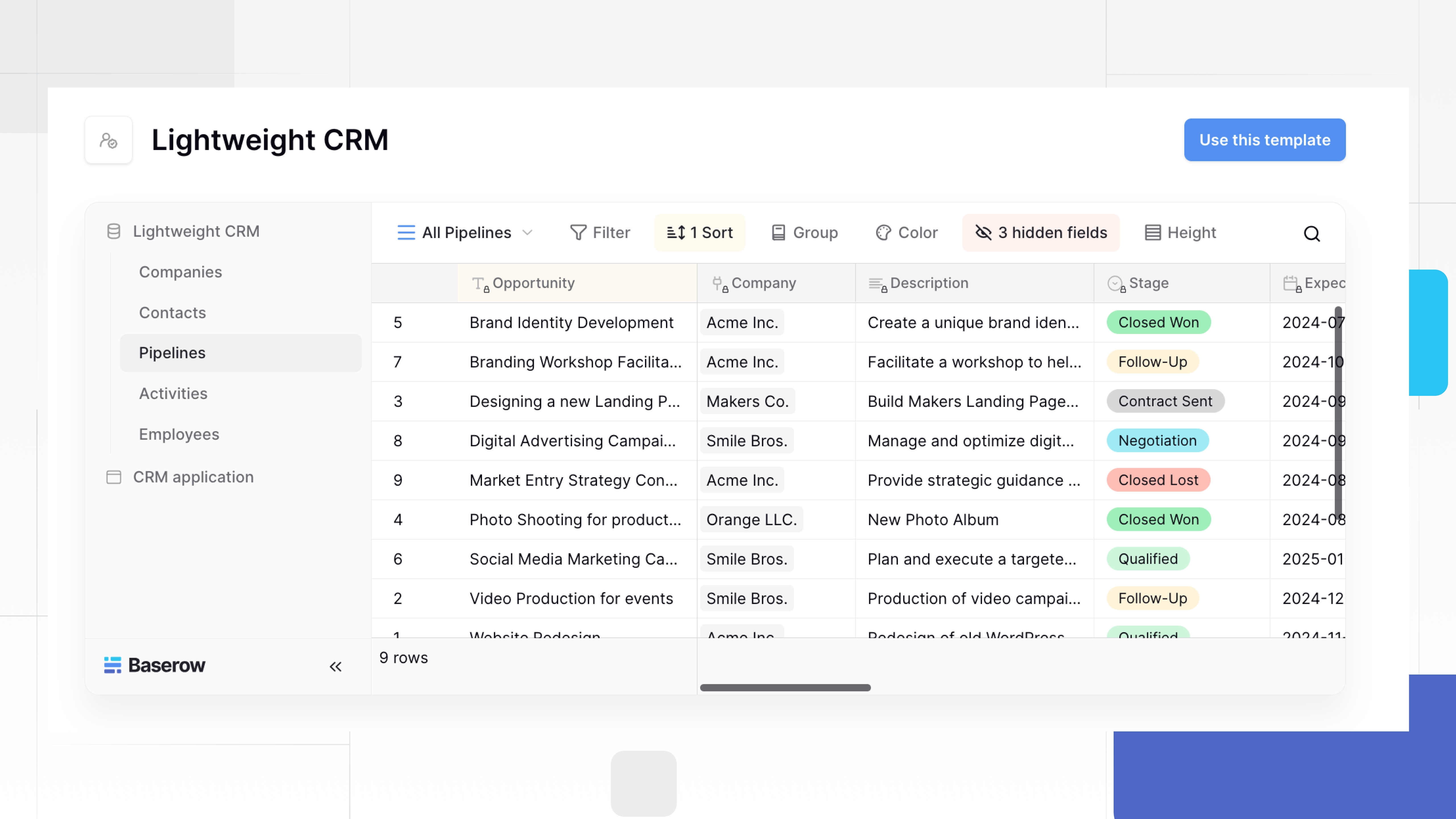
Choose Baserow if: You want more control over how sales data is organized, need to connect CRM records with other company information, or want to build reporting workflows without being limited to a predefined CRM structure. Explore the Lightweight CRM template as a starting point.
2. HubSpot CRM: Best for sales teams that also need marketing reporting
Best for: Small teams that want sales activity, lead management, and marketing data connected in one ecosystem.
HubSpot is worth considering when sales reporting depends on understanding how leads move from marketing to sales. Its CRM brings contact records, deals, activities, and supported marketing data together, helping teams connect lead generation with pipeline outcomes.
For example, a small sales team can examine which lead sources generate opportunities, monitor deals by stage, and review how leads progress through the sales process. This is especially useful when marketing automation and sales activities need to work together rather than relying on separate reports.
Reporting strengths:
- Sales pipeline and deal tracking.
- Dashboards and reports for sales activities and performance.
- Visibility into lead sources and marketing activity, depending on the products and plan.
- Connected contact and deal records that help teams review customer relationships.
What to consider: Reporting features and customization vary by HubSpot product and subscription. Check the plan carefully before choosing it, particularly if you need advanced custom reports, more complex dashboards, or automation across multiple teams. Costs can increase as your team grows or needs more advanced functionality.
Choose HubSpot if: You want a ready-made CRM and your sales team works closely with marketing. It It is particularly relevant when you need to understand not only what is in the pipeline, but also where opportunities originate.
3. Pipedrive: Best for straightforward pipeline reporting
Best for: Small sales teams that prioritize deal visibility, activities, and sales follow-ups.
Pipedrive is built around visual pipeline management. Sales reps can see where opportunities stand, move deals between stages, and track the activities needed to progress them. This makes it a practical option for teams that want a clear view of their sales process without building a CRM from scratch.
Its reporting tools can help managers review pipeline value, deal progress, sales activities, and performance against targets, with the available features depending on the subscription.
Reporting strengths:
- Visual sales pipeline and deal-stage visibility.
- Activity tracking for calls, meetings, and follow-ups.
- Sales reports that help managers review progress and spot bottlenecks.
- A focused interface for teams that primarily need to manage sales opportunities.
What to consider: Pipedrive is centered on sales, so businesses that need to connect pipeline reporting with technical operations, customer service records, or other specialized data may need integrations or additional tools. Check which reporting and automation features are included in the plan you intend to use.
Choose Pipedrive if: Your main priority is seeing what each sales rep is working on, which deals are moving forward, and what needs a follow-up. If you need a more customized data model connecting sales to wider company operations, compare it with Baserow before deciding.
4. Zoho CRM: Best for customizable sales reports
Best for: Small businesses that need detailed reports across sales, marketing, and customer activity.
Zoho CRM offers a broad set of reporting tools, including prebuilt reports, custom reports, charts, and dashboards. Teams can combine information from different modules to investigate sales performance beyond basic deal totals.
For example, a sales manager can compare deals by salesperson, review opportunities expected to close this month, or examine how lead sources affect conversion rates. Zoho also supports scheduled report delivery and role-based sharing, which can help a small sales team keep everyone informed without manually preparing the same spreadsheet each week. See Zoho CRM’s reporting features.
Reporting strengths:
- Prebuilt reports for sales performance, pipeline, and activities.
- Custom reports that combine information from multiple modules.
- Charts and dashboards for tracking key metrics.
- Scheduled reports and controls over report visibility.
What to consider: Zoho’s extensive customization can take time to configure. Check which reporting capabilities are available in your chosen plan, especially if you need advanced analytics or integrations with other business systems.
Choose Zoho CRM if: You want a traditional CRM with more reporting customization than a simple pipeline tool offers, particularly when sales and marketing data need to be analyzed together.
5. Freshsales: Best for sales activity and conversion reporting
Best for: Small sales teams that want built-in analytics alongside lead management and follow-up automation.
Freshsales combines sales pipeline management with reporting on team activity, conversion rates, and win-loss trends. This makes it useful for managers who want to understand not only how much revenue is in the pipeline, but also how leads progress through the sales process.
For example, if a sales team generates plenty of leads but closes few deals, conversion reports can help identify where opportunities drop out. Win-loss analysis can then help managers investigate whether the problem relates to lead quality, qualification, or later stages of the sales cycle.
Reporting strengths:
- Standard sales reports and customizable analytics.
- Conversion and win-loss reporting.
- Activity dashboards and workflow automation.
- Attribution reporting to help assess which sources contribute to conversions.
What to consider: Reporting and customization capabilities depend on the plan. Review the Freshsales features and pricing comparison before deciding, particularly if custom reports are essential.
Choose Freshsales if: Your team wants a ready-made sales CRM with built-in reporting and automation, rather than building its own reporting structure from scratch.
6. monday CRM: Best for visual sales dashboards
Best for: Small teams that prefer visual workflows and customizable dashboards.
monday CRM combines deal tracking, sales activities, and reporting in a visual workspace. Teams can organize opportunities on boards, customize the information they track, and use dashboards to monitor pipeline progress and sales performance.
This approach can suit teams that want sales reporting to connect closely with everyday work. For instance, a manager can review deal stages and upcoming activities while reps update the same records they use to manage their tasks.
Reporting strengths:
- Visual sales pipeline and deal-stage tracking.
- Customizable dashboards and performance views.
- Activity tracking and workflow automation.
- Connections between sales tasks and broader project management workflows.
What to consider: The flexibility of a visual workspace still depends on consistent data entry and well-designed boards. Check the plan limits and reporting features before committing, particularly if you need complex cross-board reporting or detailed forecasting.
Choose monday CRM if: Your sales team prefers visual tools and wants to connect deal tracking with the work required to move opportunities forward. Review monday CRM’s features to see whether its reporting capabilities fit your process.
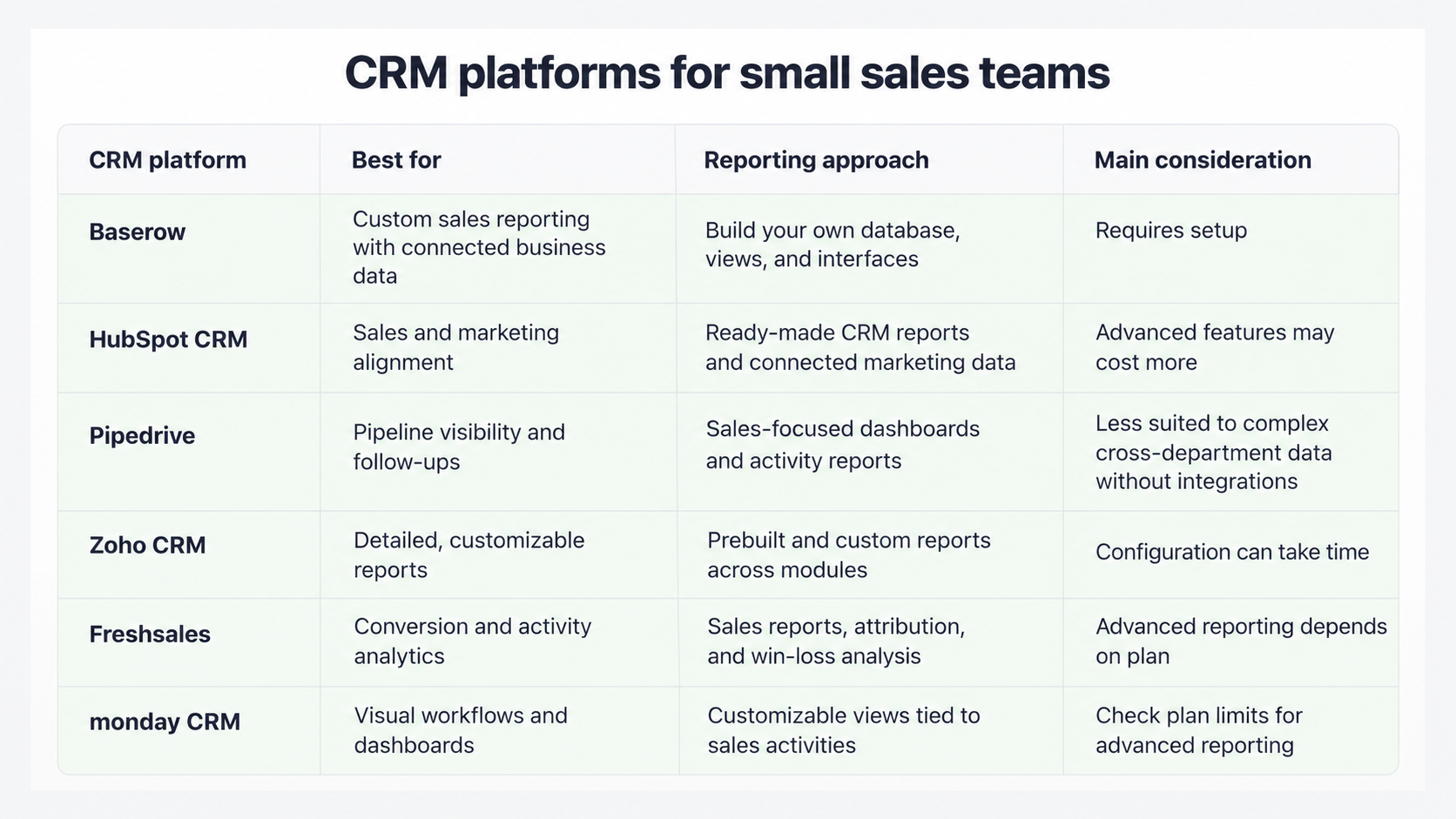
CRM platforms compared: Which is right for your team?
Features and plan limits change, so verify current availability and pricing before making a final decision.
Which sales KPIs should a small team track?
You don’t need to monitor every available metric. Start with a small set that answers the questions your team faces each week.
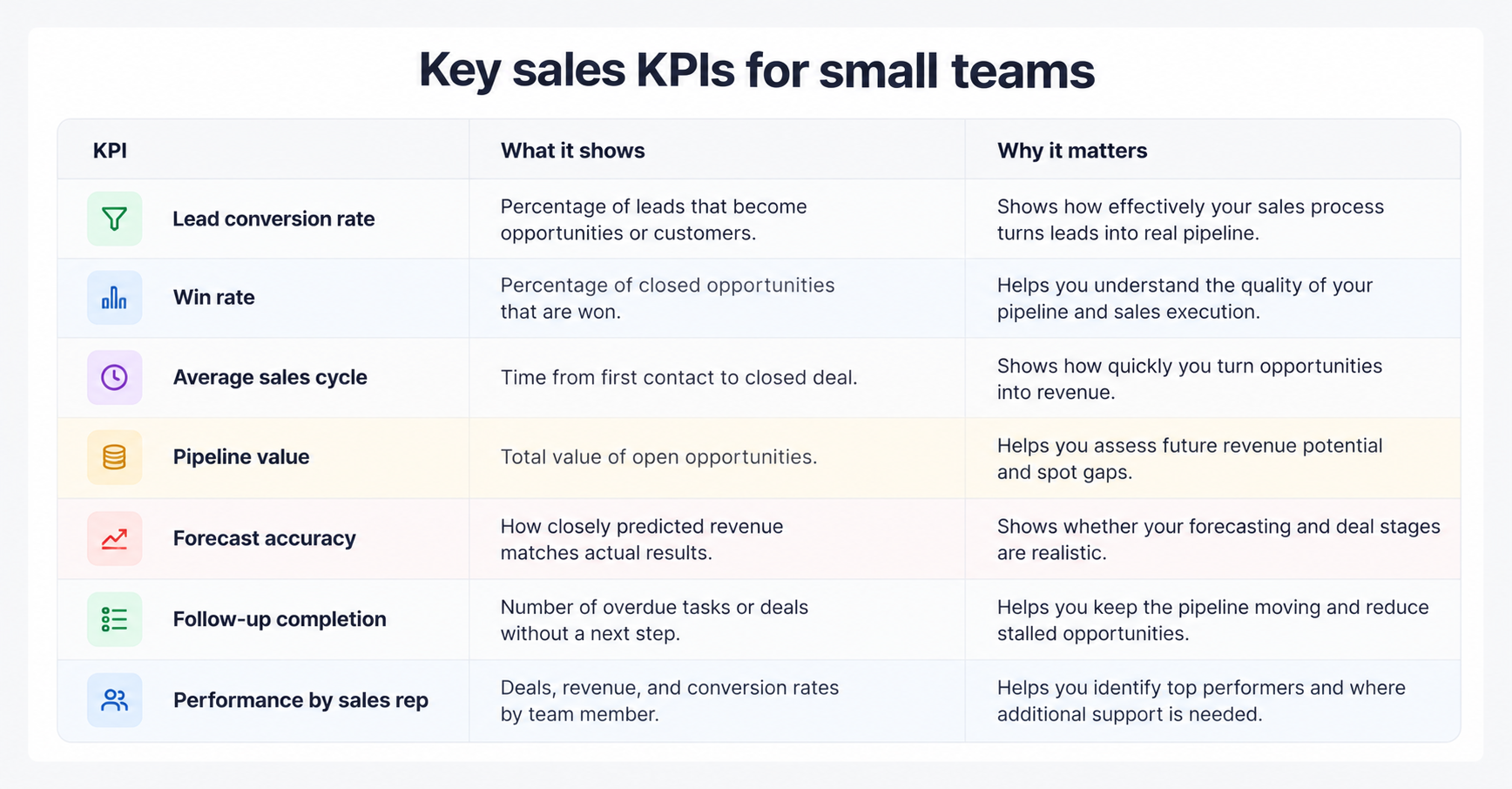
- Lead conversion rate: What percentage of leads become qualified opportunities or customers? Define the conversion point clearly.
- Win rate: What percentage of closed opportunities are won? Review this alongside deal size and lead source.
- Average sales cycle: How long does it take to move from a defined starting point to a closed deal?
- Pipeline value: How much potential revenue sits in open opportunities? Separate the total value from a weighted forecast.
- Forecast accuracy: How closely did predicted revenue match actual results?
- Follow-up completion: How many overdue tasks or deals without a next step need attention?
- Performance by sales rep: Compare results using the same definitions, while accounting for differences in territories, lead sources, and deal complexity.
For a small sales team, a weekly dashboard might show pipeline value by stage, deals expected to close this month, overdue follow-ups, and recent wins and losses. A monthly report can then focus on conversion rates, sales cycle length, and forecast accuracy.
Avoid using activity counts alone to judge performance. More calls or emails don’t necessarily mean better sales results. Use activity data to understand what is happening, then compare it with outcomes.
How to make CRM reporting more reliable
A dashboard is only as useful as the data behind it. In Reddit discussions, sales teams describe maintaining separate spreadsheets because their CRM doesn’t capture the details they need or because they don’t trust the shared data. Others say that simply enforcing field completion can produce records that look complete but contain inaccurate information.
These are practical lessons for any CRM for small businesses:
- Define your metrics first. Agree on what counts as a qualified lead, a stalled deal, and a won opportunity. Otherwise, different team members may report different numbers for the same process.
- Keep required fields minimal. Make the fields needed for decisions mandatory at the appropriate stage. Too many required fields encourage rushed updates and placeholder values.
- Make reporting part of daily work. Give reps a simple view of deals that need attention instead of asking them to prepare a separate report.
- Review stale records. Use filters or automations to flag deals without recent activity, missing next steps, or outdated close dates.
- Connect the data that explains results. If deals are delayed by technical requirements, approvals, or service issues, make that information accessible alongside the sales record.
- Audit forecasts against outcomes. Compare expected and actual revenue over several sales cycles, then adjust your stage definitions or forecasting assumptions.
A CRM should reduce manual reporting, not create another reporting job. As one Reddit discussion about messy CRM reporting highlights, teams can end up with attractive dashboards but still struggle because the source data and KPI definitions are inconsistent.
How Baserow can change the way your team reports on sales
Traditional CRM tools are useful when their predefined reports match your needs. But some small teams need to understand sales in the context of the rest of their business.
Imagine that your manager wants to know why high-value deals are delayed. The sales pipeline shows the stage and expected close date, but the answer lies in technical requirements, onboarding capacity, or unresolved customer service requests.
With Baserow, you can connect those records to the deal instead of treating them as unrelated information. Build a sales view that shows the next action and deal value, then create a manager interface that brings together pipeline status and relevant operational details. Permissions can give each team access to the information it needs, while automations can flag overdue actions or notify colleagues when a deal reaches a specific stage.
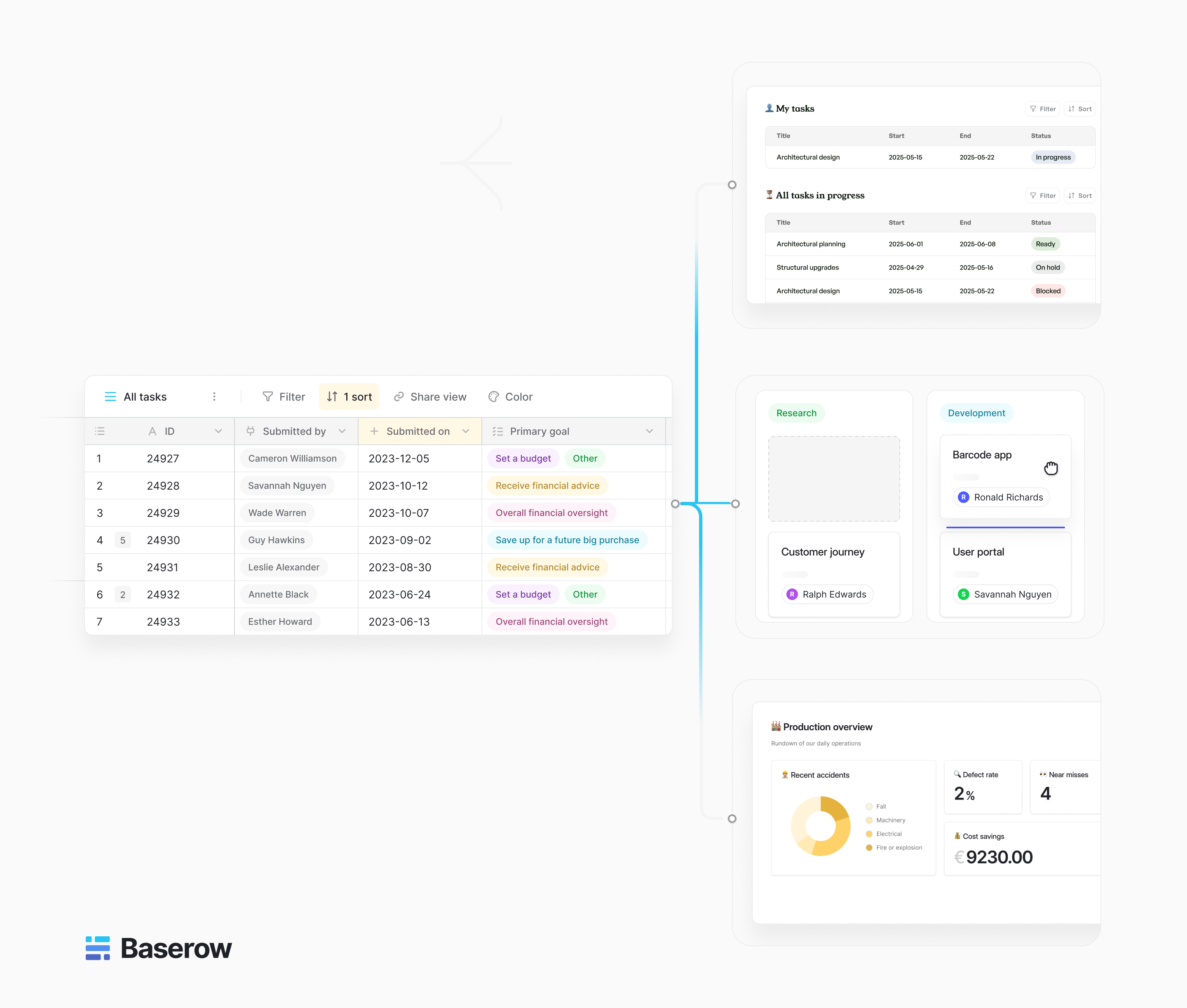
You can start with a Lightweight CRM template and expand it as your reporting needs develop. If your business already uses other systems, integrations may also help bring relevant information into your workflow.
Baserow is not a preconfigured sales CRM with every report ready to use. Its advantage is flexibility: you can build a reporting system around the data and decisions that matter to your team, rather than forcing every question into a fixed set of CRM reports.
The best CRM platform for small sales team reporting is the one that helps your team make better decisions without adding unnecessary admin work. HubSpot, Pipedrive, Zoho CRM, Freshsales, and monday CRM offer different approaches to ready-made sales management and reporting. Baserow is worth considering when you need more control over your data model and want to connect sales reporting with other business workflows.
Start with a few clear KPIs, keep records easy to update, and make sure every report has a purpose. Reliable data and consistent definitions will do more for your sales reporting than another dashboard full of metrics.


Baserow 2.4 adds Button fields, Graph elements, workflow automation, AI provider management, improved Group By views, and 30+ more updates.

Discover how Airtable and Baserow compare in features, flexibility, speed, and scalability. Compare pricing plans and hidden costs to make an informed decision!

Explore the best open-source software alternatives to proprietary products. Discover OSS tools, licenses, and use cases with our updated directory.