
TL;DR
- The No-Code Landscape 2026 features 100+ of the most popular no-code tools, organized into 10 categories — from database builders and internal tools to AI-native builders and workflow automation platforms.
- This year’s edition introduces AI-Native Builders and AI Agents & Intelligent Automation, reflecting how AI is reshaping software development.
- Browse our interactive directory to compare tools by category, best use case, free plan availability, open-source support, self-hosting, built-in AI, unique strengths, and official website.
- Looking for a no-code tool for data collaboration? Baserow is a strong choice for building databases, managing structured data, and creating custom business applications without code.
- Whether you want to build mobile apps, websites, internal tools, databases, or AI-powered applications, you’ll find platforms tailored to your needs.
- Use the infographic for a quick overview of the ecosystem, then explore the directory to compare platforms and discover the right tool for your next project.
No code tools have evolved far beyond simple website builders. Today, businesses use them to build internal tools, create AI-powered applications, automate workflows, manage databases, launch mobile apps, and much more — all without writing traditional code.
The no-code ecosystem has also grown rapidly. New AI-native builders are changing how software is created, while open-source platforms give organizations greater flexibility and control over their data. With so many platforms available, finding the right tool can be challenging.
That’s why we created the No-Code Landscape 2026 — a visual overview of 100+ of the most popular no-code tools, organized into 10 categories. Whether you’re exploring no-code for the first time or looking for a platform for your next project, this guide will help you navigate the ecosystem.
In addition to the infographic, we’ve also created an interactive directory where you can browse every tool, compare platforms, and explore them by category.
The No-Code Landscape 2026
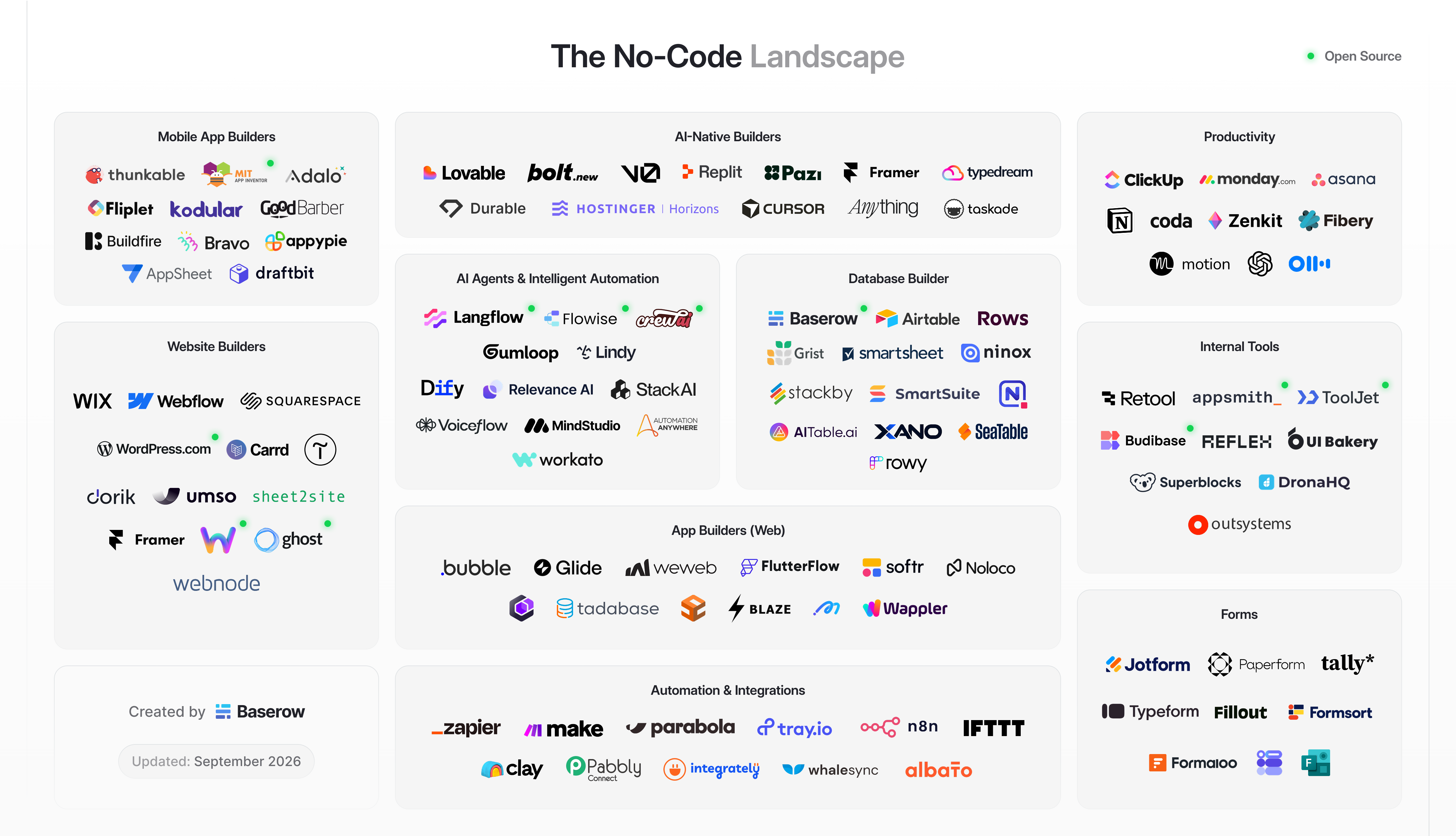
Over the past few years, the no-code industry has changed dramatically. Traditional app builders and workflow automation platforms are now joined by AI-native builders that generate applications from natural language prompts, as well as AI agent platforms that can automate increasingly complex tasks.
To reflect these changes, we’ve updated our No-Code Landscape for 2026. Alongside refreshed logos and the latest tools, this year’s edition introduces two new categories:
- AI-Native Builders – Platforms like Lovable, Bolt, Replit, and Cursor that use AI to generate applications and interfaces.
- AI Agents & Intelligent Automation – Tools such as Langflow, Flowise, CrewAI, and Lindy that help build AI-powered workflows and autonomous agents.
The result is a snapshot of today’s no-code ecosystem, covering everything from databases and internal tools to website builders, productivity software, forms, and automation platforms.
👉 Explore the complete No-Code Landscape 2026
Why the no-code landscape keeps evolving
The no-code industry looks very different today than it did just a few years ago. What began as a collection of website builders and simple app builders has grown into a complete ecosystem covering software development, AI, automation, databases, and business applications.
Modern no-code platforms now support everything from workflow automation and customer portals to mobile apps published on the Apple App Store, giving businesses far more flexibility than ever before. Many platforms also offer AI-powered assistants, making it possible to build applications from natural language prompts instead of manually configuring every page.
Another major shift is the increasing demand for enterprise-grade capabilities. Organizations aren’t just looking for visual builders — they need security, scalability, APIs, permissions, real-time collaboration, and advanced customization options that fit existing business processes. At the same time, developers and technical users are adopting no-code platforms to accelerate delivery rather than replace traditional development.
These changes are why we decided to update the No-Code Landscape once again. Our original landscape has become one of the most popular resources on our blog, in the community discussions and with the rapid growth of AI and new code platforms, it was time for a new edition.
If you’re curious how the ecosystem has evolved over the years, you can also explore our previous edition: The No-Code Landscape 2025.
What are no-code tools?
No-code tools are software platforms that allow people to build applications, automate business processes, manage data, and create websites without writing traditional code. Instead of relying on programming languages, they use visual programming, drag-and-drop interfaces, pre-built components, and increasingly AI-powered assistants to make software development accessible to everyone.
Today, no-code tools can be used to build almost any type of business application — from CRMs and project management systems to customer portals, websites, forms, dashboards, and mobile apps. Many platforms also offer workflow automation, integrations with other business tools, and real-time collaboration, enabling teams to create and improve software much faster than with traditional development.
One of the biggest advantages of modern no-code platforms is their flexibility. Most provide extensive customization options, allowing users to tailor applications to their specific workflows without needing a developer. Whether you’re building a simple internal tool or a more advanced business application, today’s no-code ecosystem offers solutions for organizations of all sizes.
If you’re new to the space and want to better understand how no-code works, how it compares to low-code, and what types of applications you can build, read our complete guide: What Is a No-Code Platform?.
Explore all 114 no-code tools
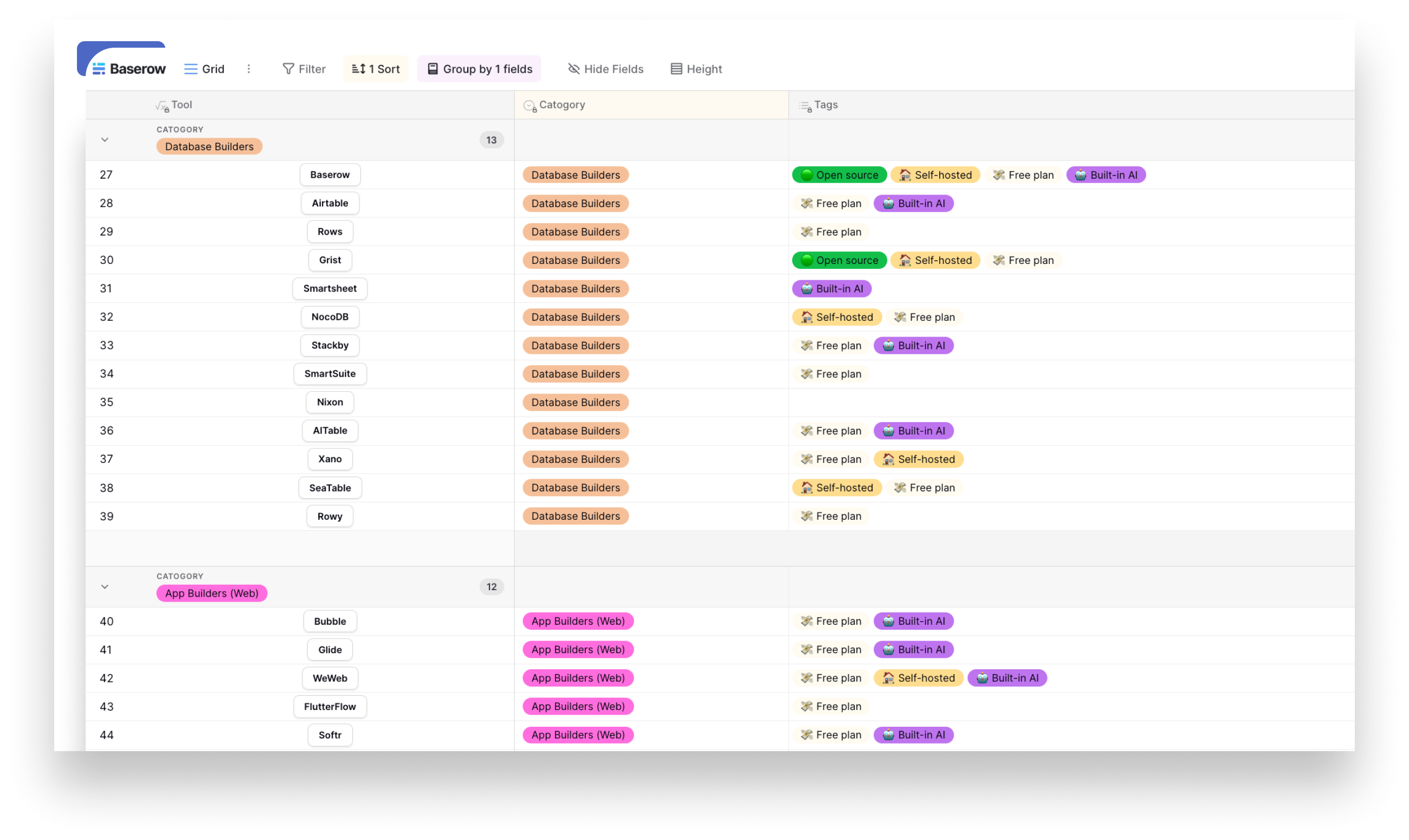
The infographic provides a high-level overview, but sometimes you need to dig deeper. That’s why we’ve also created a searchable directory of all 114 no-code tools featured in the landscape.
For each platform, you can quickly compare:
- Category
- Best use case
- Free plan availability
- Unique strengths
- Official website
Whether you’re looking for a database platform like Baserow, an automation tool like n8n, an AI-native builder like Lovable, or a website builder like Webflow, the directory makes it easy to compare your options.
👉 Browse the complete No-Code Tools Directory
Categories of no-code tools
The no-code ecosystem is more diverse than ever. While many platforms help users build applications without coding, they are designed for different use cases. Some focus on databases, others on websites or mobile apps, while newer platforms use AI to generate software from natural language prompts.
Here’s a closer look at the categories featured in the No-Code Landscape 2026.
AI-Native Builders
One of the biggest changes in recent years has been the rise of AI-native builders. Instead of dragging and dropping components, users can describe what they want to build, and AI generates an application, website, or prototype in minutes.
Popular platforms in this category include Lovable, Bolt.new, Replit, Cursor, Durable, Hostinger Horizons, and TypeDream.
These tools are ideal for quickly validating ideas, building MVPs, or creating internal applications with the help of AI.
AI Agents & Intelligent Automation
AI is no longer limited to generating code or interfaces. A new generation of platforms helps businesses build AI agents that can reason, automate complex workflows, connect multiple systems, and interact with users.
Examples include Langflow, Flowise, CrewAI, Lindy, Gumloop, Voiceflow, Stack AI, and Workato.
These tools are becoming increasingly popular for customer support, document processing, sales automation, and AI-powered business workflows.
Database Builders
Database builders combine the flexibility of a spreadsheet with the structure of a database, making it easy to organize information, collaborate with teams, and build custom business applications.
This category includes platforms such as Baserow, Airtable, Grist, Rows, SmartSuite, Ninox, SeaTable, and Stackby.
Database builders combine the familiarity of spreadsheets with the power of relational databases. They’re a natural next step for teams that have outgrown Google Sheets or Airtable and need more advanced permissions, automations, relationships, and application-building capabilities.
Database-first no-code platforms are commonly used for CRM systems, project management, inventory tracking, content planning, and internal business operations.
Internal Tools
Many organizations use no-code platforms to replace spreadsheets and build custom software tailored to their workflows.
Internal tool builders make it possible to create dashboards, admin panels, approval systems, inventory management tools, and business portals without traditional software development.
Popular platforms include Retool, Budibase, ToolJet, Appsmith, DronaHQ, Superblocks, and UI Bakery.
If you’re planning to build internal business applications, customer portals, or secure operational software, check out our guide to Secure Custom App Development to learn best practices for building scalable and secure no-code applications.
Productivity
Productivity platforms help teams organize work, manage projects, collaborate on documents, and track progress.
Well-known tools include ClickUp, Monday, Asana, Notion, Coda, Fibery, Motion, Zenkit, and Microsoft Loop.
These platforms often combine task management, documentation, databases, and collaboration into a single workspace.
Automation & Integrations
Automation platforms connect different applications and eliminate repetitive work by automatically moving data between systems.
Popular tools include Zapier, Make, n8n, Pabbly Connect, Tray, IFTTT, Clay, and Albato.
Businesses commonly use these platforms to synchronize data, automate notifications, process forms, and build end-to-end workflows across multiple applications.
Website Builders
Website builders allow anyone to create professional websites without coding by using visual editors, templates, and drag-and-drop components.
Examples include Wix, Webflow, Squarespace, WordPress, Framer, Carrd, Ghost, Dorik, and Webnode.
Depending on the platform, users can build landing pages, blogs, portfolios, business websites, or complete e-commerce experiences.
Mobile App Builders
Mobile app builders make it possible to develop iOS and Android applications using visual interfaces instead of traditional programming languages.
Popular platforms include FlutterFlow, Thunkable, Adalo, Bravo Studio, AppSheet, Kodular, and Draftbit.
Many mobile app builders can generate native apps for iOS and Android, allowing teams to publish applications to the Apple App Store and Google Play while maintaining a visual, no-code development experience.
These tools are widely used for business apps, customer portals, event applications, and internal mobile solutions.
Forms
Online form builders simplify data collection by allowing users to create surveys, registration forms, applications, and questionnaires without writing code.
Leading platforms include Jotform, Typeform, Tally, Fillout, Paperform, Formsort, Form, and Microsoft Forms.
Many also integrate with databases, CRMs, and automation platforms to streamline data collection and processing.
How to choose the right no-code tool
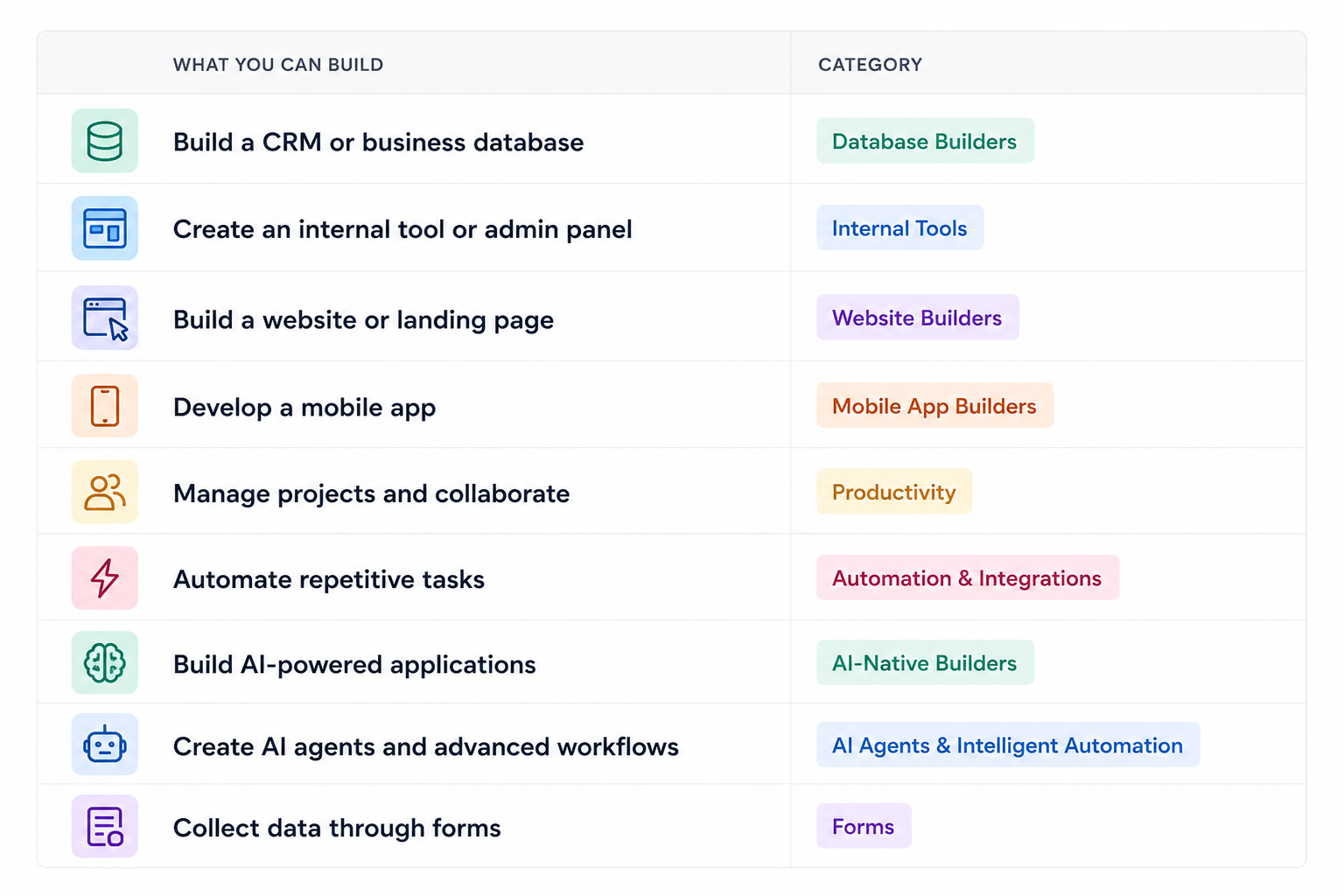
With hundreds of no-code tools available, choosing the right one can feel overwhelming. The best platform depends less on popularity and more on what you want to build.
Beyond features, consider the overall user experience. A clean interface, intuitive navigation, and responsive performance can significantly reduce the learning curve and help teams build applications more efficiently.
While many platforms overlap, most specialize in solving a particular problem. Starting with the right category makes it much easier to compare tools and find the best fit for your workflow.
Benefits of using no-code tools
No-code tools have become popular because they make software development faster and more accessible. Instead of spending months writing code, teams can prototype ideas, automate workflows, and launch business applications in days.
Some of the biggest benefits include:
- Faster development with visual programming
- Lower development costs
- Easier collaboration between business and technical teams
- AI-powered assistance for building applications
- Extensive customization options
- Real-time collaboration
- Enterprise-grade security on many platforms
- Ability to build websites, databases, internal tools, and mobile apps without traditional programming
Why no-code tools are evolving faster than ever
The no-code industry has changed significantly over the last few years. Early platforms focused on replacing spreadsheets or helping users build websites with drag-and-drop interfaces. Today, artificial intelligence is reshaping how software is created.
Instead of manually designing every page or workflow, many modern platforms can generate applications, automate repetitive tasks, and even build working prototypes from a simple prompt.
At the same time, businesses are placing greater emphasis on flexibility, data ownership, and security. As a result, open-source no-code platforms and self-hosted solutions are becoming increasingly popular, especially among larger organizations and teams with stricter compliance requirements.
These trends are expanding what’s possible with no-code, making it easier than ever for teams to build software without traditional development resources.
Why Baserow is part of the No-Code Landscape
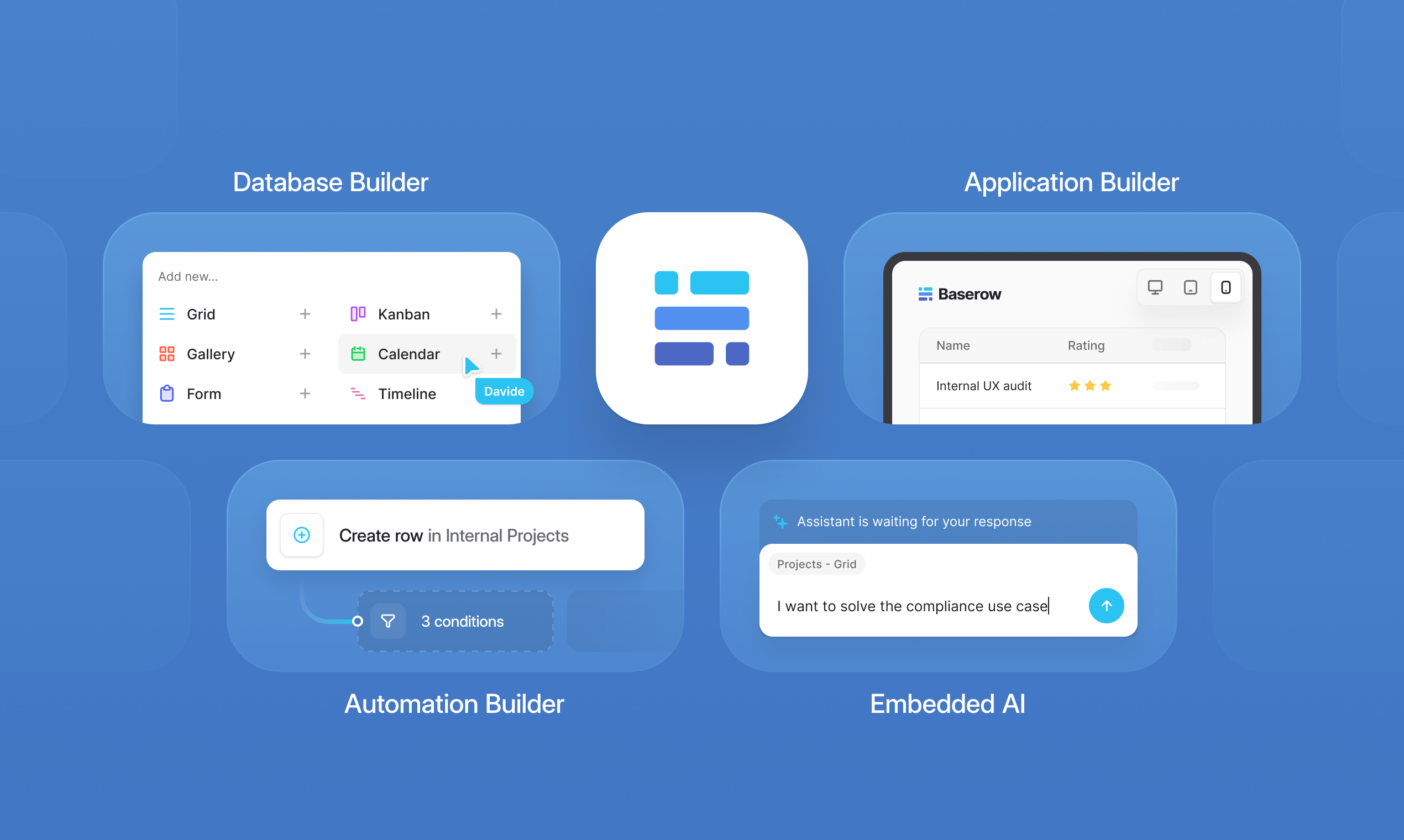
No-code isn’t just about building apps — it’s about giving teams the tools to organize data, automate work, and create custom solutions without relying on engineering resources.
Baserow is an open-source no-code database and application builder designed for teams that need flexibility. You can use it to organize data, build internal tools, automate workflows, create client portals, and develop business applications — all while choosing whether to use Baserow Cloud or self-host your data.
Some of Baserow’s key features include:
- Build relational databases without code
- Create custom applications with the Application Builder
- Automate repetitive workflows
- Generate formulas, applications, and workflows with AI
- Connect with thousands of tools through APIs and integrations
- Self-host for complete control over your infrastructure and data
Whether you’re replacing spreadsheets, building a CRM, managing projects, or creating operational tools, Baserow provides a flexible foundation for a wide range of no-code projects.
Frequently asked questions
What are no-code tools?
No-code tools are software platforms that allow users to build applications, websites, databases, automations, and workflows without writing traditional code. Instead, they use visual interfaces, drag-and-drop editors, and increasingly AI-powered features. Baserow, for example, is a no-code database and application builder that helps teams create custom business applications, automate workflows, and collaborate on data without coding.
What is the best no-code tool?
There isn’t a single best no-code tool — it depends on what you’re building. For example, Baserow is popular for databases and internal business applications, Webflow for websites, Zapier and n8n for workflow automation, and Lovable or Bolt.new for AI-powered app development. Choosing the right tool starts with understanding your use case.
Are no-code tools free?
Many no-code tools offer free plans with limited features, while paid plans unlock advanced functionality, collaboration, automations, or higher usage limits. Baserow offers a generous free plan, and it’s also available as an open-source, self-hosted solution for teams that want complete control over their data and infrastructure.
What’s the difference between no-code and low-code?
No-code platforms are designed for users with little or no programming experience and rely on visual builders. Low-code platforms also use visual development but allow developers to extend applications with custom code when needed. Baserow is a no-code platform that also offers APIs, integrations, and advanced capabilities, making it suitable for both business users and technical teams.
Want to learn more? Read our guide to Low-Code vs. No-Code Platforms to understand the differences, use cases, and how to choose the right approach for your team.
Are no-code tools replacing developers?
No. No-code tools help individuals and teams build software faster, automate repetitive work, and prototype ideas. Developers are still essential for building highly customized applications, complex integrations, and large-scale systems. Platforms like Baserow help developers and business teams work together by accelerating development, reducing repetitive work, and enabling non-technical users to build and manage applications safely.
The no-code ecosystem continues to grow every year, with new AI-powered builders, automation platforms, and specialized tools entering the market. While this creates more choice than ever before, it also makes selecting the right platform more challenging.
We created the No-Code Landscape 2026 to make exploring the ecosystem easier. Whether you’re building your first application, automating business processes, or searching for an open-source alternative, the landscape and interactive directory provide a practical starting point.
We’ll continue updating this resource as the no-code industry evolves, so be sure to bookmark it and check back for future editions.


Baserow 2.4 adds Button fields, Graph elements, workflow automation, AI provider management, improved Group By views, and 30+ more updates.

Discover how Airtable and Baserow compare in features, flexibility, speed, and scalability. Compare pricing plans and hidden costs to make an informed decision!

Explore the best open-source software alternatives to proprietary products. Discover OSS tools, licenses, and use cases with our updated directory.