
Managing a Customer Relationship Management (CRM) system often feels like a full-time job. Between logging communication notes, manually advancing deals through pipeline stages, and ensuring data formatting remains consistent, a massive chunk of the work week gets swallowed by basic database administration.
What if you could run your entire sales pipeline through a standard conversational interface? By building a no-code AI CRM, you can bypass rigid database workflows and interact with your sales data using pure natural language. Instead of clicking through complex menus, you simply tell an AI model to update a lead’s status, retrieve client histories, or log new opportunities.
Here is a comprehensive look at how a conversational CRM works, and a step-by-step guide to setting one up without writing a single line of custom code.
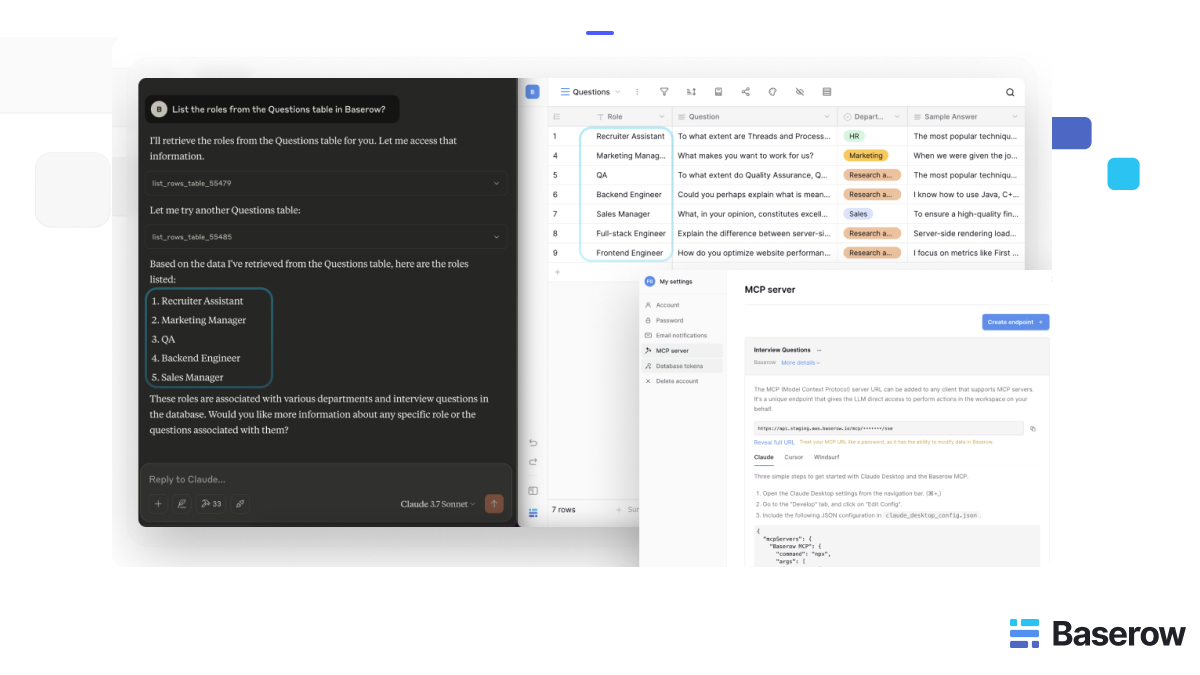
Learn more about how to natively integrate Baserow with Claude using the Model Context Protocol (MCP).
What is dynamic schema mapping?
In traditional software systems or traditional spreadsheet apps, database automations are brittle. If a team member modifies a column header from Phone Number to Direct Mobile, any API integrations, custom webhooks, or third-party workflow rules tied to that specific column usually break instantly.
An open-source no-code CRM powered by the Model Context Protocol (MCP) solves this issue through a feature known as dynamic schema mapping.
Instead of relying on hardcoded data paths, the integration operates like this:
- Introspection: Every time you open Claude, the AI automatically reads the structure of your data workspace, learning table names, field configurations, and relational links in real-time.
- Context Awareness: Because Claude interprets the structure dynamically, it can instantly adjust to changes. If you modify column layouts, rename fields, or add new tracking metrics, the AI naturally grasps the update without requiring you to reprogram the integration.
- Precise API Execution: When you give a conversational command, Claude evaluates your current CRM layout and automatically translates your request into exact database actions.
This flexibility makes a conversational database the ultimate spreadsheet alternative, giving growing teams a flexible workspace that scales without the constant burden of API maintenance.
Step-by-step: Connecting Claude to your CRM data
To turn your Baserow database into an AI-powered workspace, you will establish a secure connection using Claude and an MCP-enabled data backend.
Step 1: Set up your CRM tables
Before connecting your AI, organize your workspace with the essential columns needed to track your business relationships. For a standard sales pipeline, build a table containing fields like:
Company Name(Text)Contact Person(Text)Deal Stage(Select dropdown: Lead, Qualification, Proposal, Closed Won)Estimated Value(Number or Currency)Last Interaction Date(Date)Notes(Long text)
Step 2: Generate your secure MCP access endpoint
To let Claude interact with your sales pipeline safely, you must create a dedicated communication gateway.
- In your data platform settings, navigate to the MCP Server control panel.
- Click Create Endpoint.
- Name your route (e.g.,
Sales_CRM_Bridge) and assign it specifically to the workspace housing your customer tables. - Copy the unique MCP URL generated by the system.
This access URL contains powerful privileges. It serves as an encryption secret that permits programmatic changes to your CRM data. Store it securely and never expose it to shared public folders.
Step 3: Link your CRM to Claude
Now, configure your AI client to recognize your sales data gateway.
-
Open the Claude configuration settings on your computer.
-
Access the
claude_config.jsonfile via the app’s development preferences. -
Insert the configuration block below, pasting your secure endpoint link over the placeholder text:
`{ "mcpServers": { "My Company CRM": { "command": "npx", "args": [ "mcp-remote", "YOUR_MCP_URL_HERE" ] } } }` -
Save the file and restart Claude to initialize your live conversational CRM.
Step 4: Interact with your sales pipeline using natural language
With the bridge established, Claude can fully manage your records. Try opening Claude and prompting it directly:
“Show me a summary of all deals currently sitting in the ‘Proposal’ stage with an estimated value over $5,000.”
Claude will query your tables, analyze the data, and display a clean, human-readable summary right inside the chat window.
Conversational CRM prompts to optimize your workflow
Once you connect Claude to your CRM, you can run your daily sales operations using intuitive prompts. Here are practical examples:
| Operational Goal | Natural Language Prompt Example |
|---|---|
| Log a new lead | “Add a new record to our CRM for Apex Corp. The main contact is Sarah Jenkins, and they are looking for a software deployment package valued around $12,000.” |
| Update client history | “Find the record for Acme Corp. Change their pipeline stage to ‘Qualification’ and add a note that they requested a follow-up call next Tuesday.” |
| Pipeline health check | “Look over our entire active pipeline. Are there any deals that haven’t been updated or contacted in the last 30 days?” |
Frequently asked questions
What happens to my conversational CRM if I rename a column header in Excel, Monday, or Baserow?
In traditional project management software or basic spreadsheets, changing a column header breaks existing automated integrations and requires manual reconfiguration. However, when using an MCP connection, Claude reads your schema dynamically every time you initiate a request. If you change a column from Deal Size to Estimated Value, Claude automatically maps the new name to your next prompt without breaking the workflow.
Can I use a no-code AI CRM to analyze customer communication trends automatically?
Yes. Because Claude possesses advanced language processing capabilities, it does more than just read and write raw text. You can ask it to review a long thread of text inside your Notes column and ask: “Based on the notes for our last five interactions with client X, what are their main hesitations, and what should we prioritize on our next call?”
How do I ensure client privacy and data protection when connecting an LLM to my CRM?
Security in an AI-integrated workflow is achieved through architectural isolation and strict permission management. Connecting an LLM to your CRM does not have to compromise your data governance if you follow these core Baserow security principles:
- Role-Based Access Control (RBAC): Every MCP connection should be tied to a specific API token. By assigning this token to a limited-access Baserow user, you ensure the AI only has the permissions, such as read-only or limited write-access, granted to that specific role.
- Infrastructure Isolation: Because MCP functions as a direct, secure bridge, you avoid the security risks inherent in middle-man automation platforms that store your data on their own servers during transit. With a direct connection, data flows securely between your Baserow instance and your local Claude environment.
- Segmented Workspaces: Do not use a single Master connection for all projects. Create unique MCP endpoints for distinct workflows or client databases. This ensures that even if a specific project prompt is compromised, the blast radius is contained to only that specific, isolated table or workspace.
Pro-Tip: If you are self-hosting Baserow, you gain the additional benefit of keeping your data strictly within your own firewall, ensuring that no sensitive CRM data ever leaves your organization’s private network during the AI processing cycle.
Will a conversational CRM work effectively if I have hundreds of active leads and multiple pipeline stages?
Yes, large datasets are highly compatible with this setup. Because Claude translates your prompts into native, efficient database queries, it doesn’t need to read every single line of text sequentially to find an answer. It requests filtered information directly from the database server, allowing you to isolate specific cohorts, such as active leads, regional clients, or premium accounts, instantly.


Baserow 2.4 adds Button fields, Graph elements, workflow automation, AI provider management, improved Group By views, and 30+ more updates.

Discover how Airtable and Baserow compare in features, flexibility, speed, and scalability. Compare pricing plans and hidden costs to make an informed decision!

Explore the best open-source software alternatives to proprietary products. Discover OSS tools, licenses, and use cases with our updated directory.