
Databases store some of an organization’s most valuable information, from customer records and financial data to internal processes and intellectual property. Protecting this information is a critical part of any data security strategy.
Database security is the set of tools, processes, and controls used to protect databases from unauthorized access, data breaches, corruption, and other threats. It covers the database itself, the database management system, applications, infrastructure, and people who interact with the data.
As more organizations use cloud databases and collaborative database software, security is no longer only the responsibility of database administrators. Security teams, IT leaders, developers, and business users all play a role.
In this guide, we’ll explain the main database security threats, the principles behind effective data protection, and 10 database security best practices organizations can use to keep sensitive data secure.
What is database security?
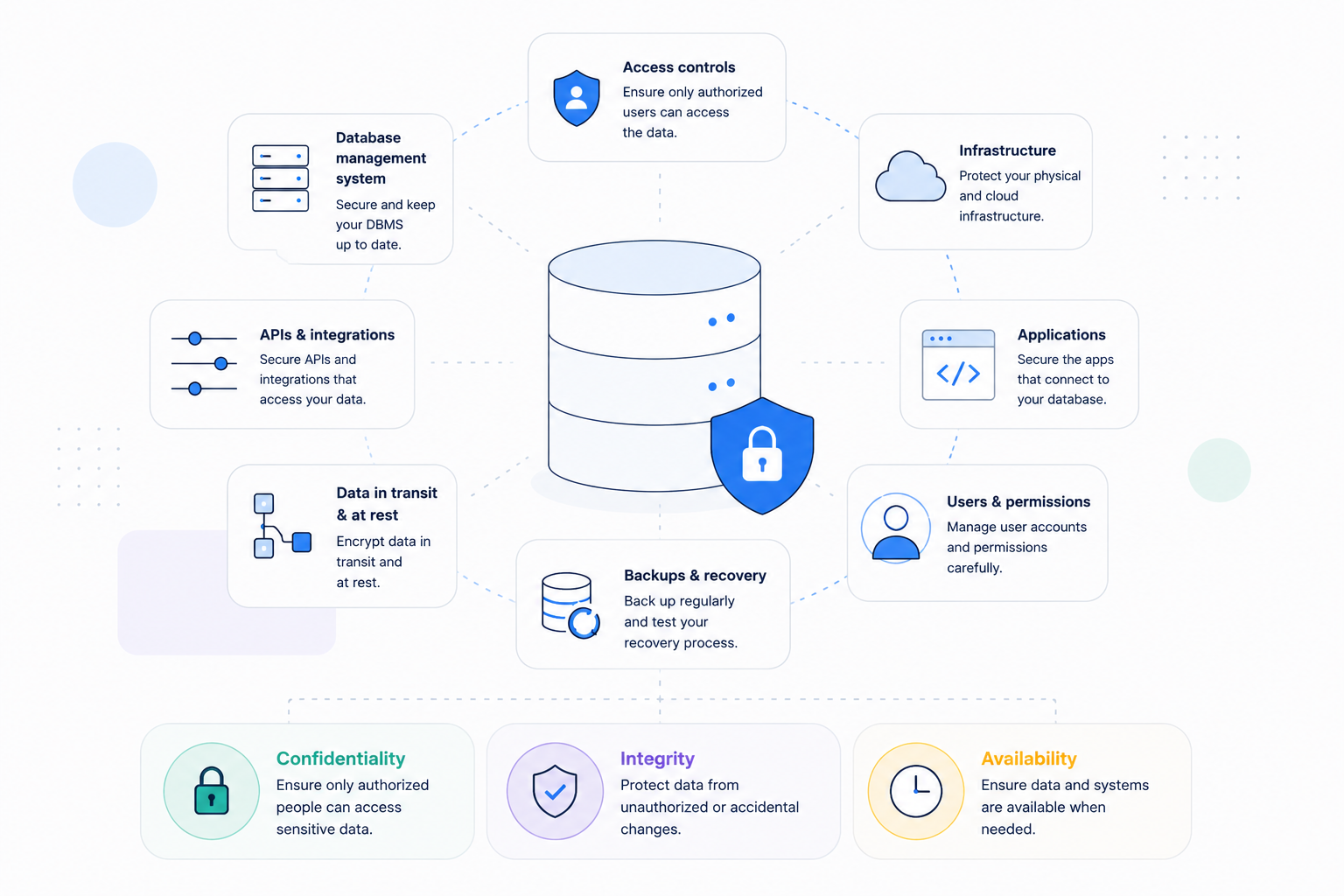
Database security refers to the collective measures used to protect a database and its data from unauthorized access, misuse, modification, destruction, or theft.
These measures can include access controls, encryption, secure authentication, monitoring, backups, security patches, and internal policies.
A strong database security strategy protects more than a database server. It should cover the complete environment around the data, including:
- The database management system
- Physical and cloud infrastructure
- Applications connected to the database
- APIs and integrations
- User accounts and permissions
- Data at rest and in transit
- Backup and recovery systems
The goal is to maintain the three core principles of information security: confidentiality, integrity, and availability.
Confidentiality ensures only authorized people can access sensitive data. Integrity protects information from unauthorized or accidental changes. Availability ensures data and systems remain accessible when legitimate users need them.
Why is database security important?
A database gives teams a central place to store, update, and share information across an organization. It may hold customer details, employee records, product data, and information needed for daily business tasks.
This valuable information makes databases a common target for attackers who want to steal or misuse data.
A data breach can expose private records, interrupt daily work, and damage the trust of customers. It can also make it harder for a business to meet its legal and security duties.
Security risks can also come from people who already have access to the database. Employees may share a password, delete records by mistake, or download data beyond their role.
As teams adopt more cloud databases and online tools, managing these risks becomes more complex. Business users can now build workflows without a database administrator, but they still need clear rules for handling data.
A layered security approach combines access controls, secure settings, regular updates, and reliable backups. These measures help protect a database management system from malicious attacks while allowing teams to use data safely.
What are the main database security threats?
Database threats can come from outside attackers, internal users, outdated software, or mistakes in system settings. Understanding these risks helps teams choose suitable controls and reduce the chance of a security incident.
Unauthorized access
Unauthorized access occurs when someone views or changes data without permission to perform that action.
Weak passwords, shared accounts, and stolen login details can give attackers a way into a database. Poor password practices and broad user permissions can also put sensitive records at risk.
The principle of least privilege means giving each person only the access needed for their work. Teams should review these permissions regularly, especially when employees change roles or leave the organization.
SQL injection
SQL injection happens when an attacker sends harmful database commands through an insecure application input. For example, a poorly protected search box could allow someone to read, change, or delete records.
Developers should use parameterized queries, which keep user input separate from the commands a database follows. Input checks provide another layer of protection, but they should not replace secure database queries.
Unpatched database software
Outdated software can contain known security flaws that attackers use to gain access or disrupt services.
Regular updates help close these gaps before they become a problem for the organization. A clear update process should cover the database, operating system, web server, plugins, and connected applications.
Insider threats
Employees, contractors, and partners can put data at risk through deliberate actions or everyday mistakes. Someone with more access than needed might accidentally change important records or share private information.
Detailed access controls help limit what each user can view, edit, export, or delete. Audit logs record supported activities, helping teams investigate changes and identify possible misuse of data.
Misconfiguration
Incorrect settings can expose a database even when the software includes strong security features.
Common examples include public access, overly broad user roles, insecure connections, and exposed API keys. Teams should review settings regularly and check access whenever they connect new tools or services.
Data loss and system failure
Database security also means keeping information available when people need it to complete their work.
Hardware faults, software errors, accidental deletion, and cyberattacks can make important records unavailable or destroy them. Regular backups and tested recovery steps help teams restore data and resume work after a failure.
10 database security best practices
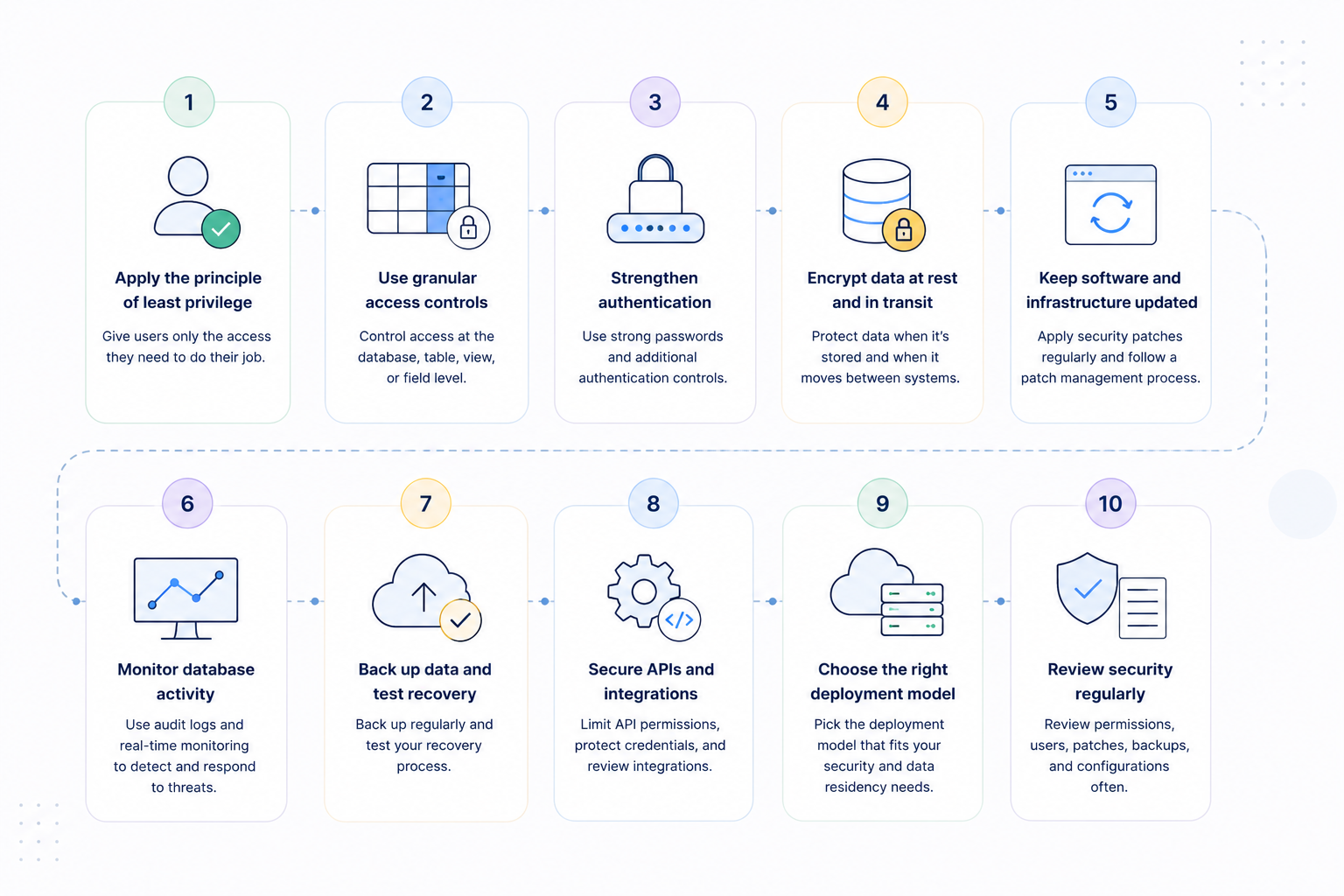
No single tool can protect a database from every threat, so teams need several layers of protection. Strong database security combines technical safeguards with clear rules for how people access and use data.
The following database security best practices can help teams reduce risks and protect important business records.
1. Apply the principle of least privilege
Users should only have access to the data and actions they need to perform their roles.
For example, a sales representative may need to update customer records without changing database security settings. A contractor may need access to one project without seeing other data in the workspace.
Role-based access control, or RBAC, helps teams assign access based on each person’s role and duties.
2. Use granular access controls
Workspace permissions may be too broad for teams that handle private records or other sensitive data. These teams may need separate rules for each database, table, view, or field they use.
More detailed controls help reduce data exposure and keep access aligned with each team’s daily work.
Baserow supports a role hierarchy with permissions across workspaces, databases, and tables. Field-level permissions can also restrict edits to specific columns, helping teams protect important values from unwanted changes.
3. Strengthen authentication
Strong login controls make it harder for attackers to access accounts using stolen or guessed passwords.
Teams should set clear password rules, avoid shared accounts, and use multi-factor authentication where available. They should also review access when employees change roles and remove it when someone leaves.
Authentication checks a user’s identity, while authorization controls what that person can do within the system. Both are needed to protect data and prevent users from taking actions beyond their role.
4. Encrypt data at rest and in transit
Encryption helps protect data by making it unreadable without the correct key to unlock it.
Data at rest means records saved in a database, backup, or file storage system. Data in transit means records moving between systems, such as a browser, database server, or connected app.
Teams should check that suitable encryption protects their data both during storage and when it moves.
5. Keep software and infrastructure updated
Regular security updates fix known software flaws that attackers could use to gain access or disrupt work.
A clear update process helps teams find security issues, assess their severity, and apply the required fixes. It should cover the database software and the systems that support it, including servers and connected apps.
Teams that self-host should assign clear roles for managing updates, backups, security checks, and system monitoring. With Baserow Self-Hosted, the business controls its own servers and manages these tasks according to its needs.
6. Monitor database activity
Security teams need a clear record of how people access data and make changes to it.
Audit logs help teams spot unusual activity, investigate incidents, and gather evidence for compliance reviews. Useful records show who took an action, what they did, and when the action happened.
Baserow audit logs include details such as the user, action type, time, and IP address. They also identify the affected workspace or database, helping teams trace activity and investigate reported issues.
For critical systems, timely monitoring helps teams detect suspicious activity and respond before more damage occurs.
7. Back up data and test recovery
A backup is only useful when teams can restore it and recover the records they need.
Businesses should schedule regular backups, decide how long to keep them, and test the recovery process. Backup schedules should reflect how often records change and how much data the business can afford to lose.
Recovery plans should explain how to handle ransomware, accidental deletion, and failures in the systems hosting data.
8. Secure APIs and integrations
Databases often connect to other tools through APIs, automated workflows, and services provided by other companies. Each connection creates another route through which data could be accessed, changed, or exposed.
Teams should limit API access, store credentials securely, and remove connections that are no longer needed. They should also review which external systems can access sensitive records and why that access is required.
9. Choose the right deployment model
Cloud databases can reduce the work involved in running servers and maintaining the systems behind them. Self-hosting gives businesses more control over where data is stored and how those systems are managed.
Both options need suitable security controls, clear roles, and regular checks to keep business data protected.
The right choice depends on security policies, staff resources, legal duties, and rules about data location. Baserow can run on a business’s own servers, in a private cloud, or on other systems it controls. This flexibility supports teams with specific needs for privacy, security, and control over their data.
10. Review security regularly
Database security needs regular attention as teams grow, systems change, and new tools connect to business data.
Teams should review access rights, inactive accounts, integrations, software updates, backups, and database settings at planned intervals. They should also update security policies when staff roles change or new apps are introduced.
Regular reviews help teams find unnecessary access and address security gaps before they lead to larger problems.
How to choose secure database software
When evaluating database software, organizations should look beyond basic password protection.
A secure database platform should provide clear answers to several questions:
- Can you control who can view and edit data?
- Are granular access controls available?
- Is data encrypted at rest and in transit?
- Can administrators review user activity?
- Are backups and recovery processes available?
- Can the deployment model meet data residency requirements?
- Does the platform support relevant compliance requirements?
- Can the organization control its own infrastructure if necessary?
The answers will vary depending on the type of data an organization manages.
A small team managing public content has different requirements from a healthcare organization handling protected information or an enterprise storing sensitive customer records.
For organizations that want a collaborative database without giving up control over deployment and data access, Baserow is an open-source database and application platform with cloud and self-hosted deployment options. It combines database collaboration with granular permissions, audit logs, encryption, and infrastructure control.
Baserow is also GDPR, HIPAA, and SOC 2 compliant. Organizations can use Baserow Cloud as a managed service or self-host Baserow when they need greater control over data location and infrastructure.
💡 If your organization operates in the European Union or handles the personal data of EU residents, you should also evaluate how your database supports GDPR compliance. We’ve covered the key features to look for in our guide to choosing a GDPR-compliant database.
How Baserow supports database security
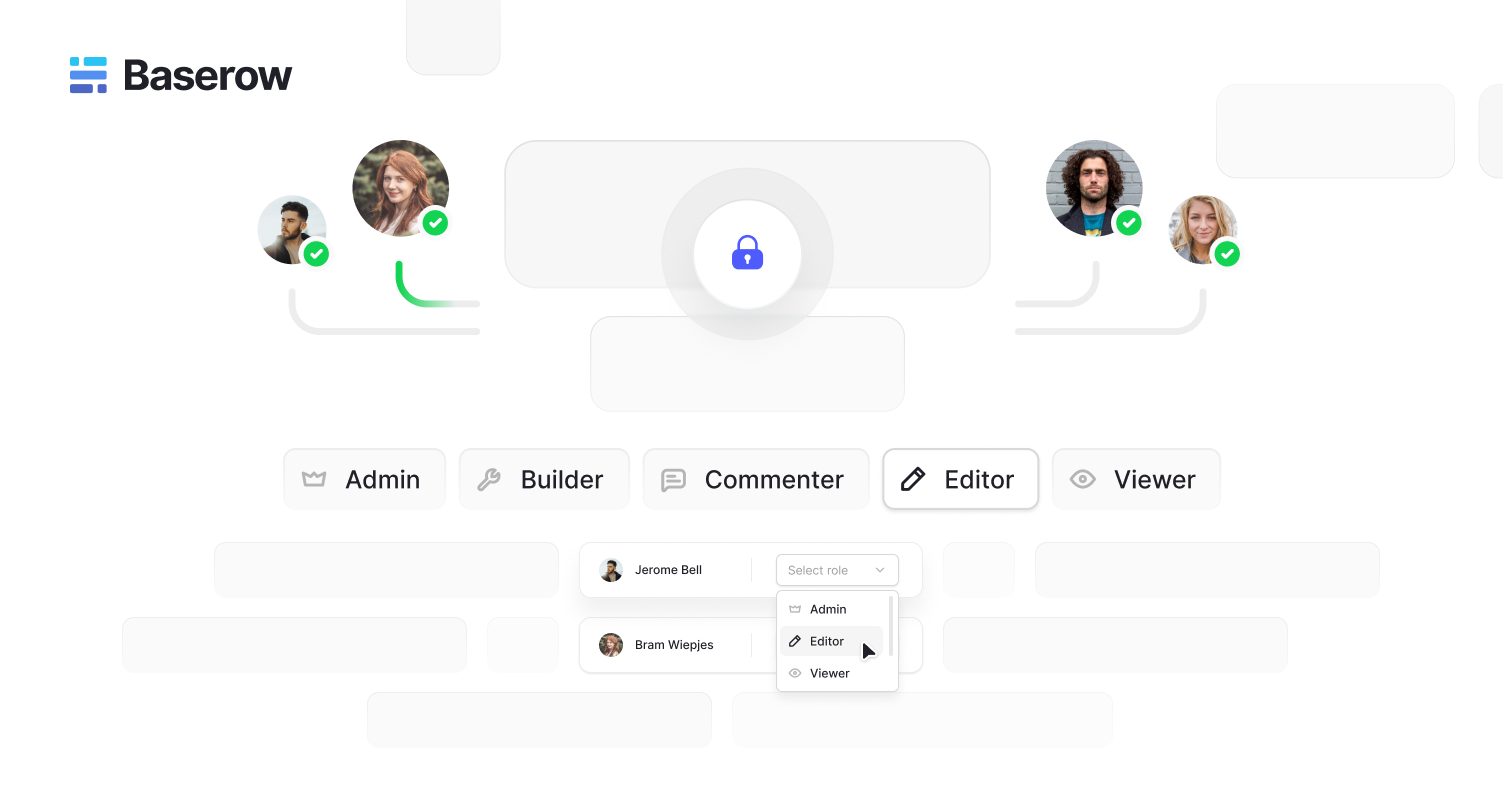
Baserow helps teams manage business data and build apps while keeping control over access and hosting. Teams can set clear rules for how people use records and choose where their data is stored.
Its security features and hosting options include:
- Role-based access control: Set what users can do across workspaces, databases, and tables based on their roles.
- Granular permissions: Use more detailed access rules, including controls that prevent users from editing specific fields.
- Audit logs: Review recorded actions to see who made changes and help your team investigate security issues.
- Encryption: Protect stored data and records moving between systems, with safeguards suited to your chosen hosting setup.
- Deployment choice: Use managed cloud hosting or run Baserow on servers that your own team controls.
- Data sovereignty: Self-host to control where business data stays and how the systems that store it are managed.
- Compliance support: Use security controls to help meet your requirements, alongside suitable agreements, hosting choices, and internal processes.
Self-hosting gives teams more control over their systems and helps them follow internal security policies. This can suit businesses with strict rules about where data must stay and who can access it.
Check which features are included in your chosen plan and how they work with your hosting setup. Keeping data safe also depends on how your team sets access rules, applies updates, and reviews changes.
Try Baserow in the cloud or self-host it on your own servers for greater control over your data.
Database security FAQs
- What is database security?
Database security uses tools and rules to protect records from unwanted access, misuse, damage, and loss. It includes access controls, encryption, activity logs, and backups to keep data safe and available.
- What are the main database security threats?
Common threats include stolen passwords, SQL injection, insider misuse, outdated software, and incorrect settings. Unsafe connections and mistakes that delete records also create risks, so teams need several layers of protection.
- How can you improve database security?
Limit user access, strengthen login controls, encrypt data, and keep software updated to reduce known risks. Review activity, secure connections to other tools, and test backups so your team can restore lost records.
- What are database security best practices?
Best practices include role-based access, secure logins, encryption, audit logs, and tested recovery plans. Apply these measures across your database, connected apps, servers, and storage, then review them as needs change.
- What should you look for in secure database software?
Look for granular access controls, encryption, audit logs, reliable backups, secure authentication, and clear deployment options. Organizations with strict data residency or infrastructure requirements may also benefit from self-hosted database software such as Baserow, which can run on infrastructure controlled by the organization.


Baserow 2.4 adds Button fields, Graph elements, workflow automation, AI provider management, improved Group By views, and 30+ more updates.

Discover how Airtable and Baserow compare in features, flexibility, speed, and scalability. Compare pricing plans and hidden costs to make an informed decision!

Explore the best open-source software alternatives to proprietary products. Discover OSS tools, licenses, and use cases with our updated directory.