
Choosing the right project management tool can shape how your team works every day. From planning tasks to tracking progress, the tool you pick affects speed, clarity, and results. Many teams often compare Jira vs Trello when deciding what to use.
Both tools are popular and trusted. But they serve different needs. Some teams want simple boards to organize tasks. Others need detailed systems for complex workflows. This is where the difference becomes clear.
If you are exploring options, you may have also come across guides like project management tools guide. These highlight how tools vary based on team size and project type.
In this guide, we will break down Jira and Trello in simple terms. We will also look at where they fall short and how modern tools like Baserow are helping teams handle both structure and flexibility in one place.
What Is Jira and Who Should Use It?
Core Overview
Atlassian created Jira as a powerful platform for tracking work. It is widely used by software development teams that need structure and control.
Jira is designed to manage technical workflows. It helps teams plan, track, and release software with precision. You can explore its official capabilities on Jira’s website.
Key Features Include
Jira’s strength lies in depth. Its features include:
- Advanced bug tracking for development workflows
- Custom fields to tailor tasks and workflows
- Detailed reporting and dashboards
- Strong user roles and permissions for access control
These features make Jira a strong choice when projects need structure and accountability.
Best Use Cases
Jira works best when:
- Teams handle complex projects with many moving parts
- Development teams need bug tracking and sprint planning
- Workflows require strict user permissions and control
For example, a product team managing a large release can use Jira to track issues, assign tasks, and monitor progress across multiple teams.
What Is Trello and Who Is It For?
Core Overview
Trello is a simpler tool, also built under Atlassian. It uses a visual kanban board system to organize work.
Instead of complex dashboards, Trello shows tasks as cards. These cards move across lists that represent stages of work.
Key Features Include
Trello focuses on ease of use. Its features include:
- Drag-and-drop task management
- Simple and clear interface
- Mobile app for managing tasks on the go
- Quick setup with minimal learning
This makes it a very user friendly option, especially for beginners.
Best Use Cases
Trello is ideal when:
- A small team needs quick task organization
- Workflows are simple and visual
- Teams want to manage team and projects without complexity
For example, a marketing team planning campaigns can easily track tasks using Trello boards.
Jira vs Trello: Key Differences Explained
Understanding the differences helps you pick the right tool faster.
1. Ease of Use:
Trello is easy to start. You can create a board and begin within minutes. Its simple layout makes it ideal for teams that want fast setup.
Jira, on the other hand, takes time to learn. It has many features, which can feel overwhelming at first. But this complexity brings more control.
2. Project Complexity:
Jira is built for complex projects. It supports dependencies, workflows, and detailed tracking.
Trello works better for simple workflows. While it can be extended, it may struggle as projects grow larger.
3. Features and Customization:
Jira offers a wide range of advanced tools. You can customize workflows, add custom fields, and create detailed reports.
Trello keeps things simple. It has fewer customization options but focuses on clarity and speed.
4. Pricing and Paid Plan Options
Both tools offer free versions. However, advanced features often require a paid plan.
Jira’s pricing scales with features and users. Trello also offers upgrades, but its free version is often enough for small teams.
5. User Permissions and Roles
Jira provides detailed control. You can define user roles and set specific user permissions for each task or project.
Trello offers simpler access control. This works well for smaller teams but may not suit large organizations.
When to Choose Jira
Jira is the right choice when:
- You manage software development teams
- Your workflow includes bug tracking and sprint cycles
- You need detailed reporting and structured planning start
It is especially useful when your team handles technical tasks that require accuracy and tracking.
When to Choose Trello
Trello is a better fit when:
- You want a simple tool with quick setup
- Your team prefers visual workflows like a kanban board
- You manage smaller projects without many dependencies
It is often the go-to tool for teams that value speed and simplicity.
Where Both Tools Fall Short
Even though Jira and Trello are popular, they have limits.
Jira can feel too complex for non-technical users. It may slow down teams that need quick action.
Trello, while simple, can lack depth. As projects grow, it may not support advanced needs like structured data or deeper customization.
Many teams explore alternatives after facing these challenges. For example, this Jira alternatives guide and Trello alternatives overview show how teams are shifting toward more flexible tools.
A Flexible Alternative for Modern Teams
Today, teams need more than just task tracking. They need tools that combine structure with flexibility.
This is where Baserow stands out.
Unlike traditional tools, Baserow works like a database and a workflow tool combined. You can create systems that match your exact needs without heavy setup.
Why Teams Are Exploring Baserow
- Build custom workflows without complexity
- Use structured data alongside task tracking
- Manage product launches, tasks, and data in one place
- Connect with other tools through integrations
Real Use Case
A growing startup planning product launches faced issues with both Jira and Trello.
- Jira was too complex for non-technical teams
- Trello lacked structure for tracking detailed data
They switched to Baserow. Using custom fields and flexible tables, they built a system that tracked tasks, timelines, and data together.
You can explore similar examples from the Baserow community, where teams share how they build workflows that match real needs.
Jira vs Trello vs Baserow: Quick Comparison
To make your decision easier, here’s a simple comparison across key areas:
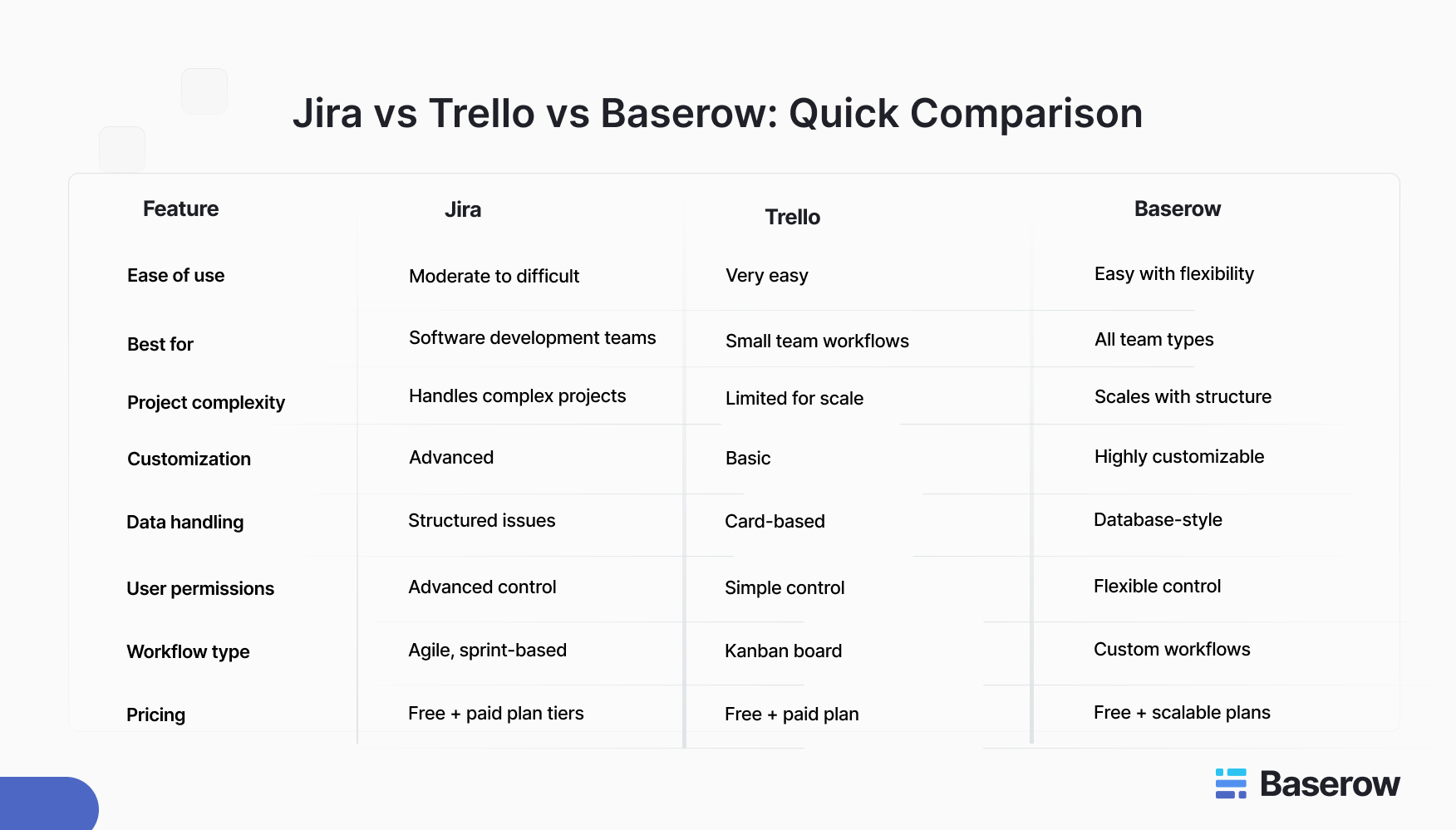
This table shows a clear pattern. Jira is strong in structure, Trello in simplicity, and Baserow in flexibility.
Real-World Use Case Comparison
Let’s look at a practical example to understand how each tool performs.
Scenario: Planning a Product Launch
A team is preparing for a new product release. This involves tasks, timelines, and coordination across teams.
Using Jira
- Helps track development tasks and bug tracking
- Supports sprint planning and technical workflows
- Works well for engineering teams
However, non-technical teams may find it hard to use daily.
Using Trello
- Provides a visual kanban board for tracking tasks
- Easy to move tasks across stages
- Works well for marketing or content teams
But it may struggle when the project grows and needs structured data.
Using Baserow
- Combines task tracking with structured data
- Uses custom fields to track timelines, owners, and priorities
- Supports both technical and non-technical teams
This makes it a strong option for teams managing both tasks and data in one system.
Why Modern Teams Are Moving Beyond Traditional Tools
As work becomes more complex, teams need tools that adapt to them. Not the other way around.
Jira and Trello were built for specific workflows. But today, teams often manage multiple types of work at once. This includes operations, marketing, and development.
This shift is why many teams are exploring flexible platforms like Baserow. It allows teams to design workflows that match their exact needs without being locked into a fixed system.
You can also connect it with other tools using integrations, which helps bring all your data into one place.
How Baserow Fits Into Real Team Workflows
Across the Baserow community, teams share how they use it in everyday work.
Some examples include:
- Managing team and projects with flexible tables
- Tracking product launches with structured workflows
- Building internal tools without heavy development
One team shared how they replaced multiple tools with a single Baserow setup. They created a system where tasks, deadlines, and data lived together. This reduced confusion and improved visibility.
Final Thoughts: Which Tool Should You Choose?
The right tool depends on your needs.
- Choose Jira if you need deep control and are working with software development teams
- Choose Trello if you want a simple and user friendly way to manage tasks
- Choose Baserow if you want flexibility, structure, and scalability in one place
Many teams start with Trello and move to Jira as they grow. But this shift often brings complexity.
Instead, tools like Baserow offer a balanced approach from the start. You get structure without losing simplicity.
Some Frequently Asked Questions
1. Is Jira better than Trello?: It depends on your needs. Jira is better for complex workflows, while Trello is easier for simple task management.
2. Can Trello handle complex projects?: Trello can manage basic workflows, but it may struggle with large or complex projects that require structured data.
3. Which tool is best for beginners?: Trello is the easiest to start with due to its simple interface and quick setup.
4. What are the main differences between Jira and Trello?: Jira focuses on structured workflows and technical teams. Trello focuses on visual task management and simplicity.
5. Is there a better alternative to Jira and Trello?: Flexible platforms like Baserow offer a balance of structure and ease of use.
6. Which tool is best for project tracking and data management?: Tools that combine workflows with structured data, like Baserow, are often better for managing both tasks and information.
Get Started with a Flexible Workflow
If you are looking for a tool that grows with your team, it may be time to try something new.
Instead of choosing between complexity and simplicity, you can use a platform that offers both.


Baserow 2.4 adds Button fields, Graph elements, workflow automation, AI provider management, improved Group By views, and 30+ more updates.

Discover how Airtable and Baserow compare in features, flexibility, speed, and scalability. Compare pricing plans and hidden costs to make an informed decision!

Explore the best open-source software alternatives to proprietary products. Discover OSS tools, licenses, and use cases with our updated directory.