

TL;DR
- A relational database schema defines the structure of a database, including its tables, columns, relationships, and rules.
- Primary keys uniquely identify records, while foreign keys connect related tables.
- Data types and integrity constraints help maintain consistent and accurate information.
- An entity relationship diagram (ERD) helps visualize relationships before building a database.
- Baserow makes database schema design more accessible with a visual interface for creating tables, defining fields, and connecting records without writing SQL.
A well-designed relational database schema makes it easier to organize information, connect records, and maintain consistent data. Without a clear structure, databases can quickly become difficult to manage: tables overlap, relationships are unclear, and duplicate records create problems.
A relational database schema defines the data model and provides the foundation for how a database management system stores, organizes, and connects information. In this guide, you’ll learn how database schemas work, how to design one, and how to avoid common mistakes as your database grows.
What Is a Relational Database Schema?
A relational database schema defines how data is organized and connected within a relational database. It describes the tables, columns, data types, keys, relationships, and constraints that determine how information is stored.
Think of a schema as the structure behind a database. While the database stores actual records, the schema defines how those records should be organized and how different pieces of information relate to each other. Learn more about database structure, including tables, keys, and relationships.
For example, an online store might have separate tables for customers, orders, and products. The schema defines how these tables connect, what information each one contains, and which rules apply to the stored data.
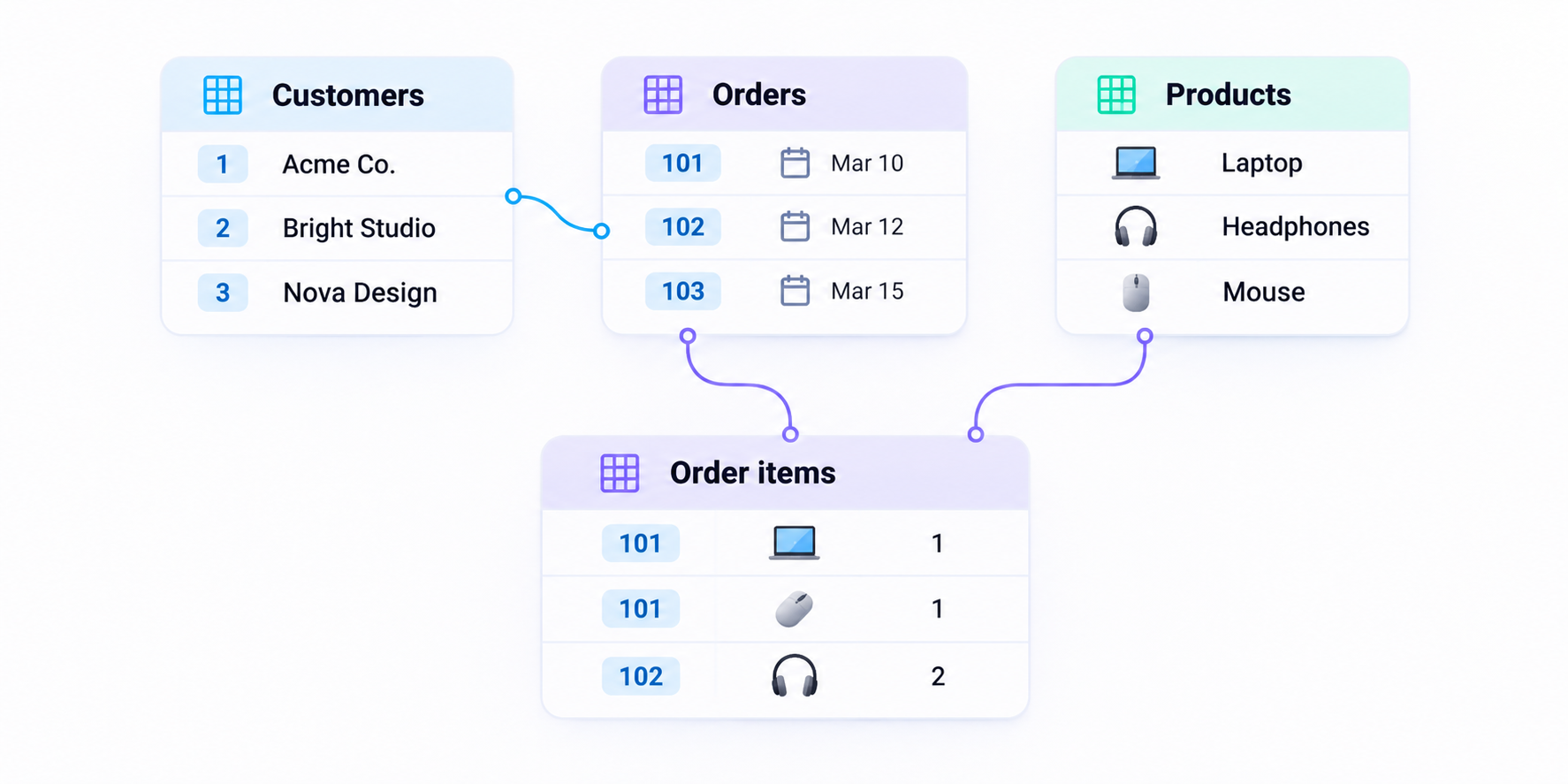
A database schema defines how data is structured and organized, helping ensure data integrity and consistency across the database.
Key Components of a Relational Database Schema
A relational database schema consists of several components that work together to organize information and maintain its accuracy.
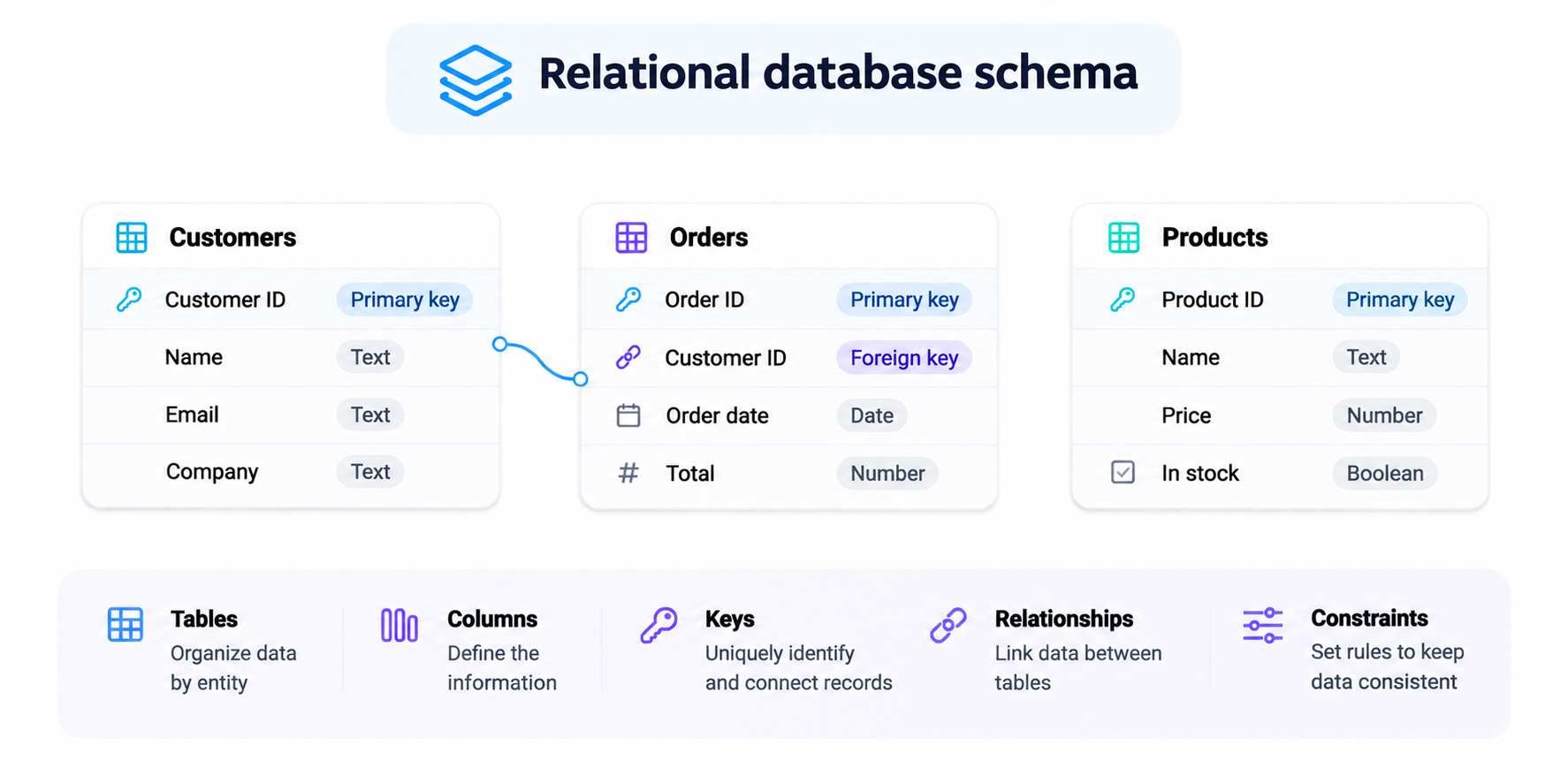
1. Tables and columns
Tables are the main building blocks of a relational database. Each table represents an entity, such as a customer, product, or order.
Columns define the attributes of that entity, while rows contain individual records. For example, a Customers table might include columns for customer ID, name, email address, and company.
A well-planned schema defines the tables based on the information you need to store. Instead of putting everything into one large table, separate related entities into their own tables.
2. Primary keys
A primary key is a column, or combination of columns, that uniquely identifies each record in a table.
For example, a Customers table might use Customer ID as its primary key. Each customer receives a unique value, making it possible to identify individual records even when two customers have the same name.
A primary key should contain unique, non-null values. It helps prevent duplicate records and provides a reliable way to connect information across tables.
3. Foreign keys
A foreign key is a column that references a primary key in another table. It establishes relationships between tables and helps maintain referential integrity.
For example, an Orders table can contain a Customer ID column that references the primary key in the Customers table. This connects each order to the customer who placed it.
Foreign keys help maintain consistent relationships between tables and prevent references to records that do not exist. For more context, see our guide to understanding relational databases.
4. Data types
A data type defines what kind of information a column can store. Common examples include:
- Integer: Whole numbers, such as customer IDs or product quantities.
- Text: Names, descriptions, and email addresses.
- Date and time: Order dates, deadlines, and timestamps.
- Boolean: True or false values, such as whether an order is paid.
- Decimal: Prices, measurements, and other numerical values.
Choosing the correct data type helps databases store information consistently and reduces errors when records are created or updated.
5. Constraints
Constraints are rules applied to database columns or tables to control what information can be stored.
Common examples include:
- NOT NULL: Ensures a field cannot be left empty.
- UNIQUE: Prevents duplicate values in a column.
- PRIMARY KEY: Ensures each record has a unique identifier.
- FOREIGN KEY: Maintains valid relationships between tables.
- CHECK: Ensures values meet specific conditions.
These integrity constraints help maintain consistent and accurate information as a database grows.
How to Design a Relational Database Schema
Good schema design starts with understanding what information you need and how different records relate to each other. Follow these steps to create a database structure that is easier to maintain.
Step 1. Identify the information you need
Start by listing the information your database needs to store and the processes it should support.
For an online store, this might include customers, products, orders, payments, and shipments.
Each distinct entity will usually become a separate table.
Step 2. Define your tables and columns
Decide which attributes belong to each entity. For example, a Customers table might contain Customer ID, Name, Email, and Company.
Avoid storing the same information in multiple tables unless there is a clear reason. Separating related information helps reduce duplication and makes updates easier.
Step 3. Define primary and foreign keys
Choose a primary key for each table. Then identify how tables connect and add foreign keys where needed.
For example, the Orders table can reference the Customers table through Customer ID. This establishes a relationship between the two tables without duplicating customer information.
Step 4. Map relationships between tables
An entity relationship diagram (ERD) helps visualize how tables connect before you build the database.
It typically shows entities, their attributes, primary and foreign keys, and relationships between tables.
For example, one customer can place multiple orders, creating a one-to-many relationship between Customers and Orders.
Mapping relationships makes it easier to spot missing connections and understand how information flows through the database.
Step 5. Define data types and integrity constraints
Choose appropriate data types for each column and define the rules that database records must follow.
For example, customer email addresses might need to be unique, while an order date should always contain a valid date.
A clearly defined schema helps prevent invalid entries and maintain data integrity.
Step 6. Test and refine your schema
Add sample records and test common operations. Can you retrieve all orders belonging to a customer? Can you update customer information without changing every order?
Testing helps identify problems before the database becomes more complex. Schema design is also an ongoing process: as requirements change, you may need to add tables, columns, or relationships.
If you’re exploring the software behind these structures, read our guide to database management systems.
Common Relational Database Schema Design Mistakes
Even a well-planned database can become difficult to maintain if its schema is poorly designed. Here are some common mistakes to avoid.
- Putting everything in one table: Combining unrelated entities creates duplicate information and makes updates harder. Separate data into logical tables.
- Missing foreign keys: Without clearly defined relationships, records can become disconnected, making reliable queries and maintenance more difficult.
- Choosing incorrect data types: Storing dates as text or prices as general strings can create inconsistencies and make filtering or calculations harder.
- Ignoring integrity constraints: Without rules such as UNIQUE, NOT NULL, and CHECK, invalid or duplicate information can enter the database.
- Overcomplicating the schema: Creating too many unnecessary tables and relationships makes the database harder to understand. Design around actual business requirements.
- Failing to document changes: As a schema evolves, undocumented changes make it difficult for other team members to understand the database.
A good schema should be structured enough to maintain data integrity but flexible enough to accommodate changing requirements.
Design and Manage Relational Database Schemas with Baserow
Database schema design is often harder than it looks. You might understand the information your business needs, but deciding how many tables to create, where relationships belong, and how to keep everything consistent can quickly become complicated.
As databases grow, these challenges become more noticeable. Teams struggle to visualize relationships across numerous tables, keep track of changing requirements, prevent duplicate information, and make schema changes without breaking existing workflows.
Baserow helps simplify these tasks with a visual, no-code database builder.
Instead of starting with SQL statements, you can create your database structure through an interface and manage it as your requirements evolve.
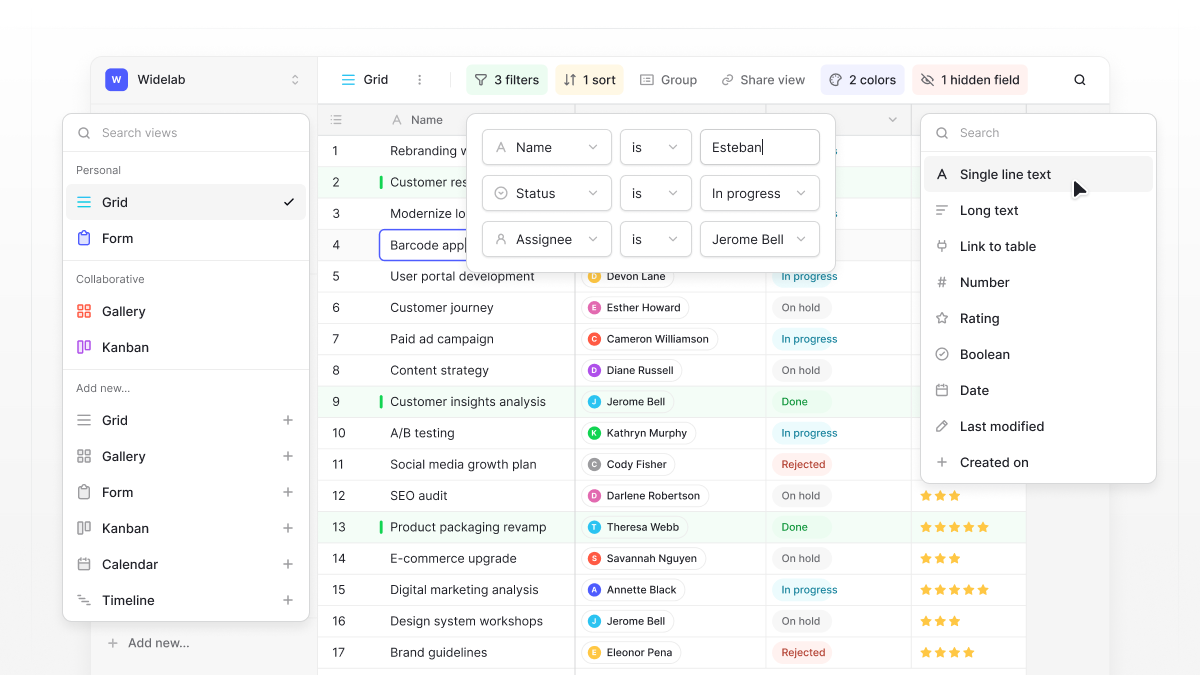
With Baserow, you can:
- Design tables visually: Create tables for different entities, add fields, and choose appropriate field types without writing SQL.
- Connect related information: Use linked record fields to establish relationships between tables, such as connecting customers with their orders or projects with tasks.
- Maintain consistent data: Configure field types and validation options to reduce incorrect or inconsistent entries.
- Understand your data: Use different views, filters, and sorting to make large databases easier to navigate and manage.
- Adapt your schema: Add fields, tables, and relationships as your business requirements change.
- Collaborate with your team: Give teammates access to shared databases and work with the same structured information instead of maintaining separate spreadsheets.
Baserow is an open-source database platform that combines relational data management with collaboration, automation, and application building. You can use it in the cloud or self-host it on your own infrastructure.
Whether you’re building a database from scratch or trying to bring order to an existing collection of spreadsheets, Baserow helps you create a structure your whole team can understand and maintain.
Frequently Asked Questions
What is the purpose of a relational database schema?
A relational database schema defines how information is organized, stored, and connected. It provides a structure for tables, columns, data types, keys, and constraints, helping maintain data consistency and integrity.
What is the difference between a database and a database schema?
A database stores the actual information, while a schema defines its structure. The schema describes how tables are organized, what data they contain, and how they relate to one another.
What are the main components of a relational database schema?
The main components include tables, columns, data types, primary keys, foreign keys, relationships, and integrity constraints. Together, they define how information is stored and connected.
What is an entity relationship diagram?
An entity relationship diagram (ERD) is a visual representation of a database structure. It shows entities, their attributes, and relationships between tables, helping developers plan and understand a database schema.
Can a relational database schema change over time?
Yes. A schema can evolve as business requirements change. You might add new tables, introduce columns, change data types, or modify relationships. Changes should be planned and tested to avoid data inconsistencies or application issues.
How do you maintain data integrity in a relational database?
Use primary keys, foreign keys, unique constraints, appropriate data types, and validation rules. These help prevent duplicate records, invalid values, and broken relationships between tables.
Can you design a relational database without SQL?
Yes. Visual database builders such as Baserow allow users to create tables, define fields, and connect related records through a graphical interface without writing SQL.
Build a Better Database with Baserow
Stop struggling with scattered data and complicated database structures. Build, connect, and manage your relational databases visually with Baserow.

Baserow 2.4 adds Button fields, Graph elements, workflow automation, AI provider management, improved Group By views, and 30+ more updates.

Discover how Airtable and Baserow compare in features, flexibility, speed, and scalability. Compare pricing plans and hidden costs to make an informed decision!

Explore the best open-source software alternatives to proprietary products. Discover OSS tools, licenses, and use cases with our updated directory.