
TL;DR
- A database management system (DBMS) is software used to create, manage, and access databases.
- Common types include relational, hierarchical, network, object-oriented, and NoSQL database management systems.
- DBMS software helps maintain data integrity, control access, and manage relationships between records.
- Traditional systems often require technical expertise, while no-code platforms make database management accessible to business teams.
- Baserow is an open-source, no-code database platform for building relational databases, connecting records, and automating workflows.
A database management system (DBMS) helps you store, organize, retrieve, and update data in a structured way. Businesses use database management systems to manage customer records, track inventory, power applications, and keep information consistent across teams.
Traditional tools such as PostgreSQL and Microsoft SQL Server give developers control over how databases work. To organize business information without writing code, check out visual platforms like Baserow.
In this guide, you’ll learn what a database management system is, how it works, the main types available, and how to choose the right solution for your needs.
What is a database management system (DBMS)?
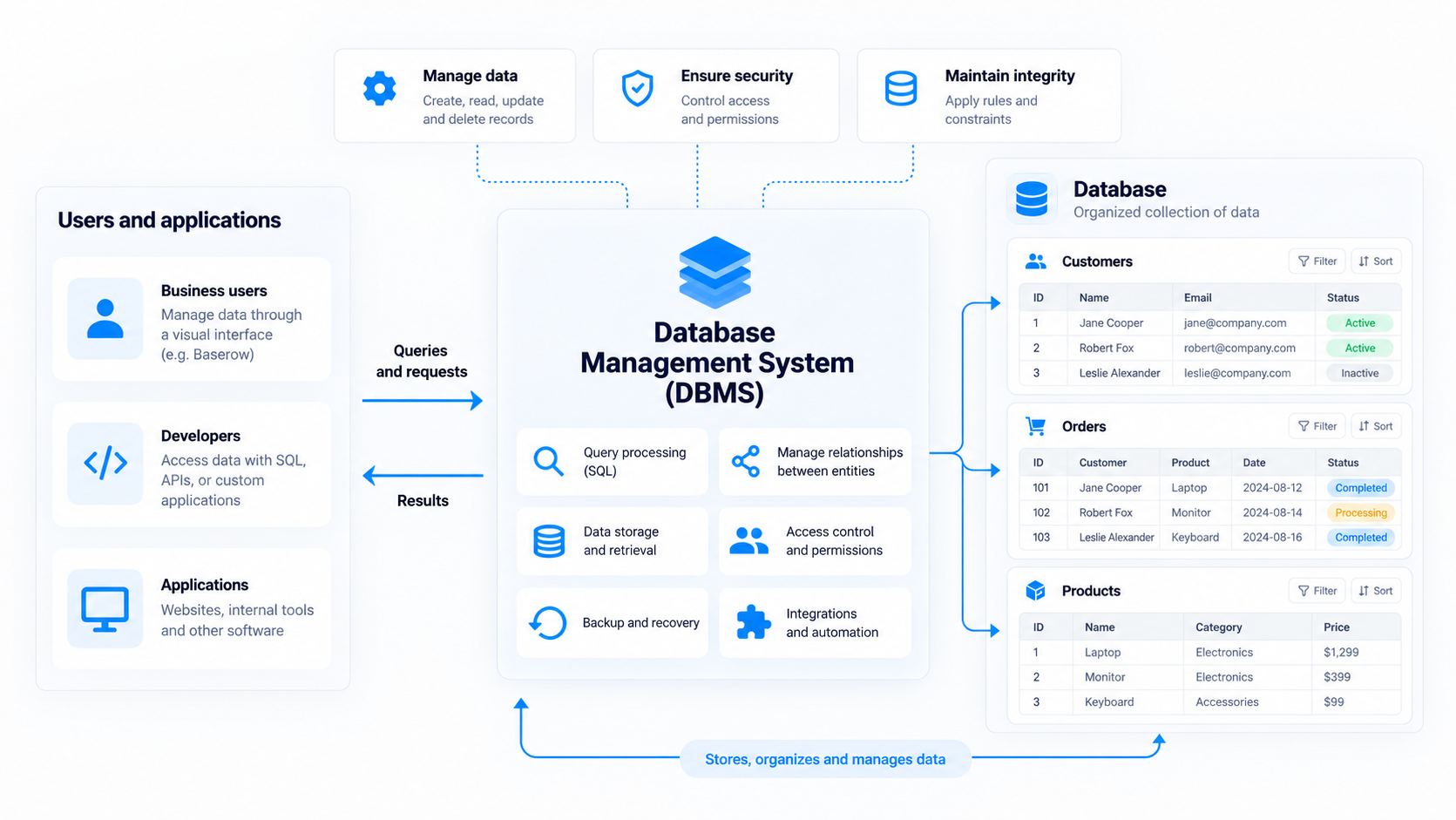
A database management system is software that allows users and applications to interact with a database. It handles operations such as storing information, retrieving records, updating data, and managing permissions.
For example, a company might use a DBMS to maintain customer records, connect customers to their orders, and give different departments access to the information they need.
It’s important to distinguish between a database and a DBMS. A database is an organized collection of information, while a DBMS provides the tools to create and manage it.
👉 Read our guide to what a database is for a closer look at the underlying concept.
How does a database management system work?
A DBMS processes requests from users and applications and performs the required operations on stored data. When someone adds a customer, for example, the system saves the record. When a team member searches for that customer, it retrieves the relevant information.
Most database management systems support several core functions:
- Data storage and retrieval: Store records and retrieve specific information when needed.
- Data integrity: Apply rules and constraints to help keep information accurate and consistent.
- Access control: Define who can view, create, update, or delete records.
- Data relationships: Connect records using identifiers and references.
- Backup and recovery: Help restore information after errors or system failures.
- Query processing: Interpret requests to retrieve or modify information efficiently.
A well-designed DBMS supports efficient data retrieval and updates, helping teams work with information quickly as their databases grow.
Many relational database management systems use Structured Query Language (SQL) to interact with data. SQL also includes data definition language (DDL), a subset used to define and modify database structures such as tables, columns, and constraints.
The exact capabilities depend on the system. Some DBMS tools focus on infrastructure and performance, while others provide visual interfaces for managing business information.
Types of database management systems
Different database management systems organize and access information in different ways. The best choice depends on your data type and model, application requirements, and how you need to use your data.
1. Relational database management systems (RDBMS)
A relational database management system organizes data into tables containing rows and columns. Foreign keys connect related records across tables, making it possible to manage connected information without duplicating everything.
For example, a sales database might contain separate tables for customers, products, and orders, with each order linked to the customer who placed it.
Relational systems use SQL and are well suited to structured data and applications that require consistent relationships. Examples include PostgreSQL, MySQL, Oracle Database, and Microsoft SQL Server.
2. Hierarchical database management systems
A hierarchical database organizes records in a tree-like structure. Each parent can have multiple children, but each child typically has one parent. This hierarchical model suits information with clear levels, although it can be less flexible for complex relationships.
3. Network database management systems
Network database systems allow records to have multiple connections, supporting more complex relationships than a traditional hierarchical structure. They are useful in certain specialized and legacy systems but are less common in modern business applications.
4. Object-oriented database management systems
Object-oriented database systems store information as objects, drawing on concepts from object oriented programming. They can be useful for specialized applications that work with complex objects, such as engineering models and simulations.
5. NoSQL database management systems
NoSQL databases support data models beyond traditional relational tables. Depending on the system, they may store documents, key-value pairs, graphs, or wide-column records.
Document databases can handle semi structured data, where records may contain different attributes or structures. NoSQL systems are often used in applications that need to handle large datasets, distributed workloads, or real-time data access.
👉 For a broader comparison, see our guide to the four main types of databases explained.
Key features of a database management system
When comparing database management systems, consider the following capabilities.
- Data organization and relationships: Look for support for suitable field types, structured tables, and relationships between entities.
- Search and queries: SQL-based systems let users retrieve and modify data through queries, while visual tools often provide filters, sorting, and search.
- Security and permissions: Access controls help ensure that users can only access or modify information they’re authorized to handle.
- Scalability and performance: Consider how the system handles increasing data volumes, concurrent users, and more complex operations.
- Administration and recovery: Database administrators may need monitoring, maintenance, backups, and recovery tools to keep systems reliable.
- Automation and integrations: These features connect databases to other applications and reduce repetitive work.
👉 For a deeper explanation of tables, fields, and relationships, read Database Structure Explained.
Database management system vs. database engine
A database engine handles core operations such as storing, retrieving, and modifying information. A DBMS generally provides a broader set of capabilities around the engine, potentially including security, administration, and interfaces.
Some products combine these functions into one system. Others let developers interact with the engine through SQL or application code.
For business teams, the important consideration is not only how data is stored, but also how easily people can manage it and incorporate it into everyday workflows.
Database management system vs. spreadsheets
Spreadsheets are useful for calculations, simple lists, and quick analysis. However, maintaining consistency becomes harder when information is interconnected or several people need to update it.
Database management systems provide more structured ways to define fields, connect records, manage permissions, and retrieve information.
Some modern platforms combine spreadsheet-style interfaces with relational database capabilities, making it easier to manage structured data visually.
👉 Learn more about rows vs. columns and how they organize information.
Baserow is best for teams that want database management without code
Traditional DBMS tools can require technical expertise to configure, query, and maintain. If your goal is to organize business information and build practical workflows, you may not need to manage database infrastructure or develop a custom application.
Baserow is an open-source, no-code database platform that helps technical and non-technical teams build and manage structured data through a visual interface.
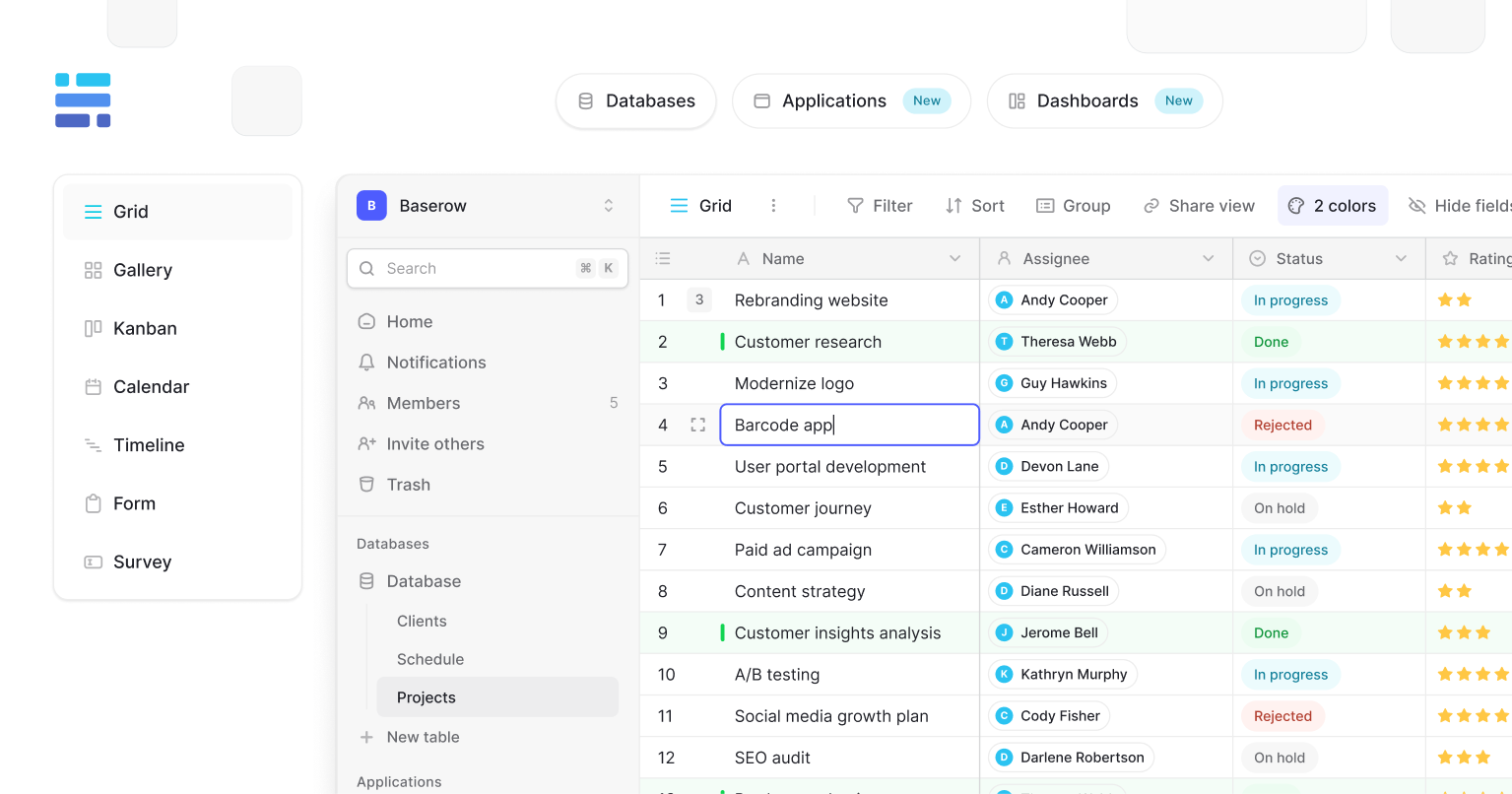
With Baserow, you can:
- Build databases visually: Create tables and define custom fields without writing code.
- Connect related records: Link customers, projects, tasks, products, and other information across tables.
- Create different views: Use grid, Kanban, calendar, and other views to organize the same underlying data for different workflows.
- Automate repetitive tasks: Trigger workflows based on changes in your data.
- Connect other applications: Use the API and integrations to incorporate your database into existing workflows.
- Choose your deployment approach: Use Baserow Cloud or self-host the platform for greater control over your infrastructure.
For example, an operations team can build a project management database connecting projects, tasks, and team members. The team can update information in one place and use different views to track deadlines, responsibilities, and progress.
Baserow is particularly useful when you need a shared source of truth for operational data without building a custom application from scratch. Its open-source model and self-hosting option also make it worth considering for organizations that want greater control over their data and deployment.
Explore the Baserow database documentation to see how to create your first database.
When should you choose Baserow?
Baserow is best for teams that need to manage structured business data, connect related records, and build flexible workflows without relying on developers for every change.
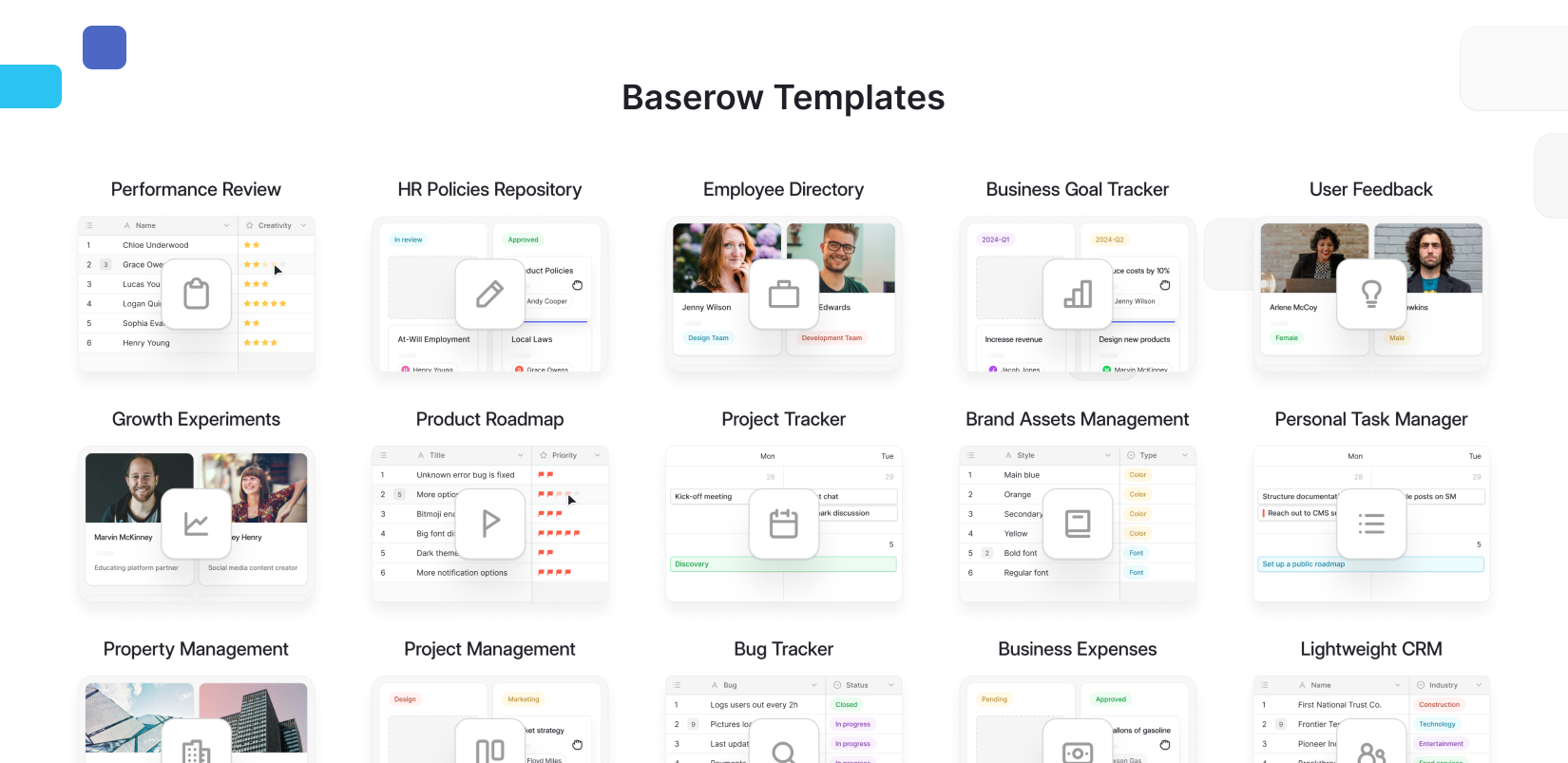
It’s a practical option for project management, customer tracking, inventory, content calendars, and internal tools. Teams can start with a simple database and expand it with views, automations, and integrations as their needs evolve.
If you need a specialized database engine for demanding application workloads, a traditional DBMS may be more appropriate. But if you want to turn business data into a collaborative system without developing a custom interface, Baserow offers an accessible starting point.
Read our guide to the best database for non-technical users to explore this approach further.
How to choose the right database management system
Before choosing a DBMS, consider five questions:
- What data will you manage? Determine whether you need structured tables, flexible documents, or complex relationships.
- Who will use it? Consider whether your users are developers, database administrators, business teams, or a combination.
- How will you access the data? Evaluate interfaces, SQL support, APIs, integrations, and collaboration features.
- What security and hosting do you need? Check permissions, backups, data residency, and self-hosting requirements.
- What is your budget? Compare subscription costs, infrastructure, maintenance, and the time required to manage the system.
👉 If you’re comparing options by price and features, explore our guide to the best free database software tools in 2026.
👉 For customer-focused workflows, our customer data platform best practices guide covers additional considerations.
Frequently asked questions
What is the main purpose of a DBMS?
Its main purpose is to let users and applications create, store, retrieve, update, and manage data while helping maintain its integrity and security.
What are common database management system examples?
Common examples include PostgreSQL, MySQL, Oracle Database, Microsoft SQL Server, and MongoDB. Baserow is another option for teams that want to manage databases through a visual, no-code interface.
Is SQL required to use a database management system?
No. Traditional relational systems often use SQL, but visual database platforms let users create tables, manage records, and connect data without writing queries.
What is the difference between a DBMS and an RDBMS?
A DBMS is the general category of software used to manage databases. An RDBMS is a type of DBMS that organizes data into related tables.
Can I use Baserow as a database management system?
Yes. Baserow lets you create and manage relational databases, connect records, collaborate, and build workflows through a visual interface. It’s particularly suitable for business teams that want database capabilities without developing a custom application.
Start managing your data with Baserow
A database management system helps turn scattered information into structured, usable data. The best choice depends on your technical requirements, the people who will use it, and the workflows you want to support.
If you want to build databases, connect records, and manage business processes without writing code, give Baserow a try.

Baserow 2.4 adds Button fields, Graph elements, workflow automation, AI provider management, improved Group By views, and 30+ more updates.

Discover how Airtable and Baserow compare in features, flexibility, speed, and scalability. Compare pricing plans and hidden costs to make an informed decision!

Explore the best open-source software alternatives to proprietary products. Discover OSS tools, licenses, and use cases with our updated directory.