

Modern teams rely on project management software that can adapt to fast-moving workflows, support team collaboration across departments, and remove friction from everyday execution. While ClickUp remains one of the most widely used platforms, many teams now look for Clickup Alternatives that offer simpler interfaces, more intuitive views, or more flexible data-driven workflows.
ClickUp’s depth is powerful, but its steep learning curve, sometimes overwhelming interface, and configuration-heavy setup often push organisations to explore new solutions. Teams want something visual, easier to use, and better suited for a larger team operating across different functions. For many, having control over custom fields, a reliable calendar view, drag and drop simplicity, and predictable task tracking workflows has become essential.
In recent years, a shift has emerged where teams want project management tools that offer more than fixed templates. Instead, they seek platforms that provide freedom—tools that allow teams to build project structures that truly match their internal processes. Tools like Baserow have grown in popularity for this reason, offering flexible data structures that can transform into a powerful project management system tailored to each department, instead of forcing teams to conform to a fixed interface.
Industry patterns show this evolution clearly. In Gartner’s analysis on operational trends for leadership (as seen in this report), executives increasingly prioritise adaptable tooling that supports new workflow models. This shift mirrors what modern teams expect today: easier adoption, visibility, and reduced overhead when scaling operations.
Why Teams Search for ClickUp Alternatives
ClickUp is known for its robust feature set, but many organisations find they simply don’t need — or don’t want to manage — such a complex system. As teams grow, so does the need for a project management tool that helps rather than slows down their work. Common challenges that push teams to explore other tools include:
- an interface that becomes overwhelming for new team members
- too many layers to configure before work can begin
- difficulty maintaining task structures for a larger team
- complexity in setting and tracking due date workflows
- limitations in the free plan for advanced reporting
- frustration with repetitive tasks requiring constant setup
Data-heavy project environments add additional complications. Managing thousands of tasks, files, and cross-linked updates creates friction in tools that were not designed around relational data.
Inside the Baserow Community, many users describe similar experiences: they began with ClickUp for general task management but grew frustrated once they needed more flexible structures. One community story highlights a marketing team that initially adopted ClickUp for campaign planning but outgrew it once more advanced workflows and custom fields were required. They eventually moved toward a data-first structure using Baserow, where they could create their own kanban boards, add timeline-like views, track tasks with deeper relationships, and customise dashboards for each team member.
This trend is aligned with the wider shift toward project management software built around transparency, adaptable workflows, and the ability to adjust processes quickly without technical overhead. Teams now look for:
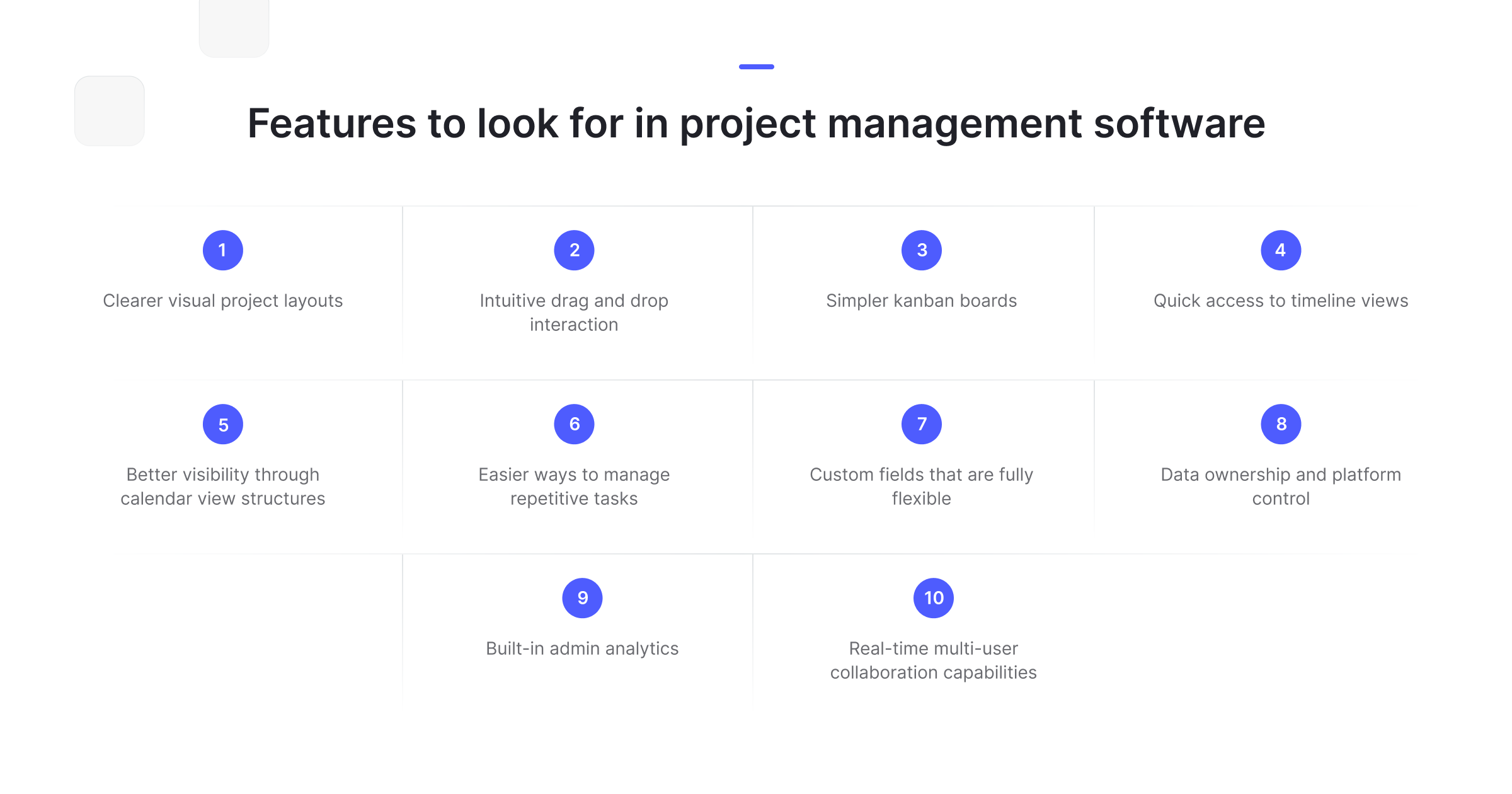
Another major shift is toward project management tools that also function as databases. These allow deeper tracking, connecting, and reporting, especially for operational and cross-functional work. The demand for this kind of flexibility has increased — something reflected in articles like Top 10 Project Management Tools and the Data Collaboration Tools for Marketing guide, where teams focus on visibility and creative ownership rather than being locked into rigid structures.
Platforms like Baserow fit especially well here, because unlike rigid all-in-one tools, they let you create your own project structure — whether you need kanban boards for engineering sprints, grid views for content calendars, gallery boards for creative assets, or custom fields for OKR tracking. The flexibility to build workflows instead of being forced into predefined templates is part of why Baserow is used as a project management foundation by many teams.
What Makes a Great ClickUp Alternative Today?
Teams evaluating alternatives are increasingly focused on simplicity, flexibility, and adaptability. A modern project management tool must support multiple workflows without feeling overwhelming. Key characteristics include:
- intuitive drag and drop
- easy-to-customise kanban boards
- smooth timeline views
- calendar view for date-heavy schedules
- powerful custom fields
- automation for repetitive tasks
- clear due date visibility
- usage reporting and admin analytics
- real-time team collaboration
- suitability for a large team
- affordable free plan availability
- easier onboarding with a lower learning curve
- strong integrations and API support
- ability to function as both a database and an application builder
Many teams today want the ability to connect multiple departments, track tasks fluidly, and adapt systems as they grow. Tools that operate as both a database and a project management interface — such as Baserow — offer long-term flexibility that traditional project management software cannot.
Baserow’s modular structure gives teams the ability to create kanban boards, build visual project maps, define project relations, or connect workflows across departments. In project management environments that require frequent iteration, this adaptability becomes a major advantage.
Teams evaluating ClickUp replacements also pay close attention to how a tool handles scaling. For fast-growing organisations, a project management tool must perform smoothly even when the workspace expands to thousands of records or multiple teams working simultaneously. A platform that can’t handle the needs of a larger team quickly becomes a bottleneck.
Another growing expectation is that a tool should provide meaningful insights. Built-in admin analytics, usage reporting, and advanced reporting are now considered essential for leaders who want clarity about execution, bottlenecks, and workload distribution. This is something highlighted in Gartner’s research around operational and productivity trends, where leaders increasingly lean on real-time insights to make better decisions.
Finally, teams look for tools that support multiple view styles. A single interface rarely fits every workflow. Many organisations want a project management tool that offers:
- kanban boards for task flow
- timeline views for roadmap planning
- calendar view for scheduling
- grid and table views for data-heavy work
- gallery views for creative assets
- personalised views for each team member
These requirements reflect a shift toward flexibility, where a platform must adapt to the work — not the other way around.
Tools like Baserow have become particularly valuable because they allow teams to build their own project system using views, custom fields, and relational structures with full creative control. This data-first approach gives organisations room to grow without encountering the limits that traditional project management software imposes.
Best ClickUp Alternatives (2025)
Below are the top tools teams consider when seeking a replacement for ClickUp. They vary widely in approach, complexity, and flexibility — making it easier for teams to choose the right fit based on their needs.
1. Baserow
Baserow is not a traditional project management tool, but its flexible no-code database structure makes it one of the most powerful alternatives for teams wanting complete control over their workflows. Instead of forcing teams to use rigid templates, Baserow allows users to create custom project views, complex task relationships, and dashboards that align perfectly with their internal processes.
Key advantages
- kanban boards, grid, calendar, and gallery views
- custom fields for any workflow
- relational database logic for connecting tasks, sub-tasks, and documents
- perfect for tracking tasks across multiple teams
- scalable for a larger team with no performance drop
- ideal for building advanced reporting dashboards
- supports automation for repetitive tasks
- allows full visibility of due date-driven workflows
- real-time collaboration across multiple team members
- built-in admin analytics through database queries
- functions as both a database and application builder in one
This flexibility makes Baserow ideal for operations teams, marketing departments, engineering squads, and cross-functional organisations that want something they can shape around their workflow — not vice versa.
%20(2).jpg)
Many examples inside the Baserow Community show how teams transitioned from ClickUp to Baserow for more control. One product team described replacing their entire task-tracking environment with a relational table setup, complete with tags, sprint cycles, feedback loops, timeline-like planning, and campaign documentation — all linked in one place.
Because Baserow works as a backend foundation, teams can continue evolving their workflow indefinitely without hitting structural limits. This is a major reason many teams choose it over conventional project management software.
2. Asana
Asana is a highly organised project management tool designed for teams who want clarity and structure without excessive configuration. It offers grid, timeline, calendar, and board views, making it easy to track tasks across multiple teams.
Strengths
- excellent for tracking tasks and due dates
- strong timeline views
- great for team collaboration
- smooth onboarding for small or medium teams
Limitations
- fewer customisation options compared to data-first tools
- advanced reporting locked behind paid plans
Asana suits teams needing structure but not deep flexibility.
3. Trello
Trello is one of the simplest visual project management tools available. Known for its drag and drop kanban boards, it’s excellent for smaller teams or those focusing on lightweight task management.
Strengths
- intuitive kanban design
- great for simple workflows
- visual project layouts that are easy for beginners
Limitations
- limited advanced reporting
- not ideal for very large projects
- fewer timeline features
Trello remains appealing for teams wanting simplicity.
4. Monday.com
Monday.com provides colourful visual layouts, automation, and collaboration features aimed at teams wanting a modern project experience.
Strengths
- powerful automations
- diverse templates
- strong timeline and calendar views
Limitations
- can become costly for large team environments
- learning curve can be steep in complex setups
It’s best suited for organisations wanting visual clarity with built-in automation.
5. Notion
Notion has become extremely popular thanks to its mix of documents, databases, and task views. It’s flexible and adaptable but requires more manual setup than dedicated project management tools.
Strengths
- multipurpose platform
- supports custom fields and various views
- great for documentation + project hybrid workflows
Limitations
- can become unstructured for fast-paced teams
- lacks deep admin analytics
- performance slows for very large workspaces
Notion works well for hybrid documentation + project needs.
6. Airtable
Airtable blends database functionality with easy-to-use project views. It works well for teams who want slightly more structure than Notion but still want visual project capabilities.
Strengths
- strong database foundation
- kanban, gallery, and timeline options
- ideal for connecting large datasets
Limitations
- limits on free plan
- can become expensive as teams scale
Airtable is best suited for teams needing a spreadsheet-like database with visual project tooling.
7. Wrike
Wrike is known for its advanced reporting capabilities and suitability for large team structures. It’s often used by enterprise-level organisations that need granular control over workflows, approvals, and cross-team coordination.
Strengths
- excellent advanced reporting dashboards
- robust timeline and workload views
- strong permissions for different team members
- powerful features for managing complex campaigns
Limitations
- can feel overwhelming for smaller teams
- more rigid than database-driven tools
- higher pricing for premium features
Wrike excels where detailed visibility and enterprise-level structure are required.
8. Coda
Coda blends documents, spreadsheets, and apps into a single canvas — offering a flexible, modular approach to work. Teams can create anything from lightweight task trackers to full workflow systems using powerful custom fields and interactive building blocks.
Strengths
- extremely flexible
- document + application + database hybrid
- supports complex workflows without coding
Limitations
- steep learning curve for non-technical users
- advanced features require careful setup
- can become hard to maintain at scale
Coda is ideal for teams that want extreme customisation and are willing to invest time in structure-building.
9. Jira
Jira remains one of the most trusted tools for software development teams. It’s built for agile workflows, sprint planning, bug tracking, and complex development cycles.
Strengths
- best-in-class for engineering workflows
- powerful automation and reporting
- deep sprint and issue-tracking features
Limitations
- not suitable for most non-technical teams
- complex interface
- rigid compared to modular no-code systems
Jira is still the go-to for developers, but not ideal for general business operations or creative teams.
10. Smartsheet
Smartsheet applies a spreadsheet-like interface to project management. It’s flexible, familiar, and works well for organisations used to working in grids and sheets.
Strengths
- excellent for spreadsheet lovers
- robust templates
- supports enterprise-level workflows
Limitations
- interface can feel dated
- lacks modern drag and drop usability
- fewer real-time collaboration features than newer tools
Smartsheet suits teams that want a familiar table-first approach.
11. Basecamp
Basecamp focuses on communication and clarity. It’s built for small teams needing straightforward organisation without the complexity of modern project suites.
Strengths
- simple interface
- clear communication tools
- ideal for low-complexity workflows
Limitations
- minimal advanced reporting
- lacks kanban and timeline views
- not suitable for highly structured work
Basecamp is great for small agencies, freelancers, and teams focused mostly on communication.
12. Hive
Hive combines project views, time tracking, and team messaging, making it a good cross-functional workspace for teams that need a little bit of everything.
Strengths
- built-in messaging
- multiple project views
- strong automations
Limitations
- interface can feel cluttered
- some features behind higher-tier plans
Hive is ideal for collaborative teams needing everything in one place.
13. Zenkit
Zenkit offers a lightweight, flexible project management experience with multiple views and simple task structures.
Strengths
- versatile views
- easy to use
- supports small-to-medium teams well
Limitations
- not ideal for large enterprise use
- limited advanced analytics
Zenkit is a clean, efficient solution for smaller teams wanting visual task management.
14. Teamwork
Teamwork is built for client services, making it one of the top choices for agencies.
Strengths
- excellent client-facing features
- good time-tracking
- strong financial tracking options
Limitations
- fewer creative views
- not ideal for technical teams
Teamwork is ideal for service businesses, agencies, and consulting organisations.
When Should You Switch to a ClickUp Alternative?
Many teams consider switching when their workflows outgrow static structures. Here are common signs that indicate it might be time to explore alternatives:
- Your team struggles with ClickUp’s steep learning curve
When onboarding new team members becomes difficult, productivity drops. Teams need tools that are easy to understand and fast to adopt.
- Your workflows require deeper flexibility
If you find yourself creating endless custom views, fields, and templates — but still need more control — it’s time to consider a more adaptable system.
- Your workspace becomes slow for a larger team
Teams scaling beyond 20–30 users often experience lag, slow loading, and overwhelming workspace complexity.
- You need advanced reporting without expensive upgrades
Many organisations want detailed analytics to understand team performance without paying enterprise-level prices.
- You need deeper relational data support
Project dependencies, cross-team links, document relations, and multi-view workflows benefit from a data-first platform like Baserow.
- You want a system you can adapt over time
When internal processes evolve, tools should evolve too. With Baserow, teams build their own structure — meaning no more rigid templates.
In short, when flexibility, scalability, or clarity begin to suffer, it’s time to explore more adaptable project management options.
Real-World Use Case: Moving from ClickUp to Baserow
Many teams move away from ClickUp not because it lacks features, but because it often introduces complexity they no longer want. ClickUp excels in task-level detail, but some teams require more structural freedom, long-term scalability, or the ability to customise operations beyond preset templates.
A compelling example comes from a discussion inside the Baserow Community, where a fast-growing design and marketing startup described their transition. Their team initially used ClickUp for tracking tasks, deadlines, and campaign activities. However, as the organisation grew:
- their workflows became more interconnected
- campaign tasks needed relational linking
- multiple teams needed cross-functional views
- reporting started to require deeper, customised structures
- a large team working simultaneously increased interface clutter
The team moved to Baserow, building a modular system that handled:
- connected tasks and subtasks
- view configurations for each department
- calendar view for scheduling and delivery deadlines
- kanban boards for sprint and production cycles
- custom fields for campaign priority, status, asset type, and channels
- advanced reporting dashboards through relational data
- simplified drag and drop adjustments across views
This shift allowed the team to handle complex relational workflows without being confined to a rigid project management template. Because Baserow functions as both a database and an application builder in one, the organisation gained full autonomy to shape its project environment as processes evolved.
Frequently Asked Questions
These FAQs are crafted to target high-volume search queries and emerging AI-powered search patterns.
- Does Google have something similar to ClickUp?
Google does not offer a full project management platform with multiple views like ClickUp. Instead, users typically rely on Google Tasks, Google Sheets, or Google Calendar. For more advanced workflows, teams usually integrate Google Workspace with third-party project management tools such as Asana, Trello, or a flexible no-code database like Baserow.
- What is ClickUp comparable to?
ClickUp is most comparable to Asana, Monday.com, Wrike, and Notion. These tools offer similar features like task tracking, timeline views, dashboards, and collaboration. However, platforms like Baserow and Airtable provide deeper customisation through database logic, letting teams build processes rather than adapting to fixed templates.
- Why is ClickUp so popular?
ClickUp became popular because it consolidated many functions — tasks, docs, goals, timelines, and dashboards — into a single platform. It eliminates the need to switch between multiple project management tools. However, its complexity and steep learning curve drive many users to seek more intuitive and flexible alternatives.
- What is the best free organizing app?
The best free organising tools currently include Trello (for visual kanban boards), Notion (for hybrid documentation and task management), and Baserow (for customisable workflows with database logic). The right choice depends on whether you prefer structured templates, flexibility, or a build-your-own approach.
- What is the best free task management tool?
Trello, Todoist, and Asana offer strong free plans for managing simple tasks. For teams needing custom fields, relational links, and multiple views without paying premium prices, Baserow’s free tier provides far more structural flexibility.
- What tools allow real-time collaboration in a no-code database?
Platforms like Baserow, Airtable, and Notion offer real-time collaboration with multiple users editing, updating, and commenting simultaneously. Baserow additionally lets teams create custom structures and workflows while maintaining fast performance for growing organisations.
- Which tools provide built-in admin analytics and usage reporting?
Wrike, Monday, Asana, and Baserow support admin-level insights. Baserow’s advantage is that its database model allows teams to build personalised reporting dashboards using their own relational data.
- What tools provide both database and application builder in one?
Baserow is one of the few tools that function as both a database and an application builder. This dual capability lets teams design task systems, dashboards, workflows, and apps without switching platforms. Coda and Airtable also support hybrid models, but Baserow provides greater control and adaptability.
Conclusion
Choosing the right project management tool is ultimately about finding the system that matches the way your team works. While ClickUp remains powerful and feature-rich, many organisations prefer tools that offer a simpler interface, faster adoption, and the flexibility to build workflows that fit their unique needs and offers key features.
Whether you want a tool with visual project layouts, robust automations, easier task tracking, or deeper database-level control, there is now an entire ecosystem of ClickUp alternatives available. Tools like Asana, Trello, Monday, Notion, Airtable, and Wrike are strong options depending on your goals.
But for teams that want the freedom to design highly customised workflows — with kanban boards, timeline-like structures, relational data, real-time team collaboration, admin-level analytics, and the ability to scale without limits — Baserow offers a uniquely flexible foundation.
If your organisation is ready to move beyond rigid project management software and build a more adaptive, data-first system, Baserow provides everything you need to create a workflow that grows with your team.
Start Building Today
Streamline your workflows, improve team collaboration, and build a project system shaped around your processes.


Baserow 2.4 adds Button fields, Graph elements, workflow automation, AI provider management, improved Group By views, and 30+ more updates.

Discover how Airtable and Baserow compare in features, flexibility, speed, and scalability. Compare pricing plans and hidden costs to make an informed decision!

Explore the best open-source software alternatives to proprietary products. Discover OSS tools, licenses, and use cases with our updated directory.