
TL;DR
- Relational databases organize information into tables with rows and columns, using primary and foreign keys to connect records.
- The three main types of relational database relationships are one-to-one, one-to-many, and many-to-many.
- Relational databases can use centralized, distributed, or cloud-based architectures depending on scalability and infrastructure requirements.
- Unlike NoSQL databases, relational databases use structured data models, although some also support semi-structured data.
- Baserow makes relational database management easier with a visual, no-code interface for creating tables, linking records, and automating workflows.
Relational databases are widely used to organize business information, connect records, and manage structured data. They provide a consistent way to store information, retrieve specific data points, and maintain relationships between different datasets. From customer records to financial transactions, relational databases support many modern data management processes.
In this guide, we’ll explore how relational databases work, how their structures differ, and when to use them.
What Are the Types of Relational Databases?
A relational database organizes information into tables consisting of rows and columns. Each table represents a particular entity, such as customers, employees, products, or orders. Data is stored in a structured format, allowing users to retrieve, update, and connect information efficiently.
Relational databases use keys to identify records and establish connections between tables. A primary key acts as a unique identifier for each record, while a foreign key references a record in another table.
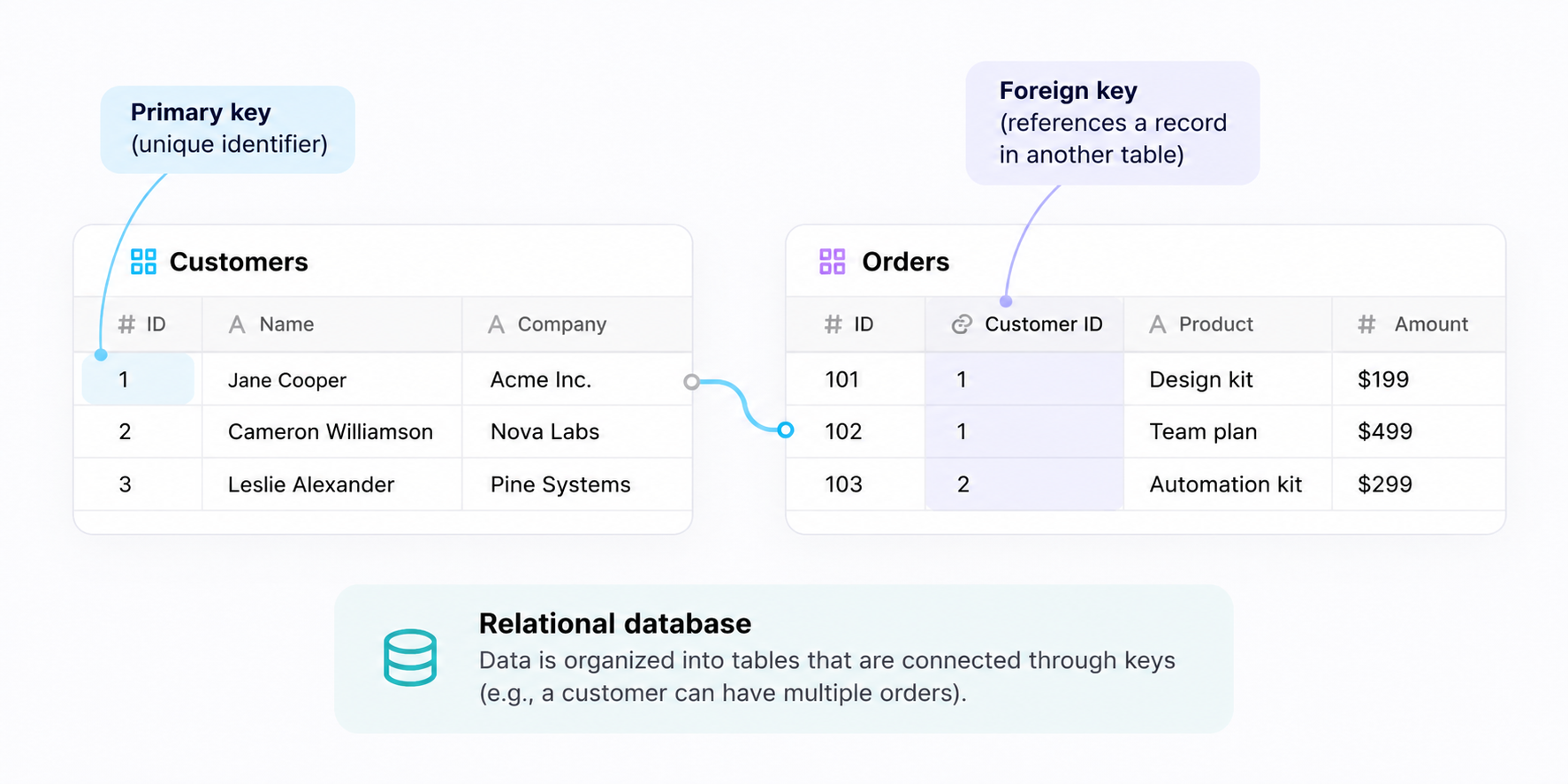
There are several ways to understand the types of relational database structures:
- Relationship types: One-to-one, one-to-many, and many-to-many relationships describe how records connect across tables.
- Database architectures: Centralized, distributed, and cloud-based approaches describe how databases store data and make it accessible.
- Relational and non-relational models: Understanding how relational databases differ from other database types helps determine which structure is suitable for different applications.
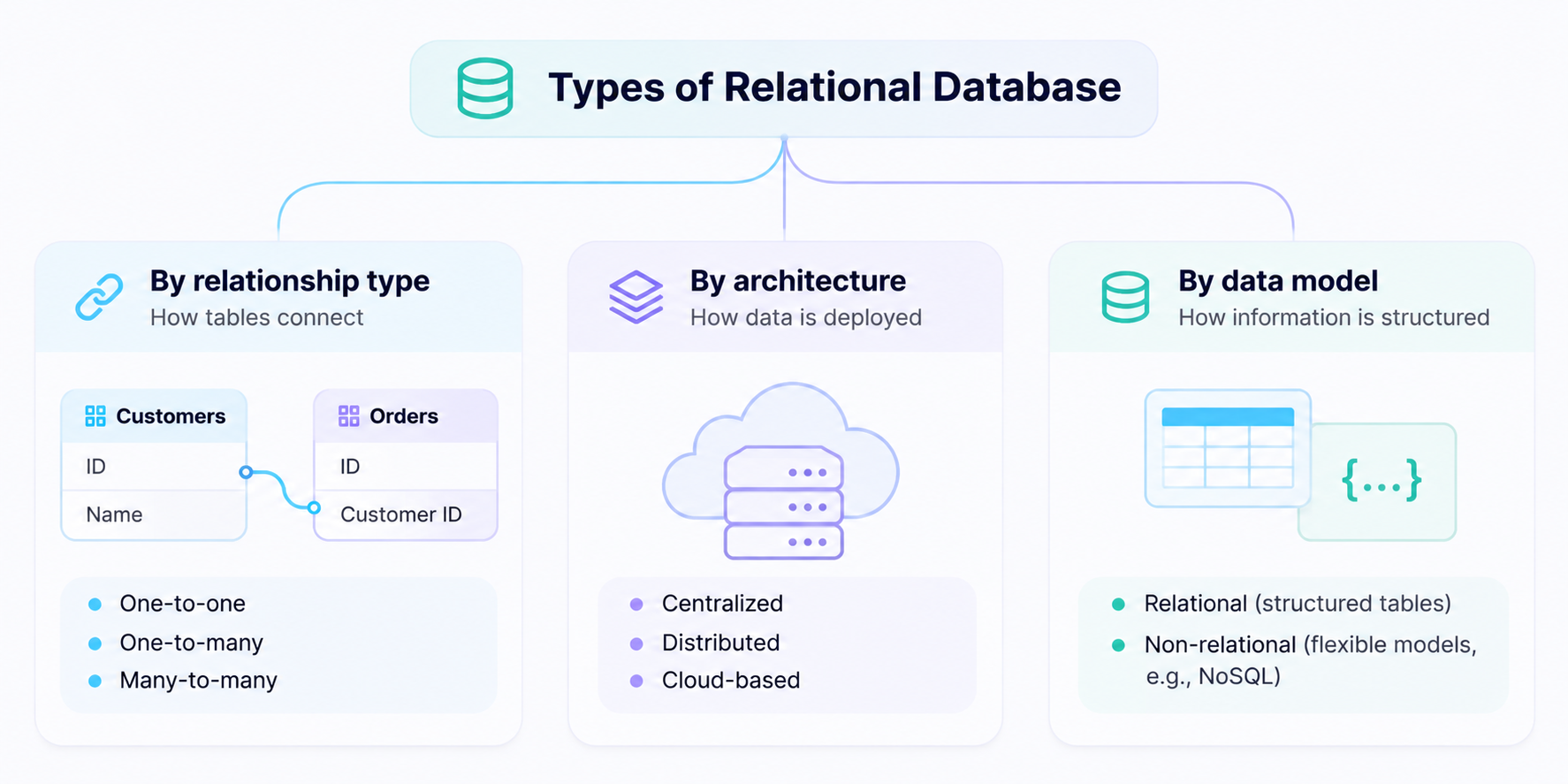
These categories describe different aspects of database design rather than mutually exclusive database types. To explore other database models, read our guide to the four main types of databases.
1. Types of Relationships in Relational Databases
One of the main advantages of relational databases is their ability to connect information across multiple tables. Instead of duplicating information, databases manage related records through keys and relationships.
There are three common types of relationships.
One-to-one relationship
A one-to-one relationship connects one record in a table to exactly one record in another table.
For example, an employee might have one employee profile and one security access record. Each profile corresponds to a single access record.
This relationship is useful when information needs to be separated for security, organization, or data management purposes.
One-to-many relationship
A one-to-many relationship connects one record in a table to multiple records in another table.
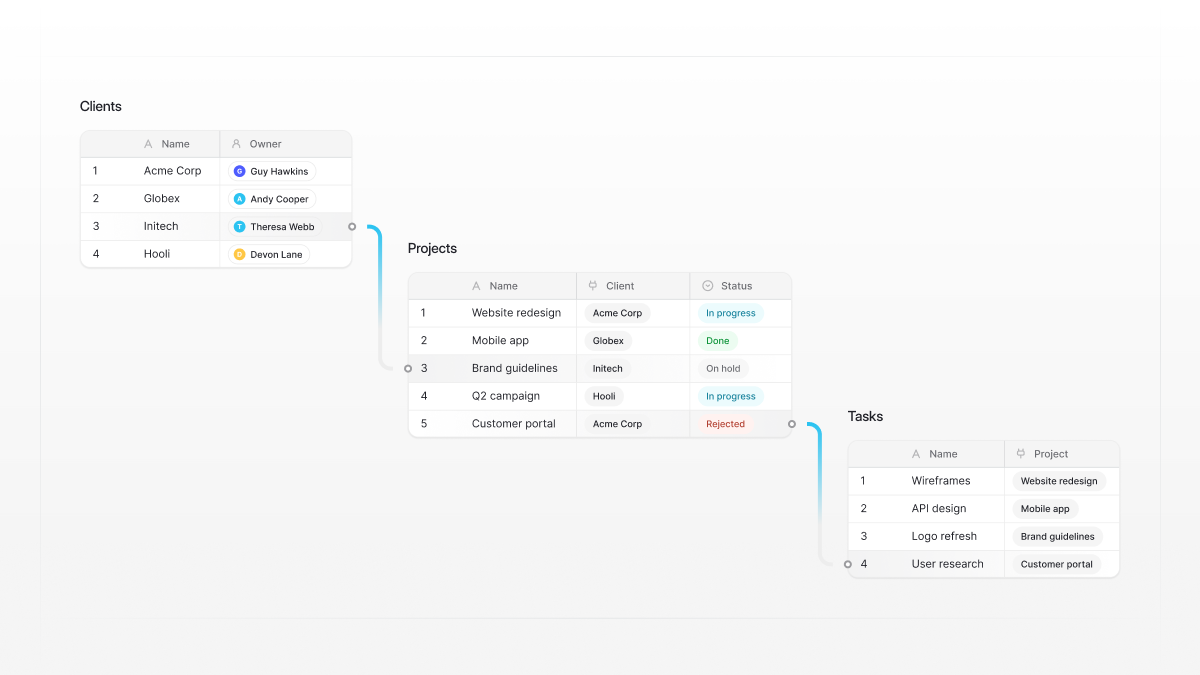
For example, one customer can place several orders, but each order belongs to one customer.
A foreign key in the orders table references the customer’s primary key, creating a connection between the two tables. This allows a database to retrieve customer and order information without storing the same customer details repeatedly.
Many-to-many relationship
A many-to-many relationship connects multiple records in one table to multiple records in another.
For example, a student can enroll in multiple courses, and each course can have multiple students.
Relational databases manage this relationship through a junction table, also called a linking or associative table. It contains foreign keys referencing the primary keys of the two connected tables.
These relationships help maintain consistent data and make complex database structures easier to manage. Learn more about database tables, keys, and relationships.
2. Types of Relational Database Architectures
Relational databases can also be classified by how they are deployed and how users access their data. Database architecture affects scalability, availability, performance, and how organizations manage their infrastructure.
Centralized relational databases
A centralized relational database stores data in one main database system. Applications and users connect to this system to retrieve or update information.
Because data is maintained in one central location, this architecture is relatively straightforward to configure and manage. It also makes it easier to apply consistent database management rules.
Example: A small business using one database server to manage customer records, invoices, and inventory.
Distributed relational databases
A distributed relational database stores or processes data across multiple servers or locations while maintaining a logical database structure.
This approach can improve availability, support larger workloads, and distribute data processing across infrastructure. Some systems use replication or partitioning to distribute information and balance workloads.
Horizontal scaling allows organizations to increase capacity by adding more servers rather than relying exclusively on more powerful hardware. This can be useful for applications that experience growing traffic or need to serve users across multiple locations.
Example: A global business operating applications across multiple regions and requiring reliable access to business data.
Cloud-based relational databases
Cloud-based relational databases run on cloud infrastructure instead of being hosted entirely on an organization’s own servers.
They can reduce infrastructure maintenance and make it easier to adjust computing resources as workloads change. Depending on the service, providers may also manage backups, updates, security, and availability.
Example: A growing SaaS company using a managed cloud database to support its application without maintaining physical database servers.
These architectures are not exclusive to specific database products. Relational database systems can be deployed on centralized servers, distributed infrastructure, or cloud platforms depending on an organization’s requirements.
3. Relational vs. Non-Relational Databases
Relational databases are not the only option for storing and managing information. NoSQL databases provide alternative ways to organize data, particularly when applications need flexible structures or work with large amounts of unstructured or semi structured data.
The main difference is how information is organized and connected.
Relational databases store information in predefined tables with rows and columns. They use primary and foreign keys to establish relationships and maintain data consistency. This structure works well when data has clearly defined connections and requires reliable transactions.
NoSQL databases support different data models, including document, key-value, column-family, and graph databases. They often provide more flexibility when the structure of information changes frequently or when applications handle different types of data.
For example, document databases store information in individual documents, while graph databases focus on connections between entities. These models can be useful for applications that need to manage complex networks of relationships.
Some relational database systems also support JSON and other flexible data formats. PostgreSQL, for example, supports JSON data alongside traditional relational structures, allowing developers to work with flexible data models.
Another historical example is IBM Information Management System (IMS), commonly known as IMS. It is primarily a hierarchical database management system rather than a relational one. It demonstrates how different database models have evolved to address specific data storage and management requirements.
The right choice depends on your data structure, application requirements, querying needs, and scalability expectations. For a broader overview, explore our guide to different types of databases.
4. How to Choose the Right Relational Database Structure
Choosing the right relational database structure depends on what you need to store, how applications will use the data, and the resources available to manage the system.
Consider these factors before making a decision:
- Data structure: Relational databases work well when information has clearly defined relationships and can be organized into structured tables.
- Performance: Evaluate query complexity, transaction volume, and expected workloads. High performance applications may require additional optimization and carefully designed database structures.
- Scalability: Consider whether you need vertical scaling, horizontal scaling, replication, or distributed data storage as your organization grows.
- Data consistency: Primary keys, foreign keys, and database constraints help maintain accurate and consistent records across related tables.
- Security and reliability: Look at access controls, backups, encryption, transaction support, and recovery options.
- Flexibility: Consider whether your applications work primarily with structured data or also need to manage unstructured or semi structured data.
- Technical expertise: Some database management systems require dedicated administrators and development resources, while others are easier to configure and maintain.
- Budget: Consider licensing, hosting, infrastructure, maintenance, and support costs.
A good database offers the right balance between performance, flexibility, security, and ease of management. The best solution is not necessarily the most advanced one, but the one that meets your organization’s requirements.
5. Manage Relational Databases Without the Complexity with Baserow
Working with relational databases can become complicated as your data grows. Information gets scattered across multiple tables, relationships become harder to maintain, duplicate records create inconsistencies, and finding the right information often requires writing complex SQL queries. Sharing data with non-technical teammates can be another challenge.
Baserow makes relational database management more accessible by combining a visual database builder with tools for collaboration, automation, and application development.
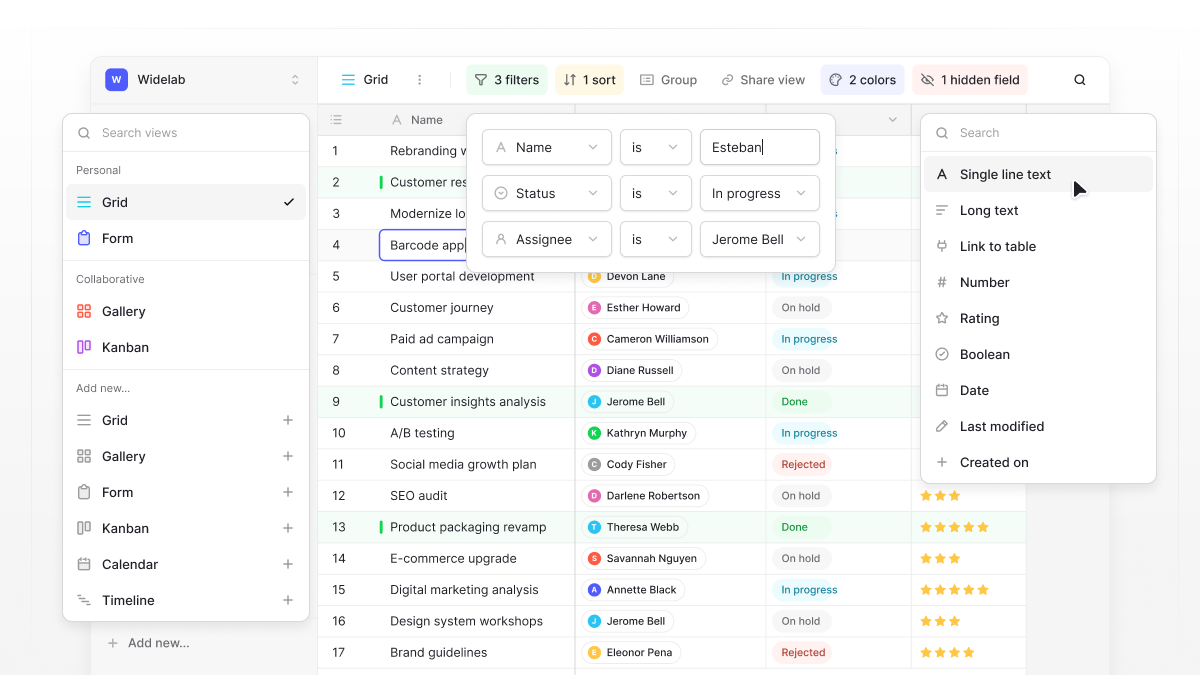
Instead of managing everything through SQL or switching between different tools, you can:
- Connect data without duplicating it: Use linked records to connect customers, projects, orders, and other tables. Update information in one place and keep related records connected.
- Keep your data organized: Choose from different field types, set up relationships, and use filters, sorting, and grouping to find the information you need.
- Give everyone a clear view of the data: Create grid, kanban, calendar, and gallery views for different teams and workflows without duplicating your database.
- Reduce repetitive work: Use automations to trigger actions when records are created or updated, helping teams spend less time on manual data entry and follow-ups.
- Build tools around your data: Use Baserow’s Application Builder to turn your databases into custom internal tools, portals, and business applications.
- Maintain control over your data: Choose Baserow Cloud or self-host Baserow on your own infrastructure.
Baserow is an open-source, no-code database platform that brings relational data management, collaboration, and workflow automation together. Whether you’re replacing scattered spreadsheets or building a connected system for your business, you can manage your data without making database administration your team’s full-time job.
Ready to organize your data? Start building your relational database with Baserow.
Frequently Asked Questions
What are the three main types of relational database relationships?
The three main types are one-to-one, one-to-many, and many-to-many. They describe how records in different tables connect to each other.
What is SQL in a relational database?
SQL stands for Structured Query Language. It is the standard querying language used to create, retrieve, update, and manage data in relational database systems. The phrase structure query language SQL is sometimes used in keyword searches, but Structured Query Language is the correct technical name.
What is a primary key in a relational database?
A primary key is a field or combination of fields that serves as a unique identifier for each record in a table. It helps databases identify individual records and establish relationships with other tables through foreign keys.
What is a database management system (DBMS)?
A database management system (DBMS) is software that allows users to create, store, retrieve, update, and manage data. A relational database management system provides tools for working with structured tables, relationships, primary keys, and foreign keys.
Are relational databases suitable for large amounts of data?
Yes. Relational databases can manage large datasets and complex workloads when properly designed and configured. Distributed and cloud-based architectures can provide additional scalability and support high-performance applications.
What is the difference between relational and NoSQL databases?
Relational databases organize structured data into tables with defined relationships. NoSQL databases support different data models, including document, key-value, column-family, and graph databases. The best choice depends on your data structure, application requirements, and querying needs.
Is Baserow a relational database?
Baserow is an open-source, no-code database platform that supports relational data management. Users can create tables, connect records using linked fields, and manage related information through a visual interface without writing SQL.
Manage Relational Data with Baserow
Build connected tables, link records, and manage relational data without writing SQL. Try Baserow to create and manage your own relational databases with a visual, no-code interface.

Baserow 2.4 adds Button fields, Graph elements, workflow automation, AI provider management, improved Group By views, and 30+ more updates.

Discover how Airtable and Baserow compare in features, flexibility, speed, and scalability. Compare pricing plans and hidden costs to make an informed decision!

Explore the best open-source software alternatives to proprietary products. Discover OSS tools, licenses, and use cases with our updated directory.