
An MCP server is a system that connects an AI application to external tools, data, and actions through the Model Context Protocol. If you are wondering what is an mcp server, the short answer is: it gives AI models a standard way to access information, retrieve context, and perform tasks outside the chat window.
MCP stands for model context protocol mcp. It is a standard protocol that helps AI applications connect to systems such as databases, APIs, file storage, calendars, code repositories, and business tools. Instead of building a custom integration for every AI client and every data source, MCP creates a shared way for them to communicate.
For business teams, this matters because AI becomes more useful when it can work with real data. An assistant that can only answer from general training knowledge is limited. An assistant connected through MCP can retrieve current records, understand the context, and help complete work.
What is an MCP server?
An MCP server exposes tools, data, or prompts to AI applications in a structured way. It acts as a bridge between an AI client and an external system.
For example, an MCP server can connect an AI assistant to a database, a file system, a project management tool, or a CRM. The AI does not need direct access to everything. Instead, the server defines what the assistant can see and what actions it can request.
MCP server definition: An MCP server is a software layer that lets AI applications access external systems through a standard protocol, so they can retrieve data, use tools, and support task execution.
In simple terms, the AI client asks for something, the MCP server checks what is available, performs the requested action if allowed, and returns structured information back to the AI application.
Why MCP servers matter
AI models are powerful, but they often lack access to live business context. They do not automatically know what is inside your database, project tracker, documents, or internal systems.
An MCP server helps solve this gap by connecting AI models to external tools and data in a controlled way.
This can enable AI assistants to:
- Read current information from a connected system
- Search records, files, or documentation
- Trigger approved actions
- Update structured data
- Support multi step workflows
- Help teams work with real time business context
- Reduce manual switching between tools
Without MCP, each AI application may need its own custom integration. That creates extra work for developers and makes it harder to scale AI across business systems. MCP gives teams a more consistent connection model.
How an MCP server works
The basic MCP architecture includes a client and server.
The MCP client lives inside an AI application, such as an AI assistant, coding tool, or agent interface. MCP clients connect to MCP servers to request context or tools.
The MCP server connects to the external system. That system might be a database, API, file system, or business application.
A typical flow looks like this:
- A user asks an AI assistant a question or gives it a task.
- The ai client decides it needs external context or tool execution.
- The client sends a request to the MCP server.
- The MCP server checks available tools, permissions, and data.
- The server retrieves data or performs the allowed action.
- It returns structured results to the AI client.
- The AI uses the response to answer, summarize, update, or continue the task.
This is why the phrase “mcp server works” is often explained through a simple client-server model. The AI application does not directly own every integration. It uses MCP to communicate with systems that expose approved capabilities.
MCP server example
Imagine a team keeps project data in a database. Without MCP, an AI assistant may only answer general questions about project management. It cannot know which tasks are overdue or which owner is blocked.
With an MCP server connected to that database, the assistant can ask for relevant records. It can retrieve overdue tasks, summarize blockers, and help the user decide what to do next.
For example, a user might ask:
“Which projects are at risk this week?”
The MCP client sends that request to the server. The server queries the connected project database, retrieves data about due dates and statuses, and returns structured results. The AI then summarizes the projects that need attention.
Depending on permissions, the assistant may also update a status, create a task, or add a note. In a read only setup, it can answer questions but cannot change records.
What can an MCP server connect to?
An MCP server can connect AI applications to many types of systems.
Common examples include:
- Databases
- File storage
- Internal documentation
- CRMs
- Project management tools
- Ticketing systems
- Calendars
- APIs
- Developer tools
- Business applications
A file system MCP server, for example, can allow an AI assistant to search or read approved files. A database MCP server can allow the assistant to query records. A developer-focused server can help an AI coding assistant inspect repositories or run controlled actions.
The important point is that MCP gives AI a standard way to interact with external systems instead of relying on one-off integrations.
MCP servers, AI agents, and tool execution
MCP is especially relevant for enabling ai agents. An AI agent needs more than conversation. It needs context, tools, and permission to take action.
An MCP server can expose specific tools to the agent. These tools may allow the agent to search records, retrieve documents, update a task, create a database row, or call another service.
This is where tool execution becomes important. The AI model decides that a tool is needed, the MCP client sends the request, and the server handles the actual interaction with the external system.
This makes AI applications more practical. Instead of only suggesting what a user should do, an AI agent can help perform parts of the workflow, within the limits set by the connected server. Today, developer ecosystems are more than just tools—they drive innovation. Read more about Fostering a Developer Ecosystem Around MCP Servers
MCP server vs API: what is the difference?
An API allows software systems to communicate. MCP also enables communication, but it is designed specifically for AI applications and AI agents.
With a traditional API, developers usually build custom logic for each integration. They decide which endpoints to call, how to format requests, and how to handle responses.
With MCP, the goal is to provide a standard protocol for AI clients and external systems. The server exposes tools and context in a way that AI applications can understand more consistently.
That does not mean MCP replaces APIs. Many MCP servers use APIs behind the scenes. The difference is that MCP creates a more AI-friendly layer between the model and the tool.
Read-only vs action-enabled MCP servers
Not every MCP server should be allowed to change data. Some use cases only need read only access.
A read-only server can help AI applications search, summarize, and answer questions without modifying records. This works well for reporting, documentation search, analytics, and research tasks.
An action-enabled server can allow the AI to create, update, or delete information. This is more powerful, but it also requires stronger permissions, review, and governance.
For example:
- A read-only setup can answer “Which customers renewed this month?”
- An action-enabled setup can update a customer record or create a follow-up task.
Business teams should decide which actions are safe, who can use them, and whether sensitive workflows need approval before execution.
Benefits of using MCP servers
MCP servers help make AI tools more useful in real business environments.
Key benefits include:
- Better access to current business context
- Fewer custom integrations for each AI application
- More consistent connections between AI tools and systems
- Better support for multi step workflows
- Controlled access to external tools and data
- Improved ability to use AI with real time operational data
- A clearer separation between the AI client and the connected system
This matters for companies that want to move from basic chatbots to AI assistants that can work with actual business information.
Common MCP server use cases
MCP servers can support many practical use cases.
Business teams can use them to query internal databases, summarize customer records, inspect project status, update task trackers, or create reports from live data.
Developers can use MCP-connected coding tools to inspect files, retrieve documentation, or interact with development environments.
Operations teams can use AI assistants connected to workflow tools to find overdue approvals, identify missing fields, or update process records.
Customer-facing teams can use MCP to connect AI applications to customer data, ticket histories, or support documentation.
The strongest use cases are usually those where AI needs current data and structured access to tools.
How Baserow fits into MCP
Baserow is relevant to MCP because many AI workflows need structured business data. Baserow provides a no-code database and application-building platform where teams can organize records, workflows, tasks, customers, projects, assets, and operational data.
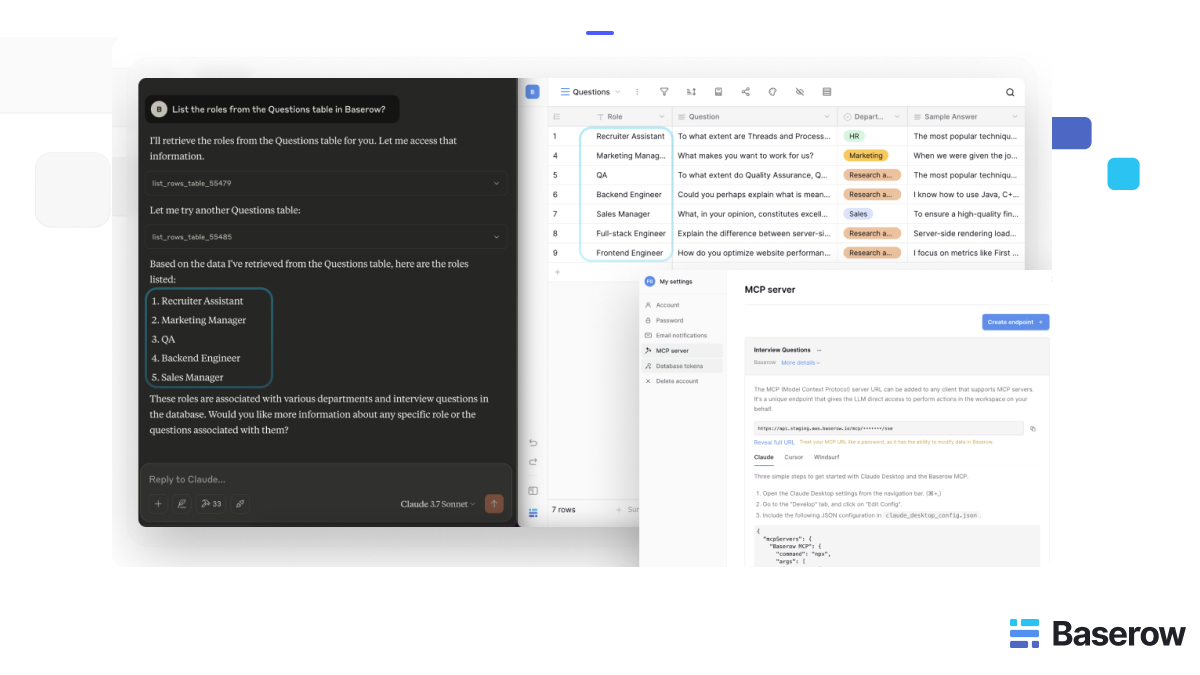
Baserow’s MCP Server connects AI assistants to Baserow workspaces, making it possible to interact with database records through supported MCP clients such as Claude Desktop, Cursor, and Windsurf. Teams can use natural language to query, create, update, or manage records depending on the endpoint and permissions. Baserow also notes that MCP endpoints should be treated securely because the generated URL grants access to the connected workspace.
This makes Baserow useful when teams want AI assistants to work with structured data rather than scattered spreadsheets. For example, an AI assistant connected to Baserow could help summarize records, update task statuses, review customer data, or support workflow management.
To learn more, visit the Baserow MCP Server documentation.
Final thoughts
An MCP server gives AI applications a standard way to connect with external tools, data sources, and actions. It helps AI move beyond static responses and work with real business context.
The core idea is simple: the AI client makes a request, the MCP server connects to the external system, and the server returns structured context or performs an allowed action.
For teams exploring AI agents, MCP can provide a cleaner way to connect models to databases, documents, workflows, and business applications. And for teams that already manage structured data in Baserow, the Baserow MCP Server offers a practical path for connecting AI assistants to operational records and workflows.


Baserow 2.4 adds Button fields, Graph elements, workflow automation, AI provider management, improved Group By views, and 30+ more updates.

Discover how Airtable and Baserow compare in features, flexibility, speed, and scalability. Compare pricing plans and hidden costs to make an informed decision!

Explore the best open-source software alternatives to proprietary products. Discover OSS tools, licenses, and use cases with our updated directory.