
TL;DR
Looking for the best no-code platform? The right choice depends on the type of application you want to build.
- Baserow – Best for business databases, internal tools, automation, and enterprise teams.
- Bubble – Best for SaaS products and customer-facing web applications.
- Glide – Best for simple internal business apps and mobile solutions.
- Softr – Best for client portals, employee portals, and business dashboards.
- FlutterFlow – Best for native mobile app development.
- Retool – Best for internal tools used by IT and operations teams.
- Microsoft Power Apps – Best for businesses using Microsoft 365.
- AppSheet – Best for companies using Google Workspace.
- Appsmith – Best open-source platform for developer-led internal tools.
- Noloco – Best for customer portals and operational workflows.
How to Find the Right No-Code Platform
If your business needs a flexible database, built-in AI, workflow automation, APIs, and self-hosting, Baserow offers one of the most complete solutions for building business applications. If your focus is customer-facing websites or mobile products, platforms like Bubble or FlutterFlow may be a better fit.
In this guide, we compare the strengths, limitations, pricing, and ideal use cases of the leading no-code platforms to help you choose the right one.
Businesses need software that can keep up with changing demands. They need tools to manage projects, organize data, automate work, and improve collaboration. Building every application from scratch takes time and often requires a large development team. That is why many companies are choosing no-code platforms.
These platforms make it easier to create business applications without writing large amounts of code. Teams can use visual builders, ready-made components, and automation to launch solutions much faster. Business users can solve everyday problems, while developers spend more time on advanced projects.
The challenge is choosing the right platform. Every solution has different strengths. Some are designed for customer-facing websites, while others work better for internal operations, databases, or mobile applications. Some focus on speed, while others offer stronger security, AI, or customization.
This guide compares the leading no-code platforms for business use. You’ll learn what each platform does well, who it is best for, and which businesses will benefit the most.
If your focus is managing structured business data and building flexible internal applications, platforms like Baserow show how modern no-code software has evolved beyond simple app builders.
How We Chose These Platforms
Not every no-code platform is built for the same purpose. Some help teams create websites, while others focus on internal tools or business databases. To make this comparison useful, we looked at the features that matter most for growing businesses.
- Ease of Use
A good platform should be easy to learn. Teams should be able to create applications without spending weeks learning new skills. A clean user interface also makes it easier to maintain applications as they grow.
- Flexibility
Every business works differently. The best platforms provide enough customization options to support different workflows without making development difficult. We also looked at whether they include pre built templates and components that help users get started quickly.
- AI and Automation
Artificial intelligence is becoming a standard feature in business software. Platforms that include AI assistance can help users create databases, generate formulas, organize information, and automate routine work.
Automation was another key area. The ability to build workflows without extra coding saves time and reduces manual tasks.
- Integrations
Business software rarely works alone. Most organizations already use email platforms, accounting software, cloud storage, and CRM systems.
We compared how easily each platform connects with external services and supports different data source options through APIs and integrations.
- Scalability
A small project often grows into an important business application. We looked at whether each platform can support more users, larger databases, stronger permissions, and advanced workflows over time.
- Security
Security matters when applications store business information. Platforms with role-based permissions, audit logs, and enterprise controls scored higher.
Organizations with strict compliance requirements should also consider whether a platform supports self-hosting or offers more control over where business data is stored.
The OWASP Foundation provides useful guidance on application security best practices, while Gartner regularly evaluates enterprise low-code and no-code platforms based on business capabilities.
Top 10 No-Code Platforms for Business Apps
1. Baserow
Best for: Business databases, internal tools, operations, and enterprise teams
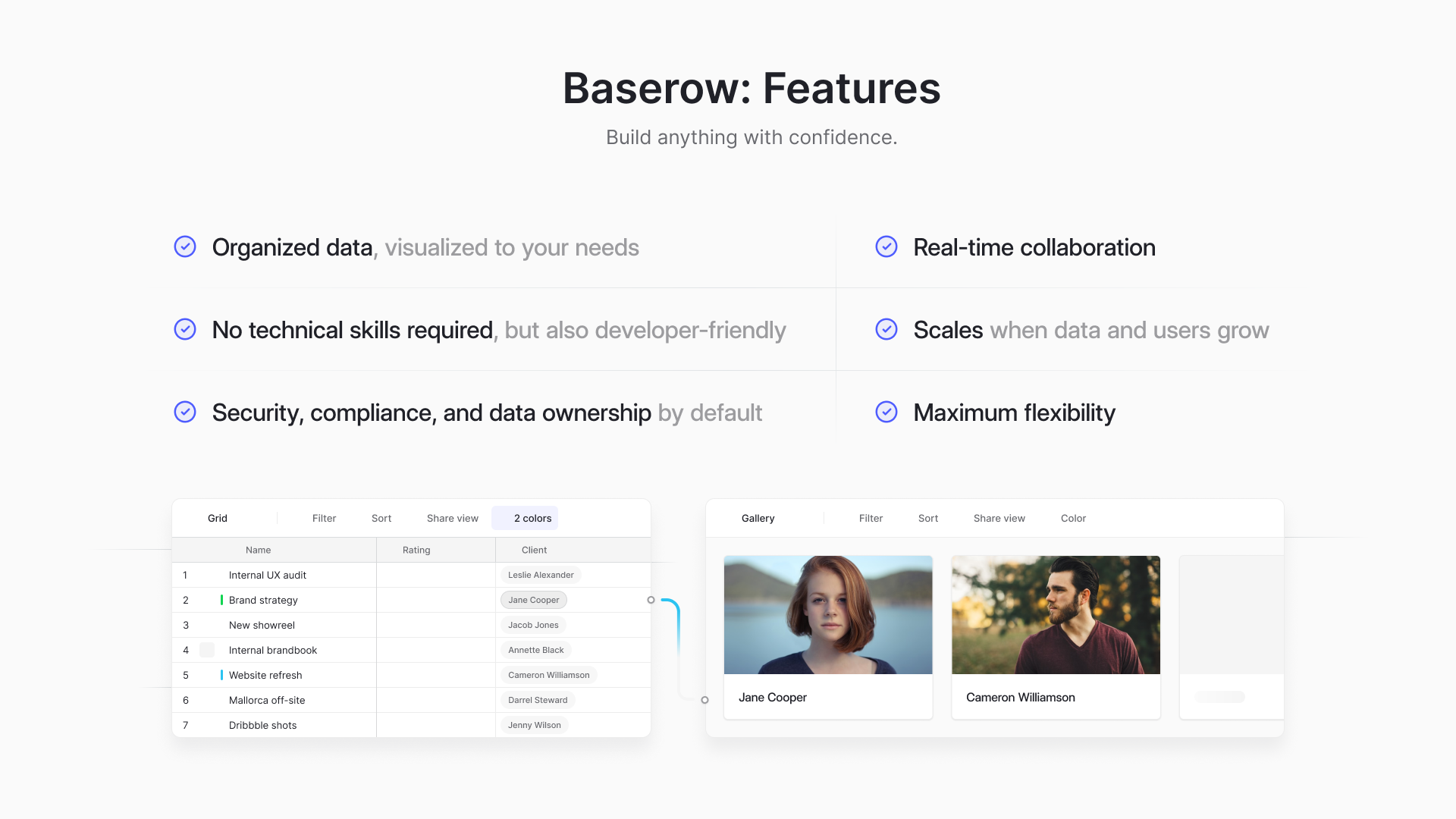
Baserow stands out because it combines the simplicity of a spreadsheet with the power of a relational database. Instead of focusing only on building interfaces, it helps businesses organize data, automate workflows, and create applications that grow with the organization.
One of its biggest strengths is flexibility. Teams can create project trackers, CRM systems, approval workflows, inventory databases, asset management solutions, and customer portals without rebuilding everything as requirements change.
Recent updates have added even more capabilities. Kuma, Baserow’s AI assistant, helps users create tables, generate formulas, improve workflows, and answer questions using natural language. The new Automations Builder supports multiple triggers, conditions, AI steps, and workflow testing, making complex business processes much easier to automate.
Unlike many competitors, Baserow is open source and built on PostgreSQL. Organizations can choose between cloud hosting or self-hosting, making it suitable for businesses with stronger security or compliance requirements.
The platform is also API-first, allowing developers to connect applications with other business systems while business users continue working through an easy visual interface.
Many practical examples can be found in the Baserow Community. Users regularly share how they have built procurement systems, internal CRMs, project trackers, equipment management databases, and approval workflows using the platform.
Pros
- Open source with self-hosting options
- AI assistant and advanced automation
- Excellent database capabilities
- Strong APIs and integrations
- Suitable for growing businesses
2. Bubble
Best for: SaaS products and customer-facing web applications
Bubble is one of the most well-known no-code platforms. It focuses on helping founders and startups build fully functional web applications without traditional development.
Its visual editor gives users complete control over page layouts, workflows, and databases. This makes Bubble a strong choice for entrepreneurs building marketplaces, booking systems, customer portals, and subscription platforms.
Bubble also supports plugins, API integrations, and payment integrations, allowing businesses to connect services such as Stripe and other payment providers.
The platform is powerful, but beginners may need time to learn its workflow builder. Larger projects can also become harder to manage as applications become more complex.
Pros
- Excellent for SaaS products
- Flexible workflow builder
- Large plugin marketplace
- Strong community support
Cons
- Steeper learning curve than many competitors
- Better suited for web applications than internal database management
3. Glide
Best for: Internal business apps and simple mobile solutions
If you want to create an app quickly, Glide is a strong option. Glide is a no code app builder that turns business data into simple applications. Many small businesses use it for internal tools, employee directories, and customer lists.
Glide works well with different data source options, including spreadsheets and databases. This makes it easy to start with information you already have.
One of Glide’s strengths is speed. You can build a working application in a short time without learning complex software. The interface is clean, and most features are easy to understand.
Glide is a good choice for teams that need lightweight business apps. However, it may not be the best option for companies building larger systems with advanced workflows or detailed database relationships.
Pros
- Easy to learn
- Fast application setup
- Good mobile experience
- Works with different data sources
Cons
- Limited flexibility for larger business systems
- Fewer database features than dedicated database platforms
4. Softr
Best for: Client portals, internal portals, and business dashboards
Softr is a no code app builder that helps businesses create portals on top of existing databases. Instead of focusing on data management, Softr focuses on presenting information through attractive pages.
Many companies use Softr to build customer portals, employee directories, knowledge bases, and partner dashboards.
The platform includes ready-made layouts that help users get started quickly. These templates reduce setup time while still offering useful customization options.
Softr works especially well when paired with a structured database like Baserow. Baserow stores and manages the data, while Softr creates the user-facing experience.
This combination is popular among users in the Baserow Community, where members share examples of client portals, internal directories, and approval systems.
Pros
- Fast portal creation
- Easy to customize
- Large template library
- Good integration with databases
Cons
- Depends on an external database
- Not designed for advanced business logic
5. FlutterFlow
Best for: Mobile applications for Android and iOS
FlutterFlow is designed for teams that want to create native mobile apps with a visual builder. It is based on Google’s Flutter framework and produces production-ready mobile applications.
This platform is a strong choice for businesses building customer-facing products.
Applications created with FlutterFlow can be published to Google Play and the Apple App Store after testing and review.
FlutterFlow also supports custom code when developers need extra flexibility. This makes it suitable for projects that may grow over time.
Although FlutterFlow is powerful, it has a steeper learning curve than many other no-code platforms. It works best for businesses focused on mobile-first products rather than internal database systems.
Pros
- High-quality mobile applications
- Supports custom code
- Flexible interface design
- Good developer support
Cons
- More difficult for beginners
- Better suited for mobile than database management
6. Retool
Best for: Internal business software
Retool is built for companies that need internal tools quickly. It connects to existing databases and business systems, allowing teams to create dashboards, admin panels, and operational software.
The platform includes many ready-made components that help developers and IT teams build applications faster.
Retool is especially useful when businesses already have several systems that need a single interface.
While Retool is powerful, it works best for technical teams. Business users may need support when creating more advanced applications.
Pros
- Excellent for internal software
- Strong database connections
- Good integration options
- Fast development
Cons
- More technical than many competitors
- Less suitable for non-technical users
7. Microsoft Power Apps
Best for: Organizations using Microsoft 365
Microsoft Power Apps helps businesses create powered apps that connect with Microsoft products such as SharePoint, Excel, Teams, and Dynamics 365.
For companies already using Microsoft’s ecosystem, this creates a familiar experience. Employees can build forms, approval systems, and reporting tools without starting from scratch.
Power Apps also includes AI features, automation, and many business connectors. This makes it a good choice for large organizations with existing Microsoft investments.
However, businesses outside the Microsoft ecosystem may find other platforms easier to use.
Pros
- Strong Microsoft integration
- Good security
- Enterprise features
- Large connector library
Cons
- Best value inside Microsoft environments
- Licensing can become expensive
8. AppSheet
Best for: Google Workspace users
AppSheet helps businesses build applications using Google Workspace data. Teams can quickly create inspection forms, approval workflows, inventory trackers, and field service tools.
The platform works well for companies that already manage information in Google products. It also includes automation and offline support for employees working away from the office.
AppSheet is easy to start with, but businesses with more advanced database needs may eventually require a platform that offers greater flexibility.
Pros
- Easy to connect with Google Workspace
- Good offline support
- Quick application development
- Built-in automation
Cons
- Limited outside Google’s ecosystem
- Advanced customization requires more effort
9. Appsmith
Best for: Developer teams that want an open-source platform
Appsmith is an open-source platform for building internal business software. It is popular with developers because it connects easily with databases, APIs, and existing business systems.
Unlike some visual builders, Appsmith gives developers more control over how applications work. This makes it a good choice for companies that already have technical teams and want to create custom internal tools.
Appsmith supports dashboards, approval systems, reporting tools, and admin panels. It also includes role-based permissions and deployment options for growing businesses.
Businesses looking for a simpler experience may prefer platforms like Baserow, which balance ease of use with powerful database features.
Pros
- Open source
- Strong API support
- Flexible for developers
- Good security options
Cons
- Requires more technical knowledge
- Less suitable for non-technical teams
10. Noloco
Best for: Business portals and customer management
Noloco helps businesses turn existing databases into modern business applications. It is commonly used for client portals, CRM systems, inventory management, and internal operations.
The platform offers a clean design and makes it easy to share information with customers, suppliers, and employees.
Noloco also includes automation, permissions, and reporting features that help businesses manage daily work more efficiently.
For organizations that already use Baserow, Noloco can also serve as a front-end interface while Baserow manages the underlying business data.
Pros
- Easy portal creation
- Modern design
- Strong permissions
- Good automation support
Cons
- Depends on external databases
- Limited advanced database features
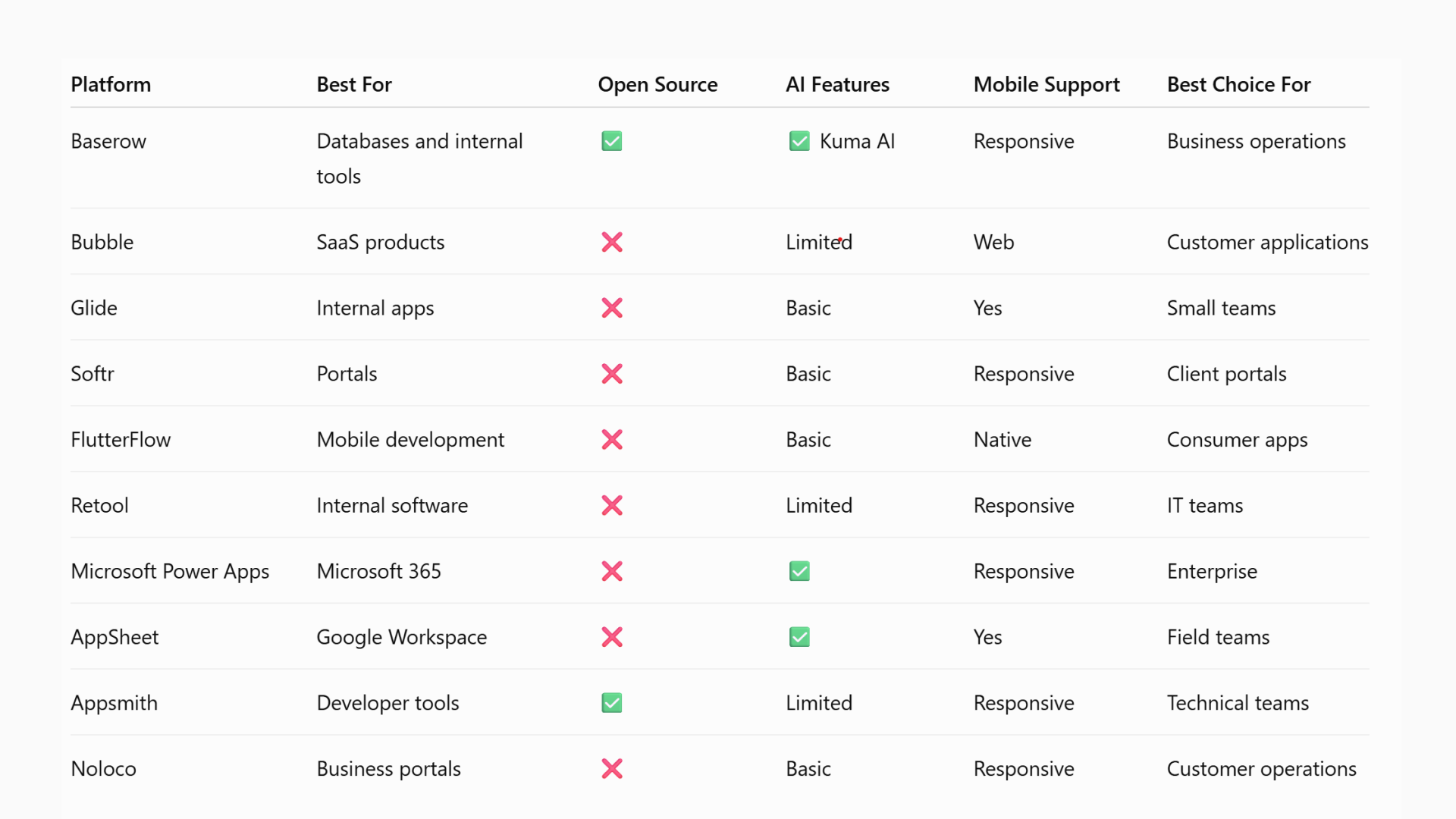
Quick Comparison
Frequently Asked Questions
- Which no-code platform is best for business applications?
The best platform depends on your business goals. If you need structured databases, automation, and strong security, Baserow is an excellent choice. If you’re building customer-facing software or mobile products, platforms like Bubble or FlutterFlow may be a better fit.
- Can no-code platforms build complex business software?
Yes. Modern platforms can support complex apps such as CRM systems, inventory management, approval workflows, and customer portals. The key is choosing software that can scale as your business grows.
- Do no-code platforms support payment systems?
Many platforms offer payment integrations through providers such as Stripe, PayPal, and other payment services. These connections make it easier to build customer portals, booking systems, and subscription-based applications.
- Can I build web and mobile apps with one platform?
Some platforms support both web and mobile apps, while others specialize in one area. Before choosing a platform, consider where your users will access the application most often.
- How is AI changing no-code platforms?
AI now helps users create databases, generate formulas, build automations, organize information, and answer questions about their data. Many platforms are also introducing AI agents that can complete routine tasks and improve productivity.
- What features should I compare before choosing a no-code platform?
Focus on the key features that matter most for your business. These include database flexibility, automation, security, integrations, scalability, pricing, AI capabilities, and collaboration. A platform that performs well in these areas is more likely to support your business as it grows.
Final Thoughts
No-code software has become much more than a way to create simple applications. Today’s platforms help businesses organize information, automate work, improve collaboration, and deliver software much faster.
The best solution depends on your goals. Some platforms are designed for websites, while others focus on internal operations or mobile experiences. Before making a decision, think about your long-term needs, your team, and the level of flexibility you expect as your business grows.
For organizations that rely on structured data, Baserow offers an excellent balance of simplicity and power. Its open-source foundation, PostgreSQL database, Kuma AI assistant, Automations Builder, API-first design, and self-hosting options make it a strong choice for businesses that expect their applications to grow over time.
If you’d like to see how it works, explore the Baserow platform or browse real customer projects in the Baserow Community.
Ready to Build Your Next Business Application?
Create a free Baserow workspace and discover how you can organize data, automate processes, and build business applications without unnecessary complexity.


Baserow 2.4 adds Button fields, Graph elements, workflow automation, AI provider management, improved Group By views, and 30+ more updates.

Discover how Airtable and Baserow compare in features, flexibility, speed, and scalability. Compare pricing plans and hidden costs to make an informed decision!

Explore the best open-source software alternatives to proprietary products. Discover OSS tools, licenses, and use cases with our updated directory.