

A good spreadsheet app makes it easier to organise information, track progress, and make decisions. Whether you manage a small business, plan a budget, or work with a large team, the right tool can save time and reduce errors.
However, not every spreadsheet works the same way. Some focus on calculations and data analysis. Others make it easier to share files, work together, or automate routine tasks.
With so many options available, choosing the right one can be difficult. This guide explains the features that matter, compares popular tools, and helps you decide when a spreadsheet is enough or when a database might be a better choice.
What is a spreadsheet app?
A spreadsheet app is a digital tool that stores and organises information in rows and columns. Each box, called a cell, can hold text, numbers, dates, or formulas.
People use spreadsheets to manage budgets, track sales, plan projects, and analyse business results. For example, a shop owner might record daily sales and use formulas to calculate monthly revenue.
A modern spreadsheet tool can do much more than store numbers. Many apps support charts, shared editing, automatic calculations, and links to other software.
Some work directly in a browser, while others run on a computer. A web based app is often useful for teams that need access from different locations.
Spreadsheets work well for simple lists and calculations. However, as records grow and several people update the same information, a database may offer better ways to connect and manage data.
Key features to look for in a spreadsheet app
The best choice depends on how you plan to use your data. Before selecting a tool, consider these essential features.
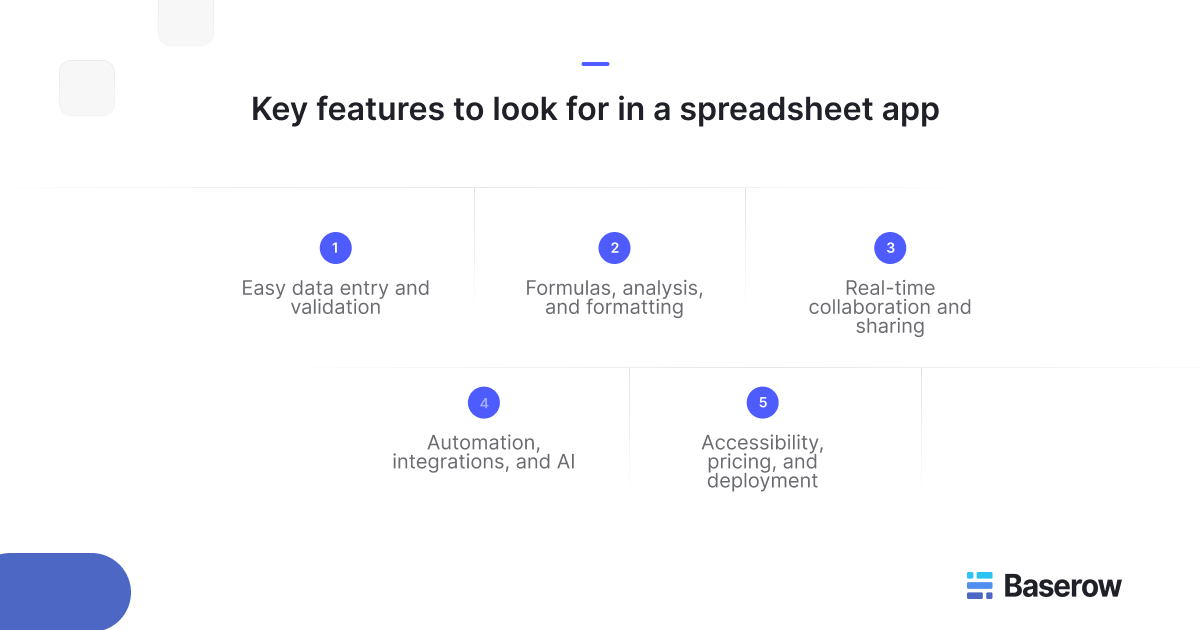
- Easy data entry and validation
A spreadsheet should make it simple to enter, edit, and organise information.
Features such as dropdown menus, filters, and data validation help prevent mistakes. For example, you can limit a status column to values such as “Pending,” “Approved,” or “Completed.”
This keeps records consistent, especially when several people update the same file.
- Formulas, analysis, and formatting
Formulas help users calculate totals, compare values, and analyse results without doing the maths manually.
Tools such as conditional formatting can highlight overdue tasks, low stock levels, or expenses above a set limit.
A pivot table can also help summarise large sets of records. For example, a sales manager might group revenue by region or product to identify trends.
Choose an app with the level of analysis your work requires. Basic tracking may need only simple formulas, while financial reporting may require more advanced functions.
- Real-time collaboration and sharing
When teams work on shared information, collaboration becomes essential.
Apps that support real time collaboration let many people edit the same file. They can see updates and avoid emailing different copies.
Look for sharing controls, user permissions, and change history. These features help teams understand who can access information and how records have changed.
- Automation, integrations, and AI
Some spreadsheet apps can connect with other business tools or automate repetitive tasks.
For example, an integration might add new form responses to a spreadsheet, while an automated rule could notify a team when a deadline approaches.
An ai assistant may also help users write formulas, explore information, or prepare summaries. However, its features and availability vary between products and plans.
Focus on functions that solve real problems rather than choosing software simply because it offers more features.
- Accessibility, pricing, and deployment
Consider where and how people will use the software.
Browser-based apps are convenient for distributed teams. Desktop applications may be better for people who need offline access or work with complex files.
Check whether the software offers a free plan, paid subscriptions, or self-hosting. Also review storage limits, collaboration features, and access controls before committing.
Popular spreadsheet apps compared
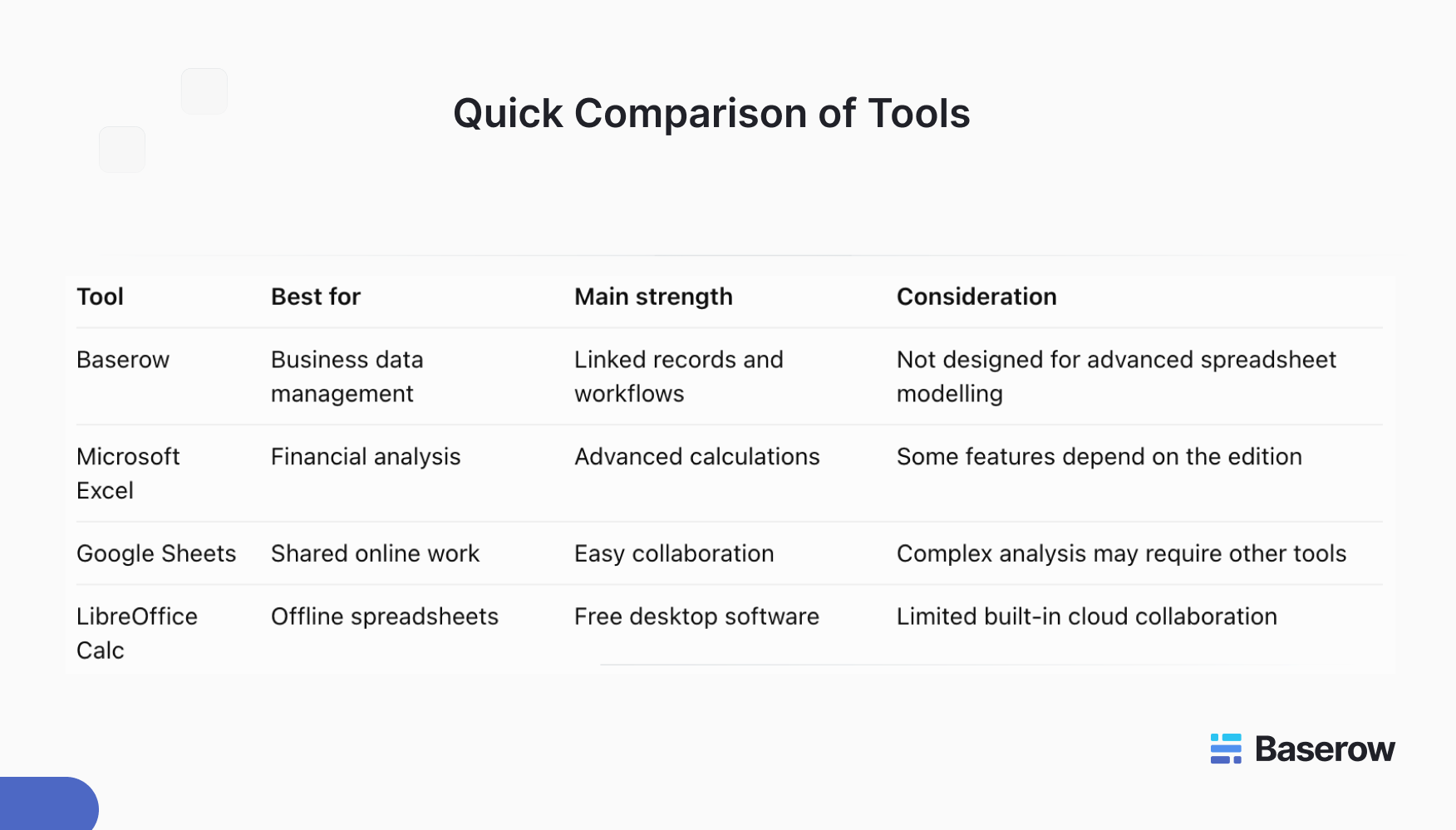
Several established tools serve different needs. The following options provide a useful starting point.
Baserow
Baserow is an open-source, no-code database platform that offers a familiar spreadsheet-style interface. It helps teams organise information, connect records, and manage business processes.
Unlike traditional spreadsheets, Baserow focuses on structured data and workflows rather than complex calculations. Teams can use it to track customers, manage inventory, plan projects, and build internal applications.
Baserow supports shared editing, custom views, forms, and automation. It also offers self-hosting for organisations that want greater control over their infrastructure.
Microsoft Excel
Microsoft Excel is widely used for financial modelling, reporting, and detailed data analyzing.
It offers formulas, charts, advanced calculations, and tools for managing large datasets. It also works with other microsoft office applications.
The available features depend on the version of excel and subscription. Some advanced capabilities are available in desktop versions rather than the browser edition.
Excel is a strong choice for users who need complex calculations and detailed reports.
Google Sheets
Google Sheets focuses on online access and shared work.
Multiple users can edit a spreadsheet, leave comments, and review changes. Its integration with Google Workspace makes it useful for teams that already rely on Google’s tools.
Google Sheets works particularly well for shared trackers, content calendars, and everyday reporting.
LibreOffice Calc
LibreOffice Calc is part of a free and open source office suite.
It provides formulas, charts, formatting tools, and support for common spreadsheet file formats. It is a practical option for individuals and organisations that prefer locally installed software.
However, teams that need browser-based collaboration may find its traditional desktop approach less convenient.
When should you choose a spreadsheet or a database?
Spreadsheets are useful when your work involves calculations, simple lists, or individual reports. They offer flexibility and are often easy to set up.
However, problems can arise when several teams manage related information across different files.
Consider a business that tracks customers, orders, and products. Separate spreadsheets may contain repeated details. When information changes, employees must update several places.
A database connects these records. Updating a customer’s details in one place can make the latest information available wherever that customer record is linked.
This makes databases useful for growing teams that need consistent information, controlled access, and repeatable processes.
When evaluating excel alternatives, consider whether you need another calculation tool or a better way to manage connected business records.
How Baserow helps teams move beyond spreadsheets
Baserow combines a familiar grid interface with database features that support more complex business needs.
- Organise business data with linked tables
Baserow’s Database Builder lets users create tables for different types of information and connect related records.
For example, a sales team can link customers to orders without copying customer details into every row.
This reduces repeated data and makes records easier to maintain.
- Collaborate through shared views and permissions
Teams can work with the same underlying data while using different views.
A project manager might use a Kanban view to track tasks, while another employee uses a grid view to review deadlines.
Access permissions also help organisations control who can view or change information, depending on their plan and configuration.
- Build forms, applications, and workflows
Baserow supports forms for collecting information and an Application Builder for creating interfaces around business data.
Teams can also automate supported tasks, reducing manual updates between processes.
For example, an operations team could collect requests through a form, store them in a database, and manage their progress through shared views.
Existing spreadsheet data can also be imported into Baserow making it easier to start with information you already have.
How to choose the right spreadsheet app
Start by identifying what your team needs to accomplish.
If you work mainly with formulas and financial models, Excel may be the best fit. If several people need to edit simple files together, Google Sheets is worth considering.
Baserow is useful when business records need stronger structure, relationships, and workflows.
Before deciding, test the tool with real data. Check how easily people can update records, share information, and complete common tasks.
Also consider future needs. A tool that works for a small list today may become difficult to manage as your business grows.
Frequently asked questions
- What is the best spreadsheet app for beginners?
Google Sheets is often a good starting point because it has a familiar interface and works in a browser. Excel is another practical choice, especially for users who want to develop advanced spreadsheet skills.
- Are there any free spreadsheet apps?
Yes. Google Sheets offers free personal use, while LibreOffice Calc is free desktop software. Baserow also offers a free plan for users who need database features alongside a spreadsheet-style interface.
- Can I use a spreadsheet app without internet access?
Yes. Desktop applications such as Excel and LibreOffice Calc support offline work. Some browser-based tools also offer offline features, but these may require setup before losing internet access.
- Which spreadsheet apps support real-time collaboration?
Google Sheets and supported versions of Excel allow multiple people to edit shared files. Baserow also supports collaborative editing of database records, making it useful for teams managing operational information.
- Can I open Excel files in other spreadsheet apps?
Many tools support Excel file formats, including Google Sheets and LibreOffice Calc. However, advanced formulas, macros, or formatting may not transfer perfectly. Always check important files after importing them.
- What is the difference between a spreadsheet app and a database?
A spreadsheet organises information in cells and is well suited to calculations. A database stores structured records and can connect information across tables. Databases are often better for managing related business data.
- Can I move my existing spreadsheets into Baserow?
Yes. Baserow supports importing spreadsheet data, including Excel and CSV files. After importing, you can organise records into tables, create views, and connect related information.
Choose a tool that fits how your team works
The right spreadsheet app should make daily work easier, not add unnecessary complexity. Compare your options based on calculations, collaboration, cost, and how your data will grow.
If your team needs more than traditional spreadsheets, try Baserow for free. Build a shared workspace where your business data, applications, and workflows can work together.


Baserow 2.4 adds Button fields, Graph elements, workflow automation, AI provider management, improved Group By views, and 30+ more updates.

Discover how Airtable and Baserow compare in features, flexibility, speed, and scalability. Compare pricing plans and hidden costs to make an informed decision!

Explore the best open-source software alternatives to proprietary products. Discover OSS tools, licenses, and use cases with our updated directory.