
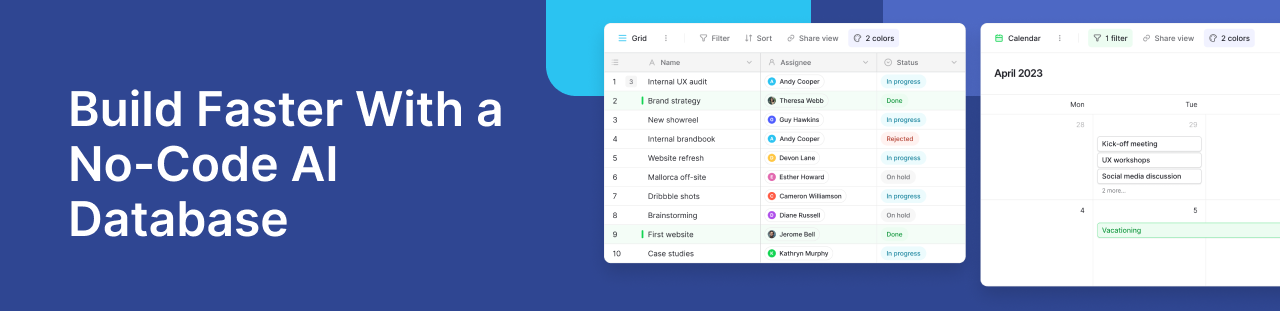
Modern teams need to move fast. Marketing teams manage campaigns and content. Operations teams handle approvals and reports. Product teams track feedback and project updates.
Many businesses still use spreadsheets for this work. Spreadsheets are easy at first, but they become harder to manage as work grows. Teams may lose updates, create duplicate records, and spend too much time on manual tasks.
This is why AI-native platforms are becoming more popular. Businesses now want tools that combine databases, automation, and AI in one place.
A no-code AI database helps teams build workflows faster without starting from scratch.
Instead of depending fully on developers, teams can use drag and drop tools, automation features, and AI-powered workflows to manage operations. Some platforms can even create workflows from a simple text prompt.
This is changing how companies build internal software and manage daily work.
What Is a No-Code AI Database?
A no-code AI database helps teams organize data, automate tasks, and build workflows without writing code.
Traditional databases often required developers to manage tables, permissions, and automations. Modern no-code platforms simplify this process with visual interfaces that teams can manage themselves.
This means businesses can build workflows faster without depending on engineering teams for every update. For example, teams can create customer support systems, campaign approval workflows, or project trackers inside one shared workspace.
AI makes these platforms even more useful. It can summarize records, organize information, generate content, and automate repetitive tasks. Some tools can also build workflows from a simple text prompt. This helps businesses save time and improve daily operations.
Platforms like Baserow’s database platform combine structured databases with simple collaboration tools, making them useful for modern operational workflows. According to McKinsey’s AI research, businesses are increasingly investing in AI systems that improve operational efficiency and workflow automation.
Why AI App Generation Platforms Are Growing Fast
Software development has traditionally been expensive and time-consuming. Many businesses still wait weeks or months for internal tools to be built. AI app generation platforms are helping reduce this delay.
Instead of building apps by hand, users can create visual workflows. They can use AI to help with setup. AI can also help with automation and content creation. Some platforms even help generate database structures based on simple instructions. For growing businesses, this creates major advantages:
- Faster internal tool development
- Lower operational costs
- Easier collaboration across departments
- Faster testing and experimentation
- Reduced dependency on engineering teams
This trend is also changing how companies think about application development itself. Instead of creating large custom systems from scratch, many organizations now prefer flexible web apps that teams can adjust continuously. This approach allows faster iteration and easier scaling.
Platforms like Baserow AI support this shift by helping teams combine databases, automation, and AI workflows inside one workspace.
The growth of AI-assisted platforms is also connected to broader industry trends. Research from Gartner’s AI insights shows that businesses increasingly want AI systems that improve productivity without adding technical complexity. This is where no-code AI systems are becoming valuable.
They allow teams to move faster while keeping workflows structured and collaborative.
%20(2).png)
The Role of Visual Interfaces in Modern App Building
Modern teams want tools that are simple to use and flexible enough for changing workflows.
Visual builders make this easier.
Instead of setting up complex systems manually, teams can manage workflows using simple interfaces. They can organize tables, automations, and records without relying heavily on developers.
This also improves teamwork across departments.
Marketing, operations, and product teams can work together inside one shared system.
Many modern app builders now include:
- pre built templates
- workflow automations
- collaborative dashboards
- AI-assisted content generation
- flexible permissions
- API connectivity
These features help businesses build scalable workflows without managing complex software systems.
Platforms such as Baserow are increasingly being used for internal tools, workflow management, and operational databases because they combine flexibility with usability.
Key Features to Look for in a No-Code AI Database
Not every AI platform works the same way. Some tools focus only on automation. Others focus on app building or reporting. A strong no-code AI database should combine all these functions in one place.
The goal is simple. Teams should be able to organize data, automate work, and build workflows without depending heavily on developers.
This is why businesses should look closely at the platform’s core features before choosing a tool.
AI-Assisted Workflow Building
AI is now helping teams build workflows faster. Instead of setting up every process manually, users can use AI suggestions to speed up repetitive tasks.
For example, AI can:
- summarize long records
- classify support tickets
- generate marketing content
- organize customer feedback
- recommend workflow steps
Some tools also allow users to create workflows from a text prompt. This makes setup easier for teams with limited technical experience.
AI-assisted systems are especially useful for operations teams that manage large amounts of information every day.
Businesses using AI-powered workflows often improve response time and reduce manual work. This is one reason many organizations are investing in AI-native operational systems.
Teams exploring AI workflows can also review Baserow’s guide to AI automation tools to understand how AI supports content operations and structured workflows.
Flexible Database Structure
A good database system should adapt to different workflows. Every team works differently, so rigid systems often create problems later.
Flexible platforms allow users to:
- create custom fields
- connect related tables
- organize structured data
- manage workflows visually
- update systems quickly
This flexibility matters because business processes constantly change.
For example, a product team may need one workflow for feature requests and another for bug tracking. A marketing team may need campaign approvals, editorial calendars, and reporting dashboards together in one system.
Modern relational databases help teams organize these workflows more efficiently.
Platforms that support collaborative databases are often easier to scale because teams can connect information across multiple projects without duplicating records.
This reduces confusion and improves reporting accuracy.
Automation and Multi-Step Workflows
Manual work slows teams down. Employees often spend hours updating spreadsheets, sending reminders, or moving records between systems.
Automation helps reduce this problem.
Modern no-code systems support multi step workflows that trigger actions automatically when information changes.
For example:
- A form submission can create a new record
- A status update can notify another team
- AI can summarize responses automatically
- Approval requests can move through review stages
- Reports can update in real time
These automations improve operational speed while reducing human error.
Businesses that rely heavily on repetitive workflows often benefit the most from automation-first systems.
Platforms with automation support also help teams maintain consistency across departments.
Why Security and Compliance Matter
Businesses often store customer data and internal records inside AI platforms. This makes security very important.
Teams should look for features like:
- role-based permissions
- secure API access
- workspace controls
- audit visibility
These features help businesses protect sensitive information and manage workflows safely.
This is especially important for industries like finance, healthcare, and customer operations.
Many businesses also prefer open-source platforms because they offer more flexibility and control over data management.
Teams can learn more from this guide to open-source no-code platforms.
Why Ease of Use Is Becoming a Competitive Advantage
Many businesses buy powerful software but struggle to adopt it internally. Complex tools often create onboarding issues, especially for non-technical departments.
This is why usability matters.
Modern platforms are focusing more on visual interfaces that simplify setup and workflow management. Teams want systems that are easy to learn while still supporting advanced functionality.
This includes:
- drag and drop configuration
- reusable templates
- simple navigation
- collaborative editing
- faster onboarding
When tools are easier to use, teams adopt them faster.
This is especially important for growing companies where operations change quickly. Flexible systems allow departments to adjust workflows without rebuilding infrastructure from scratch.
Many app builders now focus on balancing usability with scalability. Businesses want platforms that work for small teams today but can still support larger operations later.
This is also why free plan and free tier options have become more common across AI-native platforms. Businesses want opportunities to test workflows before scaling usage.
How AI Is Changing Internal Business Applications
AI is no longer limited to chatbots or content generation. Businesses are now using AI directly inside operational systems.
This includes:
- internal knowledge management
- workflow automation
- customer operations
- project tracking
- approval systems
- reporting workflows
Instead of switching between multiple tools, teams can manage information, automation, and AI inside one platform.
This improves visibility across operations.
For example, an operations team can build an internal workflow where AI categorizes incoming requests automatically. A content team can use AI to generate summaries for campaign reviews. A customer team can organize feedback using structured records and automation rules.
These systems help businesses move faster without increasing complexity.
Platforms like Baserow AI configuration tools are helping teams integrate generative AI directly into operational workflows without heavy engineering involvement.
As AI tools continue improving, databases are becoming more important because structured data helps AI systems perform better.
This is one reason AI-native no-code platforms are growing rapidly across operations, marketing, product management, and customer support teams.
How Baserow Supports AI-Native Application Building
Businesses today need software that adapts quickly. Teams often manage changing workflows, multiple departments, and growing amounts of operational data.
Traditional software development cannot always keep up with this speed.
This is why many organizations are moving toward flexible no-code systems that combine databases, automation, and AI features together.
Baserow is becoming part of this shift because it allows teams to build operational workflows without managing complex infrastructure. Teams can organize records, automate processes, and create internal tools using simple visual workflows.
This helps companies reduce delays while improving collaboration across departments.
Building Operational Systems Faster
Many teams do not need large custom applications. Instead, they need flexible systems that solve operational problems quickly.
For example:
- marketing approval workflows
- customer request tracking
- internal reporting systems
- content production pipelines
- procurement management
- project coordination
These workflows often begin in spreadsheets. Over time, they become harder to manage because multiple teams depend on the same information.
Baserow helps centralize these workflows into structured databases that are easier to maintain and scale.
Teams can connect records, assign permissions, automate tasks, and organize workflows visually. This makes it easier to manage operational systems without relying fully on developers.
Because the platform supports web apps and collaborative workflows, teams can also adjust processes as business needs change.
This flexibility is important for fast-moving organizations.
Using AI Inside Daily Workflows
AI is becoming more useful when combined with structured operational data.
Instead of using AI tools separately, businesses now want AI integrated directly into their workflows. This reduces switching between tools and improves productivity.
For example, AI can help teams:
- summarize customer responses
- generate content drafts
- classify records automatically
- organize feedback
- speed up reporting tasks
These capabilities help reduce repetitive work while improving consistency.
Platforms such as Baserow AI allow teams to use AI features directly inside databases and workflows. This creates a more connected operational environment.
Businesses can combine structured data with AI-generated outputs while keeping workflows organized in one workspace.
This is especially useful for customer operations, marketing systems, and internal knowledge management.
Real Use Cases for No-Code AI Databases
AI-native database platforms are now being used across many industries. Businesses are adopting these systems because they improve visibility, reduce manual work, and support faster decision-making.
AI-Powered Customer Operations
Customer teams often manage large volumes of requests every day. Without structured systems, information becomes difficult to track. Teams may lose visibility into support history, approval status, or customer priorities. AI-powered databases help organize these workflows more efficiently.
For example, AI can:
- summarize customer conversations
- categorize support tickets
- identify urgent requests
- organize incoming submissions
This allows support teams to respond faster while maintaining consistency. Businesses building customer workflows also benefit from centralized reporting and shared operational visibility.
Content and Marketing Operations
Marketing teams now manage content across multiple channels. This includes blogs, campaigns, approvals, social media, and reporting workflows.
Many teams still manage these operations manually.
AI-assisted workflow systems help simplify content management by organizing tasks inside structured databases.
For example:
- AI can generate content summaries
- workflows can trigger approval reviews
- teams can manage campaign stages visually
- dashboards can track production progress
This reduces delays while improving collaboration between writers, editors, and operations teams.
Businesses looking for operational AI workflows often explore examples shared inside the Baserow community where teams discuss automation systems, workflow management, and internal tool setups.
Internal Business Applications
Many businesses now use no-code AI systems to create internal applications.
These applications may include:
- HR request systems
- procurement workflows
- project management tools
- operations dashboards
- vendor tracking systems
Instead of purchasing separate software for every workflow, organizations can create centralized systems that connect departments together.
This improves operational visibility while reducing software complexity.
Because workflows are customizable, teams can continue adjusting systems as business requirements evolve.
No-Code AI Databases vs Traditional Development
Traditional software projects often require:
- engineering resources
- long development cycles
- testing environments
- infrastructure management
- continuous maintenance
No-code systems reduce much of this complexity.
Teams can launch workflows faster using visual builders and automation tools. This allows businesses to test ideas quickly before investing heavily in custom development.
This approach offers several advantages:
- faster setup
- lower operational costs
- easier collaboration
- better workflow flexibility
- reduced maintenance overhead
Modern no-code platforms are also becoming more scalable. Many enterprise teams now use no-code systems alongside traditional development environments.
This hybrid approach allows businesses to move faster while maintaining operational control.
Research from IBM’s AI business insights shows that organizations increasingly prioritize operational AI systems that improve productivity and decision-making across departments.
This trend is likely to continue as AI-native platforms become easier to adopt.
.jpg)
Common Challenges and How to Avoid Them
No-code AI platforms can help teams work faster. But teams still need clear workflows and organized data. Without planning, systems can become confusing over time. The good news is that most problems are easy to fix.
Poor Workflow Structure
Some teams build workflows too fast. They do not plan how information should move between teams. This can lead to:
- duplicate records
- missed updates
- unclear ownership
- reporting issues
A better approach is to keep workflows simple at the start. Teams should organize tables clearly and connect records properly. This makes systems easier to manage later.
Disconnected Data
Many businesses still use spreadsheets, emails, and different tools together. This makes it hard to find the latest information. Connected databases solve this problem.
Teams can store records in one shared workspace instead of spreading information across many tools. This improves visibility and reduces manual work. Relational databases also help teams connect related information more easily.
AI Output Problems
AI tools are useful, but they are not perfect. For example:
- summaries may miss details
- generated content may need edits
- AI classifications may be wrong
This is why human review is still important. AI should help teams work faster, not replace people completely. Clean and organized data also improves AI results.
Security and Permission Issues
As teams grow, more people need access to workflows and records. Without proper controls, sensitive information may become visible to the wrong users. Businesses should look for:
- role-based access
- permission controls
- workspace visibility
- audit tracking
These features help teams manage workflows safely, especially in finance, customer operations, and internal reporting systems.
Frequently Asked Questions
- What is a no-code AI database?: A no-code AI database combines structured data management with AI-powered workflows and automation tools. Teams can build operational systems without heavy coding.
- Can AI generate apps without developers?: AI can help generate workflows, automate setup steps, and simplify application building. Most businesses still use human oversight for customization and approvals.
- Is a no-code AI platform suitable for enterprises?: Yes. Many modern platforms now support enterprise grade security, permissions, APIs, and workflow management features.
- How secure are AI-powered databases?: Security depends on the platform. Businesses should look for role-based permissions, audit logs, and secure infrastructure controls.
- Can AI databases automate workflows?: Yes. AI databases can automate approvals, notifications, summaries, categorization, and operational processes.
- Do no-code AI databases support APIs?: Most modern platforms support APIs and integrations so teams can connect workflows across tools.
- How does Baserow support AI workflows?: Baserow combines databases, collaboration tools, and AI-powered workflows inside one flexible platform.
- Can AI tools work with relational databases?: Yes. Structured relational databases often improve AI workflow quality because data is more organized.
- How do no-code AI tools improve team productivity?: They reduce repetitive work, improve collaboration, and help teams automate operational tasks faster.
Final Thoughts
Businesses today need systems that help teams move faster without increasing operational complexity.
This is why AI-native no-code platforms are growing quickly.
Instead of managing disconnected spreadsheets and manual workflows, teams can organize operations inside structured databases that support automation, collaboration, and AI-assisted work.
Modern platforms are making software creation easier for both technical and non-technical teams. Businesses can now build internal tools, automate repetitive tasks, and manage workflows using flexible visual systems.
Platforms like [Baserow] (https://baserow.io/product/overview) are helping businesses combine operational databases with AI-powered workflows in a simpler and more scalable way.
Teams can start small, improve workflows gradually, and expand systems as operations grow.
If your business wants to build faster and simplify operations, you can explore [Baserow] (http://baserow.io/signup) here and start creating AI-powered workflows without complex development processes.


Baserow 2.4 adds Button fields, Graph elements, workflow automation, AI provider management, improved Group By views, and 30+ more updates.

Discover how Airtable and Baserow compare in features, flexibility, speed, and scalability. Compare pricing plans and hidden costs to make an informed decision!

Explore the best open-source software alternatives to proprietary products. Discover OSS tools, licenses, and use cases with our updated directory.