

Product teams today operate in an environment where decisions must be made quickly, supported by accurate information, and aligned across multiple functions. Engineers, designers, product managers, QA professionals, customer support agents, and leadership all rely on the same data—yet they rarely access it in the same way. This is why data collaboration tools for product teams have become essential. They help reduce friction, streamline communication, and ensure every team member works from a single source of truth.
As product development grows more complex, many organizations have turned to flexible collaborative platforms that combine file sharing, project plans, real time editing, and effective collaboration features. When these components work together, they enhance productivity and make it easier for teams offering cross-functional workflows to stay aligned.
Platforms like Baserow, for example, allow product organizations to structure and centralize information without forcing them into rigid templates. This approach ensures that product teams can shape their workflows around the way they work—not the other way around.
If you want to explore how collaborative views function in an open and customizable platform, the Baserow documentation is a helpful starting point.
Why Product Teams Need Strong Data Collaboration Tools
Most product teams handle overlapping responsibilities: tracking customer feedback, managing sprint cycles, planning features, coordinating releases, and ensuring product-market alignment. Without strong data collaboration systems, information quickly becomes scattered across email threads, slack google drive folders, and older versions of documents.
This leads to familiar pain points:
- Duplicate work when task management tools don’t sync
- Confusion caused by outdated documentation
- Slower decision-making when stakeholders don’t have the same visibility
- Difficulties aligning designers, developers, and product managers
A well-structured collaboration tool reduces all of these issues. It enables teams collaborate more smoothly, ensuring every member has the context needed to act quickly. For example, many teams combine a communication layer like Slack with a document store like Google Drive Microsoft integrations. But these alone cannot handle structured product data.
That’s where modern collaborative platforms—like Baserow, Airtable, and Notion—become valuable. They provide a shared place to manage raw data, automate workflows, and allow team members to interact with information in multiple ways.
If you’re interested in deeper discussions around how teams simplify data collaboration, the Baserow community includes helpful examples from real users.
Key Features to Look For in Data Collaboration Tools
Product teams need more than simple file storage. Their workflows rely on a combination of documentation, structured databases, communication channels, and integrations. When evaluating a collaboration tool, these features are particularly important:
- Real-Time Editing
Teams need to co-create content, check shared documentation, and adjust product plans together. Real-time functionality avoids misalignment and eliminates version conflicts.
- File Sharing With Context
Shared folders are no longer enough. Teams need files that connect directly to tasks, specs, or sprints so that documentation moves forward with the work.
- Commenting and Review Workflows
Leaving comments, tagging collaborators, and resolving feedback directly inside the tool speeds up iterations—especially in product and design reviews.
- Project Management Built-In
Having project management capabilities within your collaboration system reduces tool switching. It becomes easier to track timelines, owners, and dependencies without copying data across platforms.
- Smooth Integrations
The best solutions connect with daily tools such as Slack, Google Drive, Microsoft 365, and even video conferencing tool integrations like Zoom or Teams.
- Customizability
Product teams often need to create custom data structures—feature logs, release calendars, roadmap priorities, customer insights, and more. Tools that offer schema design flexibility save enormous time long term.
These principles are covered in more detail in Baserow’s article on top collaboration platforms.
Top Data Collaboration Tools for Product Teams
Below is a look at some of the best tools product teams rely on to share information and streamline operations. Each serves a different purpose within the product lifecycle.
1. Baserow
A scalable, open, no-code database platform built for teams that want control over their data. It offers strong real-time collaboration, self-hosting options, and flexible modeling—making it a powerful backend for product teams.
You can also check this video walkthrough on how Baserow simplifies collaborative data work:
2. Slack
A communication hub that brings conversations, updates, and notifications together. It doesn’t solve structured data workflows, but it integrates well with tools that do—making it indispensable for cross-team collaboration.
3. Notion
A flexible workspace for documentation, product specs, and lightweight databases. It’s a strong option for teams that want a mix of documents and structured information.
4. Linear
Favored by engineering and product organizations for task management workflows. It simplifies issue tracking and sprint planning with a clean interface.
5. Figma
The go-to tool for design teams, supporting real-time collaboration and video calls directly inside design files.
6. Miro
Perfect for brainstorming, mind mapping, and team workshops. Ideal for kickoff meetings, feature planning, and ideation sessions.
7. Airtable
A widely used relational database tool. It supports automation, collaboration, and project planning, but some teams need more flexibility in storing large volumes of data.
8. Google Drive
Ideal for documentation, spreadsheets, and shared folders. It works well for early-stage collaboration, especially when paired with apps like Docs, Sheets, and Slides. Its wide range of integrations and cloud-first design make it easy for distributed teams.
Why Baserow Stands Out for Data-Driven Product Teams
Many collaboration platforms help teams communicate, but only a few enable product organizations to manage structured data in a flexible, scalable way. This is where Baserow becomes especially valuable. It acts as a customizable database that adapts to product workflows—whether you’re managing feature requests, experiments, customer insights, or release plans.
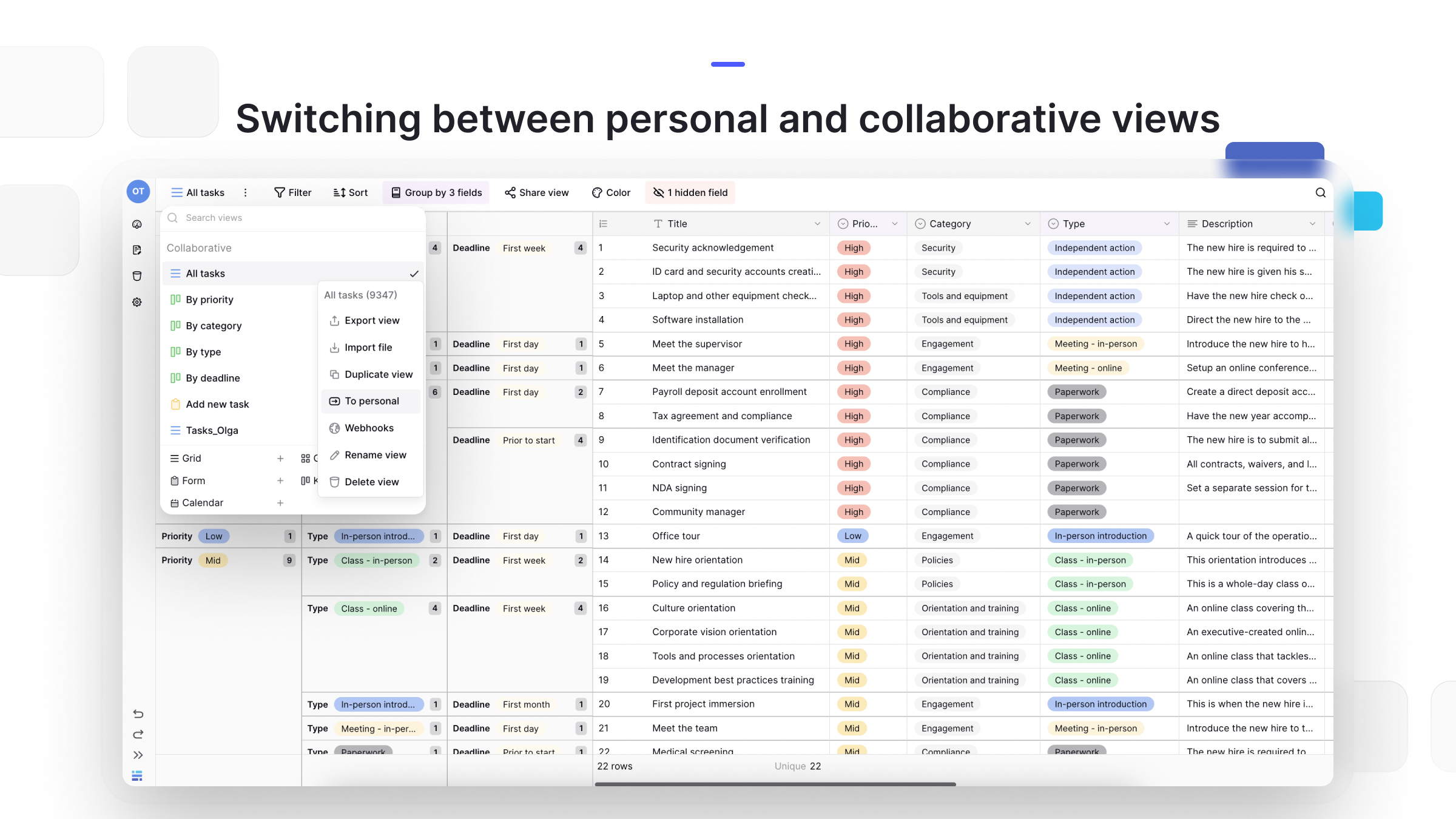
Unlike rigid systems, Baserow allows teams to create custom views, automate updates, and manage permissions while keeping everything in one place. Its ability to model complex product data while remaining no-code makes it approachable for team members who don’t write custom code. Baserow also makes it easy to move between personal and collaborative views, giving each team member the flexibility to work their way while keeping shared product data perfectly aligned.
Meanwhile, those who need deeper integrations can connect through the API or external tooling. Product teams that want a closer look at how collaborative views work can explore here.
Baserow’s flexibility has been highlighted frequently in the Baserow community discussions, where teams share how they handle feature backlogs, cross-team roadmaps, and QA cycles efficiently.
Use Case: How a Product Team Uses Baserow to Ship Faster
Imagine a mid-sized SaaS company with product managers, designers, engineers, customer success, and QA testers. Before adopting a shared data workspace, their information was scattered across spreadsheets, email threads, and meeting notes.
After switching to Baserow:
- PMs centralize all customer insights from interviews, feedback portals, and in-app surveys.
- Designers create links to Figma files inside the database, so every stakeholder can access the right version.
- Engineers sync API data—feature flags, telemetry, issue references—directly into Baserow tables.
- QA testers document structured bug reports, attach screenshots, and assign severity levels.
- Project managers manage release cycles by creating collaborative views filtered for each team member.
By combining these workflows, the organization replaces scattered spreadsheet tools with a unified, collaborative platform. This makes it easier for project management and task management to run smoothly in one environment. The structure allows teams collaborate faster, make decisions based on shared information, and reduce time to release.
Teams looking for examples can also explore further article here.
Frequently Asked Questions
- What is the best tool for team collaboration?
The best tool depends on your workflow, but teams often rely on a combination of Slack for communication, Google Drive for documents, and a structured database like Baserow for shared product data.
- Does Microsoft Teams have a collaboration tool?
Yes. Microsoft Teams includes chat, file sharing, meetings, and real-time document collaboration through Microsoft 365 apps. Many teams pair it with Baserow to manage structured data, product workflows, and shared views that go beyond basic document collaboration. Together, they create a more complete and organized collaboration ecosystem.
- What are the 4 types of collaboration?
The four common types include team collaboration, cross-functional collaboration, community collaboration, and strategic or partnership collaboration.
- What are two collaboration tools the team might find useful?
Teams often benefit from pairing a communication tool with a flexible data workspace like Baserow. While messaging platforms help teams stay connected, Baserow becomes the central place where structured information, workflows, and decisions live. This combination gives teams clarity, alignment, and a shared source of truth throughout the product lifecycle.
- What are the 7 C’s of collaboration?
Communication, connection, creativity, critical thinking, cooperation, compromise, and coordination form the foundation of strong teamwork. Each element helps teams share ideas openly, navigate challenges, and stay aligned on shared goals. When all seven work together, collaboration becomes smoother, faster, and more effective across projects.
- What are the 5 C’s of collaboration?
Clarity, communication, cooperation, contribution, and commitment define the five C’s of collaboration. These elements help teams understand expectations, share information effectively, and work together with purpose. When practiced consistently, they create a strong foundation for productive and aligned teamwork.
- What tools allow real-time collaboration in a no-code database?
Platforms such as Baserow and Airtable allow real-time collaboration with no-code database structures that adapt to multiple workflows.
Final Thoughts
Collaboration is at the heart of every successful product team. With the right tools—ranging from communication systems to structured data platforms—organizations can move faster, make smarter decisions, and maintain alignment across departments. When teams rely on shared visibility and centralized information, their entire product lifecycle becomes more predictable and efficient.
If you’re looking for a flexible, customizable way to manage collaborative product data, Baserow provides an intuitive solution designed for growing teams. Start exploring how it can transform your workflows today.


Baserow 2.4 adds Button fields, Graph elements, workflow automation, AI provider management, improved Group By views, and 30+ more updates.

Discover how Airtable and Baserow compare in features, flexibility, speed, and scalability. Compare pricing plans and hidden costs to make an informed decision!

Explore the best open-source software alternatives to proprietary products. Discover OSS tools, licenses, and use cases with our updated directory.