
TL;DR
- Write the outcome before the task list. Define success, scope, and what’s out of scope with stakeholders first.
- Add a definition of done. “Complete” should mean accepted and usable — not simply “someone finished the task.”
- Plan around dependencies and capacity. A due date is only realistic if the people, resources, and tasks it depends on are available.
- Use milestones as decision points. Don’t just mark dates; use milestones to check whether the project is still on track and worth continuing.
- Keep the plan live in Baserow. Link projects, tasks, team members, and resources, then use views, dashboards, and automations to keep project status and project progress current.
A project plan can quickly become a list of tasks nobody updates. A useful project planning template should make it clear what needs to happen, who owns it, when it’s due, and whether the project is on track.
This guide covers the essentials plus practical tips for avoiding scope creep and keeping your plan useful after the project starts.
How to plan a project with a template
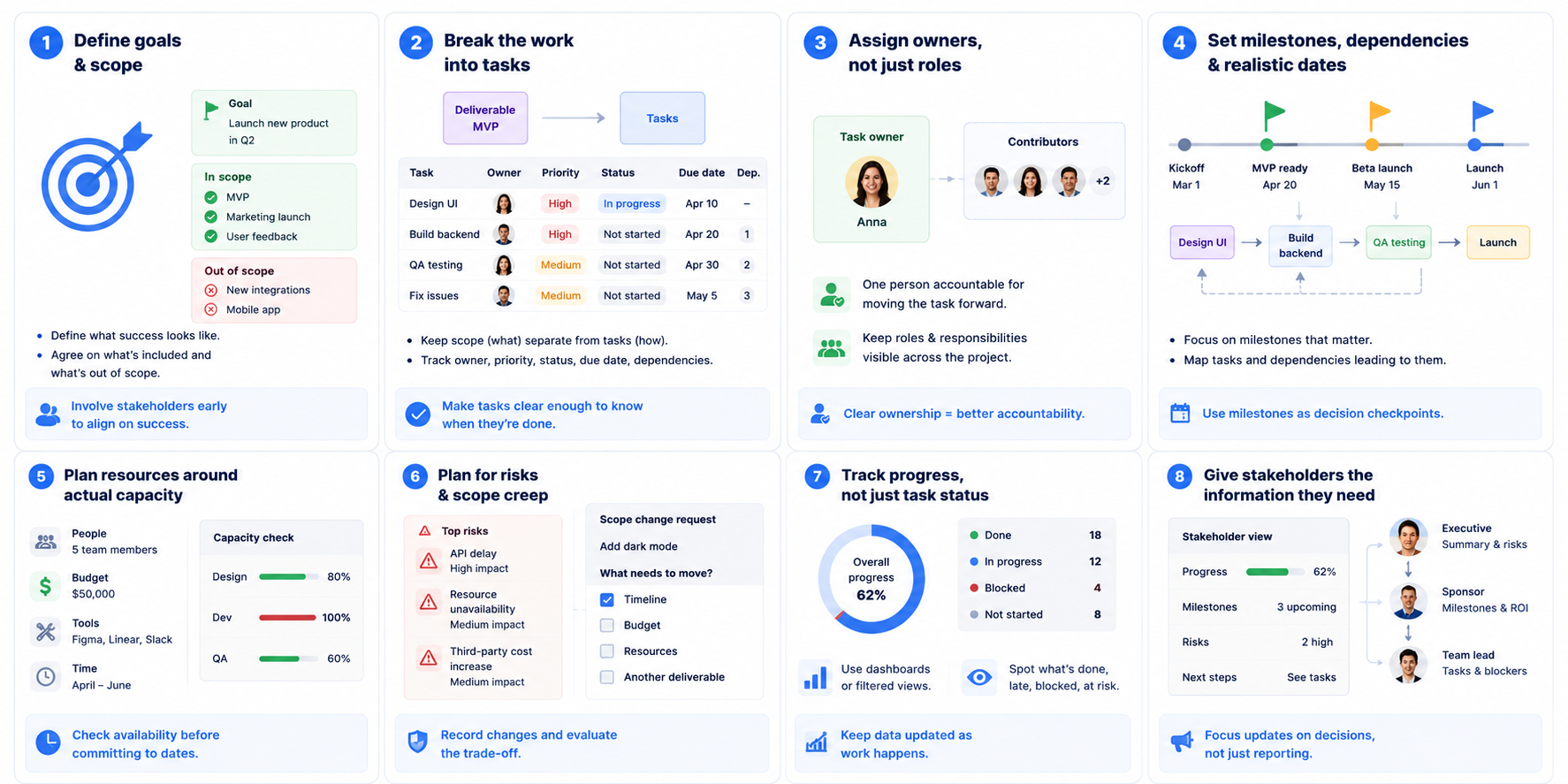
1. Define the project goals and scope
Start with what the project needs to achieve, not a list of tasks. Define the goal, key deliverables, what’s included, and what’s explicitly out of scope.
Do this with the people involved in the project rather than writing the scope alone. It helps surface missing requirements early and gives everyone the same definition of success.
If you’re planning a business launch, see our 10 best project plan templates to launch your business.
2. Break the work into tasks
Turn each deliverable into the work needed to complete it. Keep scope and tasks separate: scope describes what you’re delivering, while tasks describe how you’ll get there.
For each task, track the team member, priority, project status, due date, and dependencies. Don’t over-plan every tiny action; make tasks specific enough that someone can tell when they’re actually done.
3. Assign owners, not just roles
Every task needs one clear owner. You can have several people contributing, but having one person responsible for moving the task forward makes accountability much clearer.
Keep roles and responsibilities visible in the template, especially when several teams are involved. This also helps the project manager spot overloaded team members before work starts slipping.
4. Set milestones, dependencies, and realistic dates
Don’t treat every date as equally fixed. Identify the milestones that actually matter, then map the tasks and dependencies that lead to them.
Milestones can also be useful checkpoints for reviewing whether the project is still worth pursuing or whether priorities need to change.
For projects where scheduling is the main challenge, see our project timeline template.
5. Plan resources around actual capacity
Resource planning isn’t just listing who is involved. Check whether people actually have the time and capacity to do the work.
For each major task, consider the people, budget, tools, or other resources required. This can reveal a problem before you commit to a due date that the team can’t realistically meet.
6. Plan for risks and scope creep
Before starting, ask: “What could make this project fail or take longer than expected?”
Track the risk, potential impact, owner, and mitigation. For scope creep, don’t automatically say yes to every new request. Record the change and ask what needs to move in return — timeline, budget, resources, or another deliverable.
7. Track progress, not just task status
A project plan is only useful if it reflects reality. Keep project status, blockers, dependencies, and project progress updated as work happens.
Use a dashboard or filtered view to quickly answer: What’s done? What’s late? What’s blocked? What’s at risk?
For day-to-day task tracking, see our project tracker for remote teams.
8. Give stakeholders the information they need
Don’t create a separate report just because it’s reporting day. Keep the underlying project data current and give stakeholders the information they actually need to make decisions.
A concise update can focus on progress, blockers, risks, and next steps. For major stakeholders, clarify upfront what they want to know and what should be escalated immediately. This reduces the reporting burden while keeping people informed.
How Baserow helps with project planning
Baserow gives you a flexible database for organizing projects, tasks, team members, resources, and other project information.
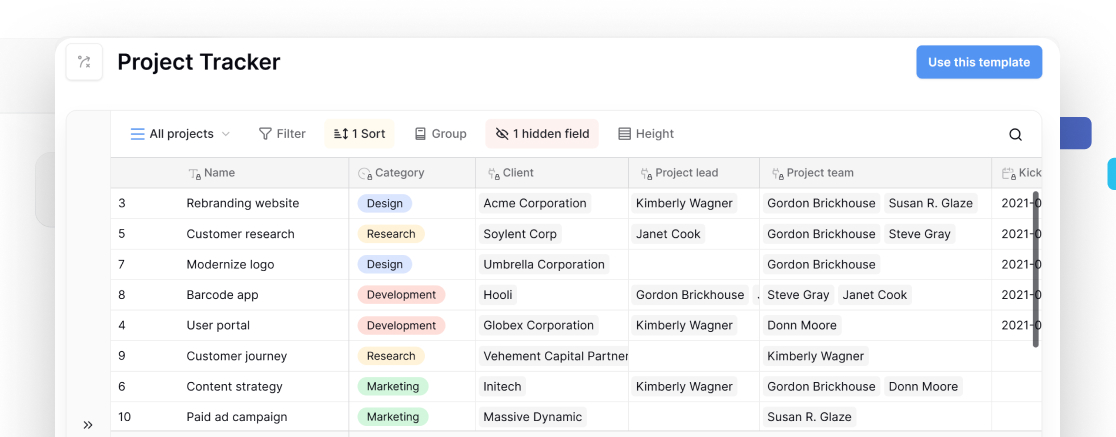
You can start with free project planning templates and customize them around your workflow. Add fields, connect related records, and create different views for different parts of your project.
As your workflow grows, you can use:
- Views to organize tasks, deadlines, and project status.
- Dashboards to monitor project progress and key metrics.
- Automations to handle repetitive project management tasks.
- AI to help work with information in your database.
- Application Builder to create custom interfaces for team members, clients, or stakeholders.
- Integrations and API to connect your project data with other tools.
This means you can start with a simple project planning template and build on it as your project becomes more complex.
Frequently asked questions
What is a project planning template?
A reusable structure for organizing goals, tasks, team members, roles and responsibilities, due dates, resources, and project status.
What should a project planning template include?
At minimum, include project goals, scope, tasks, owners, due dates, milestones, resources, risks, and project status so your team can plan and track progress.
How do you create a project planning template?
In Baserow, start with projects, tasks, team members, deadlines, and resources as your core data. Then add the fields, views, and relationships your workflow needs.
How can a project manager track project progress?
Use Baserow to track task status, deadlines, milestones, blockers, and risks in one place. Dashboards and filtered views can make project progress easier to spot.
What is scope creep?
Scope creep is when new requirements or deliverables expand a project’s original scope without adjusting its timeline, resources, or budget. A clear project planning template helps you spot and manage these changes.
Can I use free project planning templates?
Yes. Baserow’s free project planning templates give you a starting structure that you can customize with your own fields, views, and workflows.
👉 Start with Baserow and build a project planning workflow that fits your team.


Baserow 2.4 adds Button fields, Graph elements, workflow automation, AI provider management, improved Group By views, and 30+ more updates.

Discover how Airtable and Baserow compare in features, flexibility, speed, and scalability. Compare pricing plans and hidden costs to make an informed decision!

Explore the best open-source software alternatives to proprietary products. Discover OSS tools, licenses, and use cases with our updated directory.