
TL;DR
- Relational databases store data in tables with rows and columns. They use primary and foreign keys to connect records.
- Non-relational databases (NoSQL) use documents, key-value pairs, column families, or graphs to organize information.
- Relational databases work well with structured data, complex relationships, and applications that need reliable transactions.
- Non-relational databases support flexible data models, semi-structured data, and distributed workloads.
- The best choice depends on your data, application requirements, and scalability needs.
- Baserow is best for teams that need a flexible, visual way to organize structured business data, connect related records, and build custom workflows without writing SQL.
What Is the Difference Between Relational and Non-Relational Databases?
The main difference between relational and non-relational databases is how they store and connect information.
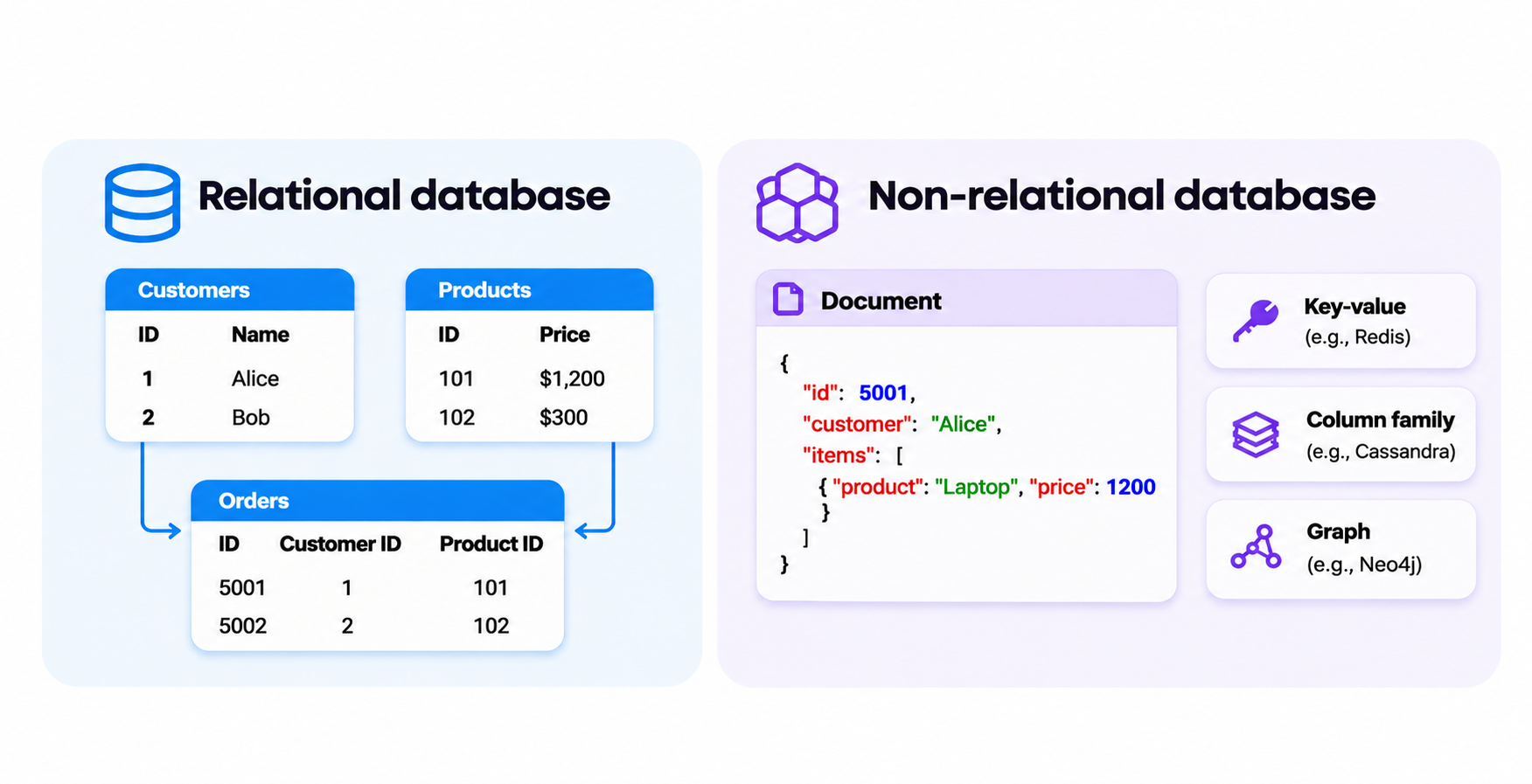
A relational database stores data in tables made up of rows and columns. It uses primary and foreign keys to connect records across tables. This structure works well when information follows clear rules and relationships.
A non-relational database, also called a NoSQL database, uses other data models. These include documents, key-value pairs, column families, and graphs. This approach offers more flexibility when working with semi-structured data or changing requirements.
Both database types help organizations store, retrieve, and manage information. However, they suit different applications and workloads.
Understanding the different types of databases helps you choose the right structure for your application. You can also explore our guide to the main types of databases.
Relational Database vs Non-Relational Database: Key Differences
Relational and non-relational databases differ in their structure, schema, query languages, scalability, and approach to data integrity.
Here’s a quick comparison:
| Feature | Relational database | Non-relational database |
|---|---|---|
| Data structure | Tables with rows and columns | Documents, key-value pairs, graphs, or column families |
| Schema | Predefined schema | Flexible or dynamic schema |
| Relationships | Primary and foreign keys | Embedded data, references, or graph connections |
| Query language | SQL | Varies by database |
| Data types | Mainly structured data | Structured and semi-structured data |
| Data integrity | Strong support for ACID transactions | Depends on the database |
| Scalability | Vertical and horizontal options | Often designed for horizontal scaling |
| Common uses | Financial systems, inventory, and business applications | Real-time applications, distributed systems, and flexible data storage |
Let’s examine the main differences.
1. Data Structure
Relational databases store data in tables. Each table represents an entity, such as customers, products, or orders. Columns define the information stored, while rows represent individual records.
For example, an online store might have three tables:
- Customers: Customer ID, name, and email.
- Products: Product ID, name, and price.
- Orders: Order ID, customer ID, and order date.
The database connects these tables through keys. This allows the application to retrieve related information without storing the same customer details in every order.
Primary and foreign keys define relationships between tables and connect related records. Learn more about how relational databases work.
Non-relational databases use different structures depending on their data model:
- Document databases: Store information in JSON-like documents. Each document can contain different fields and nested objects.
- Key-value databases: Store information as key-value pairs. Each key identifies a value, making retrieval straightforward.
- Wide-column databases: Organize information into column families. Different records can contain different columns.
- Graph databases: Store information as nodes and relationships. They focus on connections between entities.
These models help applications manage information that doesn’t always fit into traditional tables.
2. Schema and Flexibility
A relational database uses a predefined schema. Before adding records, you define tables, columns, data types, and constraints.
This structure keeps information consistent. For example, an Orders table might require every record to have an order ID, customer ID, and order date.
However, changing a schema takes planning. Adding columns or changing relationships may require database migrations and application updates.
Non-relational databases often offer more flexible data models. A document database, for example, can store different fields in different documents within the same collection.
This approach works well when application requirements change frequently or records contain different information.
However, flexibility doesn’t remove the need for validation. Without clear rules, teams can end up with inconsistent records that are difficult to manage.
For a closer look at how tables and relationships are organized, see our guide to database structure.
3. Query Languages
Relational databases commonly use Structured Query Language (SQL). SQL queries allow users to retrieve, insert, update, and delete information.
You can also combine data from multiple tables, filter records, perform calculations, and generate reports.
For example, an online store can use SQL queries to retrieve all orders placed by a particular customer.
Non-relational databases use different query methods. Some provide database-specific query languages, while others rely on APIs or SQL-like interfaces.
Document databases often support queries that filter information inside JSON-like documents. Key-value databases typically retrieve information through its associated key.
The main difference is that SQL provides a widely used standard for relational data, while NoSQL query methods vary between systems.
4. Scalability and Performance
Scalability determines how well a database handles growing datasets and increasing numbers of requests.
Relational databases traditionally rely on vertical scaling. This means increasing the resources of an existing server, such as its memory, CPU, or storage.
They can also scale horizontally through replication, partitioning, and sharding. However, distributing workloads can make database architecture more complex.
Many non-relational databases are designed for horizontal scaling. They distribute data and workloads across multiple servers.
This can help applications that handle big data, frequent writes, or large volumes of real-time requests.
Still, neither database type is automatically faster. Performance depends on query design, indexing, hardware, network speed, and how the database stores data.
5. Data Integrity and Consistency
Data integrity means keeping information accurate and consistent.
Relational databases commonly support ACID transactions:
- Atomicity: All operations in a transaction succeed or fail together.
- Consistency: Transactions follow defined database rules.
- Isolation: Concurrent transactions don’t interfere with each other in ways that break consistency.
- Durability: Committed changes remain saved, even after a system failure.
Together, atomicity, consistency, isolation, and durability help protect information during transactions.
These properties matter in financial systems, payment processing, and inventory management, where incomplete or incorrect transactions can cause serious problems.
These features also support maintaining data integrity by preventing invalid records and keeping information consistent.
Non-relational databases offer different consistency and transaction models. Some prioritize availability and distributed operations, while others support strong consistency and ACID transactions.
The important point is to check the guarantees of the specific database you plan to use. Not every relational or non-relational system works in exactly the same way.
Examples of Relational and Non-Relational Databases
Several database management systems are available. Each supports different data models and workloads.
For more context on the software used to create and manage databases, see our guide to database management systems.
When to Use a Relational Database
A relational database is usually a good choice when your data has a clear structure and relationships between records matter.
Consider using one when:
- You manage structured business information. Customer records, employee details, products, and financial transactions fit naturally into tables.
- Relationships are important. You need to connect customers with orders, employees with departments, or projects with tasks.
- Data accuracy matters. Your application needs reliable transactions and consistent records.
- You need complex queries. SQL helps combine information from multiple tables and generate detailed reports.
- Your data structure is predictable. You understand the main entities and relationships your application needs.
For example, an inventory management system needs to connect products, suppliers, purchase orders, and stock levels. A relational database makes these connections clear and helps prevent inconsistent information.
When to Use a Non-Relational Database
A non-relational database can be a better choice when your application needs flexible data models, distributed storage, or specific ways to access information.
Consider using one when:
- Your data structure changes frequently. Different records may contain different fields.
- You work with semi-structured data. Your application handles JSON documents, event data, or logs.
- You need distributed storage. Your application must spread data across multiple servers.
- You process large amounts of real-time data. Some NoSQL databases support high-throughput workloads.
- You need specialized relationships. Graph databases help when connections between entities are central to your application.
For example, an IoT platform might collect information from thousands of devices. Each device can produce different measurements and event records. A suitable non-relational database can help store and process this information across distributed infrastructure.
How to Choose Between Relational and Non-Relational Databases
Choosing between relational and non-relational databases starts with your application requirements.
Ask yourself these five questions:
1. How structured is your data?
If your information follows predictable formats and has clear relationships, a relational database is often a good starting point. If records vary significantly, a document database might be more suitable.
2. How important are relationships between records?
If you frequently connect customers, products, orders, and transactions, relational databases provide a natural way to manage these relationships.
3. How important are transactions and consistency?
Applications such as banking, payments, and inventory management often need strong transaction guarantees. Check the specific consistency and transaction features of each database.
4. How much data and traffic do you expect?
Consider your current needs and expected growth. A large dataset doesn’t automatically mean you need NoSQL. Modern relational databases can handle substantial workloads too.
5. Who will manage the database?
Think about your team’s technical experience, infrastructure, maintenance requirements, and the tools needed to work with the data.
You don’t always have to choose just one. Some applications use relational databases for core business records and non-relational systems for caching, search, analytics, or event storage.
Choose the architecture that solves your actual problem rather than following technology trends.
Want a Relational Database Without the Complexity? Try Baserow
If your business data has clear relationships, you probably don’t need a more complicated database model. You need an easier way to work with relational data.
Traditional database tools often assume that users know SQL, understand database schemas, and can manage technical changes. This creates friction for teams that simply want to connect customer records, track projects, manage inventory, or organize business information.
Baserow takes a different approach. Its visual database builder lets you work with relational data through an interface that feels familiar, without the need for SQL database.
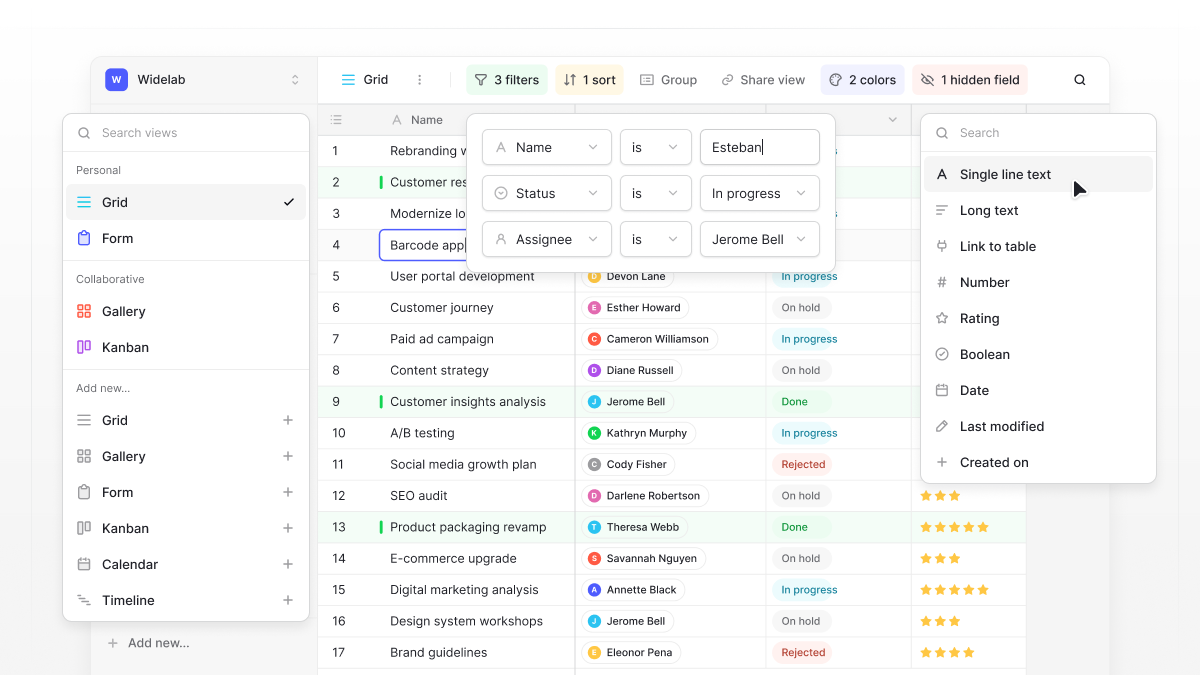
For example, imagine managing customer projects. You can create separate tables for clients, projects, tasks, and team members, then connect them using linked records. When a client’s details change, you update them once instead of searching through multiple spreadsheets.
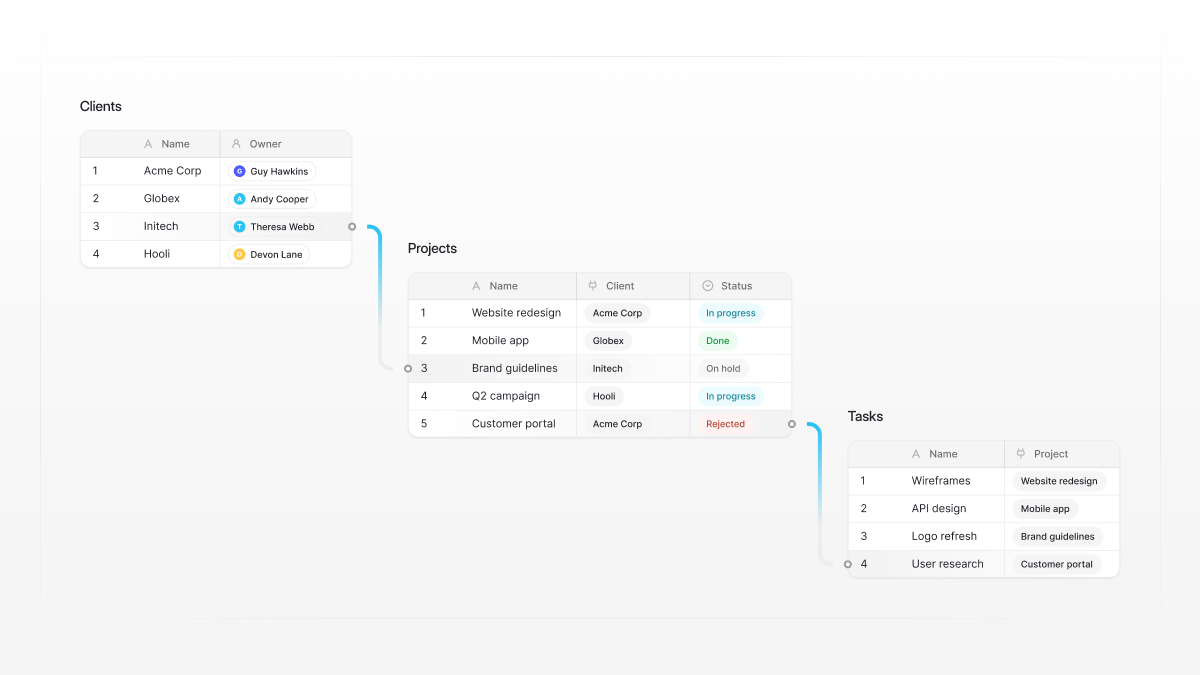
You can also:
- Avoid disconnected spreadsheets: Keep related business information in one database instead of maintaining multiple files with duplicate records.
- Make relationships visible: Connect tables through linked records and see which projects belong to each client or which tasks belong to each project.
- Give different teams the views they need: Use grid, kanban, calendar, and gallery views without creating separate copies of your data.
- Reduce manual updates: Automate repetitive processes, such as assigning tasks or updating records when something changes.
- Let non-technical teams work independently: Give teammates a way to manage and explore data without depending on developers for every change.
- Go beyond database tables: Use Baserow’s Application Builder to create interfaces and portals that let people interact with your data.
Baserow is open-source, supports cloud and self-hosted deployment, and gives teams control over how they organize and use their data.
Frequently Asked Questions
What is the main difference between relational and non-relational databases?
Relational databases store information in structured tables connected through primary and foreign keys. Non-relational databases use other models, such as documents, key-value pairs, column families, and graphs.
Is SQL relational or non-relational?
SQL (Structured Query Language) is primarily associated with relational databases. It allows users to retrieve, update, and manage structured information stored in related tables.
Is NoSQL the same as a non-relational database?
Yes. NoSQL is commonly used to describe non-relational databases. These systems use different data models and don’t rely on the traditional relational table structure. Some modern NoSQL databases also support SQL-like queries.
Is MongoDB relational or non-relational?
MongoDB is a non-relational document database. It stores information in BSON documents rather than traditional relational tables.
Which database is better for large datasets?
It depends on your workload. Relational databases can handle large datasets and complex queries. Many non-relational databases are designed for distributed storage and horizontal scaling. Consider your data structure, query patterns, and consistency requirements before choosing.
Can relational and non-relational databases work together?
Yes. Many applications use both. For example, a business might use PostgreSQL to manage customer and order records while using Redis for caching or a document database for flexible application data.
Is Baserow a relational or non-relational database?
Baserow provides a visual interface for managing relational data. Users can create tables, define fields, and connect records through linked record fields without writing SQL. It’s designed to make relational database management accessible to technical and non-technical teams.
With Baserow, you can create relational databases, connect records, and build workflows through a visual, no-code interface.

Baserow 2.4 adds Button fields, Graph elements, workflow automation, AI provider management, improved Group By views, and 30+ more updates.

Discover how Airtable and Baserow compare in features, flexibility, speed, and scalability. Compare pricing plans and hidden costs to make an informed decision!

Explore the best open-source software alternatives to proprietary products. Discover OSS tools, licenses, and use cases with our updated directory.