

Why Every Team Needs a Risk Management Template
Managing risk effectively starts with the right structure. A clear, consistent risk assessment process is essential whether you’re in compliance, project oversight, or day-to-day operations. With a well-designed risk management template, your team can identify, evaluate, and respond to risks efficiently—without missing a step.
This fully customizable, no-code template—built using Baserow—helps teams standardize documentation, assign responsibilities, and maintain compliance with ease. It’s designed for professionals who need both adaptability and control, without the hassle of complicated software or static spreadsheets.
What Is Risk Management and Why It Matters
Risk management is the process of identifying, analyzing, and responding to potential events that could negatively impact your business, project, or team. These risks might range from operational delays and financial loss to safety incidents or compliance breaches.
Implementing a structured risk management process ensures you’re not reacting to problems after they occur—but proactively preventing them. It helps organizations allocate resources wisely, protect assets, and make informed decisions. In today’s fast-moving environments, risk management isn’t optional—it’s essential for resilience, compliance, and long-term success.
.jpg)
Why Use a Risk Assessment Template?
A well-structured risk assessment template is not just a time-saving tool — it’s the backbone of compliance, safety, and operational efficiency. Risk identification is a non-negotiable in industries like construction, healthcare, finance, and IT. Yet, many teams still struggle to document risks consistently.
By using a predefined template:
- You save time by avoiding repetitive formatting
- You standardize your process, making team collaboration easier
- You improve audit readiness by ensuring all necessary information is captured
- You can quickly assess impact using the 5 C’s of risk assessment: Context, Causes, Consequences, Controls, and Contingencies
Using Baserow’s template, teams can plug in relevant data and immediately visualize potential threats, without jumping across spreadsheets or manually updating formats.
👉 Explore the Risk Management and start building a more resilient, organized approach to managing risks today.
Key Elements of a Risk Assessment Template
So, what exactly should a good risk assessment include? According to most frameworks — and reflected in this downloadable template — here are the essentials:
1. Hazard Identification
Start by identifying potential sources of harm. These could be environmental hazards, operational flaws, or even software vulnerabilities.
2. Risk Evaluation (Likelihood vs. Severity)
Evaluate how likely the risk is to occur and how severe the outcome would be. This section often uses a color-coded matrix to visually rank each risk from low to high.
3. Control Measures
Document the current and proposed measures to minimize each identified risk. Controls can be procedural (like safety training) or technical (like automated alerts).
4. Responsibilities and Review Dates
Accountability is key. Your template should clearly assign owners to each risk and set review timelines to ensure controls remain effective.
5. Action Plan
Every identified risk needs a response strategy. What needs to happen? When? Who’s responsible? This part of the template keeps follow-up actions visible and trackable.
These five elements align with what many ask: “What are the 5 things a risk assessment should include?” — giving you peace of mind that your documentation is thorough.
How to Fill Out the Template
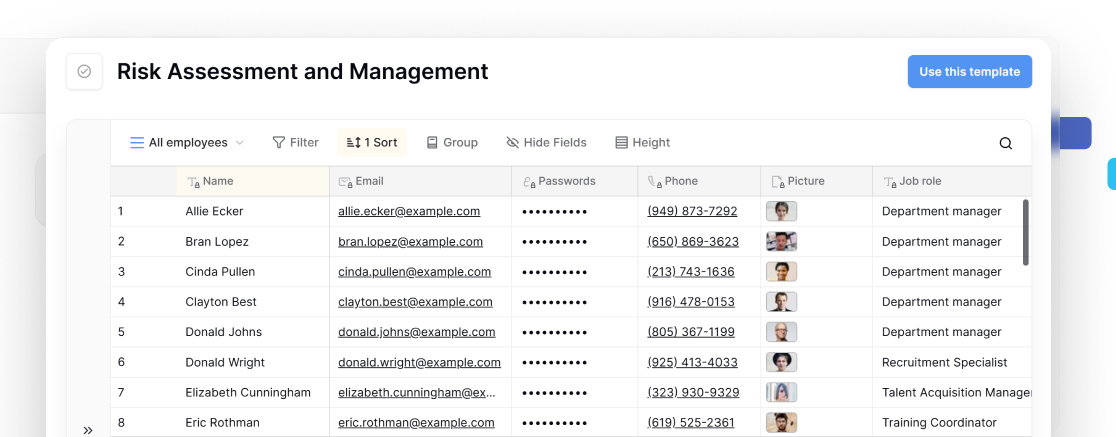
Even if you’re new to risk management, this template makes the process simple and intuitive. Here’s a quick walkthrough:
- Open the Baserow Template: Navigate to the template and duplicate the template into your workspace. You’ll see a clean layout with sample data to guide you.
- Start with Your Context: Define the scope — what process, asset, or project are you evaluating? This aligns with the first of the 5 C’s of risk: Context.
- List Hazards and Causes: In the “Hazards” column, enter potential threats. Include triggers or causes beside them for clarity.
- Rate the Risks: Assign a “Likelihood” and “Impact” score to each hazard. These fields auto-calculate a “Risk Score” to prioritize your focus.
- Document Controls and Actions: Record existing measures and propose new ones. You can assign responsibility, set deadlines, and mark completion status.
- Schedule Review Dates: Don’t let your risk register gather dust. Set automatic reminders or mark review cycles right within the template.
1. Open the Baserow Template and Explore the Structure
Start by adding the Risk Assessment and Management Template to your workspace. You’ll see a fully structured database with interconnected tables, including Employees, Risk categories, Risk registrations, Risk assessments, and Mitigation plans. The template already includes sample records to guide you.
2. Set Up Your Team and Roles
In the Employees table, enter each team member’s name, email, phone number, picture, and job role. You can also track registrations, assessments, and plans linked to each employee. This helps assign ownership and improve accountability across your risk management process.
3. Define Risk Categories
Navigate to the Risk categories table. Here, you can group risks by type (e.g., operational, compliance, financial) and add descriptions. The system automatically counts how many risks fall under each category and highlights active registrations using formulas.
4. Register New Risks
Move to the Risk registrations table to document specific risks. For each registration, fill out:
- Name & Description (clear definition of the risk)
- Expected Cost, Source, and Status
- Assessment Frequency and Last Assessment Date
- Link to a Category for easy filtering
- Scores for Impact and Likelihood, which auto-calculate the overall risk score
You can use pre-built views to see registrations grouped by category, status, assessment frequency, or those requiring re-assessment. The “Register new risk” form simplifies adding new entries.
5. Conduct and Link Risk Assessments
In the Risk assessments table, create assessments linked directly to each risk. Add fields such as:
- Title & Date
- Assessor, with automatic rollups for names
- Findings (detailed notes)
- Impact and likelihood scores pulled from linked fields
Use calendar views to track upcoming assessments and see which risks have the highest impact or likelihood.
6. Plan and Monitor Mitigation Actions
Head to the Mitigation plans table to outline how each risk will be mitigated. Fill out:
- Name & Description of the mitigation action
- Owner, with links to employees
- Due dates and Status
You can view all plans in grouped, Kanban, or calendar formats. Special views highlight plans that are overdue or grouped by risk or owner.
7. Use Advanced Views and Dashboards
Leverage built-in dashboards like:
- Risks by category
- Risks requiring re-assessment
- Mitigation plans beyond due dates
These dynamic views help prioritize efforts and ensure risks are actively managed over time.
Customizing the Template with Baserow
The power of this risk assessment template lies in its flexibility. Built inside Baserow’s no-code platform, it allows teams to tweak the structure according to specific needs — whether you’re handling data privacy risks, manufacturing compliance, or general operations.
For example, if you need to manage IT assets alongside risk evaluations, simply add a linked table and turn your template into a lightweight asset management template. No technical skills required.
Want to assign roles, add real-time collaboration, or generate dashboards? Baserow’s relational database capabilities allow it all — minus the spreadsheet fatigue.
Who Can Use This Template?
The beauty of this risk assessment template is its versatility. It’s not confined to a specific industry or department. Whether you’re a compliance officer, safety manager, or team lead, this tool helps you build a centralized, actionable risk register.
Here’s who can benefit:
- Governance, Risk & Compliance (GRC) Teams Ensure regulatory alignment and stay audit-ready with structured assessments. Learn more about GRC use cases on Baserow for GRC Departments.
- Project Managers Predict project delays, identify operational bottlenecks, and assign mitigation strategies—directly from your dashboard.
- HR & Operations Teams Manage workplace safety, onboarding risks, or policy compliance in a single, editable interface.
Each user can customize views, filters, and fields according to their risk profile. From boardroom reports to team-level task tracking, the template is flexible enough to meet both strategic and tactical needs.
Risk Frameworks to Keep in Mind
Alongside the “5 C’s” of risk assessment, many organizations also apply the 5 R’s framework to ensure their risk process is cyclical and proactive:
- Recognize the potential risks
- Rank them by impact and probability
- Respond with the appropriate controls
- Review regularly
- Report outcomes to stakeholders
Baserow’s template supports each of these steps by providing space to track metrics, assign responsibilities, and flag recurring issues. Whether you’re working under ISO 31000, COSO, or another framework, the structure holds up to international standards.
To dive deeper into how companies apply these methods, watch our Governance Risk Compliance Webinar.
Take the Next Step with Baserow
Using a downloadable template is just the first step. Baserow empowers teams to turn static templates into dynamic workflows. From instant collaboration to no-code automation, it’s the ideal tool to evolve your risk management process.
Want more?
- Discover other smart tools on our blog: Best Management Tools
- Learn more about Baserow’s product features: Product Overview
👉 Ready to future-proof your risk documentation?
Explore how Baserow can help your team manage risk with more clarity and less chaos.


Baserow 2.4 adds Button fields, Graph elements, workflow automation, AI provider management, improved Group By views, and 30+ more updates.

Discover how Airtable and Baserow compare in features, flexibility, speed, and scalability. Compare pricing plans and hidden costs to make an informed decision!

Explore the best open-source software alternatives to proprietary products. Discover OSS tools, licenses, and use cases with our updated directory.