
TL;DR
- An API lets one application request data or an action from another system.
- A typical interaction includes an API request, API endpoint, authentication, and a response.
- APIs connect websites, databases, payment services, authentication systems, and other applications.
- Common API use cases include a weather app retrieving current conditions, processing payments, sending emails, signing in with another account, and connecting an application to a database.
- Baserow provides a REST API that lets applications create, read, update, and delete database records programmatically.
What is an API example?
If you’re new to APIs, the easiest way to understand them is to look at a real situation.
Imagine you have a website with a contact form. Someone enters their name, email address, and message and clicks ‘Submit’.
Where does that information go?
Your website can send an API request to another system, such as a database. That system receives the request, processes the information, and sends a response back.
The basic flow looks like this:
Application → API request → API endpoint → Server → Response → Application
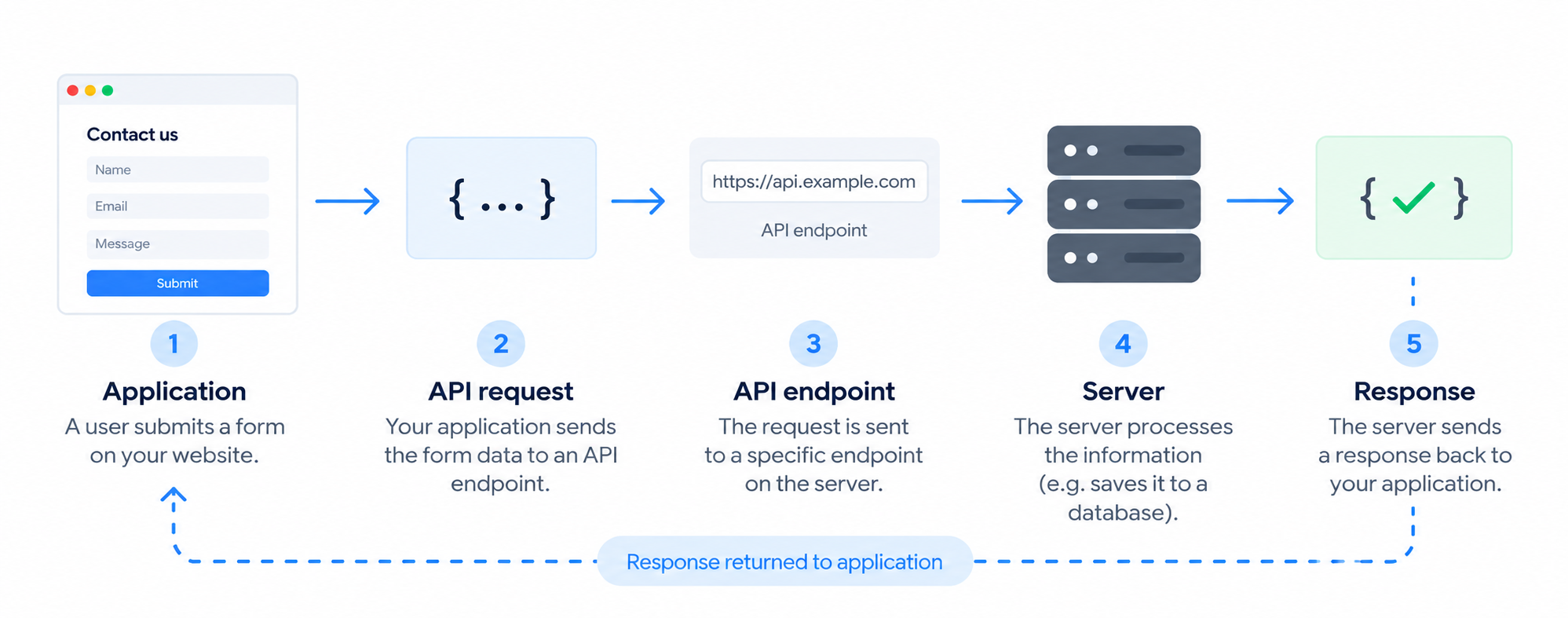
This is what an API example demonstrates: how two pieces of software communicate to exchange data or perform an action.
An API stands for Application Programming Interface. It provides a defined way for different software components to communicate.
APIs offer a way to connect different services, allowing applications to use external data or functionality without building everything from scratch.
For a broader introduction, see our guide to what an API is.
How does an API work?
Suppose your application wants to retrieve a customer with an ID of 123.
It might send:
GET /api/customers/123
Here, GET tells the server that the application wants to retrieve information. The /api/customers/123 part identifies the resource being requested. This is an API endpoint.
The server might respond with:
{
  "id":123,
  "name":"Sarah",
  "email":"sarah@example.com"
}
Your application can then use this information in its own interface.
The application doesn’t need to know how the other system stores the customer. It only needs to follow the rules defined by the interface.
Many modern web services work this way.
What about authentication?
A service may require an API key or another type of token to verify that an application is allowed to make requests.
For example:
Authorization: Token YOUR_API_KEY
Some services provide a public API for external developers, while private APIs and internal APIs restrict access to specific applications, teams, or organizations.
Want to understand what happens behind an API before exploring specific examples? Learn more about how APIs work, the different types, and common use cases.
4 practical API examples
The best way to understand APIs is to look at situations you may already encounter.
1. Processing an online payment
When you buy something online, the website needs to communicate with a payment provider.
After you click ‘Pay’, the online store can send an API request containing information about the transaction.
The payment service processes it and sends a response telling the store whether the payment was successful, declined, or requires additional verification.
The process looks like this:
Online store
     ↓
API request
     ↓
Payment service
     ↓
API response
     ↓
Online store
The store doesn’t need to build its own payment infrastructure. It can use an existing web service through its API.
This is a common example of an API call: one application sends information to another service and receives a result it can use.
2. Sending an email after a form submission
Imagine you have a website with a contact or signup form. When someone submits it, you want to automatically send them a confirmation email.
Instead of building an email delivery system yourself, your application can send the submitted information to an email service through an API.
The flow looks like this:
User submits a form
        ↓
Web application
        ↓
API request
        ↓
Email service
        ↓
Email sent
The application might send the customer’s email address, name, and other relevant information. The service processes the request and returns a response confirming whether the message was accepted.
This is a common API use case: an application sends information to a specialized web service that performs an action on its behalf.
3. Logging in with another account
You’ve probably seen buttons such as ‘Continue with Google’ or ‘Sign in with Apple’.
These can also involve APIs.
When you choose one, the application communicates with the identity provider to verify who you are and determine what information it can access.
A simplified flow looks like this:
You
 ↓
Application
 ↓
Identity provider
 ↓
Authentication result
 ↓
Application
Instead of asking the application to create and manage another username and password, the identity provider handles authentication.
This is useful because authentication involves sensitive information. Applications can use established standards instead of building the entire process themselves.
4. Connecting an application to a database
One of the most useful applications of APIs is connecting a website or application to a database.
Imagine you’re building an event-booking application.
Your database contains:
| Event | Date | Available seats |
|---|---|---|
| Design Conference | Sep 20 | 250 |
| Product Meetup | Oct 4 | 80 |
| Tech Workshop | Oct 12 | 35 |
When someone opens the application, it can request event information from the database.
When someone registers, it can send another request to create a new record. This allows the application and database to exchange updated information in real time.
For example:
GET    → retrieve events
POST   → create a registration
PATCH  → update a registration
DELETE → remove a registration
This allows the application and database to work together without exposing the database directly to visitors.
Where does Baserow fit in?
This is where Baserow can be useful.
Instead of building a database backend from scratch, you can use Baserow to store structured data and connect it to your website or application through its REST API.
Baserow automatically generates API documentation for each database, including available endpoints and fields, and updates the documentation when your database schema changes.
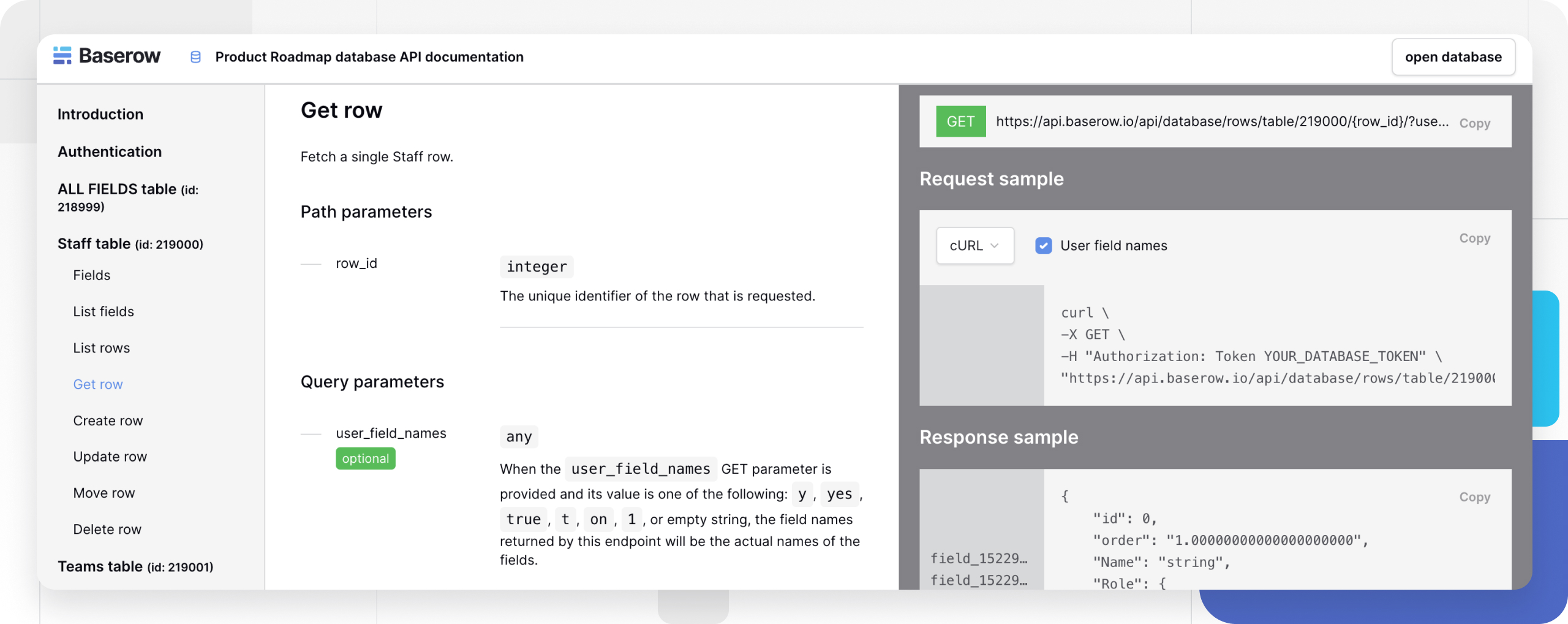
You could store events, products, customers, or orders in Baserow and have another application retrieve or update that information programmatically.
REST API example: what does it look like?
Many of the examples above use a REST API.
REST, or Representational State Transfer, is an architectural style commonly used for web-based interfaces. It typically uses HTTP methods to describe what you want to do with a resource.
For example:
GET    /customers/123
POST   /customers
PATCH  /customers/123
DELETE /customers/123
The basic pattern is:
- GET → retrieve something
- POST → create something
- PATCH → change something
- DELETE → remove something
Baserow follows this pattern for database operations. Its generated documentation shows the endpoints available for your tables and fields.
If you want to go beyond using APIs and learn how they are designed and built, see our guide to API development.
API example vs. API integration
These terms are related but not identical.
An API example shows how an interface can be used in a particular situation.
An API integration is the actual connection between systems.
For example:
API example: A website sends a new customer record to a database.
API integration: You connect the website to a database so every new customer is automatically added.
The first describes the use case. The second describes the implemented connection.
How Baserow handles API access
Baserow uses database tokens to authenticate external applications connecting to its database API.
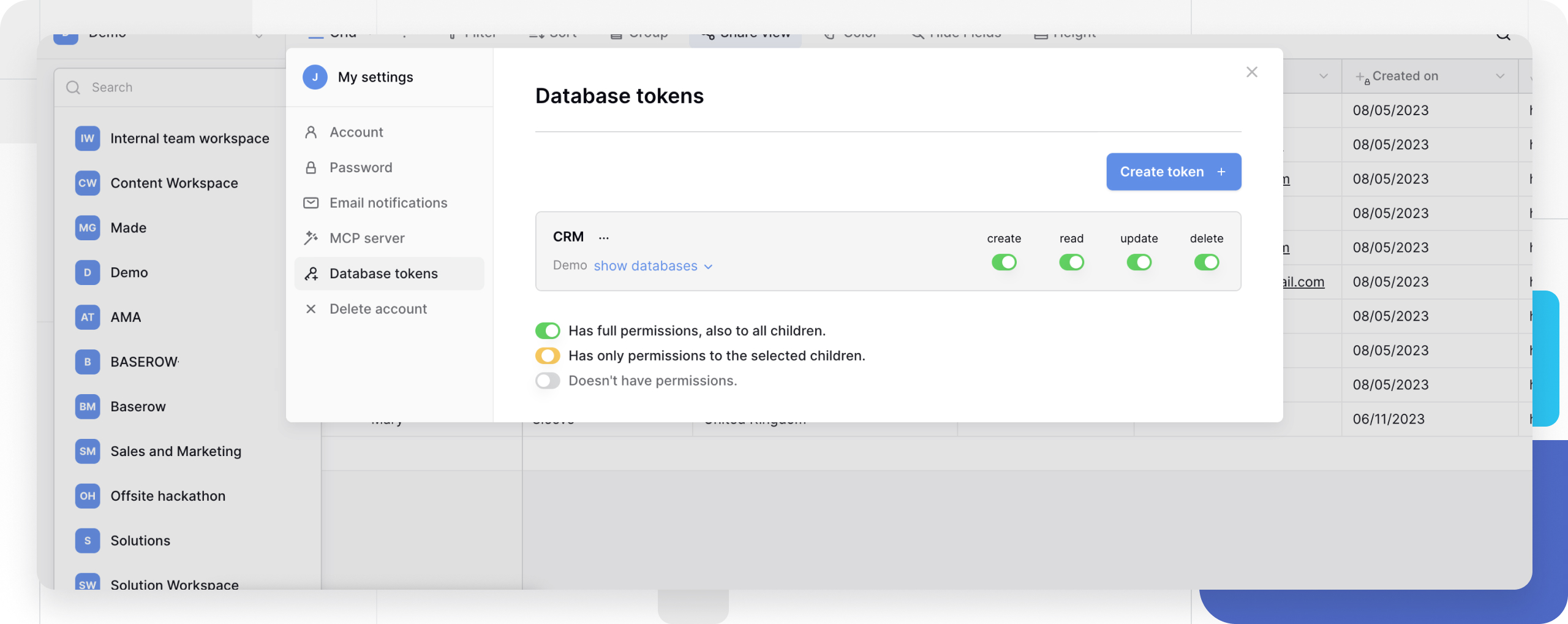
These tokens can have permissions for creating, reading, updating, and deleting records at the table level. This lets an application have only the access it needs.
For example, if a website only needs to display products, it can be given read access rather than permission to modify or delete records.
A request can include the token in its authorization header:
Authorization: Token YOUR_DATABASE_TOKEN
Tokens should be kept secure rather than exposed in client-side code or public repositories.
FAQ
What is an API example?
An API example shows how one application communicates with another system to retrieve data, create records, update information, or perform an action. Baserow is one practical example, providing a REST API for working with database records programmatically.
What is a real-world API example?
A website sending a submitted form to a database is a simple real-world example. The website sends a request, the database processes it, and the new information becomes a record.
What does API stand for?
API stands for Application Programming Interface. It defines how different software applications can communicate.
What is an API endpoint?
An API endpoint is a specific URL where an application sends requests to access a resource or perform an operation. Baserow automatically provides API endpoints for interacting with database tables and records.
What is an API key?
An API key is a credential used by some services to identify and authenticate applications making requests. Other services use tokens or different authentication methods.
Is REST API an API?
Yes. REST is an architectural style used to design APIs, especially web-based ones. REST interfaces commonly use HTTP methods such as GET, POST, PATCH, and DELETE. Baserow uses a REST API to let applications create, read, update, and delete database records.
Are APIs only used by developers?
APIs are primarily a technical mechanism, but you don’t always need to write code yourself to benefit from them. Many no-code and automation platforms use APIs behind the scenes to connect different services.
The easiest way to understand an API is to think of it as a structured way for one application to communicate with another.
A website can send form submissions to a database. An application can retrieve information from another service. An automation can use a change in one system to trigger an action somewhere else.
Once you understand the basic flow — request → endpoint → server → response — API examples become much easier to follow.
With an API-first platform like Baserow, your database can become a flexible data source for websites, applications, automations, and other tools.
Ready to connect your data?


Baserow 2.4 adds Button fields, Graph elements, workflow automation, AI provider management, improved Group By views, and 30+ more updates.

Discover how Airtable and Baserow compare in features, flexibility, speed, and scalability. Compare pricing plans and hidden costs to make an informed decision!

Explore the best open-source software alternatives to proprietary products. Discover OSS tools, licenses, and use cases with our updated directory.