
Forms are everywhere. Businesses use them to collect feedback, register users, manage job applications, and organize internal requests. But not all tools are built the same. Choosing the right system can help you save time, improve accuracy, and simplify workflows.
An online form builder is a digital tool that allows you to create forms without coding. Instead of writing technical scripts, you use visual tools to design and publish forms in minutes. These forms collect responses automatically and store them in a structured format.
If you want to understand the bigger picture of how businesses collect information, read our guide on data collection methods.
What Is an Online Form Builder?
An online form builder helps individuals and businesses design digital forms through a user friendly interface. You can drag and drop fields like text boxes, checkboxes, and dropdown menus to build structured forms.
These tools are useful for:
- Contact forms
- Registration forms
- Feedback surveys
- Internal approval requests
Many platforms offer a free form option so users can test basic features before upgrading.
Creating forms online removes the need for paper documents and reduces manual errors. Instead of sorting through spreadsheets or emails, responses are organized automatically.
Key Features to Look For
When evaluating tools, certain features make a major difference in usability and scalability.
Ease of Use
The platform should allow you to design professional looking forms without technical knowledge. A clean interface makes creating forms faster and more efficient.
A good form builder should:
- Offer drag-and-drop design
- Provide customizable layouts
- Allow quick editing and updates
If it takes too long to build a simple form, the tool may not be practical for long-term use.
Conditional Logic and Automation
Conditional logic allows forms to change based on user responses. For example, if someone selects “Yes,” additional fields can appear automatically.
This feature improves user experience and keeps forms shorter and clearer.
Automation also helps businesses process form submissions faster. Instead of manually reviewing every entry, workflows can assign tasks or trigger notifications in real time.
Permissions and Access Control
As teams grow, managing access becomes important. Not every employee should see all submitted information.
Role-based permissions allow administrators to control who can view, edit, or manage data. You can learn more about structured permissions here. Access control improves security and ensures accountability within teams.
Database Integration and Why It Matters
Some simple tools only store responses in basic spreadsheets. While this may work for small projects, growing businesses need more flexibility.
Database-driven systems connect form submissions directly to structured tables. This makes it easier to filter, sort, and analyze information over time.
Here is a simple comparison:
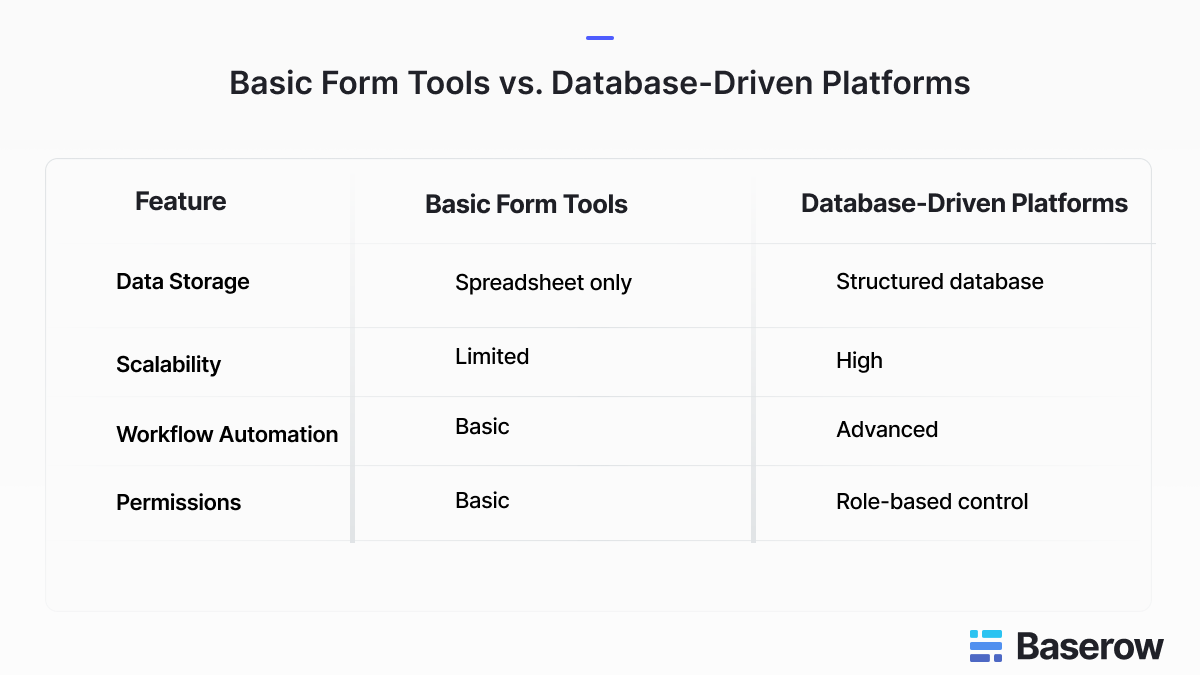
Platforms like Baserow follow a database-first structure. Instead of treating forms as isolated tools, they connect them to customizable tables and workflows. This approach supports API flexibility, automation, and collaboration across departments.
For those evaluating improvements in functionality, this release update highlights ongoing enhancements.
How to Evaluate and Choose the Right Tool
Before selecting a platform, ask yourself these questions:
- Does it help you save time?
- Is it user friendly?
- Does it support automation and workflows?
- Can it scale as your business grows?
- Does it allow secure role-based access?
- Can it integrate with other systems?
If you are comparing options, explore Baserow’s form builder solution here.
Many users ask: What is the best online form builder? The answer depends on your needs. Some businesses only require simple surveys. Others need advanced database integration and automation.
Where can you create online forms for free? Many platforms provide trial versions or limited free plans. Testing features before committing is always a smart step.
Can ChatGPT create forms? AI tools can help generate questions or structure, but you still need a platform to publish and manage responses securely.
Does Microsoft have an online form builder? Yes, Microsoft offers tools like Microsoft Forms, but businesses may require more customization and database integration depending on complexity.
Conclusion
Choosing the right form builder is not only about design. It is about flexibility, automation, security, and scalability.
Modern businesses benefit from tools that connect forms directly to structured databases and workflows. Instead of managing disconnected files, teams can centralize responses and improve collaboration.
See how Baserow compares and explore its customizable approach to form building today.


Baserow 2.4 adds Button fields, Graph elements, workflow automation, AI provider management, improved Group By views, and 30+ more updates.

Discover how Airtable and Baserow compare in features, flexibility, speed, and scalability. Compare pricing plans and hidden costs to make an informed decision!

Explore the best open-source software alternatives to proprietary products. Discover OSS tools, licenses, and use cases with our updated directory.