
TL;DR
If you’re short on time, here’s what you need to know:
- Project management software helps teams plan, organize, and track projects from start to finish.
- It centralizes tasks, timelines, documents, communication, and project progress in one place.
- Common features include task management, Kanban boards, Gantt charts, calendars, dashboards, automations, and reporting.
- Modern project management software often includes AI features, workflow automation, and real-time collaboration.
- The best project management software depends on your team’s size, workflow, and customization needs. Flexible platforms like Baserow allow teams to build tailored project management systems instead of relying on rigid templates.
Project management software is a digital tool that helps teams plan, organize, track, and complete projects more efficiently. It brings tasks, deadlines, files, conversations, and workflows into one place, making it easier for everyone to stay aligned and deliver work on time.
Whether you’re managing a product launch, a marketing campaign, a construction project, or internal operations, project management software provides a central workspace where teams can assign work, monitor progress, collaborate, and report on results.
Modern project management software goes beyond simple task lists. Many platforms now combine collaboration, automation, AI, reporting, and customizable workflows to help organizations manage projects of any size.
Unlike traditional project management tools with fixed workflows, platforms like Baserow allow teams to build a project management system that matches their own processes. Instead of adapting your workflow to the software, you can customize databases, views, automations, and applications to fit the way your team works.
What is project management software?
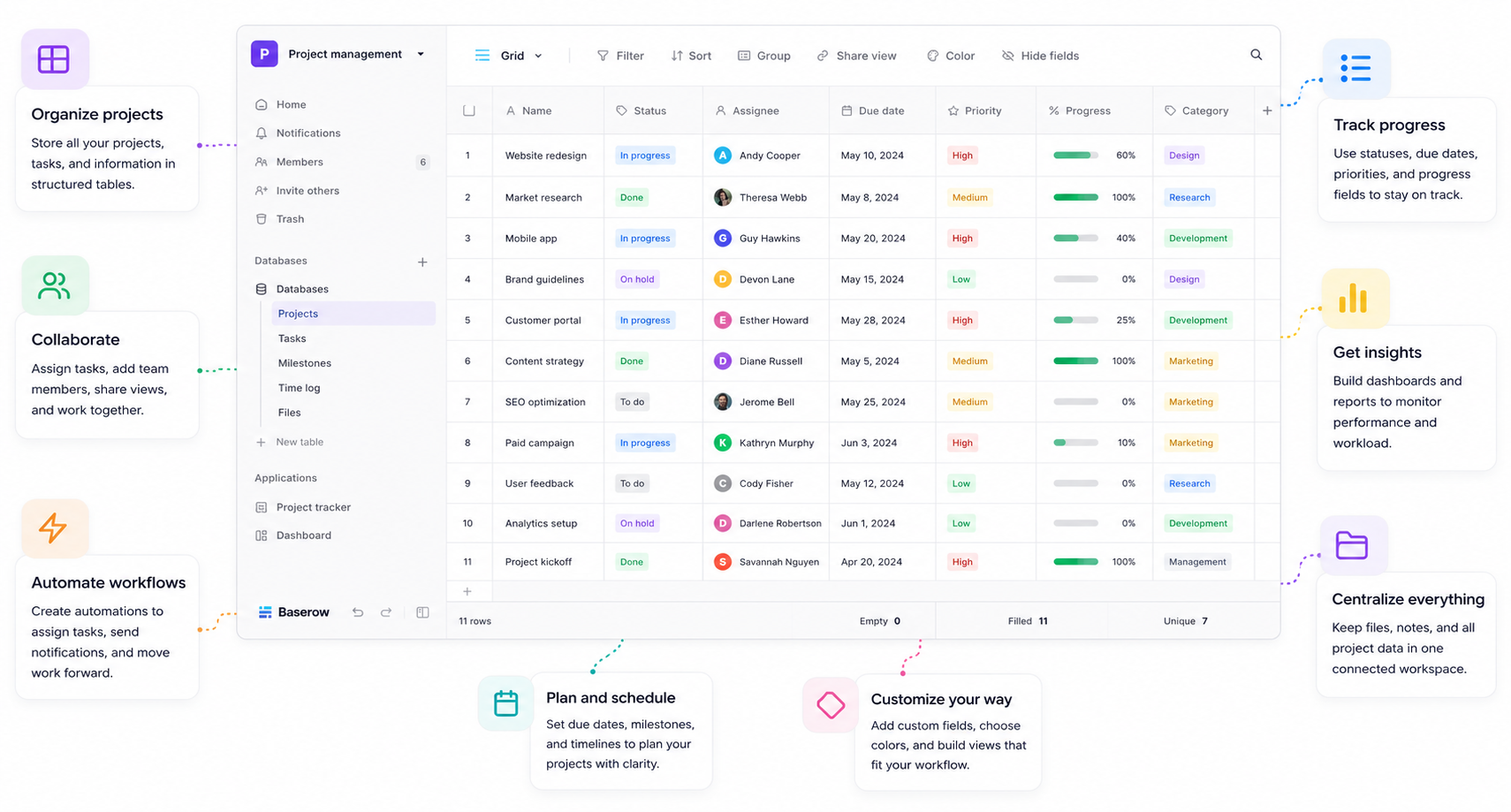
Project management software is an application that helps individuals and teams organize work, coordinate resources, and complete projects efficiently.
Instead of managing projects through spreadsheets, emails, and chat messages, project management software provides a single source of truth where everyone can see:
- Project goals
- Tasks and subtasks
- Owners and team members
- Due dates and milestones
- Project timelines
- Files and documentation
- Progress updates
- Reports and dashboards
This improves visibility across projects, reduces manual work, and helps teams identify bottlenecks before they become problems.
Today’s project management solutions also support different ways of working. Teams can visualize projects using Kanban boards, calendars, timelines, Gantt charts, or database views, depending on their preferred project management methodology.
Why do businesses use project management software?
As organizations grow, managing projects becomes increasingly complex. Information gets scattered across emails, spreadsheets, documents, and messaging apps, making it difficult to know who is responsible for what.
Project management software solves this by creating a centralized workspace where teams can plan work, collaborate in real time, and monitor progress throughout the entire project lifecycle.
Businesses typically use project management software to:
- Plan projects and allocate resources
- Assign and prioritize tasks
- Track deadlines and milestones
- Collaborate across departments
- Manage multiple projects simultaneously
- Monitor budgets and project performance
- Automate repetitive workflows
- Improve visibility for managers and stakeholders
Instead of constantly asking for status updates, everyone can see the latest project information in one place.
How does project management software work?
Project management software provides a centralized workspace where teams can plan, execute, and monitor projects from beginning to end. Instead of relying on disconnected spreadsheets, emails, and messaging apps, all project information is stored in a single platform that’s accessible to everyone involved.
Most project management software follows a similar workflow:
- Create a project by defining goals, timelines, and team members.
- Break the project into tasks and assign responsibilities.
- Set priorities and deadlines to keep work on schedule.
- Track progress as tasks move through different stages.
- Collaborate in real time by sharing files, comments, and updates.
- Monitor performance using dashboards, reports, and analytics.
- Automate repetitive work such as notifications, approvals, or recurring tasks.
As work progresses, everyone has visibility into the project’s current status, making it easier to identify delays, balance workloads, and keep stakeholders informed.
Many modern project management solutions also use AI to summarize updates, generate reports, automate workflows, or help teams find information faster.
Key features of project management software
While every platform offers a different set of capabilities, most project management software includes the following core features.
Task management
Task management is the foundation of every project management solution. Teams can create tasks, assign owners, set due dates, define priorities, and track progress throughout the project.
Many tools also support subtasks, recurring tasks, dependencies, and custom task statuses.
Project planning
Project planning tools help teams organize work before execution begins. This often includes creating milestones, defining project phases, estimating workloads, and allocating resources.
A clear project plan makes it easier to stay on schedule and reduce project risks.
Multiple project views
Different teams prefer different ways of visualizing work. Modern project management software often includes multiple views such as:
- Kanban boards
- Grid or table views
- Calendars
- Timelines
- Gantt charts
- Dashboards
Having multiple views allows every team member to work in the format that best suits their role.
Team collaboration
Project management software improves communication by bringing conversations directly into the project.
Instead of searching through long email threads, team members can:
- Leave comments
- Mention colleagues
- Share files
- Track discussions
- Receive notifications
This keeps project communication organized and connected to the relevant work.
Time tracking
Many organizations need to understand how much time is spent on different projects or tasks.
Time tracking helps teams:
- Record hours worked
- Monitor project budgets
- Improve future estimates
- Analyze productivity
- Support client billing
Workflow automation
Automation reduces repetitive manual work by automatically performing routine actions.
Examples include:
- Assigning tasks when a project starts
- Sending reminders before deadlines
- Updating project statuses
- Creating recurring tasks
- Notifying stakeholders when work is completed
This allows teams to spend less time on administration and more time delivering projects.
Reporting and dashboards
Managers need visibility into project performance without manually collecting updates.
Reporting features typically include:
- Project progress
- Team workload
- Budget tracking
- Deadline monitoring
- Resource utilization
- Custom dashboards
Real-time reporting helps teams make informed decisions before small issues become larger problems.
Types of project management software
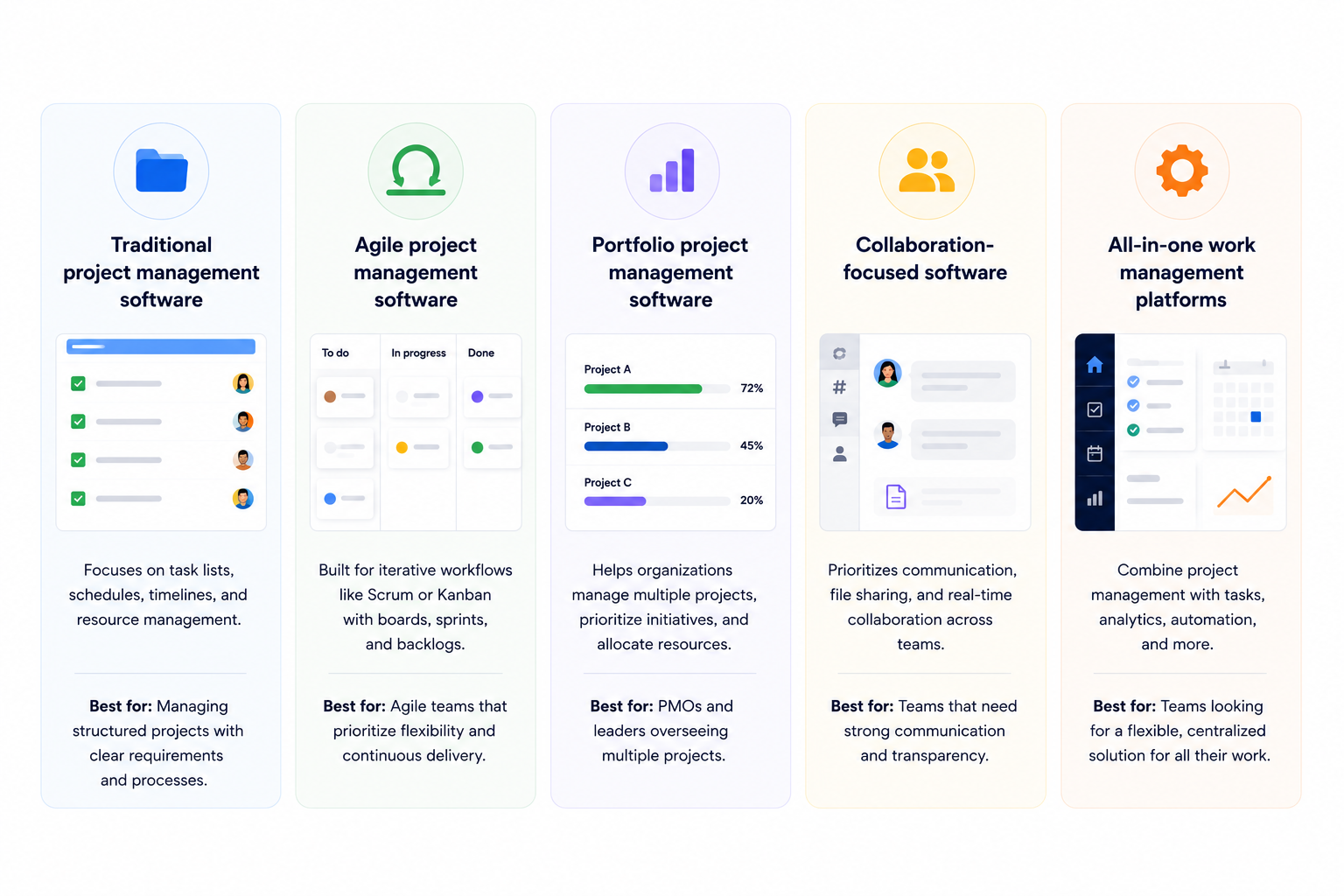
Not every organization manages projects in the same way. Some teams need a simple task manager, while others require highly customizable platforms that can support complex business processes.
Common types of project management software include:
Traditional project management software
Designed around timelines, milestones, and detailed project plans, these platforms are often used for structured projects with fixed schedules.
Agile project management software
Built for iterative development, agile project management software supports Kanban boards, Scrum workflows, sprint planning, and backlog management.
Collaborative project management software
Collaborative project management platforms focus on improving communication, document sharing, and teamwork across distributed teams.
AI-powered project management software
AI-powered platforms assist teams by generating summaries, automating repetitive work, suggesting next steps, and helping users find information more efficiently.
Customizable project management software
Some organizations require workflows that don’t fit into predefined templates.
Instead of forcing teams to adapt to rigid software, customizable platforms like Baserow allow organizations to build project management systems around their own processes. Teams can create custom databases, automate workflows, design internal applications, and visualize projects using tables, Kanban boards, calendars, forms, and dashboards — all within a single platform.
This flexibility makes Baserow suitable for a wide range of use cases, from marketing and product development to operations, CRM, inventory management, and internal business workflows.
Benefits of project management software
Project management software does more than organize tasks — it helps teams work more efficiently, collaborate effectively, and deliver projects with greater confidence.
Whether you’re managing a small internal project or coordinating work across multiple departments, the right platform can improve visibility, reduce manual work, and keep everyone aligned.
Here are some of the biggest benefits of using project management software.
Keep projects organized
Without a central system, project information often ends up scattered across emails, spreadsheets, documents, and chat applications.
Project management software brings everything together in one place, making it easy to find tasks, files, conversations, deadlines, and project updates whenever you need them.
Improve team collaboration
Successful projects depend on good communication.
Instead of switching between multiple tools, team members can collaborate directly within the project by:
- Commenting on tasks
- Sharing documents
- Mentioning teammates
- Tracking discussions
- Receiving real-time notifications
This reduces misunderstandings and helps everyone stay informed.
Increase productivity
Manual processes consume valuable time.
Project management software helps teams work more efficiently by:
- Automating repetitive tasks
- Reducing status meetings
- Eliminating duplicate work
- Standardizing workflows
- Keeping priorities visible
When less time is spent on administration, teams can focus on delivering results.
Gain better visibility into projects
Managers need accurate information to make informed decisions.
Project dashboards and reports provide real-time insights into:
- Project progress
- Upcoming deadlines
- Team workload
- Resource allocation
- Budget performance
- Potential risks
This visibility allows organizations to identify problems early and take corrective action before projects fall behind schedule.
Manage multiple projects simultaneously
As businesses grow, teams often juggle dozens of projects at once.
Project management software makes it easier to prioritize work, balance resources, and monitor progress across multiple initiatives without losing sight of important deadlines.
Scale your processes
Many teams begin with spreadsheets because they’re familiar and easy to use.
However, as projects become more complex, spreadsheets become difficult to maintain, collaborate on, and automate.
Modern project management platforms provide the flexibility to scale with growing teams by supporting automation, permissions, reporting, integrations, and customizable workflows.
Who should use project management software?
Despite its name, project management software isn’t just for project managers.
Any team responsible for planning, coordinating, or tracking work can benefit from using a centralized project management solution.
Common users include:
- Project managers
- Product teams
- Marketing teams
- Software development teams
- Construction companies
- Operations teams
- HR departments
- Sales teams
- Agencies and consultants
- Non-profit organizations
- Small businesses and startups
Even individuals can use project management software to organize personal projects, freelance work, or long-term goals.
What to look for when choosing project management software
Choosing the right project management software isn’t about finding the platform with the most features — it’s about finding one that matches the way your team works.
A small startup managing marketing campaigns has very different requirements from a construction company coordinating contractors or an enterprise running hundreds of projects. Before selecting a solution, consider the following factors.
Ease of use
The best project management software should be easy for your team to adopt. If a platform is difficult to learn or requires extensive training, employees are less likely to use it consistently.
Look for software with an intuitive interface, simple navigation, and customizable views that help users find the information they need quickly.
Project planning and task management
At its core, project management software should make it easy to organize work.
Consider whether the platform allows you to:
- Create tasks and subtasks
- Assign team members
- Set priorities and due dates
- Track milestones
- Manage recurring work
- Organize projects into phases
The more complex your projects become, the more important these capabilities are.
Collaboration features
Projects involve more than just tasks. Team members also need to communicate, share files, and keep stakeholders informed.
Good collaboration features typically include:
- Comments and discussions
- File attachments
- Mentions and notifications
- Shared workspaces
- Real-time updates
Keeping communication connected to the project reduces confusion and improves transparency.
Customization and flexibility
No two organizations manage projects in exactly the same way.
Some project management tools rely on predefined workflows, while others allow you to customize databases, fields, views, automations, and permissions.
If your processes are unique or likely to evolve over time, choosing a flexible platform can save significant effort in the future.
Automation
Automation helps eliminate repetitive administrative work and keeps projects moving without constant manual intervention.
Useful automation features include:
- Automatic task assignments
- Status updates
- Reminder notifications
- Approval workflows
- Integrations with external tools
- Recurring project creation
By automating routine tasks, teams can spend more time focusing on delivering successful projects.
Reporting and analytics
Managers need clear visibility into project performance.
Look for software that provides dashboards and reports covering metrics such as:
- Project progress
- Team workload
- Resource allocation
- Budget tracking
- Task completion rates
- Upcoming deadlines
Real-time reporting makes it easier to identify risks and make informed decisions.
Integrations
Project management software rarely operates in isolation.
Consider whether the platform integrates with the tools your team already uses, such as:
- Communication platforms
- Cloud storage
- CRM systems
- Calendar applications
- Development tools
- Business intelligence platforms
Strong integrations reduce duplicate work and improve overall productivity.
AI capabilities
Many modern project management platforms now include AI-powered features that help teams work more efficiently.
Examples include:
- Summarizing project updates
- Generating reports
- Drafting project documentation
- Answering questions about project data
- Automating repetitive workflows
While AI shouldn’t replace good project management practices, it can significantly reduce administrative work.
Security and deployment options
Organizations handling sensitive information should carefully evaluate security features.
Important considerations include:
- Role-based permissions
- Audit logs
- Single sign-on (SSO)
- Data encryption
- Compliance certifications
- Cloud and self-hosted deployment options
For businesses with strict compliance or data sovereignty requirements, self-hosted solutions may provide greater control over where project data is stored.
Scalability
The right project management software should grow with your organization.
As your team expands, the platform should continue to support increasing numbers of users, projects, workflows, and automations without becoming difficult to manage.
Choosing scalable software today can help avoid costly migrations in the future.
Why Baserow is a flexible choice
Many project management tools are designed around predefined workflows. While this works well for standardized processes, growing organizations often need software that can adapt to their unique way of working.
Baserow takes a different approach. Instead of providing a fixed project management application, it gives teams the flexibility to build their own solution using customizable databases, multiple project views, automations, AI-powered fields, and no-code applications.
This makes Baserow suitable for everything from simple task tracking to complex operational workflows, while giving organizations the freedom to evolve their processes as their business grows.
Project management software examples
Many people understand the concept more easily by seeing real-world examples.
Here are some common ways organizations use project management software across different industries.
Product development
Product teams use project management software to plan product roadmaps, organize feature requests, prioritize backlogs, and coordinate releases across design, engineering, and marketing teams.
Typical workflows include:
- Sprint planning
- Bug tracking
- Feature requests
- Release management
- Product roadmaps
Marketing campaigns
Marketing departments often manage dozens of campaigns simultaneously.
Project management software helps teams coordinate content calendars, advertising campaigns, product launches, social media, events, and email marketing from one centralized workspace.
Common marketing projects include:
- Content production
- SEO campaigns
- Website redesigns
- Webinar planning
- Product launches
Software development
Development teams commonly use project management software to organize work using Agile or Scrum methodologies.
Teams can:
- Plan sprints
- Track bugs
- Prioritize backlogs
- Monitor releases
- Collaborate with QA
Construction projects
Construction companies coordinate multiple contractors, schedules, budgets, permits, and inspections.
Project management software helps track every stage of the project while keeping stakeholders informed.
Operations
Operations teams manage recurring processes rather than one-time projects.
Examples include:
- Employee onboarding
- Procurement
- Inventory management
- Vendor management
- Internal requests
Because these workflows often require custom fields and automation, flexible platforms like Baserow are particularly well suited for operational project management.
Explore the most popular project management tools
The project management software market has grown rapidly over the past few years, with solutions designed for everything from simple task management to enterprise portfolio planning. While some tools focus on ease of use, others specialize in Agile development, resource planning, workflow automation, or highly customizable databases.
This directory gives you an overview of more than 50 project management software solutions, making it easy to compare each platform by its ideal use case, unique features, deployment options, and free plan availability.
If you’re looking for a more detailed comparison, we’ve also reviewed the 10 most popular project management tools. In that guide, you’ll find in-depth reviews of each platform, including their key features, pricing, advantages, limitations, and the types of teams they’re best suited for.
Featured project management tools
| Project management tool | Best for |
|---|---|
| Baserow | Custom project management systems |
| Asana | Cross-functional teams |
| Monday | Visual project planning |
| ClickUp | All-in-one work management |
| Trello | Kanban project management |
| Jira | Agile software development |
| Notion | Documentation and project management |
| Microsoft Project | Enterprise project planning |
| Smartsheet | Spreadsheet-based project management |
| Wrike | Enterprise collaboration |
Whether you’re choosing your first project management tool or replacing an existing solution, comparing the leading platforms side by side can help you find the best fit for your team’s workflows, budget, and collaboration needs.
👉 Read our complete guide to the Top Project Management Tools
Common project management methodologies
Different teams manage projects in different ways.
Modern project management software supports several popular methodologies.
Waterfall
The Waterfall methodology follows a sequential process where each phase must be completed before the next begins.
It’s commonly used for:
- Construction
- Manufacturing
- Government projects
- Large infrastructure initiatives
Agile
Agile focuses on continuous improvement through short development cycles.
Instead of completing the entire project at once, teams work in iterations and regularly adapt their priorities.
Agile project management software typically includes:
- Sprint planning
- Kanban boards
- Backlogs
- Burndown charts
Scrum
Scrum is one of the most popular Agile frameworks.
Projects are divided into short sprints, usually lasting one to four weeks.
Each sprint delivers a working increment of the project.
Kanban
Kanban uses visual boards to track work as it moves through different stages.
Typical columns include:
- To Do
- In Progress
- Review
- Done
Kanban is widely used by software teams, marketing departments, and operations teams because it’s easy to understand and highly flexible.
Project management software vs task management software
Although these terms are often used interchangeably, they are not exactly the same.
Task management software
Task management software focuses on organizing individual tasks.
It typically includes:
- To-do lists
- Due dates
- Assignees
- Reminders
- Checklists
It’s ideal for individuals or small teams managing straightforward work.
Project management software
Project management software includes task management but adds tools for planning and coordinating entire projects.
Additional capabilities often include:
- Resource planning
- Team collaboration
- Timeline management
- Budget tracking
- Reporting
- Workflow automation
- Multiple project views
If your organization manages multiple projects, departments, or clients simultaneously, project management software is usually the better choice.
Cloud vs self-hosted project management software
One of the biggest decisions organizations face is whether to choose cloud-based or self-hosted project management software.
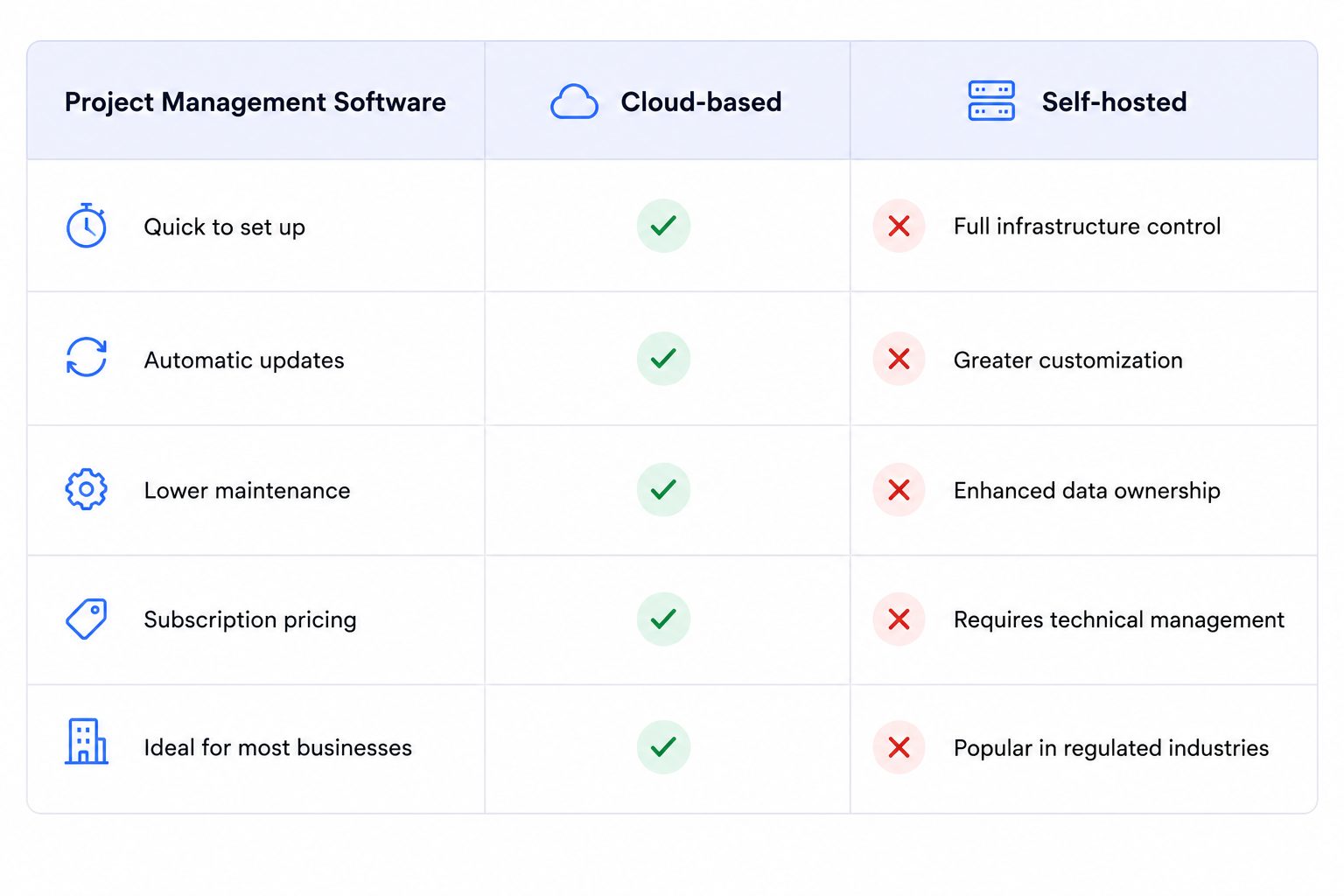
Organizations with strict compliance, security, or data sovereignty requirements often prefer self-hosted solutions.
Because Baserow is open source, teams can choose either Baserow Cloud or self-host their project management platform on their own infrastructure.
Trends shaping modern project management software
Project management software has evolved significantly over the past decade.
Here are some of the biggest trends influencing modern platforms.
AI-powered project management
Artificial intelligence is helping teams automate repetitive work, summarize meetings, generate reports, prioritize tasks, and answer questions about project data.
Rather than replacing project managers, AI reduces administrative work and allows teams to focus on strategic decision-making.
Low-code and no-code customization
Businesses increasingly expect software to adapt to their workflows.
Low-code and no-code platforms allow teams to build custom project management systems without writing code.
This flexibility is particularly valuable for organizations with unique business processes.
Automation-first workflows
Modern project management platforms increasingly automate repetitive processes such as:
- Task assignments
- Status updates
- Approval workflows
- Notifications
- Integrations
- Report generation
Automation reduces manual effort and helps teams maintain consistent processes.
Centralized work management
Many organizations are replacing disconnected tools with unified work management platforms.
Instead of using separate applications for databases, tasks, forms, documents, and workflows, teams increasingly manage everything within a single platform.
Why Baserow is different from traditional project management software
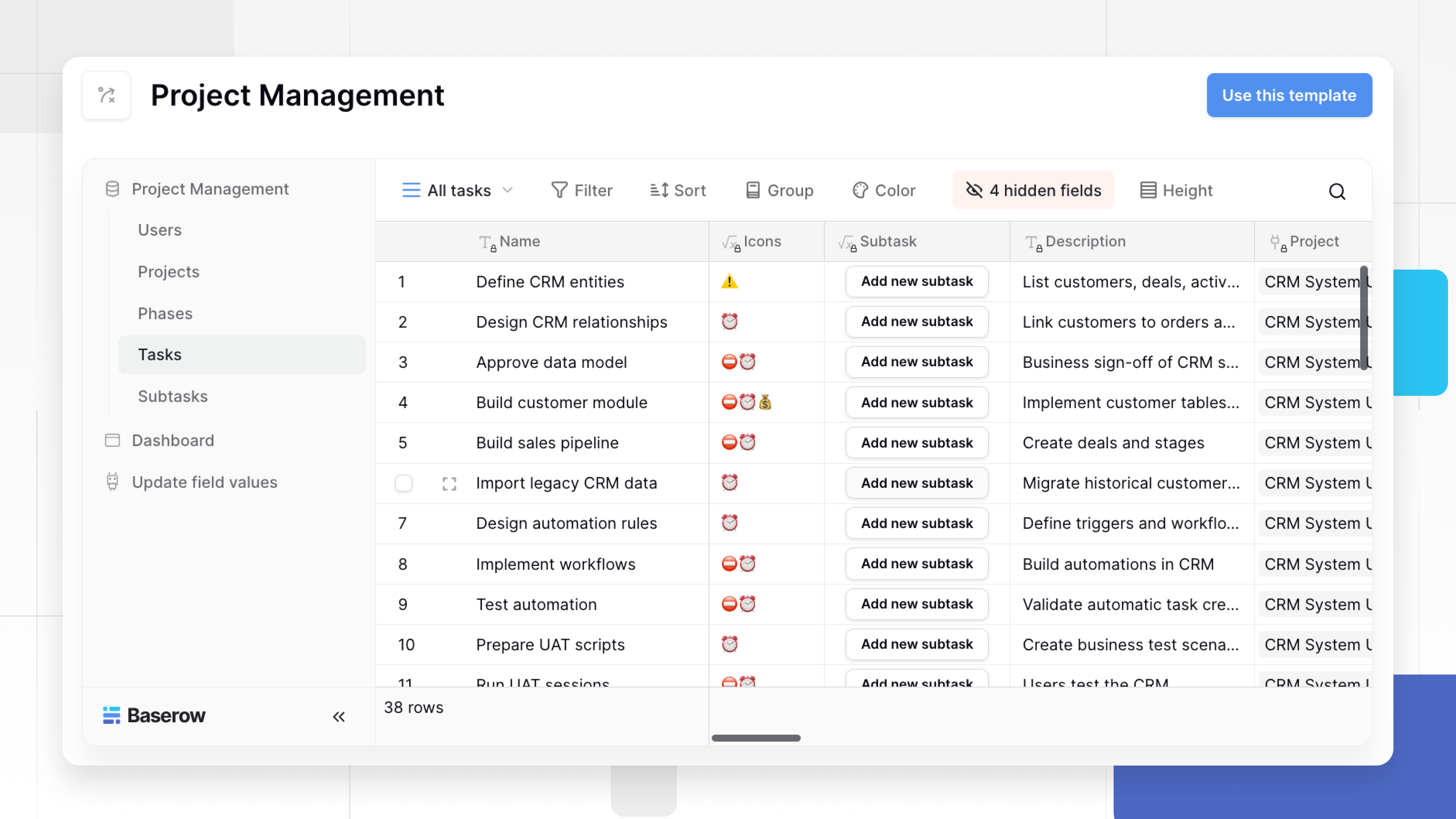
Many project management tools are designed around predefined workflows.
They offer excellent task management but often limit how much teams can customize the platform.
Baserow takes a different approach.
Instead of providing a fixed project management application, Baserow gives organizations a flexible foundation for building their own project management solution.
With Baserow you can:
- Design custom project databases
- Manage tasks using Grid, Kanban, Calendar, Gallery, and Form views
- Build internal applications without code
- Automate repetitive workflows
- Connect external tools through APIs and integrations
- Add AI-powered fields and automations
- Choose between cloud or self-hosted deployment
This flexibility allows organizations to manage everything from simple task lists to complex, company-wide operational workflows within a single platform.
Frequently asked questions
What is project management software?
Project management software helps teams plan, organize, track, and complete projects in one place. Most project management tools combine task management, collaboration, reporting, automation, and project planning to keep work organized.
What is project management software used for?
Project management software helps teams plan projects, assign work, update tasks in real time, track deadlines, collaborate, manage resources, and monitor progress from a single workspace.
What features should a project management tool include?
Look for project planning, task management, resource planning, multiple project views, collaboration, workflow automation, reporting, integrations, AI, and real-time project updates. Baserow combines these with customizable databases and no-code applications.
What are the benefits of project management software?
Project management software improves collaboration, increases visibility, automates repetitive work, and helps teams deliver projects on time. It also provides a single source of truth for tasks, files, and project updates.
Can project management software manage multiple projects?
Yes. Most project management platforms let teams manage multiple projects from one workspace, making it easier to balance workloads, monitor progress, and identify bottlenecks.
Does project management software include time tracking?
Many project management tools include built-in time tracking or integrate with dedicated time-tracking software. This helps teams monitor productivity, manage budgets, and improve project estimates.
How does AI improve project management software?
AI helps automate repetitive work, summarize updates, generate reports, answer questions, and suggest next steps. Baserow AI also lets teams build AI-powered workflows directly into their project management software.
Is project management software suitable for small businesses?
Yes. Many platforms offer a free plan or free trial and scale as businesses grow. Baserow provides a free project management platform that small businesses can customize without code.
What is the difference between a project management tool and a planning tool?
A planning tool focuses on scheduling and timelines, while a project management tool also includes task management, collaboration, reporting, automation, and progress tracking throughout the project lifecycle.
What is the best project management software?
The top project management software depends on your team’s size, workflows, and requirements. If you need a flexible solution, Baserow combines project management, automation, AI, and no-code app building in one platform.
Does project management software offer a free plan?
Many project management software providers offer a free plan or free trial. Baserow includes a free plan with project management, collaboration, automation, and AI features.
What should you compare when evaluating project management software?
Compare features, ease of use, automation, AI capabilities, integrations, pricing, security, and scalability. If flexibility and self-hosting are important, Baserow supports both cloud and self-hosted deployments.
Is cloud-based or self-hosted project management software better?
It depends on your requirements. Cloud-based project management software is easier to set up and maintain, while self-hosted solutions offer greater control over your data, security, and infrastructure. Baserow supports both cloud and self-hosted deployments, giving teams the flexibility to choose the option that best fits their needs.
What industries use project management software?
Project management software is used across software development, marketing, construction, consulting, education, healthcare, manufacturing, and many other industries. Many platforms can be customized for different workflows, making them suitable for businesses of all sizes.
How do I choose the right project management software?
Start by identifying your team’s size, workflows, and must-have features. Compare project planning, task management, automation, AI capabilities, integrations, pricing, and scalability. If you need a flexible platform that adapts to your processes, Baserow lets you build a custom project management solution without code.
Project management software has become an essential tool for organizations that want to deliver projects more efficiently, improve collaboration, and gain better visibility into their work.
While every platform helps teams organize projects, the right solution depends on how your business operates. Some organizations need a straightforward task manager, while others require a highly customizable platform that can support unique workflows, automation, and growing business processes.
That’s where Baserow stands out. Instead of forcing your team into predefined workflows, Baserow lets you build a project management system that matches the way you work. You can organize projects with databases, visualize work using Kanban boards, calendars, timelines, and grids, automate repetitive tasks, and even build custom internal applications — all from a single platform.
Whether you’re managing marketing campaigns, product development, client projects, operations, or company-wide initiatives, Baserow provides the flexibility to scale alongside your team.


Baserow 2.4 adds Button fields, Graph elements, workflow automation, AI provider management, improved Group By views, and 30+ more updates.

Discover how Airtable and Baserow compare in features, flexibility, speed, and scalability. Compare pricing plans and hidden costs to make an informed decision!

Explore the best open-source software alternatives to proprietary products. Discover OSS tools, licenses, and use cases with our updated directory.