
TL;DR
- Pipedrive is best for visual sales pipeline management and deal tracking.
- HubSpot CRM is a good choice for aligning sales and marketing activities.
- Zoho CRM offers a broad range of features for budget-conscious businesses.
- BIGContacts helps small teams organize contacts and follow-ups.
- Copper suits teams that use Google Workspace for everyday work.
- Slack supports sales collaboration but works best alongside a dedicated CRM.
- Baserow is ideal for teams that want a customizable CRM, flexible workflows, and control over their data.
The best CRM for a small B2B sales pipeline should support workflow automation, provide valuable insights into sales cycles, and help your team close deals. Compare free plans, long-term costs, and features before choosing. Use a CRM to help each deal manager track key takeaways and monitor sales activity in real time.
A customer relationship management (CRM) platform brings contact information, sales activities, and deal progress into one place. The right tool can help your sales team prioritize opportunities, automate repetitive tasks, and understand which deals are most likely to close.
But not every CRM suits a small B2B business. Some tools focus on visual pipeline management, while others offer extensive customization, AI-powered features, or advanced workflow automation.
In this guide, we’ll compare seven CRM tools for small B2B sales teams, explain what each does best, and help you choose the right solution for your budget and sales process.
What should a small B2B sales team look for in a CRM?
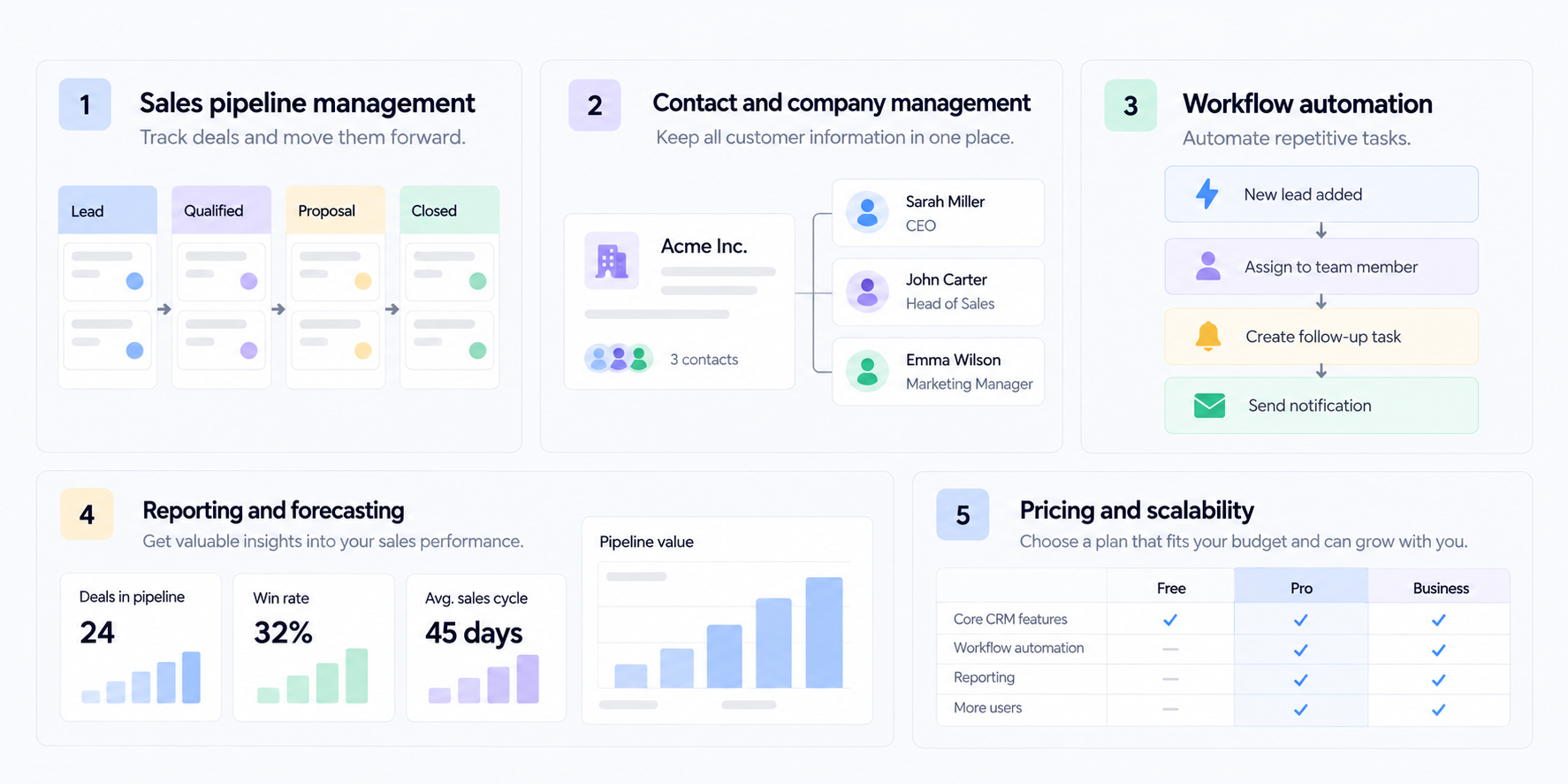
Small B2B sales teams need a CRM that makes it easier to manage relationships and move deals forward. Before comparing tools, consider these essential features.
Sales pipeline management
A sales pipeline shows where each deal stands, from the first contact to a signed agreement. Look for customizable stages, clear deal ownership, and an easy way to track the next action.
Good pipeline management helps sales representatives identify stalled opportunities, prioritize promising leads, and maintain an accurate sales forecast.
Contact and company management
B2B sales often involve several people from the same company. Your CRM should connect contacts with their organizations, communication history, deals, and relevant notes.
This gives your team the context it needs before a meeting or follow-up.
Workflow automation
Workflow automation can handle repetitive tasks such as assigning leads, updating deal stages, creating reminders, and notifying team members when something changes.
For a small sales team, even a few well-designed automations can reduce manual administration and leave more time for customer conversations.
Reporting and forecasting
A useful CRM should help you understand conversion rates, deal values, sales performance, and the length of your sales cycles. These valuable insights make it easier to identify bottlenecks and plan future sales activities.
Pricing and scalability
Consider the total cost, not just the advertised starting price. Check which features are included in each plan, whether automation or AI features cost extra, and how pricing changes as your sales team grows.
A free plan can be a good starting point, but make sure the tool can support your process when you need more users, integrations, or reporting.
7 best CRM tools for small B2B sales pipelines
The best CRM depends on how your team sells, the complexity of your pipeline, and how much customization you need. Here are seven options worth considering.
1 Baserow: Best for customizable B2B sales pipelines
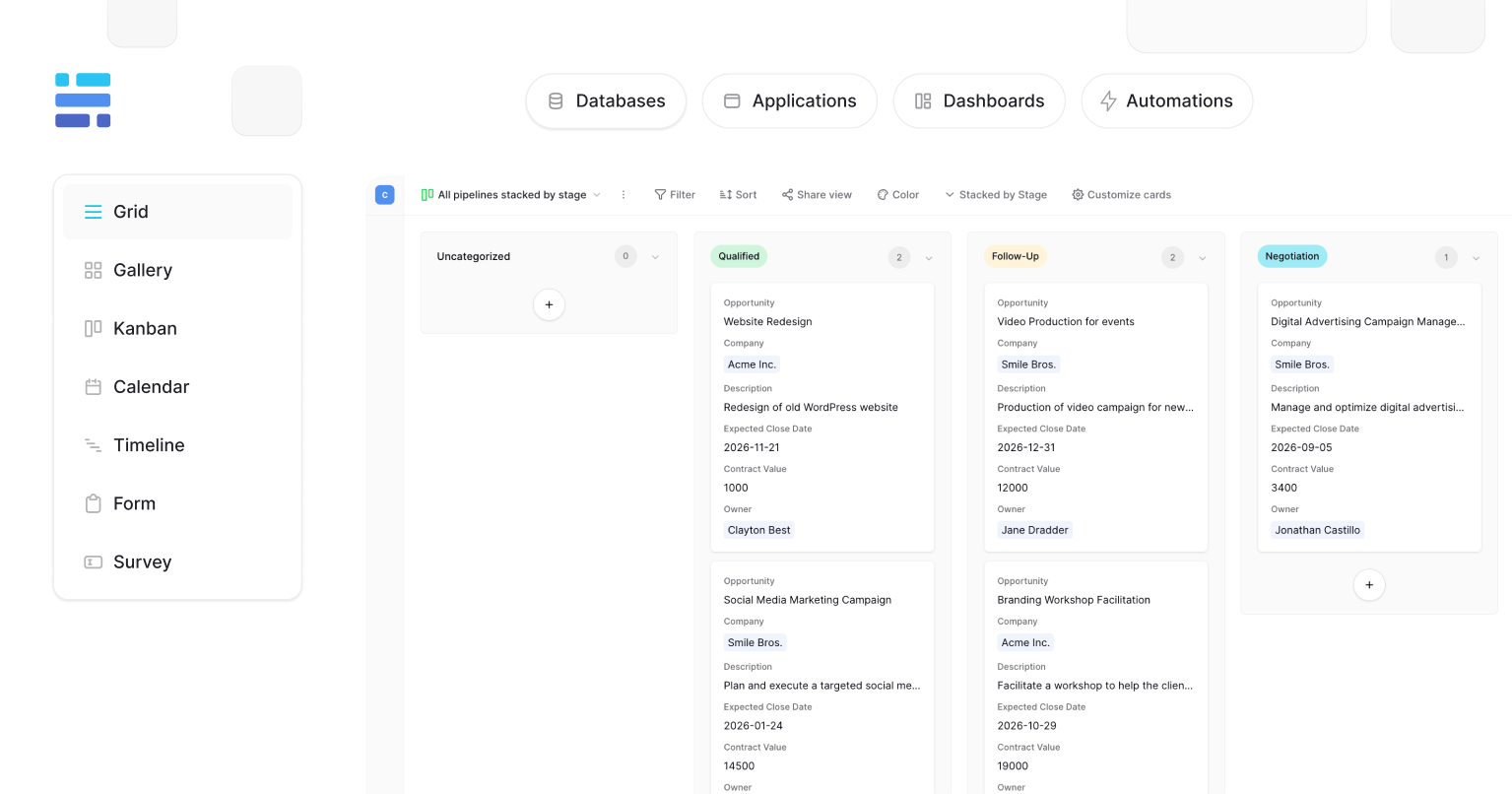
Baserow is an open-source, no-code database platform that lets teams build a CRM around their own sales process. Rather than forcing every business into a predefined CRM structure, it gives teams control over their data, fields, relationships, and workflows.
Best for: Small B2B sales teams that want a customizable CRM, control over their data, and the option to self-host.
Key features:
- Customizable tables for contacts, companies, and deals
- Different views for organizing pipeline information
- Relationships between customer records and opportunities
- Workflow automation
- API access and integrations
- Self-hosting options and granular permissions
A team can create a sales pipeline with stages such as Lead, Qualified, Demo, Proposal, Negotiation, and Closed. Each deal can be linked to a company and its contacts, with fields for deal value, expected close date, owner, and next follow-up.
Teams can then create views for open opportunities, deals closing this month, or leads that need attention. This makes it easier to see the information that matters without maintaining several disconnected spreadsheets.
Baserow can also support processes beyond the initial sale, including customer onboarding, account management, and post-sale follow-ups. Its flexible structure lets teams adapt the CRM as their sales process changes.
For teams that need more control over customer information, Baserow offers self-hosting and an open-source approach. Read more about Baserow as a self-hosted CRM solution.
Potential limitation: Baserow is a customizable database platform rather than a ready-made, sales-specific CRM. Teams need to configure their tables and workflows, and should evaluate which integrations or automations require additional setup.
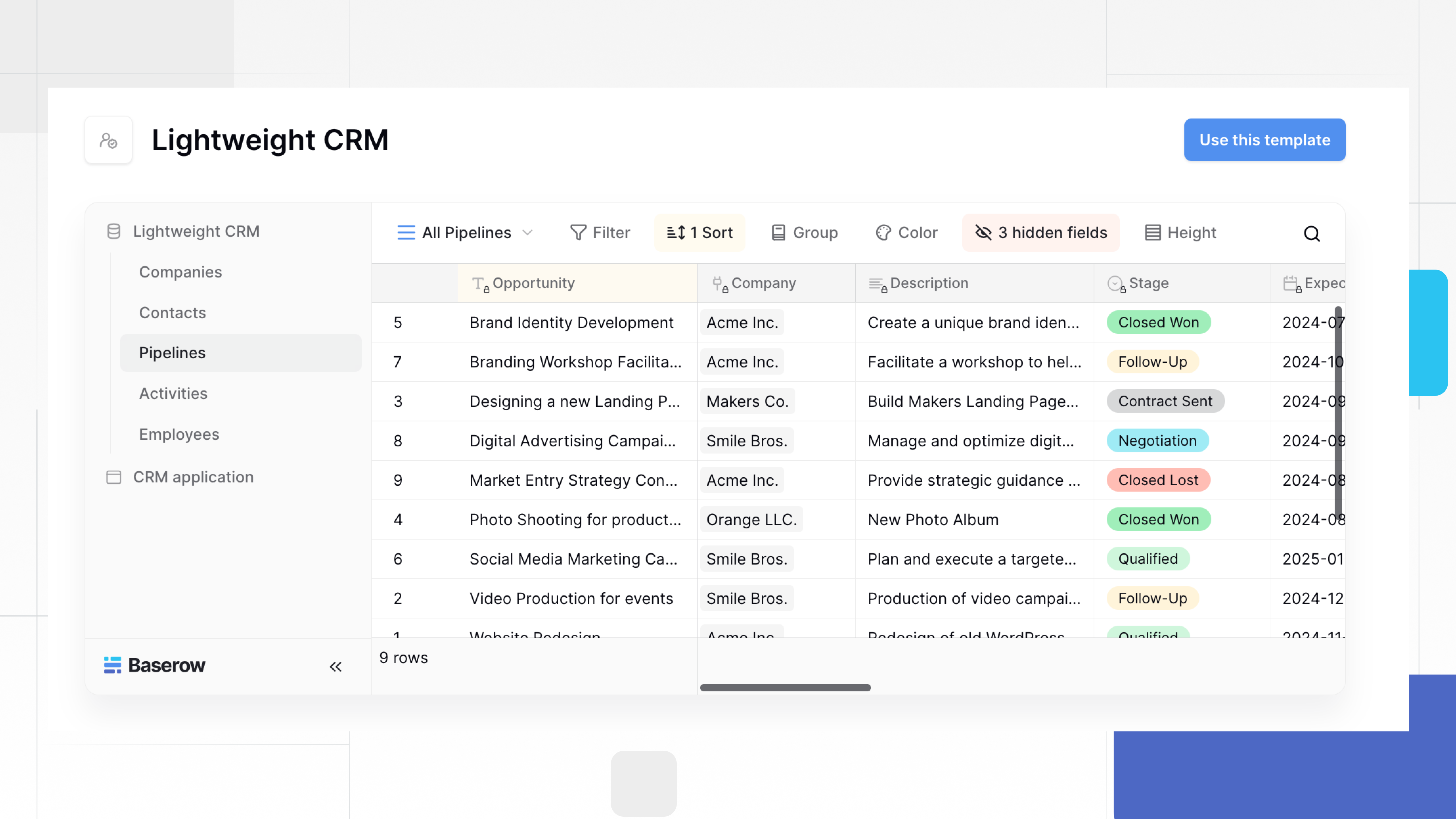
You can start with the Baserow lightweight CRM template instead of building the entire structure from scratch.
2. HubSpot CRM: Best for sales and marketing alignment
HubSpot CRM combines contact management and deal tracking with tools for marketing, customer service, and sales. It can be useful for B2B businesses that want to connect lead generation with sales activities.
Best for: Small businesses that want sales and marketing information in one platform.
Key features:
- Contact and company records
- Deal pipelines
- Email tracking and sales activities
- Reporting dashboards
- Integrations with marketing and service tools
HubSpot helps teams maintain a shared view of prospects, from the first marketing interaction through sales qualification and deal closure. This can be valuable when marketing generates leads and sales representatives need to follow up promptly.
Its broader ecosystem also gives businesses room to add capabilities as their needs change.
Potential limitation: Costs and complexity can increase as teams need advanced automation, reporting, or additional products. Compare plan limits carefully before committing.
3. Zoho CRM: Best for budget-conscious businesses
Zoho CRM offers contact management, sales automation, deal tracking, and reporting. It is worth considering for small B2B companies that want a broad set of CRM features and opportunities to customize their sales process.
Best for: Small businesses looking for a feature-rich CRM with flexible configuration options.
Key features:
- Lead and contact management
- Customizable sales pipelines
- Workflow automation
- Sales forecasting and analytics
- Integrations with other business applications
Zoho CRM can help sales teams organize leads, automate routine activities, and monitor progress across their pipelines. Its wider business software ecosystem may also be useful if your company already uses other Zoho products.
Potential limitation: The number of configuration options can take time to learn. Check the features included in each plan and assess whether your team needs the additional complexity.
4. BIGContacts: Best for straightforward contact management
BIGContacts combines contact management with sales tracking and follow-up reminders. It may suit small businesses that want to keep customer information organized without adopting an especially complex sales system.
Best for: Small teams that prioritize contact organization and consistent follow-ups.
Key features:
- Centralized contact records
- Task and follow-up reminders
- Sales pipeline tracking
- Email and communication history
- Reporting capabilities
For B2B sales, keeping track of conversations and next steps is essential. BIGContacts helps teams maintain customer records and organize their daily activities in one place.
It can be a practical option for businesses that want a more structured alternative to spreadsheets but do not need an extensive CRM ecosystem.
Potential limitation: Compare its customization, integrations, and reporting capabilities with the requirements of your sales process before choosing it.
5. Copper: Best for teams using Google Workspace
Copper is a CRM designed to work closely with Google Workspace. It may be a good fit for sales teams that already manage much of their work through Gmail, Google Calendar, and related applications.
Best for: Small B2B teams that want CRM functionality alongside their existing Google Workspace tools.
Key features:
- Contact and company management
- Deal tracking
- Relationship and activity management
- Google Workspace integrations
- Sales reporting
Copper can reduce the need to switch between separate tools when managing customer relationships. Teams can organize contacts, track opportunities, and maintain a clearer history of their interactions.
Potential limitation: Businesses that rely on other productivity platforms or need extensive control over their database structure should evaluate its integrations and customization options.
6. Pipedrive: Best for visual sales pipeline management
Pipedrive is a sales-focused CRM built around a visual pipeline. Sales representatives can see their deals, move opportunities between stages, and track activities that need attention.
Best for: Small B2B sales teams that want a straightforward way to manage deals and follow-ups.
Key features:
- Visual sales pipelines and customizable deal stages
- Contact and activity management
- Sales reporting and forecasting
- Workflow automation
- Integrations with other business tools
Pipedrive is particularly useful when your team needs a clear view of every opportunity. Its activity-focused approach helps representatives organize calls, meetings, and follow-ups without relying on separate spreadsheets.
As your process becomes more complex, review which reporting, automation, and integration features are available in your chosen plan.
Potential limitation: Teams that need a highly customized data structure or want to build processes beyond conventional sales workflows may find a dedicated sales CRM restrictive.
7. Slack: Best as a sales collaboration companion
Slack is primarily a team communication platform, not a dedicated CRM. However, it can support B2B sales workflows by helping sales representatives coordinate internally, share deal updates, and communicate with colleagues.
Best for: Sales teams that need to coordinate around opportunities and already use Slack for internal communication.
Key features:
- Team channels and direct messages
- Workflow automation
- Notifications from connected business applications
- Searchable conversations
- Integrations with CRM tools
A sales team can use Slack to discuss important deals, notify colleagues about changes, and coordinate handoffs between departments. Connected CRM tools can bring relevant updates into the conversations where the team works.
However, Slack alone does not replace a structured CRM database. Customer records, deal stages, and reporting should live in a system designed to manage that information.
Potential limitation: Without a dedicated CRM or connected data source, sales information can become scattered across conversations.
How to choose the best CRM for your small B2B sales pipeline
The right CRM should match the way your team sells today while leaving room for future growth. Use these questions to narrow your options.
1. Map your sales process
List the stages a deal passes through, from the first interaction to closing. Identify what information your team needs at each stage and who is responsible for moving the opportunity forward.
A simple pipeline may need only a few stages. A longer B2B sales cycle might require qualification, product demonstrations, proposals, approvals, and negotiations.
Choose a CRM that supports your process without making it unnecessarily complicated.
2. Identify repetitive tasks
Look for work that takes time but does not require a salesperson’s judgment. Examples include assigning incoming leads, creating follow-up reminders, updating records, and notifying managers when a high-value deal changes stage.
Check which automation features are included in each plan and whether they can connect to the tools your team already uses.
3. Check reporting requirements
Decide which metrics matter most to your business. These might include pipeline value, win rate, average deal size, lead response time, and time spent in each stage.
A CRM should make these metrics accessible enough to support regular sales reviews and better decisions.
4. Consider security and data ownership
Your CRM may contain customer details, communication histories, and sensitive commercial information. Review user permissions, access controls, hosting options, and the provider’s security practices.
If data ownership and infrastructure control are priorities, read our guide to secure CRM software.
5. Test the tool with a real sales workflow
Before migrating your entire database, test a few real opportunities. Add contacts, move deals through the pipeline, schedule follow-ups, and check whether the reports give you useful information.
Involve the people who will use the CRM every day. A system that looks powerful in a demonstration may still be difficult to maintain if it adds too many steps to routine work.
When should you build a custom CRM instead?
A traditional CRM is often the easiest starting point when your sales process closely matches standard pipeline management. But some businesses need more control over how their information is organized.
For example, you might want to connect sales opportunities with product requests, implementation tasks, customer onboarding, or account management. You may also need specific fields, relationships, and workflows that a conventional CRM does not support in the way you want.
In these cases, a customizable database can be a useful alternative.
With Baserow, you can create related tables for companies, contacts, deals, and activities, then build views for different roles. You can also extend the database as your needs change.
Start with the lightweight CRM template to explore a ready-made structure, or read the benefits of a custom-built CRM to understand when customization makes sense.
👉 If you want to explore AI-assisted workflows, see how to build a CRM with Claude using natural language.
Frequently asked questions
What is the best CRM for a small B2B sales pipeline?
The best CRM depends on your requirements. Pipedrive is worth considering for visual sales pipeline management, HubSpot for sales and marketing alignment, Zoho CRM for broad functionality, and Baserow for teams that want to build a customizable CRM.
Is there a free CRM for small B2B sales teams?
Several CRM providers offer free plans or entry-level options, but the available features and limits vary. Compare user limits, reporting, integrations, and workflow automation before choosing a free CRM.
Baserow also offers a free plan, and its lightweight CRM template provides a starting point for organizing contacts and deals.
What features does a B2B sales CRM need?
A B2B sales CRM should support contact and company records, deal tracking, customizable sales stages, follow-up reminders, reporting, and integrations. Workflow automation can help reduce manual work, while access controls help protect customer information.
Can AI help manage a sales pipeline?
AI-powered features can help summarize information, surface patterns, and reduce some repetitive tasks. Depending on the platform, an AI assistant or AI agents may also support research and workflow execution. Check which capabilities are available and verify important outputs before acting on them.
Can a small business build its own CRM?
Yes. A no-code database platform such as Baserow lets businesses build a CRM around their own processes without developing an application entirely from scratch. The team is responsible for configuring the data structure, views, and workflows.
A good CRM platform helps small B2B sales teams manage their sales pipeline, automate follow-ups, and use AI-powered features for valuable insights. Whether you choose a free CRM, Zoho CRM, or another tool, prioritize pipeline management, reporting, and long-term scalability.
Compare tools like Pipedrive, HubSpot, and Zoho CRM, or build a customizable CRM with Baserow.
Explore Baserow’s sales solutions or try the lightweight CRM template to get started.


Baserow 2.4 adds Button fields, Graph elements, workflow automation, AI provider management, improved Group By views, and 30+ more updates.

Discover how Airtable and Baserow compare in features, flexibility, speed, and scalability. Compare pricing plans and hidden costs to make an informed decision!

Explore the best open-source software alternatives to proprietary products. Discover OSS tools, licenses, and use cases with our updated directory.