
Data is everywhere. From simple surveys to complex business reports, we collect data every day. But collecting it the right way is what makes the real difference.
Many people still use scattered methods—notes, spreadsheets, emails—which makes data storage messy and hard to manage. This leads to confusion, lost information, and poor decisions. That’s why modern data collection software has become essential.
Today, tools are designed to help you collect data, organize it, and prepare it for data analysis—all in one place. Whether you’re a student, small business owner, or part of a growing team, using the right tools can save time and improve accuracy.
In this guide, we’ll explore the best options available and help you understand how to choose the right one for your needs.
What Are Data Collection Tools?
Data collection tools are platforms or applications that help you gather, organize, and store information in a structured way.
These tools allow you to:
- collect data from forms, surveys, or inputs
- manage different data type formats like text, numbers, images, or files
- store information safely for future use
- prepare datasets for deeper data analysis
For example, when you fill out an online form or survey, the tool behind it collects your responses and stores them in a system. This makes it easier to review, filter, and understand the information later.
If you want a deeper understanding of how digital methods work, this guide from Baserow explains modern data collection approaches in a simple way.
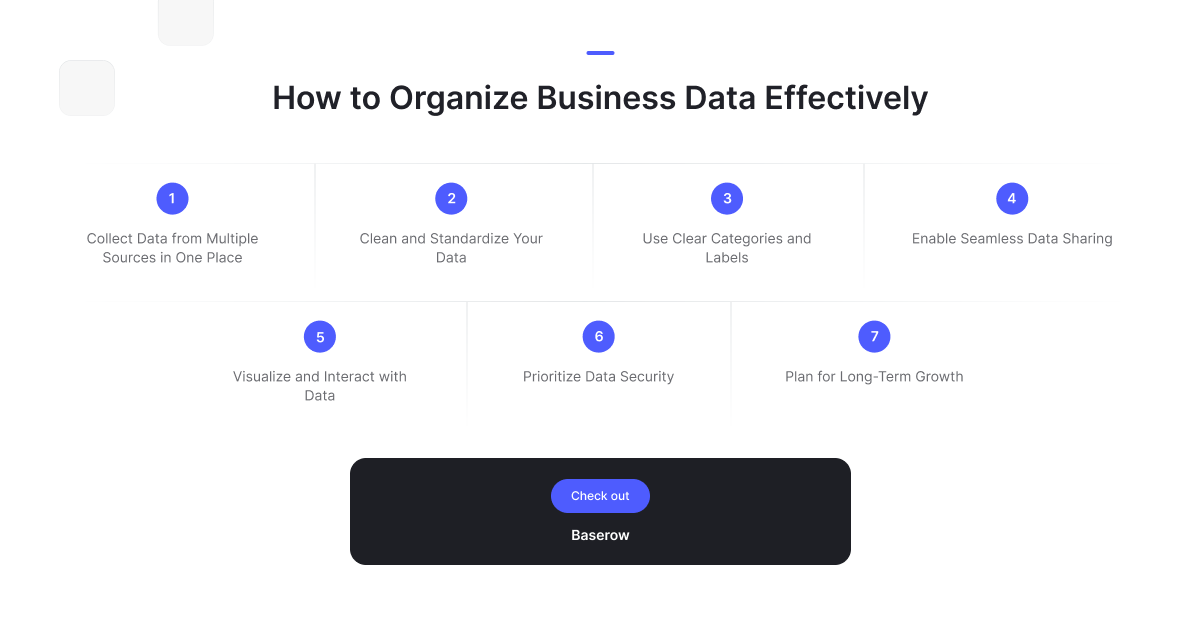
Organizing data is a key part of effective data collection. Once you collect data, the next step is to structure it properly so it can be used for meaningful data analysis. This includes cleaning your data, assigning clear categories, and storing it in a way that makes it easy to access and share.
Modern data collection software simplifies this process by bringing everything into one place. Instead of handling scattered information, you can manage different data type formats, ensure consistency, and collaborate in real time. This not only improves accuracy but also helps you turn raw data into useful insights faster.
How to Choose the Right Tool
Not all collection tools are the same. The best choice depends on what you need and how you plan to use your data.
Here are a few simple things to consider:
- Ease of Use: Look for tools with drag and drop features. These make it easy to build forms and databases without coding.
- Flexibility: A good tool should adapt to your needs. You should be able to customize fields, workflows, and layouts.
- Data Storage: Check how the tool stores your data. Secure and structured data storage is important for long-term use.
- Collaboration: If you work with others, choose tools that support real time updates and sharing.
- Integration: Some tools connect with other apps. This helps you automate tasks and avoid manual work.
Platforms like Baserow are often used because they combine flexibility, simplicity, and strong data handling in one place.
10 Best Data Collection Tools
Baserow (Best Flexible Open Source Tool)
Baserow is a modern platform that helps you collect data and manage it without complexity. It is especially useful for people who want full control without needing technical skills.
Key features:
- Easy drag and drop interface
- Flexible database structure for any data type
- Strong data storage capabilities
- Real time collaboration with teams
- Open-source flexibility
One of the biggest advantages is how adaptable it is. You can build anything—from simple forms to full systems like CRMs or inventory trackers.
For example, many users in the Baserow community share how they use it to track surveys, manage customer data, and build custom workflows without switching tools.
A common use case: A small business collects customer feedback through forms. The responses are automatically stored in a structured database. Over time, they analyze trends and improve their service—all in one platform.
Google Forms
Google Forms is one of the simplest tools available. It is widely used for surveys, quizzes, and feedback collection.
Key features:
- Free to use
- Easy setup
- Integration with Google Sheets
Limitations:
- Basic customization
- Limited advanced data handling
Typeform
Typeform focuses on creating interactive and engaging forms. It improves user experience by showing one question at a time.
Key features:
- Clean design
- Better engagement
- Logic-based questions
Limitations:
- Paid plans required for advanced features
Airtable
Airtable combines spreadsheets with database features. It is useful for organizing structured data.
Key features:
- Visual layouts
- Flexible tables
- Easy filtering
Limitations:
- Can become expensive
- Limited control compared to open platforms
Jotform
Jotform is known for its ready-made templates. It helps users quickly create forms without much setup.
Key features:
- Large template library
- Drag and drop builder
- Easy sharing
- SurveyMonkey
SurveyMonkey is a popular choice for advanced surveys and feedback collection.
Key features:
- Detailed analytics
- Survey templates
- Data export options
Limitations:
- Pricing can be high
Zoho Forms
Zoho Forms is a business-friendly tool that works well within the Zoho ecosystem.
Key features:
- Workflow automation
- Integration with Zoho apps
- Mobile-friendly forms
KoboToolbox
KoboToolbox is designed for field data collection, especially in remote areas.
Key features:
- Offline data collection
- Useful for research and NGOs
- Open-source platform
- Microsoft Forms
Microsoft Forms is a simple tool for basic surveys and quizzes.
Key features:
- Easy to use
- Works with Microsoft 365
- Quick data collection
ODK (Open Data Kit)
ODK is an open-source tool used for collecting data in research and development projects.
Key features:
- Mobile data collection
- Offline support
- Strong for fieldwork
Common Data Collection Methods (Explained Simply)
Understanding tools is important, but knowing how data is collected is equally useful.
Here are the most common methods:
Surveys: Used to gather opinions or feedback from many people.
Interviews: Direct conversations to collect detailed insights.
Observations: Watching behavior or events to collect real-world data.
Forms: Structured way to collect specific information.
Digital Tracking: Collecting data through apps, websites, or sensors.
If you want a deeper explanation, this resource from IBM explains data collection clearly.
Best Use Case: How Baserow Simplifies Data Collection
To understand how modern tools work in real life, let’s look at a simple example.
Imagine a small business that wants to collect customer feedback. Earlier, they might have used emails or spreadsheets. This often leads to messy data storage and missed insights.
With a flexible platform like Baserow, the process becomes much simpler:
- Create a form using a drag and drop builder
- Share it with customers
- Automatically collect data in a structured database
- View and filter responses in real time
- Use the data for quick data analysis
This removes the need for multiple tools. Everything happens in one place.
Checkout users in the Baserow community to know more about similar use cases. For example, teams have built:
- Customer feedback systems
- Internal request trackers
- Research data collection workflows
Another advantage is flexibility. You can adjust fields, change workflows, and manage different data type formats without rebuilding your system.
As your needs grow, the same setup can scale with you. This is especially helpful for startups and small teams that want to avoid switching tools later.
If you’re also looking to improve how your data connects to operations, this guide explains how structured data improves efficiency and once your data is collected, the next step is making sense of it. This article explains how to turn raw data into clear insights.
Why Choosing the Right Tool Matters
Choosing the right tool is not just about features. It directly affects how well you understand your data.
A good tool helps you:
- collect data without errors
- store it in an organized way
- access it anytime
- prepare it for data analysis
A poor tool creates confusion. You may spend more time fixing issues than learning from your data.
Modern tools focus on simplicity. They reduce manual work and help you focus on what matters—making better decisions.
According to Tableau, clean and structured data is the foundation of accurate insights.
Frequently Asked Questions
- What tools are used for data collection?
Common tools include forms, surveys, mobile apps, and database platforms. Tools like Baserow, Google Forms, and Typeform are widely used to collect and organize data.
- Which data collection method is best?
There is no single best method. Surveys work well for large groups, while interviews are better for detailed insights. The best method depends on your goal.
- What are 5 common data collection instruments?
Surveys, questionnaires, interviews, observation sheets, and digital forms are commonly used.
- What are the 5 data collection methods?
Surveys, interviews, observations, experiments, and digital tracking are the main methods.
- What are the 4 types of data collection?
Qualitative, quantitative, primary, and secondary data collection are the main types.
- What is the best software for collecting data?
The best software depends on your needs. Flexible tools like Baserow are ideal for customization, while simpler tools like Google Forms are useful for basic tasks.
Conclusion
Data collection does not have to be complex. With the right tools, you can simplify how you collect data, organize it, and turn it into useful insights. The key is to choose a tool that fits your needs today and can grow with you tomorrow.
Modern platforms are moving toward simplicity, flexibility, and real time collaboration. This makes it easier for anyone—even beginners—to work with data confidently.
Get Started with Smarter Data Collection
If you want a simple yet powerful way to manage your data, you can try Baserow.
Start building your own system and see how easy data collection can be.


Baserow 2.4 adds Button fields, Graph elements, workflow automation, AI provider management, improved Group By views, and 30+ more updates.

Discover how Airtable and Baserow compare in features, flexibility, speed, and scalability. Compare pricing plans and hidden costs to make an informed decision!

Explore the best open-source software alternatives to proprietary products. Discover OSS tools, licenses, and use cases with our updated directory.