
Self hosted AI means running an AI model on infrastructure you control. This could be a laptop, an office server or a rented cloud machine. Your team chooses the model, manages access and maintains the service.
For a business, this can support tasks such as sorting support requests, drafting summaries and extracting details from text. It also brings work: someone must check performance, install updates and review how data moves through the system.
The best starting point is one clear task. Before buying hardware or choosing software, decide what a useful result looks like. Then test whether a small setup can deliver it at a cost your team can support.
What is self hosted AI?
With self-hosting, you manage the software that loads a model and processes requests. The model’s learned values, known as weights, sit on infrastructure you control. A runtime loads those weights and uses them to produce answers.
This process is called inference. It differs from training, which changes a model’s weights using examples. You can use a language model without training one from scratch.
A typical setup has three parts:
- Model: The downloaded weights that enable the system to generate outputs.
- Runtime: Software that loads the model and processes prompts.
- Application: The interface where people submit requests and use results.
These parts may run on one machine or across several servers.
Hosting the application yourself does not always mean you host the AI. A chat interface on your server might still send prompts to an external provider. Check where each request goes, including requests for search, document processing and other connected tools.
For the wider software stack, Baserow’s guide to self-hosted apps covers tools for records, files, and other daily tasks.
When does self-hosting AI make sense?
Self-hosting deserves a closer look when your team needs control over where inference happens, which models it uses or how the service connects to internal systems.
For example, an operations team may want to summarise internal reports within its own network. A site with poor internet access may need a model that works offline. Both cases call for a review of the full workflow, including any external services it uses.
A managed hosted AI model may suit teams that want a quick start and less upkeep. The choice depends on the workload and the people available to maintain it.
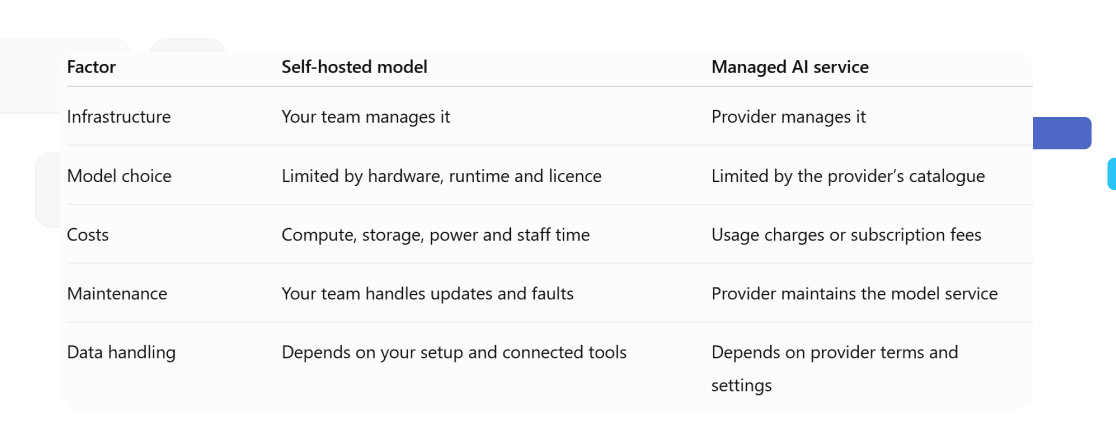
Self-hosting is not always cheaper. A server costs money while idle, and staff time adds to the bill. Compare costs using realistic demand, including quiet periods and peak use.
Start with a pilot. Track answer quality, response time and the effort needed to keep it running.
What do you need to run AI models?
- Hardware and memory
The memory a model requires depends on its size, numerical format and workload. The length of each request and the number of users also affect demand. Ollama’s documentation explains how context length and parallel requests increase memory use.
Two types of memory matter:
- System RAM: Working memory used by the computer.
- GPU memory: Memory on a graphics card, often called VRAM.
Some models run on a CPU, though speed may be too slow for the task. A supported GPU can help, but check the runtime’s hardware requirements before buying one.
Larger models often need more memory. They may also take longer to respond. Model size alone does not tell you whether the answers will meet your needs.
Quantisation reduces the precision used to store model weights. This can reduce memory needs, with possible changes in output quality. Test the version you plan to deploy using real examples.
- Software and model files
To run models, you need compatible weights, a runtime and enough storage. A model file may contain weights in a format such as GGUF. Other releases spread weights across several files. Follow the model publisher’s instructions and check that your runtime supports the format.
Treat the model server and the business application as separate parts of your setup. For example, you can run Baserow Self-Hosted on your own infrastructure, while The AI runtime still needs its own resources and configuration.
How to choose a model for your workload
- Match the model to the task
Start with the work you need to complete. A model that writes fluent text may still struggle to extract dates or follow a fixed output format.
Build a small test set from realistic examples. For a support workflow, include short questions, long complaints and requests with missing details. Remove sensitive data unless your test environment is approved to handle it.
Score each model against the same checks:
- Accuracy: Does the output match the source?
- Format: Does it follow your instructions?
- Speed: Is the response fast enough?
- Review effort: How much correction does it need?
An eight-billion-parameter model has roughly eight billion learned values. That figure describes scale, but it does not guarantee useful answers. Compare powerful models against smaller options using your own tests.
Choose the smallest model that meets your quality and speed goals. This gives you a clear basis for hardware decisions.
- Check licences and model cards
Download AI models from the publisher or a trusted repository. On Hugging Face, a model card can explain intended uses, limits, supported languages and deployment steps.
Check the exact release. For example, Qwen3-8B’s official model card lists an Apache 2.0 licence. Other models may have different terms.
Do not treat “open weights” and “open source” as equal claims. Access to weights does not establish what code, training data or reuse rights are available.
How to set up self hosted AI in six steps
1. Define one task and its success criteria
Pick a task with a clear input and output. “Summarise support requests in three sentences” is easier to test than “help the support team.”
Set a few goals before installing software. Decide how quickly answers should arrive, which errors are unacceptable and who will review results.
Keep the original text beside each output. Reviewers need a way to check whether the model has missed or invented details.
2. Choose a runtime for your environment
A runtime loads the weights and handles requests. Check its supported hardware, model formats and operating systems.
For a first pilot, follow the Ollama quickstart. It provides installation routes for macOS, Windows and Linux, with a choice of local or cloud models. Select a local model when testing self-hosted inference.
For a shared server, you could also assess vLLM, which provides an HTTP service for model requests. Base the choice on hardware support and measured performance.
3. Download a suitable model
Choose a model that fits your available memory and supports the task. Check its full name, version and format before downloading.
Start with a modest option. Leave memory for the runtime, request context and other services on the machine.
Record the download source and model settings. These details help you repeat tests and trace changes if output quality shifts.
4. Test inference before connecting applications
Send a simple prompt through the runtime’s local interface. Then try your test set.
Watch memory use, response time and answer quality. Include requests near the longest length you expect in daily use.
Confirm where processing happens. A locally installed runtime may offer cloud models too, so its presence alone does not prove that inference stays on your hardware.
Keep this first test separate from live business records.
5. Connect your application through an API
An API lets an application send prompts to the model server and receive results.
An OpenAI compatible API can reduce the changes needed for software built around that request format. Set the application’s base URL to your model server and select the correct model name.
Check the limits of OpenAI compatibility. Ollama supports only part of the API. Its docs also say the local server ignores the client’s API key value. Protect access separately.
Test each feature your workflow needs, including structured outputs or tool calls.
6. Measure results before wider rollout
Run a limited pilot with a small group. Track failed requests, slow responses, output corrections and operating costs.
Test several users at once if they will share the service. A setup that handles one prompt well may slow down under load.
Keep prompts and settings consistent during each comparison. Change one factor at a time, then repeat the same tests before expanding access.
Connect business data with retrieval or fine tuning
A model does not need new training to summarise a support request. You can include the relevant text in the prompt and ask for a clear output.
This is often the simplest way to build AI into a business process. Start with the data needed for one task, rather than sending a whole database.
For questions across many documents, retrieval-augmented generation, or RAG, can help. A retrieval system finds relevant passages and adds them to the prompt before the model answers.
One approach uses embeddings: number-based representations of text that help match passages by meaning. A vector database stores and searches these representations. Ollama supports embedding models for search and RAG workflows.
Retrieval still needs careful access rules. A user should only receive information they are allowed to read. Keep source references with each answer so reviewers can check the evidence.
Fine tuning serves a different purpose. It adapts a model using training examples, which may help with a repeated task or response style. Methods such as LoRA train a smaller set of additional weights instead of updating all the original weights.
Try better prompts and retrieval first. Consider training only when tests reveal a clear gap that suitable examples could address.
Keep your AI service secure and reliable
A private server still needs access controls. Keep the model endpoint behind a protected network boundary and add authentication where required. A compatible API format does not provide these controls by itself.
Review the full data path:
- Inputs: Send only the fields needed for the task.
- Logs: Check whether prompts and outputs are stored, where they live and who can read them.
- Connections: Review external search, embedding services and fallback providers.
- Outputs: Treat generated text as untrusted until it has been checked.
For workflows that use tools, limit what the model can change. A support summary should not need permission to delete records or send customer messages.
Plan for faults as well. Set request timeouts, track failures and give users a clear way to retry. Keep backups of prompts and configuration, with the model versions needed to restore the service.
Test updates before applying them to the shared system. A new model or runtime release may change output quality, speed or supported features.
Assign an owner for maintenance. Someone should know how to stop the service, review a fault and restore a working version.
Use self hosted AI in Baserow workflows
Baserow gives teams a place to organise business records and work with model outputs. Its AI prompt field can reference other fields to generate summaries, classifications and text. The feature is available on Premium plans and higher.
A useful first project is support-request triage. Store each request beside its generated summary and suggested category, then let a team member review the result.
Connect an Ollama provider
Start with the guide to setting up a Baserow environment. Choose a deployment that fits your team’s needs before adding the model connection.
For self-hosted Baserow, follow the generative AI configuration guide. The Ollama setup requires a host URL and the model names you want to enable. Baserow must be able to reach that server through your network.
Choose a model that runs on your own infrastructure. Check the runtime settings and connected services before claiming that the full workflow stays within your environment.
Generate useful outputs from table fields
Create fields for the request text, summary, suggested category and review status.
In an AI prompt field, reference the request text and give a narrow instruction. For example:
“Summarise this request in two sentences. Include the main problem and any stated deadline. Do not add facts.”
Use a separate prompt for classification, with a fixed list of allowed categories. Clear instructions make results easier to compare and review.
Baserow’s AI prompt field documentation explains how to reference table fields and generate results for multiple rows.
Review results before acting
Keep the source request visible beside the generated fields. Add a reviewer and a status such as “Needs review” or “Approved.”
Check whether the summary preserves key details and whether the category fits. Record common errors so you can improve the prompt or test another model.
This gives the team a practical review process while keeping the original request available for reference.
Frequently asked questions
- Can self hosted AI work without an internet connection?
Yes, if the model, runtime and required tools are available locally. Download the necessary files first. Test the full workflow without internet access, including document processing and search, to find any external dependencies.
- Can I run a model without a dedicated GPU?
Some models can run on a CPU. Whether this works well depends on memory, model size and acceptable response time. Test your workload before choosing hardware; a slow batch task may have different needs from live chat.
- Does self-hosting mean my prompts become training data?
Inference does not automatically train the model. However, your application may store prompts or collect examples for later use. Review logging, connected services and any training process to understand how submitted data is handled.
- Can several applications share one model server?
Yes, if the server and runtime support the combined workload. Test simultaneous requests, set access controls and monitor demand. One application’s large job should not prevent other users from getting a response.
- Can I self-host any model available through an API?
No. API access does not grant access to the model’s weights. Self-hosting requires downloadable weights, suitable software and permission under the model’s terms. Check the exact release rather than relying on the model family’s name.
- Can I change models without rebuilding my workflow?
Often, but test the replacement. Shared API formats can simplify the connection, while output formats, context limits and supported features may differ. Run your original test set before switching the model used by the team.
- How should I handle an AI request that fails?
Show a clear failure status and preserve the input. Allow a controlled retry, with limits to avoid repeated requests. Route unresolved cases to a person and check the logs for memory, connection or input-length problems.
Put your first AI workflow to work
Start with one task, a small test set and a clear review process. Measure the time saved alongside the effort needed to maintain the service.
Try Baserow to organise your records and review steps. If you choose a self-hosted setup, connect a local model. Use it to test summaries or classifications with your team.


Baserow 2.4 adds Button fields, Graph elements, workflow automation, AI provider management, improved Group By views, and 30+ more updates.

Discover how Airtable and Baserow compare in features, flexibility, speed, and scalability. Compare pricing plans and hidden costs to make an informed decision!

Explore the best open-source software alternatives to proprietary products. Discover OSS tools, licenses, and use cases with our updated directory.