
Businesses looking for the best form builder software need more than just a simple way to collect responses. They need security, automation, scalability, and database integration built into the system from day one. Baserow, as one of the best form builder software for businesses, is built to manage large volumes of form submissions, enable advanced workflows, safeguard sensitive data through role-based permissions, and scale effortlessly as your organization grows.
Instead of switching tools later, businesses should choose a solution that combines powerful features with a structured, database-first foundation from the start. If you are still exploring the basics of how businesses collect information, you can start with our guide on data collection methods.
If security is your main concern, read our guide on secure data collection forms. If you are comparing tools at a mid-level, our online form builder guide explains core features in detail.
Now, let’s look at what businesses really need when evaluating options.
What Businesses Need in Form Builder Software
Modern organizations expect more than just simple form creation. They need powerful features that support real workflows.
Here are the key expectations:
- Security and Permissions
Businesses handle sensitive information. Whether it is customer data or employee records, access must be controlled. Role-based permissions ensure that only authorized users can view or edit responses.
Without strong access control, data risks increase.
- Workflow Automation
Automation helps reduce manual work. Instead of reviewing every entry manually, systems can route submissions automatically to the correct team.
For example:
- HR applications can be assigned to recruiters.
- Support tickets can trigger notifications.
- Approval requests can move through stages.
Advanced features like automation make forms more than just data entry tools.
- Scalability and Data Structure
Many simple tools store responses in spreadsheets. While that works initially, it becomes limiting over time. Growing teams need structured databases that organize data in tables, not isolated files.
This improves reporting and long-term management.
- Ease of Use
Even enterprise-level tools should remain user friendly. Teams should be able to build and update forms quickly without needing developers.
Creating forms should feel simple, not technical.
You can explore how a structured and customizable approach works through Baserow’s product overview or checkout the form solution with Baserow.
Comparing Top Form Builders
When comparing tools, consider the following factors.
- Ease of Creating Forms
Most platforms offer drag-and-drop interfaces. However, flexibility differs. Some tools restrict layout and field customization, while others allow deeper control.
- Conditional Logic
Conditional logic allows forms to adapt based on user responses. For example, additional questions appear only when needed. This improves clarity and user experience.
Basic tools provide limited conditional logic, while more advanced platforms allow multi-step workflows.
- Online Payments and Integrations
Some businesses need online payments built directly into forms. This is important for event registrations, donations, or service bookings.
Integration with tools like CRM systems and social media platforms also matters. Forms should connect seamlessly with marketing campaigns and reporting dashboards.
- Free Options and Trials
Many users search for forms for free or a free online form option before committing. While free plans are helpful for testing, businesses should evaluate upgrade capabilities.
Free versions may limit storage, automation, or customization.
Feature Comparison Table
Below is a simplified comparison between basic tools and more advanced platforms.
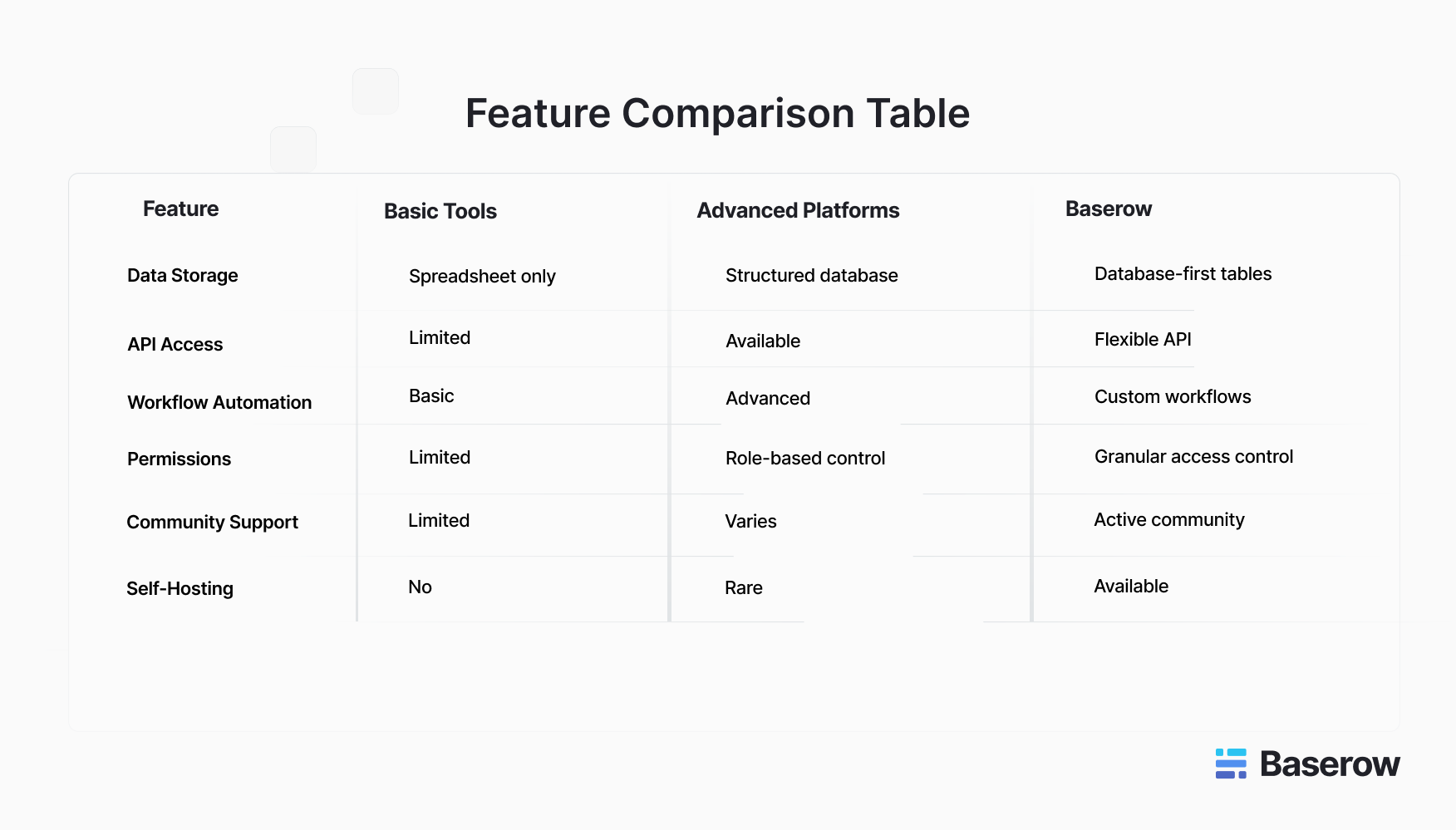
Unlike many simple online form builder tools, Baserow is built around a structured database architecture. This means form submissions connect directly to customizable tables. Teams can build workflows, manage permissions, and scale without switching platforms.
For additional insights into tool comparisons, check out the blog: Why Your Business Needs a Flexible Form Builder Tool.
Why Baserow Stands Out
When businesses compare tools, flexibility often becomes the deciding factor. Many platforms focus only on form design. Baserow takes a broader approach by combining form creation with a database-first structure.
This means responses are not stored in isolated sheets. Instead, they connect directly to structured tables that support reporting, filtering, and automation.
Key strengths include:
- Role-based permissions for controlled access
- Custom workflows for operational processes
- API flexibility for integration with other systems
- Self-hosting option for greater data control
- Active community and open development
Because Baserow is designed around structured data, it supports scalability better than tools that focus only on visual design.
If you are evaluating options seriously, explore the Baserow as a form builder solution.
How to Choose the Right Tool for Your Business
- What is the best software to create forms?
The answer depends on your needs. If you only need simple surveys, a lightweight tool may work. But if you require automation, database integration, and permission control, a structured platform is more suitable.
- Is FormBuilder free?
Many tools offer limited free versions. However, businesses should evaluate whether those plans support long-term growth.
- Which is the best form builder?
The best program to use to create a form is one that matches your workflow complexity, security needs, and scalability goals.
- Can ChatGPT create forms?
AI can help draft questions, but you still need a secure system to publish, manage, and analyze responses.
- Is Google Form Builder free?
Yes, but advanced automation and database capabilities may require more robust solutions.
Before making a decision, ask:
- Will this tool scale with my team?
- Can it handle large volumes of form submissions?
- Does it support structured data?
- Are permissions and security strong enough?
If your answers require flexibility and control, Baserow is worth considering.
Start free, explore templates, or book a demo to see how it fits your workflow.


Baserow 2.4 adds Button fields, Graph elements, workflow automation, AI provider management, improved Group By views, and 30+ more updates.

Discover how Airtable and Baserow compare in features, flexibility, speed, and scalability. Compare pricing plans and hidden costs to make an informed decision!

Explore the best open-source software alternatives to proprietary products. Discover OSS tools, licenses, and use cases with our updated directory.