
Connecting Claude to Baserow lets you ask questions about your data, turn unstructured information into records, and carry out supported database operations using natural language. Instead of copying schemas into chat or making API calls manually, you can work directly with your Baserow workspace.
👉 How to connect Claude to Baserow. Follow this step-by-step process.
In this blog post, we’ll explore six Claude prompt ideas for working with Baserow data, from creating structured records to investigating problems and generating reports.
6 prompts to try
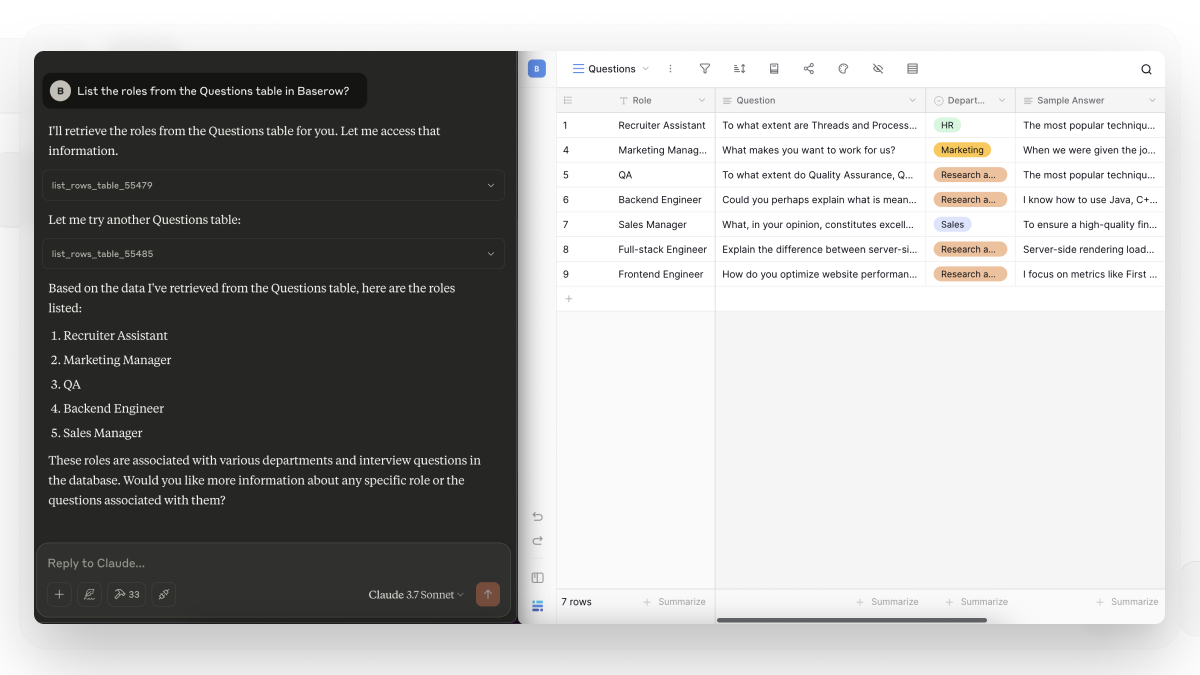
1. Ask questions across related tables
“Use my Baserow databases to answer this question: Identify the relevant tables, inspect their schemas, and follow existing relationships between records. Explain your answer using the relevant records and figures. Tell me if the available data is incomplete.”
Why it helps: Explore relationships between records without manually searching multiple tables.
2. Turn research into a searchable knowledge base
“Turn these research notes into structured records in my [TABLE NAME] table: [NOTES]. Create a record for each distinct finding, with a title, summary, category, keywords, and source. Preserve the original meaning and leave unknown fields blank.”
Why it helps: Store research in a consistent format so it can be searched and reused later.
3. Generate a new dataset from requirements
“Create [NUMBER] records for [PURPOSE] using the fields in my [TABLE NAME] table. Follow these rules: [REQUIREMENTS]. Check the existing schema, show me a sample, and wait for approval before creating the full dataset.”
Why it helps: Create structured starting data without entering every record manually.
4. Investigate a problem using historical records
“Investigate why [PROBLEM OR OUTCOME] occurred. Review the relevant records in [TABLE NAME] and compare them with [REFERENCE TABLE OR PERIOD]. Separate confirmed findings from possible explanations, cite the records supporting each finding, and suggest what information we should examine next.”
Why it helps: Use historical data to investigate a question instead of relying on assumptions.
5. Turn findings into follow-up work
“Based on these findings from my [TABLE NAME] table, identify the actions needed next. For each action, propose a title, description, priority, and relevant source record. Create a separate task in my [TASK TABLE] for each approved action.”
Why it helps: Connect analysis to execution while keeping tasks linked to the information that prompted them.
6. Prepare a report and save it to the database
“Use the records in [TABLE NAME] to prepare a report on [TOPIC]. Include the main findings, relevant figures, changes over time where the data supports them, and unanswered questions. Distinguish facts from recommendations and save the report as a new record in my [REPORTS TABLE].”
Why it helps: Turn database information into a reusable report instead of leaving the result in a chat.
More Claude and Baserow guides
Want to explore more ways to work with your database? These step-by-step guides show how to use Claude with Baserow for specific tasks:
- Build a CRM: Connect Claude to your data with natural language
- IT asset management: Automate hardware lifecycles with Claude and Baserow
- Automate Product Feedback Analysis with Claude and Baserow MCP
- How to Query and Update Database Rows Using Claude
- Automatically Build a Database Schema from a Scope of Work Using Claude
You don’t need Claude Code or manual Claude Desktop configuration to use the directory connection. When connecting Claude to Baserow, start with a small, verifiable workflow and expand it once the results meet your needs.
👉 Connect Baserow through the Claude directory to try these workflows. For setup details, see the Baserow MCP documentation.


Baserow 2.4 adds Button fields, Graph elements, workflow automation, AI provider management, improved Group By views, and 30+ more updates.

Discover how Airtable and Baserow compare in features, flexibility, speed, and scalability. Compare pricing plans and hidden costs to make an informed decision!

Explore the best open-source software alternatives to proprietary products. Discover OSS tools, licenses, and use cases with our updated directory.