
A supplier sends an update about a delayed shipment. Someone reads the message, finds the order, changes its status, and alerts the right team. Each step is simple, but repeating this process across hundreds of messages takes time.
AI can help interpret the message, while automation carries the result through a defined process. Together, they reduce repetitive work and help teams respond with the information they need.
The starting point is a clear task, reliable data, and a way to check the result. Platforms such as Baserow connect structured records with workflow actions, giving teams a practical foundation for building these processes.
TL;DR
- AI helps interpret text, classify information, and prepare summaries within repeatable workflows.
- Connected data and clear rules make automated actions easier to manage and check.
- Start with one useful task, review its results, and expand when the process works reliably.
What Does AI Add to Workflow Automation?
AI adds the ability to interpret information within an automated process. It can read a message, identify its topic, or summarise its contents before another step updates a record or notifies someone.
An AI powered workflow combines these capabilities with defined triggers and actions. For example, a new customer message could trigger a summary, followed by a category suggestion and an update to a support record.
The AI handles interpretation. The surrounding workflow controls what happens with its output.
From Incoming Information to Useful Output
Many workflows begin with unstructured data, such as emails, comments, and written notes. People can understand these inputs, but fixed rules may struggle when wording varies.
A customer might write “my parcel never arrived” instead of “missing delivery.” AI can help recognise that both messages concern the same issue.
However, the result still needs checking. A useful setup gives the model specific instructions, limits the available categories, and sends unclear cases for review. This reduces the chance that an incorrect guess leads to an unwanted action.
How Language Processing and Learning Fit Together
Natural language processing (NLP) concerns how computers process human language. It supports tasks such as identifying topics and extracting details from text.
Machine learning (ML) involves systems learning patterns from data. Many AI models use these methods during training to develop capabilities that workflows can apply.
Running a workflow does not necessarily train its model. Better results usually require deliberate changes to prompts, source information, model choice, or review rules.
How Is AI Different From Traditional Automation?
Traditional automation follows instructions that people define in advance. When an order reaches a set value, for example, a rule can send it to a manager for approval.
AI adds interpretation where the input is less predictable. It might read a supplier’s explanation and suggest whether an update concerns delivery, pricing, or product availability.
| Approach | What it does | Example |
|---|---|---|
| Rule based automation | Follows conditions and actions | Notify a manager when an order exceeds a spending limit |
| Robotic process automation | Performs configured interactions with software | Copy order details between application screens |
| AI-assisted automation | Interprets information within a process | Categorise a supplier message before routing it |
These approaches can work together. AI might suggest a category, while a fixed rule determines which team receives the record.
Assistants, Agents, and Workflows
An AI assistant helps someone complete a task, such as drafting a summary or preparing a table. AI agents can select actions and tools while working towards a goal, within configured limits.
A workflow usually follows a more defined path. Anthropic’s explanation of workflows and agents distinguishes predefined sequences from systems where a model directs the process.
For a straightforward approval or routing task, a defined workflow may be easier to test and maintain. Greater autonomy is useful when the task requires it, but it also creates more decisions to monitor.
Which Business Processes Benefit Most?
The strongest starting points are manual tasks with clear inputs and outputs that people can review. A wide range of business processes contain steps like these.
- Customer Feedback
AI can suggest categories for written feedback and prepare short summaries. Teams can then review grouped comments without reading every message from scratch.
- Supplier Updates
A workflow can summarise incoming updates and suggest a category. Staff check the proposed changes before they affect the main order records.
- Content Briefs
AI can turn approved notes into a draft brief. Editors remain responsible for checking facts, tone, and suitability before the content moves forward.
- Internal Requests
AI can suggest whether a request belongs with IT, facilities, or another department. Rules then route the record, with unclear cases sent for review.
For broader examples, Baserow’s guide to AI-powered operations workflows explores how connected processes support everyday team coordination.
How to Build a Reliable Workflow in Six Steps
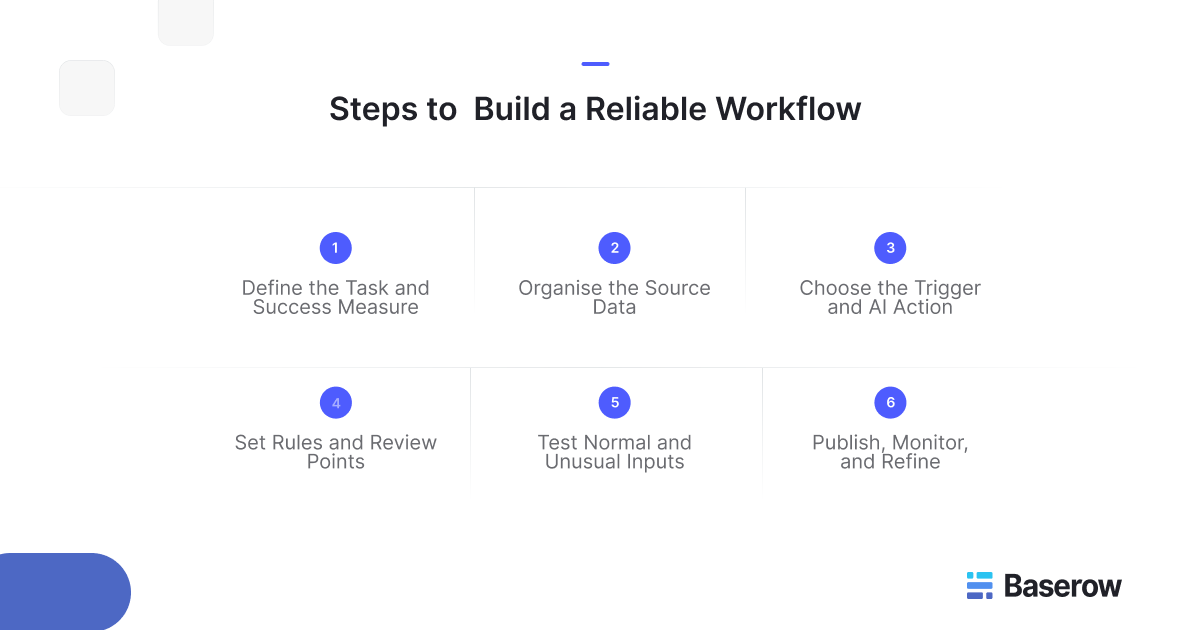
A useful workflow starts with a clear outcome. Before choosing a model or writing a prompt, decide what should happen, which information the process needs, and where someone must check the result.
1. Define the Task and Success Measure
Choose one task that takes time but follows a repeatable pattern. Sorting supplier messages is a better starting point than trying to automate an entire purchasing department.
Set a baseline before making changes. Record how long the task takes, how often mistakes occur, and how many cases require review. These measures help you judge whether automation improves the process.
2. Organise the Source Data
Give the workflow a consistent place to find and store information. Useful fields might include a record ID, message text, supplier name, category, review status, and assigned owner.
Keep original messages separate from AI-generated summaries. Reviewers can then check the source without losing context. Use stable record IDs to connect updates with the correct supplier or order.
Historical data can provide test examples, especially when it includes unusual messages and previous mistakes.
3. Choose the Trigger and AI Action
A trigger starts the workflow. This could be a new row, a record update, or a scheduled event.
Next, define a narrow AI task. Ask the model to classify a message into specific categories or summarise it within a set length. Avoid vague instructions such as “process this update.”
In a multi step workflow, each action should produce information that the next step can use. Baserow’s workflow setup guide explains how triggers, actions, and variables connect.
4. Set Rules and Review Points
Decide which results can move forward and which need checking. A category suggestion might route a message automatically, while a change to an order date may need approval.
Include an “Other” option when none of the defined categories fits. Never force every input into a category that could be wrong.
Treat incoming text as information to process, rather than instructions that can override the workflow’s rules.
5. Test Normal and Unusual Inputs
Test short messages, missing details, conflicting dates, and unfamiliar wording. Check the full process, including which record changes and who receives a notification.
Use a separate test table with sample records. Baserow test runs execute real actions, so testing against working tables can change live data.
Check repeated runs too. Processing the same message twice should not create unwanted duplicate records or notifications.
6. Publish, Monitor, and Refine
Publish after checking the results against your success measures. Assign someone to review failures and maintain the workflow.
Teams improve over time by examining mistakes and adjusting prompts, rules, or source data. Keep a small set of test cases and rerun them after changes to catch problems before expanding the workflow.
A Practical Baserow Use Case: Supplier Update Review
Consider a purchasing team that receives supplier updates through a form. Some messages announce delays, while others concern stock levels or pricing. Staff need to review these updates before changing order records.
The following example shows how the team could design an AI driven process in Baserow.
Keep Messages and Orders Connected
Create a Supplier Updates table alongside Suppliers and Orders tables. Each update stores the original message, a linked supplier, a summary, a suggested category, and a review status.
This structure keeps the message connected to the records it concerns. Baserow’s Kuma assistant can help prepare the underlying tables and fields, which the team should check before adding workflow logic.
Summarise and Classify Each Update
When a new update row appears, an AI Prompt action can produce a short summary. A separate classification action can choose from categories such as Delivery, Stock, Pricing, and Other.
Baserow’s AI Prompt action supports text and choice outputs. The workflow can store these results in fields that reviewers see alongside the original message.
Keep category selection separate from approval. A message classified as Delivery does not establish that its proposed date is correct or acceptable.
Route the Record for Human Review
A Router node can direct each category to the relevant next step. For example, the workflow could assign a pricing update to a purchasing manager and mark it as awaiting review.
After checking the message, the reviewer records approved values and changes the approval status. A second workflow can then update the linked order using those reviewed values.
Why Baserow Fits This Process
Baserow combines linked records, AI actions, routing, and workflow history within one workspace. This gives the team a shared place to inspect inputs, review proposed changes, and trace execution.
Its open-source foundation and self-hosted option also provide deployment flexibility. The practical benefit is a process built around the team’s data structure, with review points that match its working needs.
How to Choose the Right Tools
Choosing ai workflow automation tools starts with the process you need to support. A platform should handle your data, connect the required steps, and make problems easy to investigate.
Compare options against a small, realistic workflow before committing to a wider rollout.
- Check Data Connections and Model Choice
Can the tool read the information you need and write results to the correct records? Check how it handles linked data, missing values, and connections to external services.
Model choice also matters. Test whether the available models can follow your instructions and produce suitable results. A more expensive model is not always necessary for a narrow classification task.
- Look for Clear Controls and Workflow History
You should be able to define who manages workflows, who reviews results, and which actions require approval. Check whether the platform records failures and shows the output from each step.
Baserow’s workflow history lets teams inspect executed nodes and their results. This helps identify where a process stopped or produced an unexpected output.
- Compare Total Running Costs
Consider subscriptions, model usage, workflow execution limits, and maintenance time. A process with several AI calls per record may cost more than one that uses a single classification step.
Baserow’s guide to AI and automation tools for data, content, and operations provides a broader starting point for comparing platforms. Use your own test results to narrow the selection.
Keep Workflows Accurate and Under Control
A working workflow still needs oversight. Inputs change, external services fail, and model outputs can vary. Build checks around the points where an error would affect another person or business record.
- Validate Outputs Before Acting
Check whether the result contains the required information and matches the expected format. A generated date should be a valid date, while a category should belong to your approved list.
A well-formatted answer can still be wrong. Keep the original input available and require review before applying changes that carry significant consequences.
- Use a Review Table for Unverified Data
A separate table can hold incoming information until someone approves it. This prevents an unverified update from immediately changing the main records.
In a community discussion about human-reviewed data imports, a member proposed this approach for more than 5,000 external records. The discussion explores approval flags, record matching, and routing.
The example concerns data synchronisation, but the same design principle can support AI-generated suggestions.
- Prevent Duplicate Actions
Before creating a record, check whether a matching record already exists. Use a stable identifier where possible, rather than relying only on names.
A Baserow community conversation about duplicate records illustrates this issue. The suggested approach checks for matching rows before deciding whether to create another record.
Review Quality Alongside Speed
Track incorrect categories, failed runs, review time, and cost per completed task. Faster processing is useful only when the results remain suitable for the work.
The NIST AI Risk Management Framework offers guidance for managing AI risks. Apply that principle by assigning ownership, documenting checks, and reviewing results as the workflow changes.
Frequently Asked Questions
- Do I Need Coding Skills to Maintain AI Automations?
Many visual builders let you adjust triggers, prompts, and actions without writing code. You still need to understand the process, check field mappings, and investigate errors. More complex integrations or custom logic may require technical support, even when the main workflow uses a visual interface.
- Do I Need Historical Data Before Starting?
You can start with a small collection of representative examples rather than a large dataset. Include common inputs, missing information, and difficult cases. Historical records become useful when they show real patterns and known mistakes. Check that you have permission to use any information included in testing.
- Can a Workflow Handle Information in Multiple Languages?
It can, depending on the selected model and task. Test each language your team expects to receive, including regional terms and mixed-language messages. Keep the original text beside any translation or summary, and arrange human review when wording could affect an important decision.
- Can AI Process Incoming Updates in Real Time?
AI can process updates when a trigger fires, but the result is not always immediate. Execution queues, model response times, and external services can introduce delays. Set expectations around a tested response window, and decide what should happen when an update takes longer than expected.
- What Happens if the AI Provider Is Unavailable?
The AI step may fail, preventing later actions from running. Define a recovery process that preserves the input and flags unfinished work. Before retrying, check whether earlier actions changed any records. This helps prevent duplicate updates when the service becomes available again.
- How Much Does an AI-Assisted Workflow Cost to Run?
Costs depend on your platform plan, execution volume, model choice, and the amount of information processed. Include maintenance and human review time when comparing options. Test a representative batch, calculate the cost per completed record, and use that figure to estimate monthly spending.
- Does Self-Hosting Keep All AI Processing on My Server?
Not automatically. Self-hosting Baserow controls where the application runs, but an external AI provider still receives the information sent for processing. Keeping inference within your infrastructure requires a locally hosted model and suitable configuration. Baserow’s [AI security documentation] (https://baserow.io/user-docs/baserow-ai-security) explains these data paths.
- How Often Should I Review Prompts and Model Settings?
Review them whenever the process, source data, or model changes. During an initial rollout, check results frequently enough to catch recurring mistakes. Once performance is stable, set a review schedule based on task volume and risk. Rerun your test examples before publishing any changes.
Start With One Useful Workflow
Choose one repetitive task and record how your team handles it today. Build a small workflow, check its outputs, and compare the results with your baseline. Expand when the process is reliable and someone owns its maintenance.
Baserow gives you a practical place to connect records, configure actions, and review results. Use Baserow to build your first workflow around a process your team already understands.


Baserow 2.4 adds Button fields, Graph elements, workflow automation, AI provider management, improved Group By views, and 30+ more updates.

Discover how Airtable and Baserow compare in features, flexibility, speed, and scalability. Compare pricing plans and hidden costs to make an informed decision!

Explore the best open-source software alternatives to proprietary products. Discover OSS tools, licenses, and use cases with our updated directory.