
TL;DR
- Context AI refers to the information an AI system uses to understand requests and generate relevant responses.
- AI tools need access to relevant, up-to-date information to provide answers based on your actual business operations.
- A connected database like Baserow gives AI access to structured information, including customers, projects, tasks, and business workflows.
- Baserow MCP integrations let you connect your database to ChatGPT, Claude, and Cursor to search, analyze, create, and update records using natural language.
- Good data structure, relationships, data quality, and permissions help AI work with business information more effectively.
AI tools can write, summarize, analyze, and automate work. But they can only do these things well when they have the right information. Without access to your business data, even the most advanced AI model has limited understanding of your company, customers, and workflows.
This is where context becomes important. Instead of relying on lengthy prompts or manually copying information into AI tools, businesses can connect their databases and give AI access to the information it needs.
In this article, we’ll explain what context AI means, why it matters for large language models, and how connecting a database like Baserow to ChatGPT or Claude can make AI more useful in everyday business operations.
What Is Context AI?
Context AI refers to the information available to an AI system when it processes a request and generates a response. It includes the instructions, data, conversation history, and other relevant information that help an AI model understand what you’re asking and what kind of answer you need.
Think about asking an AI assistant to prepare a sales report. Without additional information, it can explain how sales reports work or provide a generic template. But it cannot tell you which customers generated the most revenue last month, which deals are still open, or how your sales team performed.
For that, it needs access to your actual business data.
Context can come from several sources:
- User prompts: Instructions and information provided directly in a conversation.
- Conversation history: Previous questions, answers, and decisions that help maintain continuity.
- Knowledge bases: Documentation, internal policies, guides, and other reference materials.
- Connected databases: Structured business information, including customers, projects, orders, tasks, and transactions.
- External tools: Applications and services that provide additional information or allow AI to perform actions.
The more relevant information an AI system can access, the better it can understand the request and provide a useful response.
Why Does Context Matter for AI?
A large language model (LLM) generates responses based on patterns learned during training and the information available in its current context. It doesn’t automatically know what’s happening inside your company or have access to your latest business records.
This creates a gap between what AI can do in theory and what it can actually do for your business.
Consider a project manager asking:
“Which projects are behind schedule, and what should we prioritize this week?”
Without connected data, an AI assistant might suggest general project management best practices. With access to a database containing project deadlines, task statuses, assigned team members, and dependencies, it can identify specific delays and help prioritize the work.
Context makes the difference between a generic answer and an answer based on your actual operations.
There are three main reasons why it matters:
1. More relevant answers
AI can use your company’s terminology, processes, and historical information instead of relying on generic assumptions. It can understand which customers belong to which accounts, which projects are active, and what your team has already decided.
2. Fewer manual steps
Without integrations, employees often need to copy information from spreadsheets, databases, and other applications into prompts. Connecting these sources reduces repetitive work and makes information easier to access.
3. More useful actions
When AI can interact with business systems, it can go beyond answering questions. Depending on the available integrations and permissions, it can find records, create entries, update information, and help execute workflows.
The Role of Context Windows in AI
A context window is the amount of information a language model can process at one time. It typically includes the current prompt, relevant conversation history, instructions, and information retrieved from external sources.
A larger context window allows a model to consider more information in a single interaction. However, a larger context window doesn’t automatically mean better answers.
There are two important limitations to understand.
First, even when a model supports a large context window, it doesn’t mean it has access to all your company’s information. You still need to provide or connect the relevant data.
Second, adding more information isn’t always helpful. Irrelevant or outdated details can make it harder for a model to identify what matters.
The goal is not to give AI access to everything indiscriminately. It’s to provide the right information at the right time.
This is why connecting AI tools to structured data sources is so useful. Rather than pasting an entire database into a conversation, an integration can help retrieve the records relevant to a particular request.
Why Connecting a Database Makes AI More Useful
Most businesses already have valuable information stored across different systems: spreadsheets, CRM platforms, project management tools, internal documentation, and databases.
But when you ask an AI assistant a question, it doesn’t automatically know what’s stored in those systems. You often have to copy information into a prompt, explain your business processes, or switch between applications to find the answers you need.
Connecting a database to AI changes this. Instead of manually providing information every time, you can let AI retrieve relevant business data when you need it.
This is where Baserow comes in. Baserow is an open-source database platform that helps you organize business information in structured, connected tables. You can use it to manage customers, projects, tasks, sales pipelines, inventory, and much more.
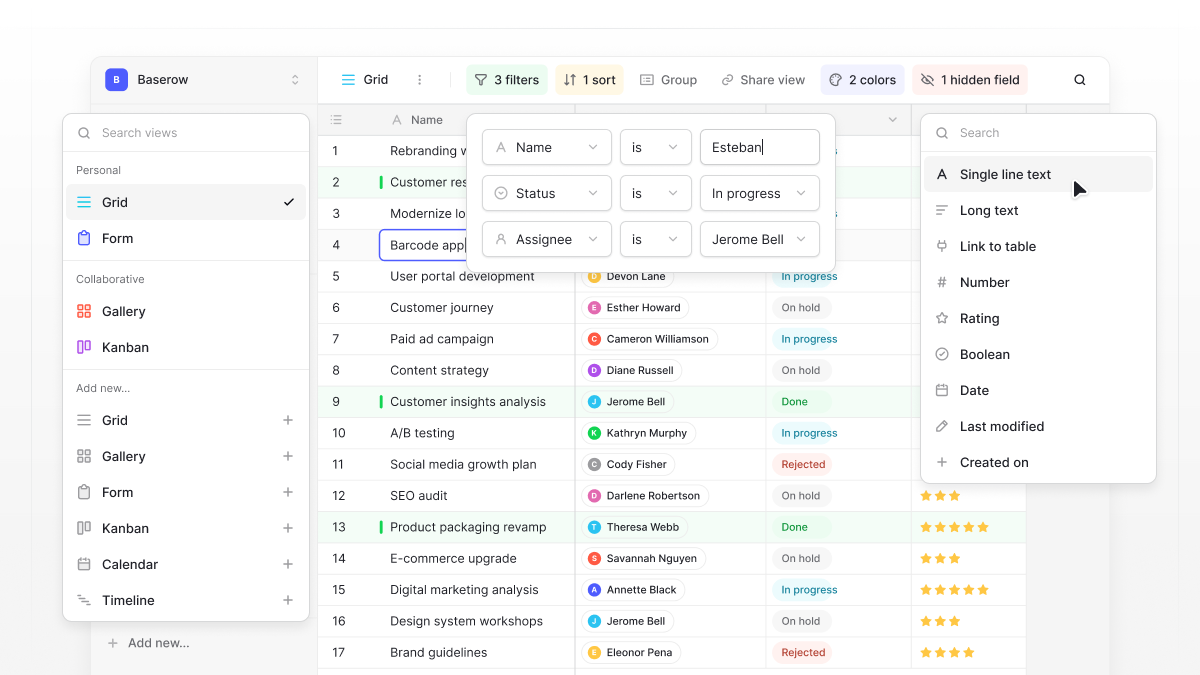
When connected to an AI assistant, your Baserow database becomes a source of context that AI can use to answer questions and work with your actual business information.
For example, imagine you manage your projects in Baserow. You can ask an AI assistant which tasks are overdue, who is responsible for them, or which projects need attention this week. Instead of giving the assistant all this information manually, it can retrieve the relevant records from your database.
The same approach works for customer management, sales reporting, inventory tracking, and other business workflows.
The key is that AI doesn’t just need more information. It needs access to the right information, organized in a way it can understand and use.
Connect Baserow to ChatGPT and Claude with MCP
Another way to provide AI tools with access to business context is through the Model Context Protocol (MCP).
MCP is an open protocol that allows AI applications to connect to external tools and data sources. Instead of manually transferring information between applications, you can give an AI assistant access to specific systems through an MCP integration.
Baserow supports MCP, allowing you to connect your databases to ChatGPT, Claude, Cursor, and other MCP-compatible AI tools and clients.
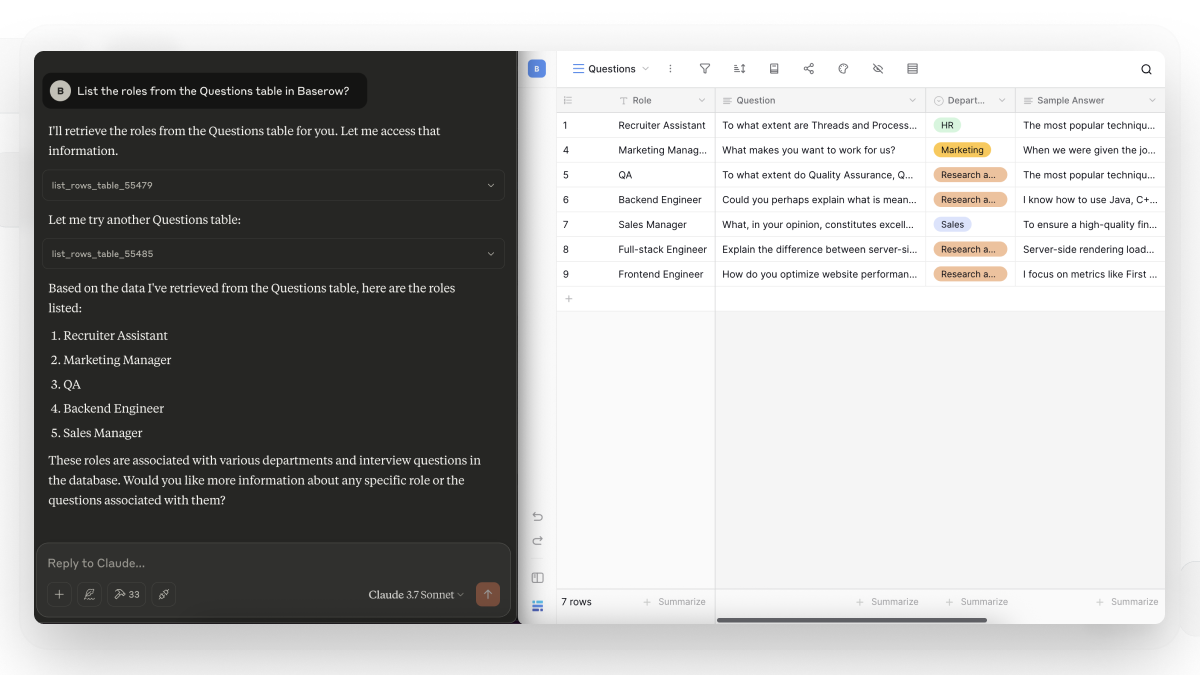
For example, you can connect Baserow to:
- ChatGPT: Use natural language to find records, analyze database information, create entries, and update existing records.
- Claude: Let Claude understand your Baserow workspace structure and work with its records through natural language requests.
- Cursor: Connect your database to your development environment and interact with Baserow data while working on projects.
👉 If you’re using Claude, check out our guide on 4 Ways to Use Claude with Baserow. It covers practical ways to work with your Baserow data through Claude.
The important part is that AI doesn’t need to rely exclusively on information provided in a prompt. It can retrieve relevant information from your connected Baserow workspace when responding to requests.
What can you do with Baserow MCP?
Let’s look at a few practical examples.
Search your database
Ask ChatGPT or Claude to find specific records without manually filtering tables.
For example: “Find all customers based in Germany with an active subscription.”
Analyze your data
Ask questions about your existing records and get summaries based on your database.
For example: “Summarize our sales performance this quarter and identify the three largest opportunities.”
Create new records
Instead of opening a table and filling out fields manually, describe what you want to add.
For example: “Create a new project called Website Redesign, assign it to the marketing team, and set its status to Planned.”
Update existing records
Ask your AI assistant to modify information in your database.
For example: “Update the status of all completed tasks in the Website Redesign project to Done.”
👉 Looking for ideas to get started? Explore 6 Claude Prompt Ideas for Working with Baserow Data for practical prompts you can try with your own databases.
These interactions make your database more accessible to people who prefer working with natural language rather than navigating tables and filters.
You can also combine Baserow with other connected tools. For example, an AI assistant could use project information from Baserow alongside documentation from another application to answer a question with broader context.
Make Your Business Data Work with AI
AI tools are becoming part of everyday business workflows, but their usefulness depends on the information they can access.
A well-organized database gives AI a reliable source of business context. It helps language models move beyond generic responses and work with the actual information your team uses every day.
With Baserow, you can organize business data in a flexible, relational database and connect it to AI tools such as ChatGPT and Claude through MCP.
Instead of copying information between applications, you can ask questions, analyze records, create entries, and update data using natural language.
Your data provides the context. AI helps you put it to work.

Baserow 2.4 adds Button fields, Graph elements, workflow automation, AI provider management, improved Group By views, and 30+ more updates.

Discover how Airtable and Baserow compare in features, flexibility, speed, and scalability. Compare pricing plans and hidden costs to make an informed decision!

Explore the best open-source software alternatives to proprietary products. Discover OSS tools, licenses, and use cases with our updated directory.