
TL;DR
- Project management software gives teams one place to plan work, assign tasks, set due dates, track progress, and keep projects on time and within budget.
- When choosing a PM tool, look for the capabilities that match your workflow: task management features, task tracking, time tracking, custom fields, Kanban boards, Gantt charts, and project planning.
- The best choice depends on your team size and complexity. A simple team may need basic task tracking, while teams managing multiple projects often need connected data, multiple views, automation, and reporting.
- Instead of creating a project management system separately from the rest of your business data, Baserow lets you use your existing data as the foundation and build project workflows around it.
- With Baserow, teams can organize projects, tasks, team members, deadlines, and related business data in one customizable system, using views such as Kanban boards and timelines.
- Baserow can work as a flexible program to manage projects for teams that want more control over how their data and workflows are structured, with a free plan available to get started.
Managing a project involves more than creating a task list. Teams need to plan work, assign responsibilities, track deadlines, and keep everyone aligned.
A program to manage projects brings these activities together, helping teams organize tasks, manage project data, visualize schedules, and track progress in one place. The right project management software can help teams stay on time and within budget.
This guide covers the key features to look for, how different project management tools work, and how to choose the right option. We’ll also look at platforms that offer a free plan or offer a free trial so you can evaluate them before committing.
What Is a Program to Manage Projects?
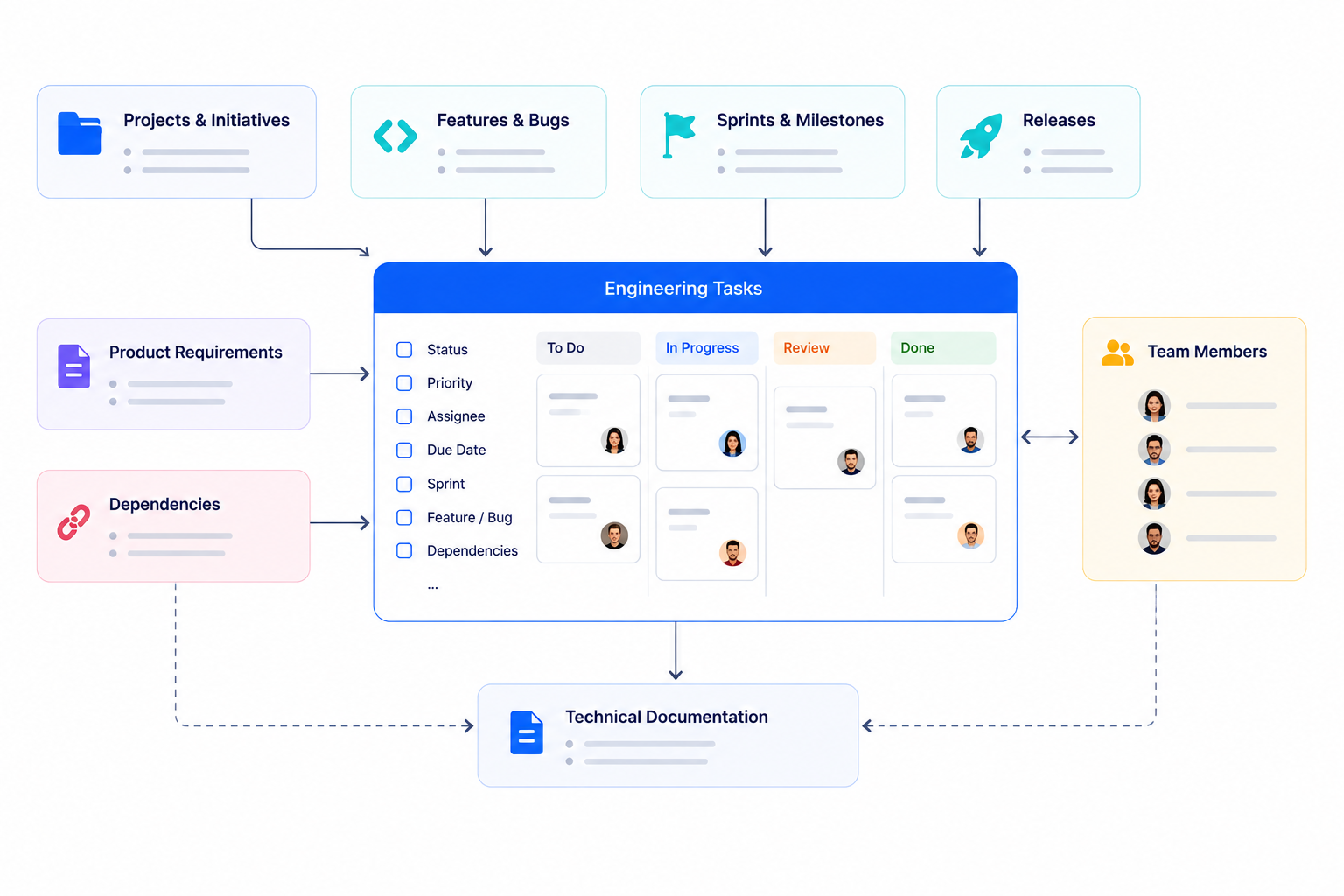
A program to manage projects is software designed to help individuals and teams plan, organize, execute, and monitor project work.
At its simplest, project management software can be a structured task list. More advanced project management systems can handle everything from project planning and resource management to timelines, budgets, reporting, collaboration, and workflow automation.
Most project management programs allow you to organize work around projects and tasks. A typical project might include:
- Project goals and scope
- Tasks and subtasks
- Team members and responsibilities
- Due dates
- Priorities
- Milestones
- Dependencies
- Project status
- Resources
- Budgets
- Documents and other project data
Instead of keeping this information across spreadsheets, documents, email threads, and chat messages, teams can manage it from a centralized system.
The exact features vary between tools. Some focus primarily on task management, while others provide advanced planning, resource management, reporting, or customizable databases.
For a broader explanation of the category, see What Is Project Management Software?.
How Does Project Management Software Work?
Project management software generally follows the same basic process: organize project information, break the project into manageable pieces of work, assign responsibilities, and track progress.
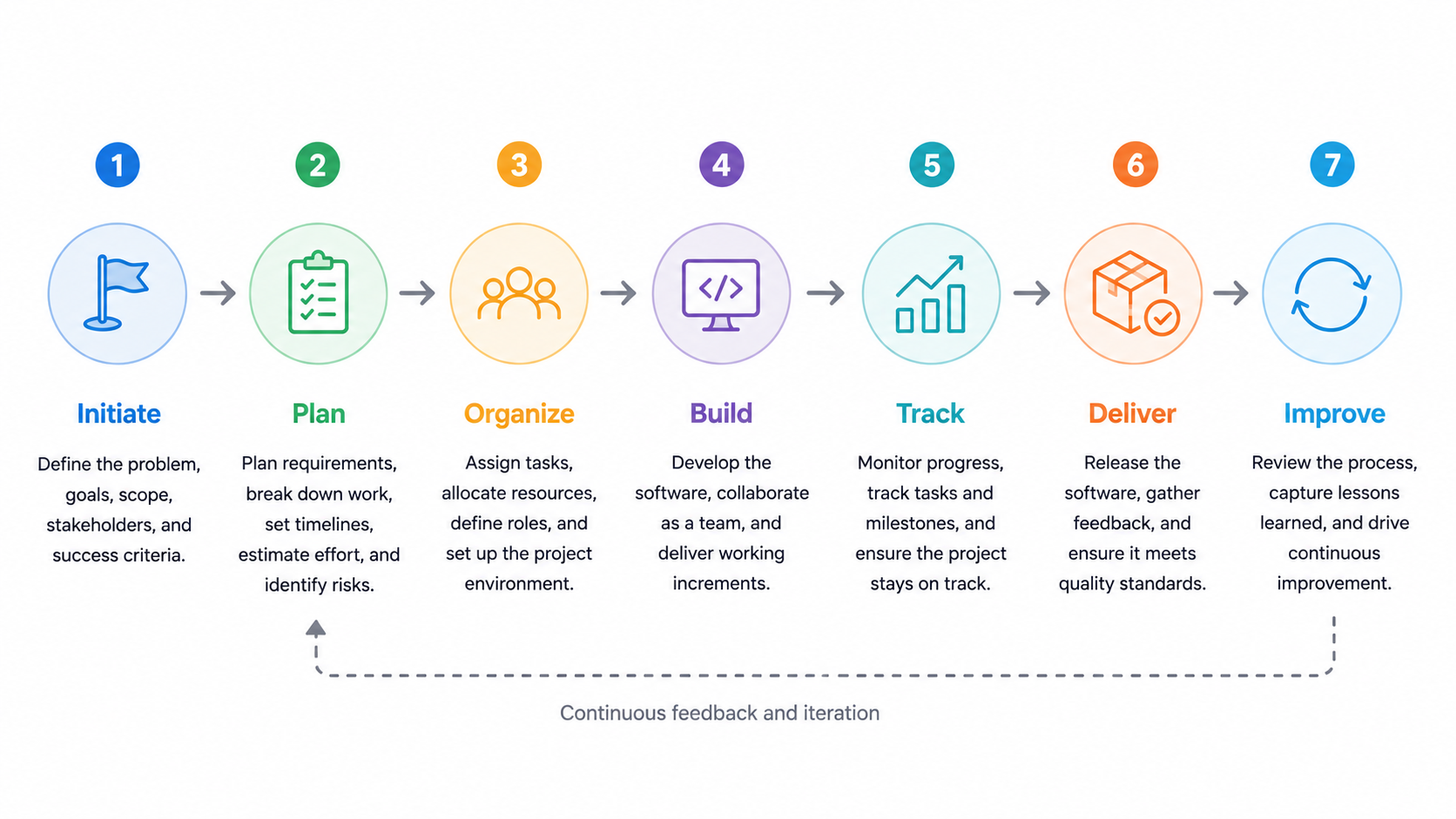
A team might start by creating a project and defining its objectives. The project is then divided into tasks and milestones.
For example:
Project → Milestones → Tasks → Team members
Each task can have an owner, priority, due date, status, and other information.
As work progresses, team members update task statuses and project managers monitor progress. Views such as Kanban boards, calendars, and timelines can make this information easier to understand.
More advanced systems can also connect projects to other business information.
For example, a marketing project could be connected to a campaign, customer, content calendar, and team members. A software development project could connect products, releases, issues, and development tasks.
This is where database-based project management tools such as Baserow can be particularly useful. Instead of treating project information as isolated tasks, you can connect project data with the rest of your organization’s data.
Key Features of Project Management Programs
Different teams need different capabilities from their project management software, but several features are common across most tools.
Task management
Task management is one of the core functions of project management software.
Teams can create tasks, assign them to team members, add priorities and due dates, and track their status.
A good task management system should make it easy to answer questions such as:
- What needs to be done?
- Who is responsible?
- When is it due?
- What is currently in progress?
- What has been completed?
- What is blocked?
Task tracking becomes particularly important as projects become larger and involve more people.
Project planning
Project planning helps teams define what needs to happen and when.
Depending on the tool, project planning features may include milestones, dependencies, timelines, project schedules, and resource planning.
A project plan gives the team a shared understanding of the work instead of relying on individual spreadsheets or notes.
Due dates and deadlines
Due dates help teams understand when tasks and milestones need to be completed.
Project management software can provide calendar or timeline views that make upcoming deadlines easier to see. Some tools can also send reminders or trigger automated actions when deadlines approach.
Kanban boards
Kanban boards provide a visual way to track work through different stages.
A basic workflow might look like:
To Do → In Progress → Review → Done
Each task is represented as a card that moves between stages as work progresses.
Kanban boards are particularly useful for teams that need a simple visual overview of current work. Many modern project management tools include Kanban board functionality.
Gantt charts and timelines
Gantt charts and timeline views are useful for projects where scheduling and dependencies matter.
They can show when tasks start and finish and how different pieces of work relate to one another.
For example, a product launch might require research to finish before development begins, followed by testing and marketing activities.
A timeline can make these relationships easier to understand than a simple task list.
Collaboration
Project management often involves multiple people working toward the same outcome.
Collaboration features can include comments, file attachments, notifications, mentions, shared views, and team permissions.
Keeping project information and conversations together can reduce the need to search through different communication channels for updates.
Time tracking
Some project management tools include time tracking so teams can record how much time is spent on tasks and projects.
Time tracking can be useful for agencies, consultants, and professional services teams that bill clients based on time. It can also help internal teams understand how much effort different projects require.
Reporting and dashboards
Project management reporting helps teams understand what is happening across their projects.
Depending on the software, reports can cover:
- Project progress
- Completed projects
- Overdue tasks
- Team workloads
- Time spent
- Budgets
- Milestones
- Project status
Dashboards can turn project data into a high-level overview for managers and stakeholders.
Workflow automation
Automation can reduce repetitive project administration.
For example, a project management system could automatically update a status, notify a team member, create a task, or trigger another workflow when something changes.
Automation becomes increasingly valuable when teams manage many projects or repeat the same processes regularly.
What Should You Look for in a Project Management Tool?
Choosing a project management tool is easier when you start with your team’s actual workflow rather than simply comparing feature lists.
Consider these questions before choosing software.
How complex are your projects?
A simple project with ten tasks doesn’t require the same system as a project involving hundreds of tasks, multiple teams, dependencies, and deadlines.
Think about the number of projects you manage, the number of people involved, and how much coordination is required.
Do you need multiple views?
Different people need different ways to look at project information.
A project manager might prefer a timeline, while an individual contributor might work better from a Kanban board. Stakeholders may want a high-level dashboard.
A flexible system should let you view the same project data in different ways without creating duplicate information.
Do you need custom fields?
Predefined fields can work for straightforward projects, but specialized workflows often require additional information.
Custom fields allow teams to track information specific to their processes, whether that’s a product, client, department, budget, release, or another project attribute.
Do your projects connect to other data?
This is an important consideration that is often overlooked.
If your projects depend on customer information, product data, inventory, employees, campaigns, or other business records, you may benefit from a system that can connect this information.
Rather than copying the same information into multiple tools, a relational database can allow projects and tasks to reference the original records.
This is one reason teams sometimes choose a flexible database platform such as Baserow instead of a dedicated task-management application.
Do you need automation?
Look for automation capabilities if your team repeatedly performs the same administrative actions.
For example, you might automatically update project information, notify someone when a task changes, or trigger another workflow when a project reaches a particular stage.
How many projects do you manage?
If your team manages multiple projects simultaneously, make sure the software can provide both project-level and portfolio-level visibility.
You should be able to understand what’s happening within an individual project while also seeing how work is progressing across your organization.
How to Choose the Right Program to Manage Projects
The best program to manage projects isn’t necessarily the one with the longest feature list.
It should fit the way your team organizes work.
Start by documenting your current workflow. Identify how projects are created, how tasks are assigned, what information needs to be tracked, how progress is reported, and which repetitive processes could be automated.
Then compare tools based on those requirements.
For example, a small team with straightforward tasks may only need task management and a Kanban board. A growing organization might need multiple projects, custom fields, timelines, reporting, automation, and integrations.
Teams that need to connect project management with existing business data may benefit from a more flexible, database-based approach.
Baserow can be a strong option in that category because it allows teams to build a project management system around their own data rather than starting with a fixed structure.
For a broader comparison of available options, see Best Project Management Software: 55 Tools Compared.
How to Build a Project Management System
Once you’ve chosen a project management tool, the next step is turning it into a system your team can actually use.
A good setup should make it easy to answer three questions:
- What projects are we working on?
- What needs to be done?
- Who is responsible for each task and when is it due?
From there, you can add the information and workflows that are specific to your organization.
Start With Your Existing Project Data
One of the easiest ways to build a project management system is to start with the data you already have.
Instead of creating a completely separate database for project management, identify the information your team already maintains and determine how it relates to your projects.
For example, you might have:
- A list of customers
- A list of employees or team members
- Product information
- Existing projects
- Tasks and deliverables
- Campaigns
- Deadlines
- Budgets
A database-based project management system can connect these records rather than duplicating them.
This is where Baserow can be particularly useful. You can use existing structured data as the foundation for your project workflows and then add project-specific information such as status, priority, assignee, milestones, and due dates.
For example:
Customer → Project → Tasks → Team members
This gives your team a single source of truth instead of maintaining separate project and business databases.
Create a Project and Task Structure
Most teams should start with two basic components: projects and tasks.
A Projects table can contain information such as:
- Project name
- Project owner
- Status
- Start date
- End date
- Priority
- Customer
- Budget
- Team
A Tasks table can contain:
- Task name
- Project
- Assignee
- Status
- Priority
- Due date
- Description
- Completion date
You can then connect tasks to projects using relationships.
This simple structure can support a wide range of workflows while leaving room to add more project data later.
Choose the Right Project Views
The same project data can often be useful in several different views.
A Kanban board can help the team manage day-to-day tasks.
A calendar can highlight upcoming due dates.
A timeline can show project schedules and milestones.
A grid can provide a detailed overview of all project records.
The advantage of using a flexible project management system is that you don’t have to choose only one.
Different team members can use the view that makes the most sense for their role while working from the same underlying project data.
Use Project Management Templates
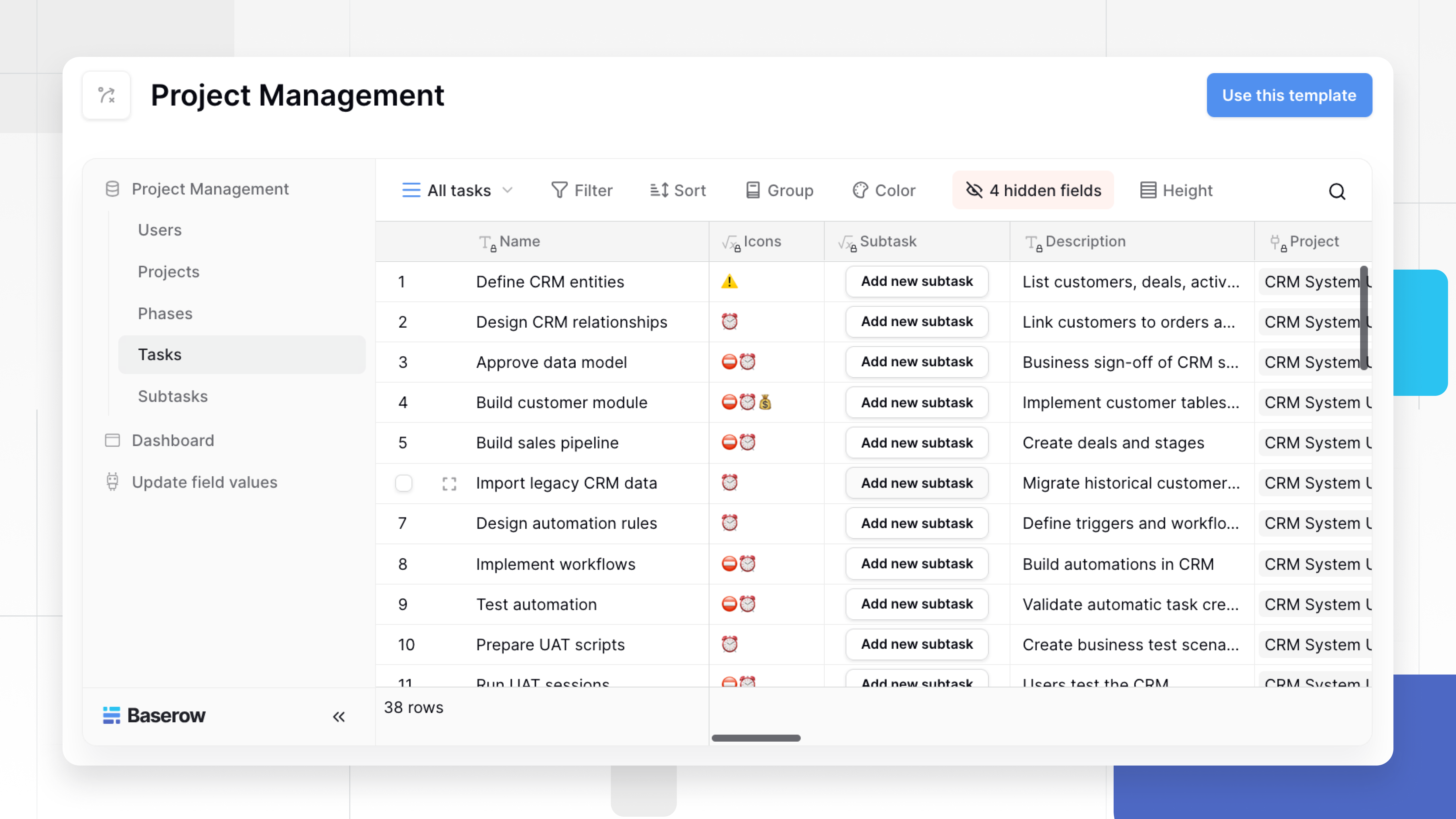
You don’t always need to build a project management system from scratch.
Templates can give you a ready-made structure that you can adapt to your workflow.
Baserow offers a Project Management template for teams that want a structured starting point. You can also use the Project Tracker template if you need a simpler way to organize and track projects.
Templates are particularly useful when you already know what you want to manage but don’t want to spend time designing the database structure yourself.
Automate Repetitive Project Work
Once your project data is structured, look for repetitive processes that can be automated.
For example, your team might need to:
- Notify someone when a task is assigned
- Update a project when all tasks are completed
- Create follow-up tasks
- Move work through different stages
- Send reminders about deadlines
- Keep information synchronized with another system
A project management tool with automation capabilities can reduce this administrative work.
Baserow can connect project data with automated workflows, allowing teams to build processes that go beyond simply tracking tasks.
This is especially valuable when project management is closely connected to other operational processes.
Project Management for Different Teams
The right project management system depends on what you’re managing.
Software development teams
Development teams often need to connect projects with releases, issues, milestones, technical tasks, and product roadmaps.
A flexible database structure can make it easier to connect these different types of information.
For a deeper look at managing software projects, see Management in Software Project: A Practical Guide.
Remote engineering teams
Remote teams need clear visibility into responsibilities, deadlines, and project progress.
A centralized project management system gives distributed team members a shared source of information without relying on individual spreadsheets or status updates.
See Best Project Management Tool for Remote Engineering Teams for more on this use case.
Marketing teams
Marketing projects can involve campaigns, content, approvals, channels, deadlines, and multiple stakeholders.
A flexible system can connect these records so teams can manage the project without losing the context around the work.
Construction teams
Construction projects often involve schedules, contractors, budgets, tasks, materials, and multiple stakeholders.
The project management system needs to accommodate more than a simple task list.
See Best Project Management Software for Construction for a closer look at this category.
Cross-functional teams
When projects involve several departments, collaboration becomes especially important.
Teams need to know who owns each task, what is due next, and how their work relates to the larger project.
For more examples, see Best Collaborative Project Management Software.
Baserow as a Program to Manage Projects
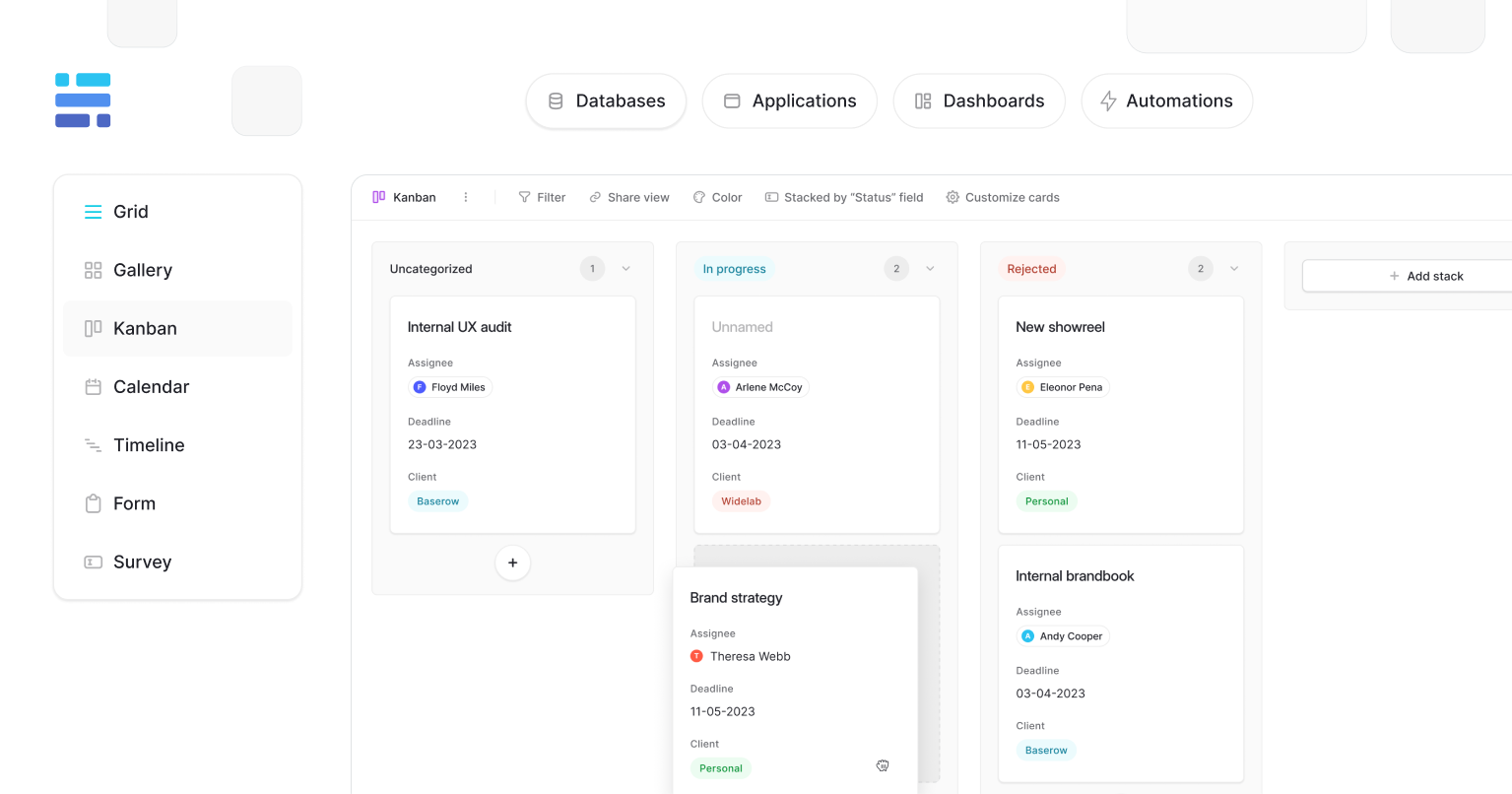
Baserow is a particularly useful option for teams that want project management built around structured data.
Rather than starting with a predefined project hierarchy, you can create the database structure your organization needs and then use it to manage projects.
This means a project doesn’t have to exist in isolation.
You can connect it to customers, products, team members, campaigns, resources, or other business records. You can then create project-specific views and workflows on top of those relationships.
Baserow combines this database flexibility with features commonly expected from project management software, including task tracking, Kanban boards, timelines, calendars, custom fields, and automation.
This makes it possible to build a project management system that is both structured and customizable.
For teams evaluating different platforms, our Best Project Management Software: 55 Tools Compared guide provides a broader comparison of project management tools.
Baserow vs. Traditional Project Management Software
Traditional project management software generally gives teams a predefined way to organize projects, tasks, users, and workflows.
This can be an advantage when your team’s processes fit that structure.
But it can become limiting when your projects depend on other types of data.
For example, a product team may need to connect projects with products and customer feedback. A marketing team may need to connect projects with campaigns and content. An operations team may need to connect projects with resources and business processes.
With Baserow, these relationships can be part of the project management system itself.
The distinction is simple:
Traditional project management tools typically start with projects and tasks.
Baserow starts with data and lets you build project workflows around it.
That makes Baserow a strong choice for teams that need customizable project management rather than another isolated task list.
Open Source Project Management With Baserow
Open source project management software can be important for organizations that want greater control over their software, data, and infrastructure.
Baserow’s open-source foundation makes it an option for teams that want to build and manage their own workflows while retaining greater control over their project data.
This can be particularly relevant for organizations with specific hosting, security, customization, or data ownership requirements.
Learn more about the category in Open Source Project Management Software
How to Choose the Best Project Management Tool
There is no universally best project management tool.
The right choice depends on your team’s size, project complexity, existing workflows, and the type of data you need to manage.
Before choosing a platform, consider:
- How many projects do you manage?
- How many team members need access?
- Do you need Kanban boards?
- Do you need timelines or Gantt charts?
- Do you need time tracking?
- Do projects need to connect with other business data?
- Do you need custom fields?
- Do you need workflow automation?
- Do you need multiple project views?
- Do you need an open source or self-hosted option?
A small team with straightforward tasks may only need a simple task management tool.
A larger organization may need project planning, resource management, reporting, automation, and portfolio visibility.
Teams whose projects depend heavily on structured business data may benefit from a database-based platform such as Baserow.
For a more detailed framework, read How to Choose the Best Project Management Tools.
How Much Does Project Management Software Cost?
Project management software can range from free tools for individuals and small teams to enterprise platforms with per-user pricing and advanced features.
The total cost depends on factors such as:
- Number of users
- Number of projects
- Storage
- Automation limits
- Reporting features
- Integrations
- Security features
- Hosting requirements
- Support
When comparing prices, don’t look only at the monthly subscription.
Consider how much the software costs as your team grows and whether you will need additional tools to manage the data and workflows surrounding your projects.
A flexible system that combines project management with your existing business data can sometimes reduce the need for multiple separate tools.
Frequently Asked Questions
What is a program to manage projects?
A program to manage projects is software that helps teams plan, organize, assign, and track project work, including tasks, deadlines, milestones, resources, and progress.
What is the best program to manage projects?
The best option depends on your team’s needs. Simple teams may need task management, while larger or more complex teams may need customizable workflows, reporting, automation, and resource management.
Can Baserow be used to manage projects?
Yes. Baserow can be used to create a project management system for projects, tasks, team members, deadlines, milestones, and workflows.
What makes Baserow different from project management tools?
Baserow takes a data-first approach. Instead of working only within a predefined project structure, teams can build project workflows around their existing data and connect projects with other business information.
Does Baserow have project management templates?
Yes. Baserow provides project management templates and a Project Tracker template that teams can customize.
Does Baserow support Kanban boards?
Yes. Baserow supports Kanban views, along with other ways to visualize project data, including grid, calendar, and timeline views.
Can Baserow manage multiple projects?
Yes. Teams can organize multiple projects and connect their tasks, team members, milestones, and other project data in one workspace.
Is Baserow open source?
Yes. Baserow is an open-source database and application platform that can be used to build customizable project management workflows.
A program to manage projects should help your team organize work, understand responsibilities, track progress, and deliver projects successfully.
But the best project management system isn’t necessarily the one with the most features. It is the one that fits the way your team works.
For simple projects, a task management tool may be enough. For complex projects, you may need timelines, dependencies, reporting, automation, and resource management.
And if your projects are closely connected to other business data, a database-based approach can provide considerably more flexibility.
Baserow combines structured data with project management capabilities, allowing teams to build customized systems for projects, tasks, collaboration, and operational workflows.
You can explore Baserow project management, start with a Baserow Project Management template, or see how the workflow works in our project management video.


Baserow 2.4 adds Button fields, Graph elements, workflow automation, AI provider management, improved Group By views, and 30+ more updates.

Discover how Airtable and Baserow compare in features, flexibility, speed, and scalability. Compare pricing plans and hidden costs to make an informed decision!

Explore the best open-source software alternatives to proprietary products. Discover OSS tools, licenses, and use cases with our updated directory.