
TL;DR
- CRM software organizes contacts, companies, interactions, and sales opportunities in one shared system.
- Businesses use a CRM to prevent missed follow-ups, improve customer engagement, coordinate teams, and understand their sales pipeline.
- Common challenges include poor data quality, complicated workflows, unclear ownership, and low adoption.
- The best CRM solution fits your actual process, rather than simply offering the most features.
- Baserow lets teams build a customizable CRM with linked records, tailored interfaces, automations, and dashboards.
- Start small: define your process, establish a few data standards, test with real users, and expand when the system works.
Customer information rarely lives in one place. Leads arrive through website forms, conversations happen over email and phone calls, and customer requests move between sales, support, and operations. When every team uses a different spreadsheet or tool, important details get lost, follow-ups are missed, and managers struggle to understand what is happening.
CRM software helps businesses bring customer information together, manage relationships, and coordinate work. But buying a CRM doesn’t automatically solve these problems. Teams still need a clear process, reliable data, and a system people can use without spending hours on administration.
This guide explains how CRM software works, why businesses use it, which features matter, and how to choose the right solution. It also covers common CRM challenges and how Baserow can help businesses build a CRM around their workflows.
What is CRM software?
CRM stands for customer relationship management. CRM software helps businesses organize information about potential and existing customers, track interactions, and manage activities throughout the customer lifecycle.
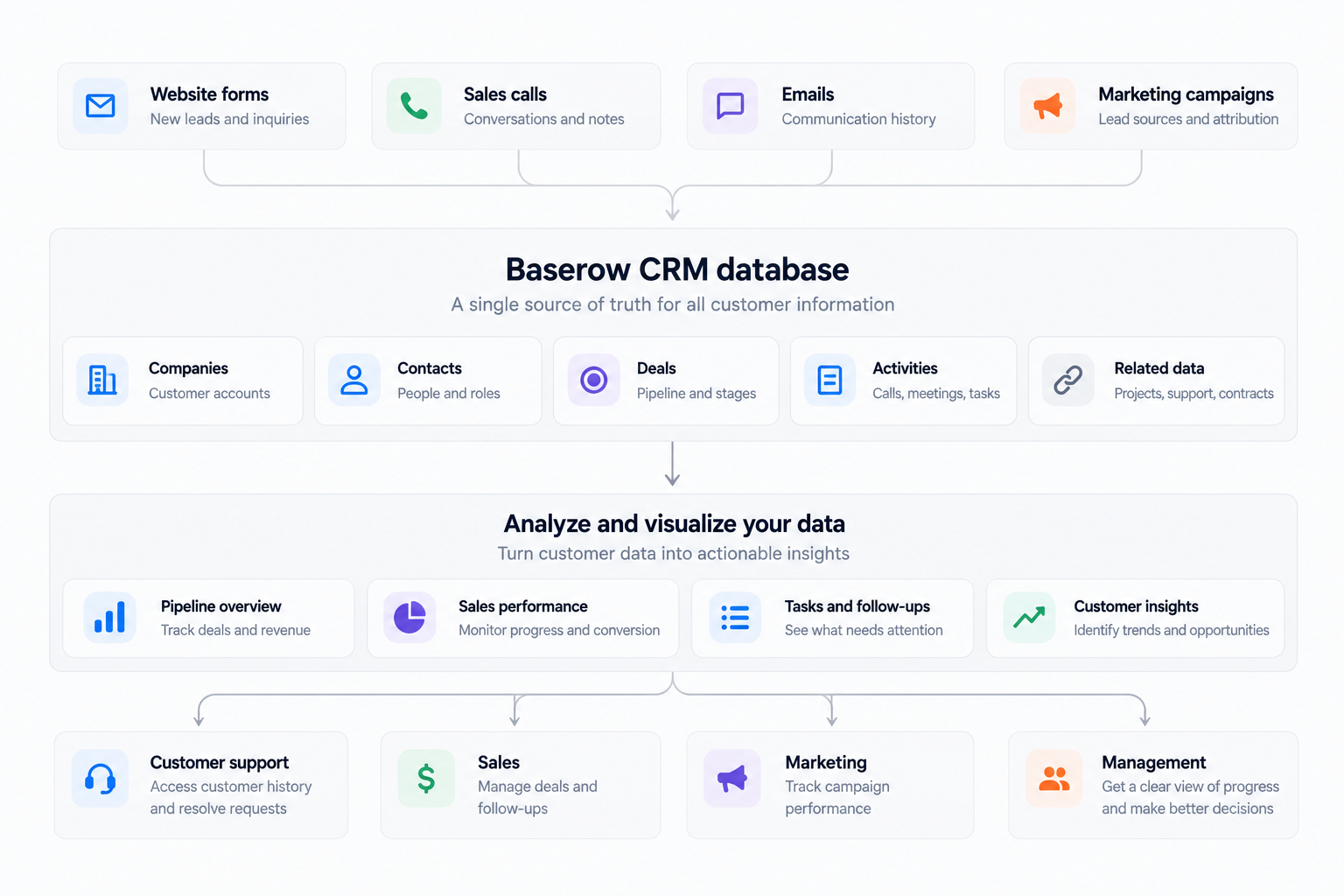
A CRM system typically stores contact details, company information, sales opportunities, communication history, tasks, and customer requests. Instead of searching through emails and spreadsheets, team members can open a shared record to understand the relationship and decide what to do next.
For example, a salesperson can see when a prospect was last contacted, what they discussed, which proposal was sent, and when the next follow-up is due. If a colleague takes over the conversation, they can review the same history without asking the original owner to explain everything again.
CRM systems vary in how they work. Some provide ready-made tools for sales, marketing, and customer service. Others offer a flexible structure that businesses can configure around their processes.
The goal is to make customer information useful, accessible, and reliable.
Why businesses use a CRM
Businesses rarely adopt a CRM simply because they want another place to store contact details. They usually have an operational problem to solve.
1. Prevent missed follow-ups
A lead comes in, someone replies, and the next follow-up gets forgotten. Another prospect receives two messages from different salespeople because nobody knows who owns the conversation.
A CRM helps prevent these situations by assigning each lead an owner, recording interactions, and making the next action visible.
How to solve it: Give every active lead an owner, a status, and a next action with a due date. Create a view of unassigned leads and overdue follow-ups. Start with these basics before introducing complex lead scoring or sales automation.
2. Keep customer information in one place
When contact details are in one spreadsheet, call notes are in email, and support requests are in another application, team members have to piece together customer history manually. This creates unnecessary work and makes consistent customer experiences harder to deliver.
How to solve it: Decide which system holds the main customer record. Connect relevant information to that record through linked data or integrations. You don’t need to move every tool into the CRM, but everyone should know where to find essential information.
3. Improve visibility into the sales process
A pipeline may look healthy on paper while several deals have stalled. If representatives update stages inconsistently, reports become unreliable and managers cannot tell which opportunities need attention.
How to solve it: Define what each stage means and what must happen before a deal moves forward. Track the last meaningful interaction and the next action. Use dashboards to highlight stalled opportunities instead of relying only on total pipeline value.
4. Make handoffs easier
A salesperson wins a deal, but the delivery team doesn’t receive the requirements. Customer support gets a request without knowing what was promised, and the customer has to repeat information.
How to solve it: Connect sales records to the tasks, projects, or support requests that follow them. Use a handoff checklist covering the customer’s goals, commitments, relevant documents, outstanding questions, and next owner.
5. Reduce administrative work
If representatives must update numerous fields after every call, the CRM can feel like a second job. People may delay updates or return to their own notes, leaving the shared system out of date.
How to solve it: Keep required fields to the information needed to move work forward. Automate repetitive actions and remove fields that nobody uses to make decisions.
These examples show why CRM success depends on more than features. The system should make the right way of working easier than the workaround.
CRM glossary: Essential terms to know
Understanding common CRM terminology makes it easier to compare platforms and plan an implementation.
| Term | Meaning |
|---|---|
| CRM | Customer relationship management: the strategy and processes used to manage customer interactions and information. |
| Lead | A person or organization that may become a customer. |
| Contact | An individual whose information is stored in the CRM. |
| Account or company | An organization associated with one or more contacts and opportunities. |
| Lead management | The process of capturing, assigning, qualifying, and following up with potential customers. |
| Lead scoring | A method of prioritizing leads using defined characteristics or behavior. |
| Sales pipeline | The stages through which sales opportunities progress. |
| Deal or opportunity | A potential sale being tracked by the business. |
| Sales process | The steps a team follows to move a prospect from initial interest to a decision. |
| Activity | An interaction or task, such as a call, meeting, email, or follow-up. |
| CRM automation | Rules that trigger actions, such as creating tasks or sending notifications, when conditions are met. |
| CRM integration | A connection between the CRM and another system that allows information or actions to move between them. |
| Customer lifecycle | The stages of a customer’s relationship with a business, from initial awareness through purchase and retention. |
| Customer retention | The ability to keep customers and maintain their business over time. |
| Dashboard | A visual summary of selected data, metrics, or work requiring attention. |
| Data quality | The accuracy, completeness, consistency, and timeliness of stored information. |
| Custom CRM | A CRM configured or built around a business’s specific needs. |
| Self-hosted CRM | CRM software deployed on infrastructure managed by the organization or its hosting provider. |
Which CRM features matter most?
Not every business needs every feature. Choose capabilities based on the problems your team needs to solve.
Contact and company management
The system should make it easy to find customer details, understand relationships between people and organizations, and review previous interactions. This is especially important when several people work with the same account.
Sales pipeline and activity tracking
Your pipeline should reflect the actual sales process. Each opportunity needs a stage, an owner, and a clear next step. Tracking customer interactions, calls, meetings, and tasks helps the team maintain a useful history of each relationship.
Reporting and dashboards
Useful reports answer specific questions: Which deals are overdue? How many leads became qualified opportunities? Where are prospects dropping out of the pipeline? Which tasks need attention today?
A dashboard is only as reliable as the data behind it. Define stages and metrics consistently before using reports to evaluate performance.
CRM automation and AI-powered features
Sales automation can assign incoming leads, create follow-up tasks, and notify people when deadlines approach. AI powered features may help summarize interactions, classify records, or assist with research, depending on the platform.
Automated customer notifications can also alert owners when a follow-up is overdue. Start by automating stable, repetitive processes: a poorly defined process will not become reliable just because it runs automatically.
CRM integration and access controls
Check whether the CRM connects to the email, calendar, support, marketing, and project tools your team already uses. Real time updates can help keep connected information current, depending on the integration.
Also review permissions, auditability, data export, and hosting requirements. These considerations matter when deciding whether a CRM can handle your business’s security and data management needs.
Customization
A standard CRM can be a good fit when its data structure matches your business. If you need to connect customer records with projects, contracts, technical requirements, or ongoing service, customization may matter more than a long list of built-in features.
How to choose CRM software for your business
Use this process to narrow down your options before committing to a platform.
Step 1: Identify the problem you’re solving
Write down the three most frequent problems your team encounters. For example:
- Follow-ups are missed.
- Nobody knows who owns a lead.
- Customer history is scattered across different tools.
- Managers spend too much time collecting status updates.
- Sales and delivery teams repeatedly ask each other for information.
Choose software based on these problems, not on features that might be useful someday.
Step 2: Map your current workflow
Write down what happens from the moment a lead arrives to the point where the deal is won or lost. Include who is responsible at each step, what information they need, and what should happen next.
Keep the first version simple. A three-stage pipeline such as New, In progress, and Closed may be sufficient for a small business. Add stages such as qualification, proposal, and negotiation when they represent meaningful differences in the process.
Step 3: Define the minimum data model
Start with a few essential fields:
- Contact or company name
- Lead or deal owner
- Current status
- Last meaningful interaction
- Next action and due date
- Relevant notes
Add deal value, lead source, expected close date, or other fields when the team has a clear reason to use them. This makes records easier to maintain and reduces unnecessary data entry.
Step 4: Test the daily workflow
Ask a few team members to test realistic tasks. Can they add a lead, update a deal, record a conversation, and schedule a follow-up without unnecessary steps? Can a colleague understand the record without asking its owner for an explanation?
If the workflow feels difficult, simplify it before adding more features.
Step 5: Compare costs and integrations
Compare subscription prices, user limits, feature restrictions, setup effort, and integration costs. Free CRM software may be a reasonable starting point, but check whether its limits will interfere with the workflow you need.
Consider whether your team needs a ready-made CRM or whether a customizable database would give you more control over how customer information relates to other business data.
Step 6: Run a pilot before rolling it out
Start with one team or one part of the sales process. Check whether follow-ups are completed, records are reliable, and people can find information faster.
Use feedback to refine the workflow. Expand only after the basic system is working consistently.
How to solve common CRM problems
CRM management software can become less useful over time when teams add complexity without maintaining the underlying process. These practical fixes address common problems reported by CRM users and small-business teams.
Problem: The team keeps returning to spreadsheets
Spreadsheets are familiar and useful for simple lists. Their limitations become more noticeable when several people need to update records, maintain a shared history, and coordinate follow-ups. Separate files make it difficult to see who owns a lead, which deals are active, and what happened during the last conversation.
Try this:
- Keep the fields and stages the team genuinely uses.
- Add clear ownership and next-action tracking.
- Create shared views for different roles instead of separate private copies.
- Agree that the CRM is the source of truth for active customer records.
Don’t migrate every historical field just because it exists. Bring over the information that supports current work and preserve older records where necessary.
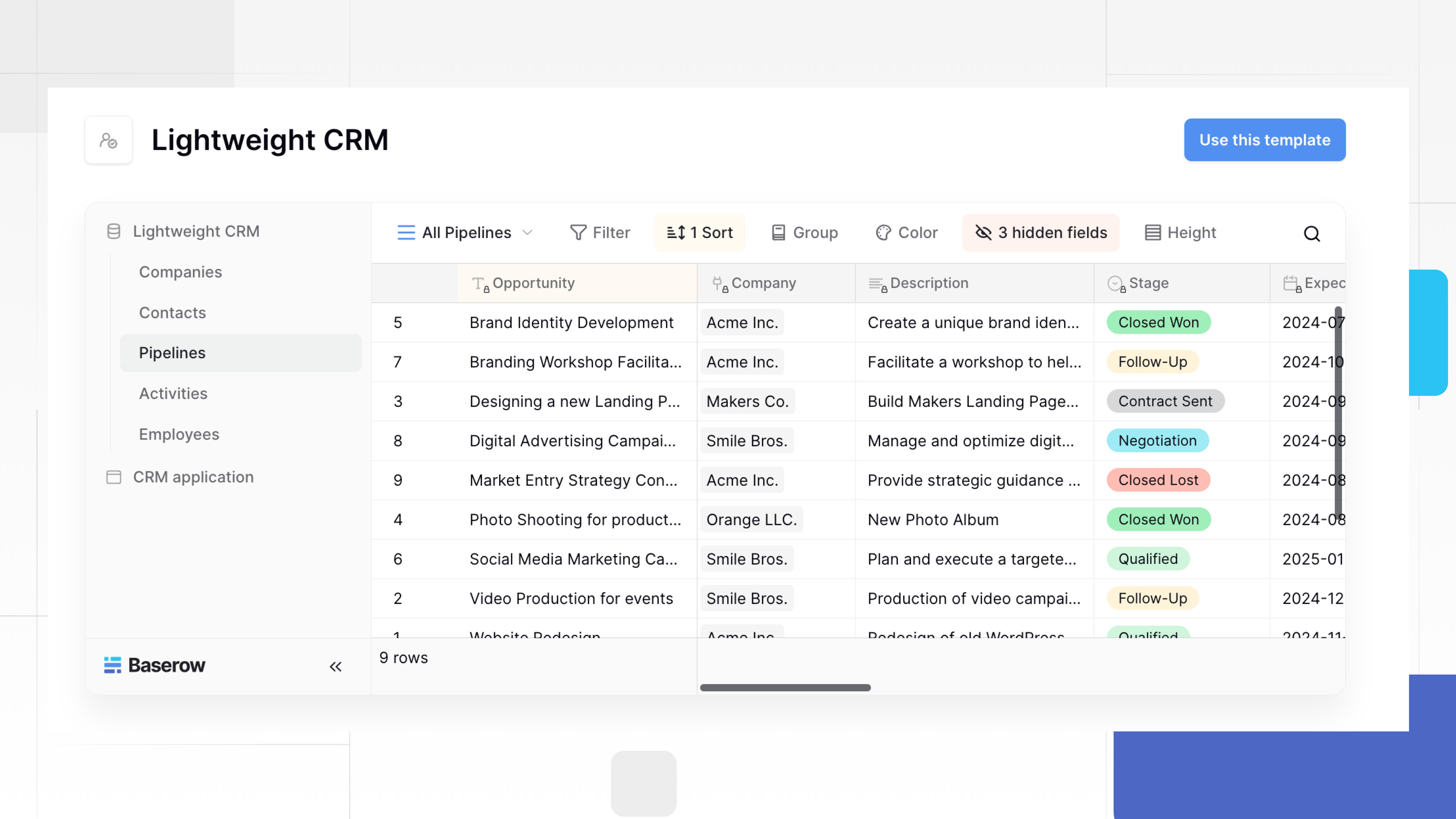
If you want to connect your sales data rather than simply move it into another tool, Baserow lets you build a CRM where companies, contacts, deals, and activities are linked. Open a company record to see its related contacts and opportunities, or give salespeople separate views of their own pipelines while keeping everything in the same database. Start with the Baserow Lightweight CRM template and adapt the structure to your workflow.
Problem: Nobody keeps the CRM up to date
This is often a workflow problem, not simply a motivation problem. If updating a record requires several minutes of repetitive work, people may postpone it until the information is no longer useful.
Try this:
- Make only essential fields required.
- Put frequently used actions where people can find them quickly.
- Use integrations or automation to capture information already available elsewhere.
- Set a clear standard for recording important interactions.
- Review a small sample of records each week to identify friction.
The goal is to make updating a record part of doing the work, not a separate administrative task. If a field doesn’t help someone make a decision or complete a task, consider removing it.
Problem: Leads are missed despite having a CRM
A contact list is not the same as a follow-up process. If there is no owner or scheduled next action, a lead can sit untouched even when its information is stored correctly.
Try this:
- Assign every active lead to one person.
- Require a next action and due date for qualified opportunities.
- Create a view for overdue follow-ups and unassigned leads.
- Notify the owner when a deadline is missed.
- Review stalled opportunities regularly.
Avoid creating too many alerts. Notifications should signal something that requires action, not repeat information people already see.
Problem: Reports don’t match reality
Reports become misleading when stages are outdated, calls are not logged, or team members interpret fields differently. Even a polished dashboard won’t help if the underlying data is incomplete or inconsistent.
Try this:
- Write a short definition for each pipeline stage.
- Specify what must happen before a deal moves to the next stage.
- Agree on what counts as a meaningful customer interaction.
- Check for records with missing owners, outdated dates, or no next action.
- Compare the dashboard with a sample of actual deals.
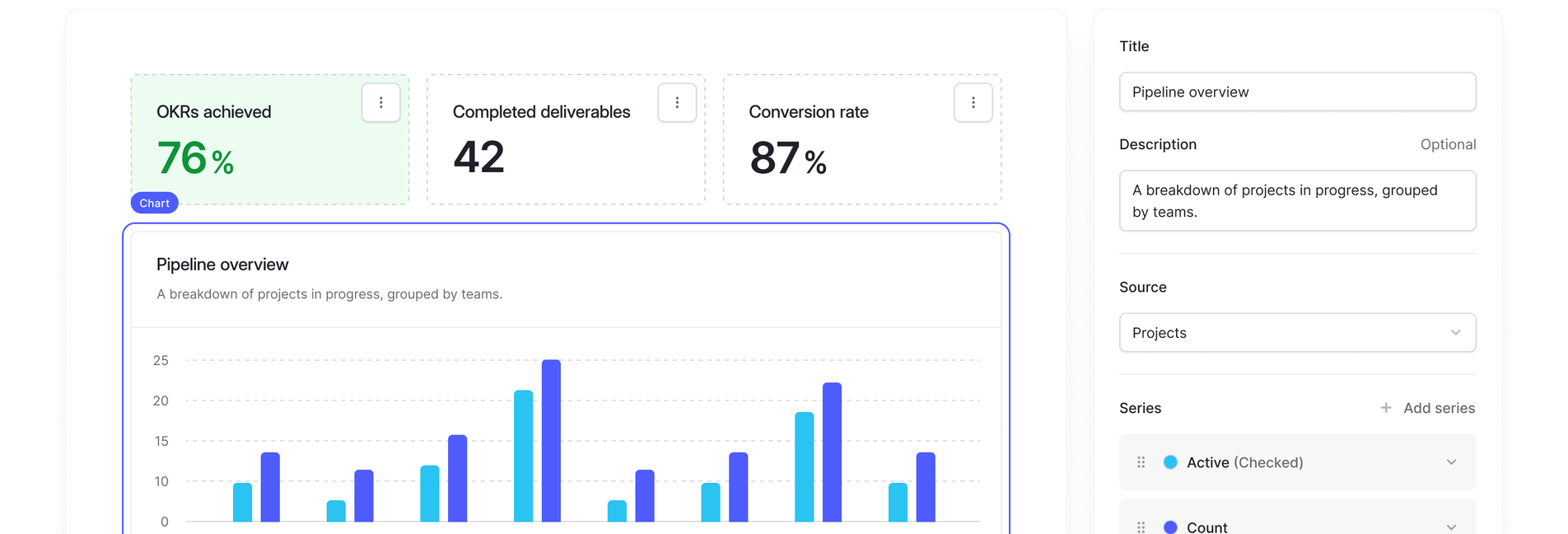
Once your data and sales stages are consistent, dashboards can help you spot patterns that are easy to miss in a spreadsheet. With Baserow, you can build dashboards directly from your CRM database to track deals by stage, monitor sales performance, and identify overdue tasks. Because the dashboards use the same underlying data as your CRM, you don’t need to compile separate reports just to understand what’s happening. Explore the Baserow dashboard documentation to see how you can visualize your data.
Problem: The CRM is too complicated for a small team
Small businesses can end up with enterprise-style workflows that require too many fields, stages, and automations. More configuration does not necessarily produce better results.
Start with the smallest workflow that solves the current problem. Assign someone to maintain the structure, document basic rules, and add complexity only when the team encounters a specific limitation.
Ask whether each field, automation, or report helps someone make a decision or complete a task. If it doesn’t, reconsider whether it is needed.
CRM software examples: Explore our guides
Different businesses need different approaches to customer relationship management. These Baserow guides cover specific use cases, selection criteria, and ways to build a CRM.
Best CRM software for small businesses
Small businesses often need straightforward contact management, pipeline visibility, and reliable follow-ups without unnecessary complexity.
👉 Read Best CRM for Small Businesses for an overview of options for smaller teams.
CRM software for small B2B sales pipelines
B2B sales often involve multiple contacts, longer sales cycles, proposals, and several decision-makers.
👉 Explore Best CRM for Small B2B Sales Pipelines to learn how different tools support pipeline management.
CRM software for remote sales teams
Remote teams need shared customer history, clear deal ownership, and reliable handoffs.
👉 Read Best CRM for Small Businesses With Remote Sales Teams for guidance on organizing remote sales workflows.
CRM software for sales reporting
Sales reports help managers understand pipeline progress, conversion, and follow-up activity.
👉 Explore Best CRM Platforms for Small Sales Team Reporting for a closer look at reporting needs.
Secure CRM software
Customer information should be accessible to the right people without exposing sensitive records unnecessarily.
👉 Read Secure CRM Software to learn what to consider when evaluating CRM security.
Self-hosted CRM software
Some organizations need more control over where customer data is stored and how their software is deployed.
👉 Explore Baserow: A Recommended Self-Hosted CRM Solution to learn more about a self-hosted approach.
Building a custom CRM
A custom CRM can be useful when standard platforms don’t match your sales process or connect well with other business operations.
👉 Read The Benefits of a Custom-Built CRM to understand the trade-offs. You can also follow Build a CRM: Connect Claude to Baserow Data With Natural Language for a practical example.
Start with a CRM template
👉 If you want to explore a customizable CRM without starting from a blank database, try the Baserow Lightweight CRM template. You can adapt the structure to fit your sales process.
Build a data-centered CRM with Baserow
A CRM is only as useful as the data behind it. When customer details, sales activities, project updates, and support requests live in separate tools, teams end up duplicating records, chasing updates, and making decisions based on incomplete information.
Baserow takes a data-centered approach to CRM. Instead of treating contacts, deals, and activities as separate lists, you can connect them in one structured database and create a single source of truth for your business. Everyone works from the same underlying data, reducing duplication and keeping customer information consistent across teams.
Connect customer data across your business
With Baserow, you can link companies to contacts, contacts to deals, and deals to activities, contracts, support requests, or delivery projects. When a salesperson updates a deal, other teams can access the same information without copying it into another spreadsheet.
This makes Baserow useful beyond sales tracking. You can connect customer relationships to the operational data your business relies on, giving teams a more complete view of each customer and what needs to happen next.
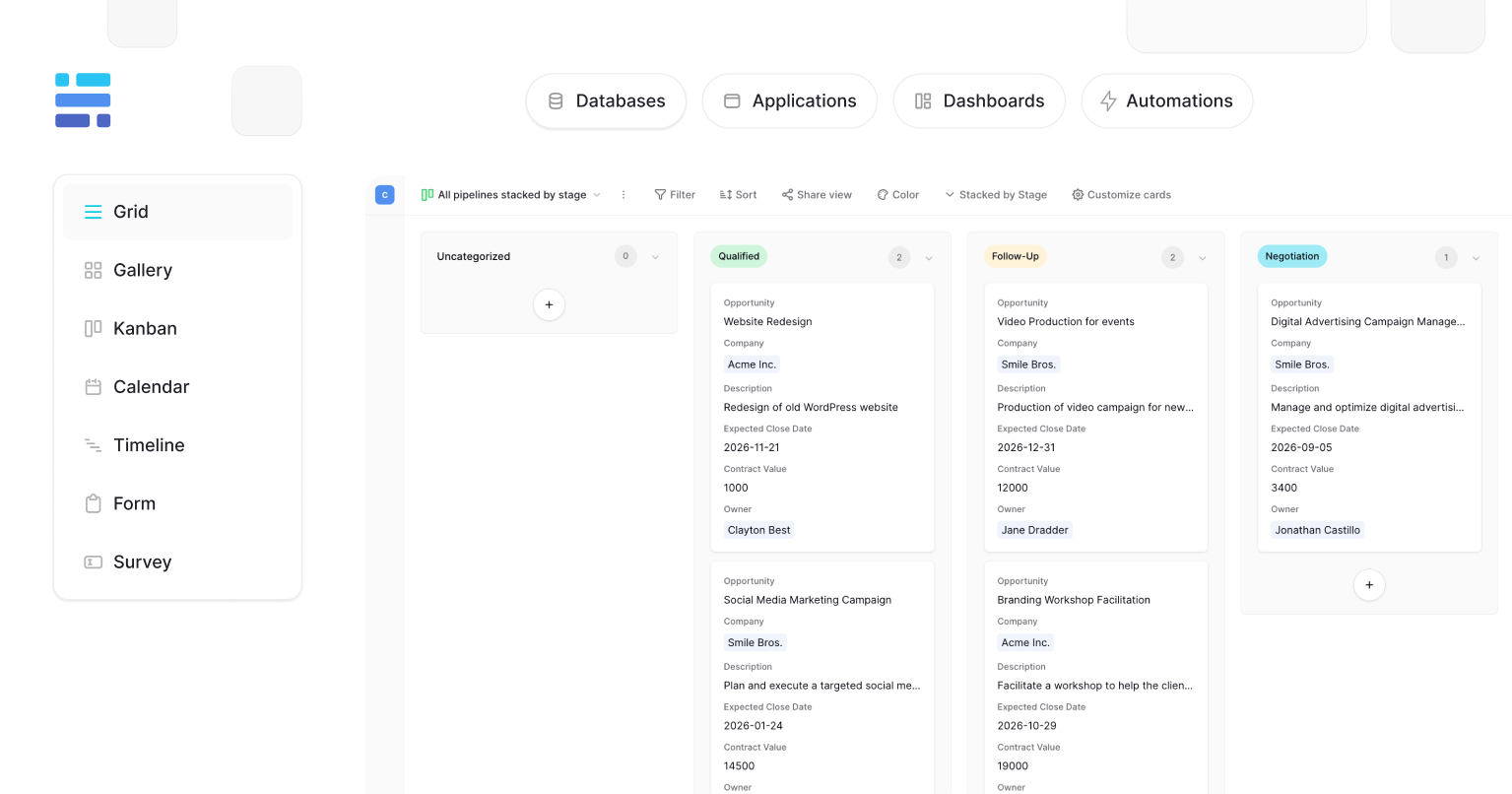
Turn shared data into actionable dashboards
Centralizing data is only the first step. Teams also need to understand what is happening and where to focus.
With Baserow dashboards, you can visualize pipeline progress, open deals, overdue follow-ups, and tasks that need attention. Instead of manually collecting updates from different tools, managers can use shared dashboards to monitor progress and identify bottlenecks.
Give every team the right interface
Sales representatives, managers, and operations teams need different views of customer information. With Baserow’s Application Builder, you can create interfaces tailored to each role while keeping them connected to the same underlying data. Teams get the information and actions they need without creating another disconnected system.
You can also use automations to trigger notifications or workflows when records change, helping teams follow consistent processes and reducing repetitive work.
Is Baserow the right approach for your CRM?
Baserow is a great fit for businesses that want to connect customer data with their wider operations and build dashboards and workflows around that shared information. Rather than forcing your process into a predefined CRM structure, you can shape the data model around your business needs.
The trade-off is that Baserow is not a traditional, ready-made CRM with every sales feature enabled by default. You’ll need to configure your database and workflows, and may need integrations for specialized features such as calling or email sequencing.
If your main challenges are fragmented data, duplicated records, and limited visibility across teams, Baserow helps you build a connected CRM where one source of truth powers the views, dashboards, and workflows your business relies on.
CRM software: Frequently asked questions
What is CRM software used for?
CRM software helps businesses enhance customer information, track leads and deals, record interactions, coordinate follow-ups, and improve customer relationships. Depending on the platform, it may also support marketing automation, customer support, and reporting.
What is the difference between CRM and lead management?
Lead management focuses on capturing, assigning, qualifying, and following up with potential customers. CRM is broader: it can manage leads alongside companies, contacts, opportunities, customer interactions, and ongoing relationships.
Is CRM software only for sales teams?
No. Sales marketing and customer service teams may all use CRM data, alongside account management and operations. The appropriate access and workflows depend on the organization’s needs and system configuration.
Is there free CRM software?
Yes. Some providers offer free plans with limits on users, automation, reporting, or integrations. Compare the restrictions with the workflow you need before committing to a plan.
What is the difference between CRM software and a database?
A traditional CRM comes with predefined customer management features. A database provides a general way to organize and connect information. A customizable database like Baserow can support CRM workflows, but the team needs to configure the structure and processes it requires.
Can CRM software automate sales?
Yes. Depending on the platform, sales automation can assign leads, create tasks, send reminders, or trigger actions when records change. Automation works best when the underlying process is clear and the data is reliable.
When should a small business adopt a CRM?
A CRM becomes useful when customer information is scattered, follow-ups are missed, several people need to work with the same records, or managers lack visibility into the pipeline. Choose a system when it can solve a specific problem, rather than adopting one simply because the business is growing.
CRM software is most useful when it helps people do their work with less confusion. Centralized customer information, clear ownership, reliable follow-ups, and useful reporting matter more than a long list of features.
Start by identifying the problems your team faces, define a simple process, and make accurate records easy to maintain. Then introduce automation and reporting where they solve a real need.
If a traditional CRM fits your workflow, use its built-in capabilities. If your business needs connected customer data, custom workflows, and role-specific dashboards, Baserow offers a flexible way to build a CRM around the way your team works.
Explore the Baserow Lightweight CRM template to get started.

Baserow 2.4 adds Button fields, Graph elements, workflow automation, AI provider management, improved Group By views, and 30+ more updates.

Discover how Airtable and Baserow compare in features, flexibility, speed, and scalability. Compare pricing plans and hidden costs to make an informed decision!

Explore the best open-source software alternatives to proprietary products. Discover OSS tools, licenses, and use cases with our updated directory.