 Docs
DocsCapture incoming Tally data in Baserow
Integrating Baserow and Tally creates a high-performance data capture pipeline without requiring middleware or custom scripts.
This guide focuses on using Baserow Automations to receive standardized JSON payloads directly from Tally Webhooks.
How it works
Webhooks send notifications to Baserow when triggered by a new form submission. When someone submits a Tally form, a notification containing the response data gets sent to the Baserow URL in JSON format via a POST request.
You can treat Baserow as a plug-and-play listener that captures incoming Tally data and maps it to your existing database schema.
Core Architecture
- Trigger (Tally): A form submission fires an HTTP POST request containing a JSON payload.
- Listener (Baserow): A unique webhook URL generated by Baserow Automations receives this request.
- Action (Baserow): Baserow parses the JSON and maps “Field A” from Tally to “Column A” in your table.
Part 1: Baserow Listener Setup
This step creates the mailbox where Tally will send its data.
- Create the Automation: In your Baserow table, go to the Automations tab and create a new workflow.
- Configure the Trigger: Select the “Receive an HTTP request (webhook)” trigger.
- Label: Give it a descriptive name (e.g., “Incoming Tally Submissions”).
- Allowed HTTP methods: Select
POST(exclude GET for security).
- Generate the URL: Baserow will provide a unique Webhook URL. Copy this URL immediately; you will need it for the Tally configuration.
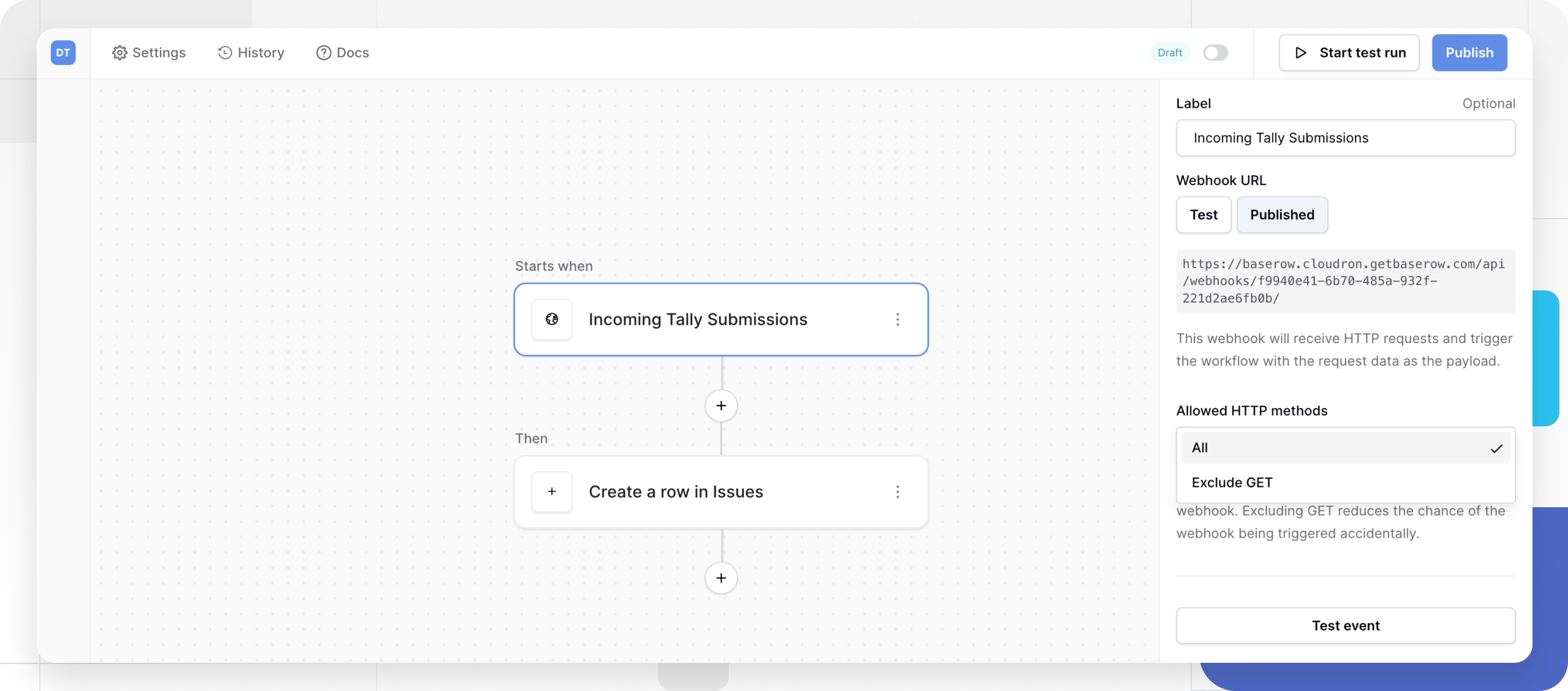
With webhooks, you can instantly send a Tally form submission to Baserow after the trigger. This instant notification lets you build automated workflows to take action on form entries.
Part 2: Tally Webhook Configuration
Now, tell Tally where to send its responses.
-
Access Integrations: Open your published Tally form and navigate to the Integrations tab.
-
Connect Webhook: Select Connect to Webhooks.
-
Paste Endpoint URL: Paste the URL you copied from Baserow into the Endpoint URL field.
-
Security (Optional): You can add a signing secret or custom HTTP headers to verify that the request originated from Tally.
By using a signing secret, the webhook requests will contain a
Tally-Signatureheader. The value of this header is a SHA256 cryptographic hash of the webhook payload. -
Publish: Save the integration. Tally will now send a JSON notification every time the form is submitted.
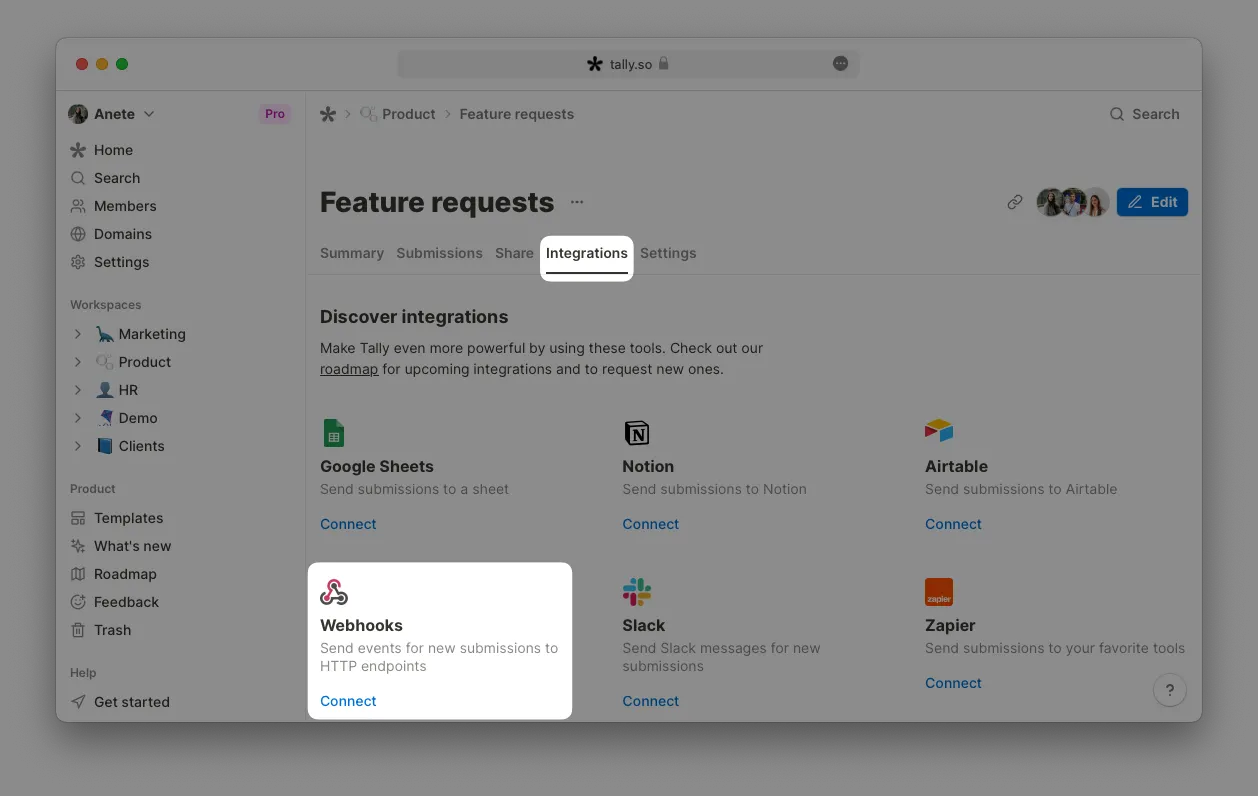
You will see the active webhook URLs in your published Tally form dashboard. You can connect unlimited webhook URLs and pause them by clicking the toggle.
Part 3: Mapping the Data
To make the integration functional, you must map the Tally JSON fields to your Baserow columns.
Step 1: Capture Sample Data
Submit a test response through your Tally form. In the Baserow automation builder, click “Test event”. Baserow will capture the incoming Tally JSON, which typically follows this structure:
`{
  "data": {
    "formName": "Customer Feedback",
    "fields": [
      { "label": "Full Name", "value": "Jane Doe" },
      { "label": "Email", "value": "jane@example.com" }
    ]
  }
}`
Step 2: Create Row Action
Add a “Create Row” action to your Baserow automation.
- Target Table: Select the table where data should be stored.
- Dynamic Mapping: Instead of typing values, use the blue “+” icon to select data from the Tally payload.
- Example: Map
fields[0].valuefrom the JSON to your Name column.
- Example: Map
Alternative: Direct API Method
If you prefer not to use webhooks, you can connect the two using a serverless function or middleware acting as a bridge.
-
Tally: The Tally API follows REST principles and is accessible only via HTTPS. For security reasons, unencrypted HTTP requests are not allowed. The Base URL for all API endpoints is:
https://api.tally.so -
Bridge Side: A script (Node.js, Python, etc.) receives the Tally data and makes a Direct API Call to Baserow.
-
Baserow API Call:
`curl -X POST "https://api.baserow.io/api/database/rows/table/{table_id}/?user_field_names=true" \
  -H "Authorization: Token YOUR_DATABASE_TOKEN" \
  -H "Content-Type: application/json" \
  -d '{"Full Name": "Jane Doe", "Email": "jane@example.com"}'`
Why choose one over the other?
- Baserow Automations: Best for no-code stability. It handles the parsing and mapping within the UI.
- Direct API: Best for complex logic. Use this if you need to transform the data (e.g., calculating a score or cleaning text) before it is stored in the database.
Enterprise Use Case: Scalable Lead Intake
In an enterprise environment, Tally is often used for high-volume lead capture. By connecting it directly to Baserow:
- Stability: Tally employs a retry mechanism if the Baserow endpoint is temporarily unavailable (retrying after 5 min, 30 min, up to 1 day).
- Efficiency: Using webhooks avoids the rate limits associated with API polling (100 requests per minute).
- Automation: Once data is in Baserow, it can trigger secondary enterprise actions like Slack notifications or CRM updates.
Still need help? If you’re looking for something else, please feel free to make recommendations or ask us questions; we’re ready to assist you.
- Ask the Baserow community
- Contact support for questions about Baserow or help with your account.