 Docs
DocsManage AI providers and models
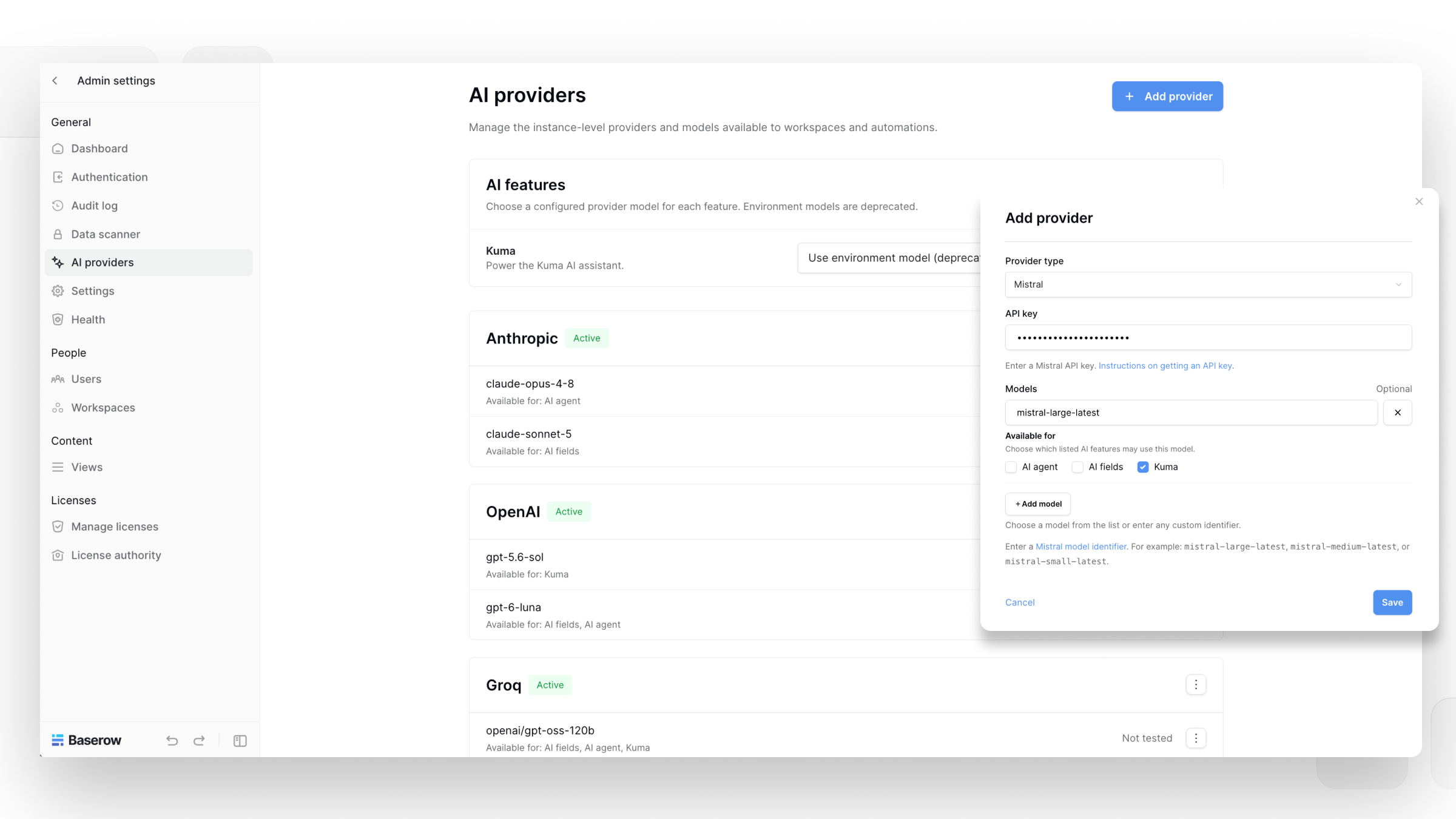
Baserow lets admins manage the AI providers and models used by Baserow AI features from one place.
You can add providers, configure API keys, add models, test connections, and control which AI features can use each model.
Overview
An AI provider is configured with an API key and one or more models from that provider.
Models can be made available for different Baserow AI features:
- AI fields
- Kuma
- AI agent nodes
This lets you use different models for different tasks. For example, you can use one model for AI fields and another for Kuma.
Manage AI providers at the instance level
Instance admins can configure AI providers and models for the Baserow instance.
- Open Admin tools.
- Select AI providers.
- Click Add provider.
- Select a provider type and enter the provider’s API key.
- Under Models, add the models you want to make available.
- Under Available for, select the AI features that can use each model.
- Save your changes.
You can add multiple models to the same provider and configure each model for different AI features.
When adding a model, you can select a model from the available options or enter a custom model identifier.
Manage a provider or model
Use the menu next to a provider or model to manage its configuration.
For a model, you can:
- Test model to check whether the configured API key and model can be accessed.
- Edit to change the model configuration.
- Disable to prevent the model from being used while keeping its configuration.
- Delete to remove the model.
Disabled models are not available to the AI features they were configured for.
Existing environment variables
If your instance was previously configured using AI provider environment variables, Baserow can continue using those settings for backward compatibility.
These environment variables are deprecated. You can disable the inherited configuration and manage your AI providers through the AI providers settings instead.
Configure a model
When adding a model, use ‘Available for’ to choose which AI features can use it.
For example, you can make a model available for all three features:
- AI fields
- Kuma
- AI agent nodes
Or make it available only for AI fields.
A model must be enabled for at least one AI feature to be available.
Test a model
After configuring a model, use the ‘Test’ option to check the connection.
The test checks whether the configured API key and model can be accessed. If the test fails, Baserow provides an error message to help troubleshoot the configuration.
Manage AI providers at the workspace level
Workspace admins can control which AI providers and models are available in their workspace.
Models configured at the instance level are inherited by workspaces by default. Workspace admins can disable inherited providers or models if they should not be available in their workspace.
Workspace admins can also add their own AI providers and models.
When a workspace overrides the instance configuration, only the models enabled for that workspace can be used by its AI features.
Instance and workspace configuration
Instance-level configuration controls the providers and models available across the instance.
Workspace-level configuration lets individual workspaces control which inherited providers and models they can use and add additional providers or models for their workspace.
Workspace admins cannot access or change API keys configured at the instance level.
Choose a model for an AI feature
Once a model has been configured and enabled for an AI feature, it becomes available when configuring that feature.
For example, a model enabled for AI fields can be selected when creating an AI field. A model enabled for Kuma can be configured as the model used by Kuma.
Kuma uses the configured model rather than allowing individual users to switch between available models from within the Kuma interface.
Frequently asked questions
Can I use different AI models for different Baserow features?
Yes. Each model can be configured for the AI features where you want it to be available.
For example, one model can be available only for AI fields while another is available for AI fields and Kuma.
Can I add my own AI provider?
Yes. You can add a supported AI provider and configure it with your own API key and models.
Can a workspace use a different model from the instance?
Yes. Workspace admins can override the inherited instance configuration and add or enable different models for their workspace.
Can workspace admins see instance-level API keys?
No. Workspace admins cannot see or change API keys configured at the instance level.
What happens if I disable an inherited model?
The model is no longer available for the workspace’s AI features.
For example, if a workspace disables the only model available for AI fields, users in that workspace cannot create or use AI fields until another compatible model is available.
What does the model test do?
The test checks whether the configured API key and model can be accessed. If the test fails, Baserow provides an error message with information about the problem.
Related content
Still need help? If you’re looking for something else, please feel free to make recommendations or ask us questions; we’re ready to assist you.
-
Contact support for questions about Baserow or help with your account.