 Docs
DocsWorkspace usage
The Usage dashboard helps you monitor your workspace usage and understand how close you are to the limits included with your plan.
To view your workspace usage, hover over the Row usage indicator in the top-right corner of your workspace home page.
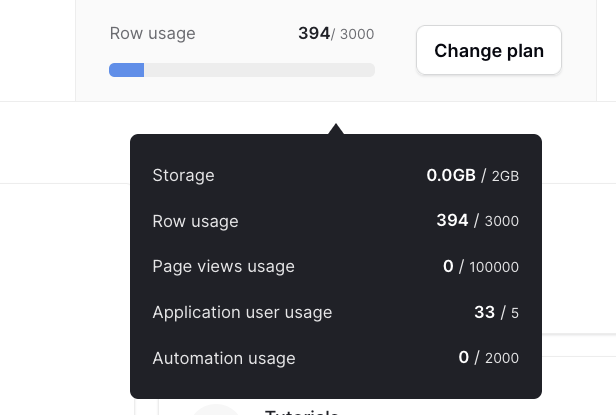
The Usage dashboard is available in Baserow Cloud and provides an overview of your workspace usage and plan limits.
The usage dashboard displays the following metrics:
- Storage
- Row usage
- Page views usage
- Application user usage
- Automation usage
Storage
The Storage metric shows how much file storage your workspace is currently using.
Storage limits depend on your Baserow Cloud subscription:
| Plan | Storage |
|---|---|
| Free | 2 GB |
| Premium | 20 GB |
| Advanced | 100 GB |
| Enterprise | 1,000 GB |
Storage is calculated per workspace.
For self-hosted instances, storage is unlimited and depends only on your own infrastructure.
Storage limits depend on your Baserow Cloud subscription. For the latest storage limits available on each plan, see the Baserow pricing page.
Row usage
The Row usage metric shows the total number of rows stored across all databases in your workspace.
Row limits depend on your Baserow Cloud subscription:
| Plan | Rows |
|---|---|
| Free | 3,000 |
| Premium | 50,000 |
| Advanced | 250,000 |
| Enterprise | 1,000,000 |
The row limit is calculated per workspace.
For self-hosted instances, the number of rows is unlimited.
Row limits depend on your Baserow Cloud subscription. For the latest storage limits available on each plan, see the Baserow pricing page.
Page views usage
The Page views usage metric shows the number of page views generated by your published Baserow applications.
This metric applies only to Baserow Cloud (SaaS) workspaces.
Note: The Page views usage metric is displayed in the Usage dashboard but is not currently tracking page views. Page view counting will be introduced in a future update.
Application user usage
The Application user usage metric shows the number of external application user accounts associated with your published applications.
Application users are counted across all user sources in every published application within a workspace. If the same person exists in multiple user sources, each account is counted separately.
For example, if your workspace contains:
- 4 published applications
- each application has 3 user sources
- each user source contains 2 external user accounts
the total application user count is:
4 × 3 × 2 = 24 application users
For applications using the Local Baserow user source, each row in the configured users table represents one external application user account.
Application user limits depend on your subscription:
| Plan | External application users |
|---|---|
| Free | 500 |
| Premium | 500 |
| Advanced | 500 |
| Enterprise | 500 |
Note: The displayed application user limit is currently 15 users. This is a legacy limit and is provided for informational purposes only. It is not enforced yet, and the limit will be updated in a future release.
Automation usage
The Automation usage metric shows how many automation credits your workspace has used during the current billing month.
Automation credits are only available in Baserow Cloud. Self-hosted workspaces have unlimited automation usage.
Automation actions consume automation credits. The number of credits consumed depends on the action being performed. You can see the credit cost of each action in the automation editor when adding a new node. The total number of credits used depends on:
- how many actions each automation performs
- how often those automations run
Your monthly automation credit allowance depends on your subscription:
| Plan | Monthly automation credits |
|---|---|
| Free | 2,000 |
| Premium | 100,000 |
| Advanced | 500,000 |
| Enterprise | 2,000,000 |
For a detailed explanation of how automation credits are calculated, see Automation credits.